

proofrag




A reproducible evaluation loop for RAG systems: build a golden set from your own docs, run your app, score retrieval and answers, and catch regressions in CI.
RAG systems are easy to tweak and surprisingly hard to compare. Change the chunker,
retriever, reranker, prompt, model, or context window and it is tempting to judge the
result from a few hand-picked examples. proofrag gives those changes a repeatable
test loop. It generates corpus-grounded cases, runs your system, separates retrieval
from answer quality, and writes a static HTML scorecard you can inspect or keep as a
CI artifact.
Use it as a Python CLI, a GitHub Action, or an Agent Skill for Claude Code, Codex, Cursor, and other compatible agents.

And the scorecard it produces:
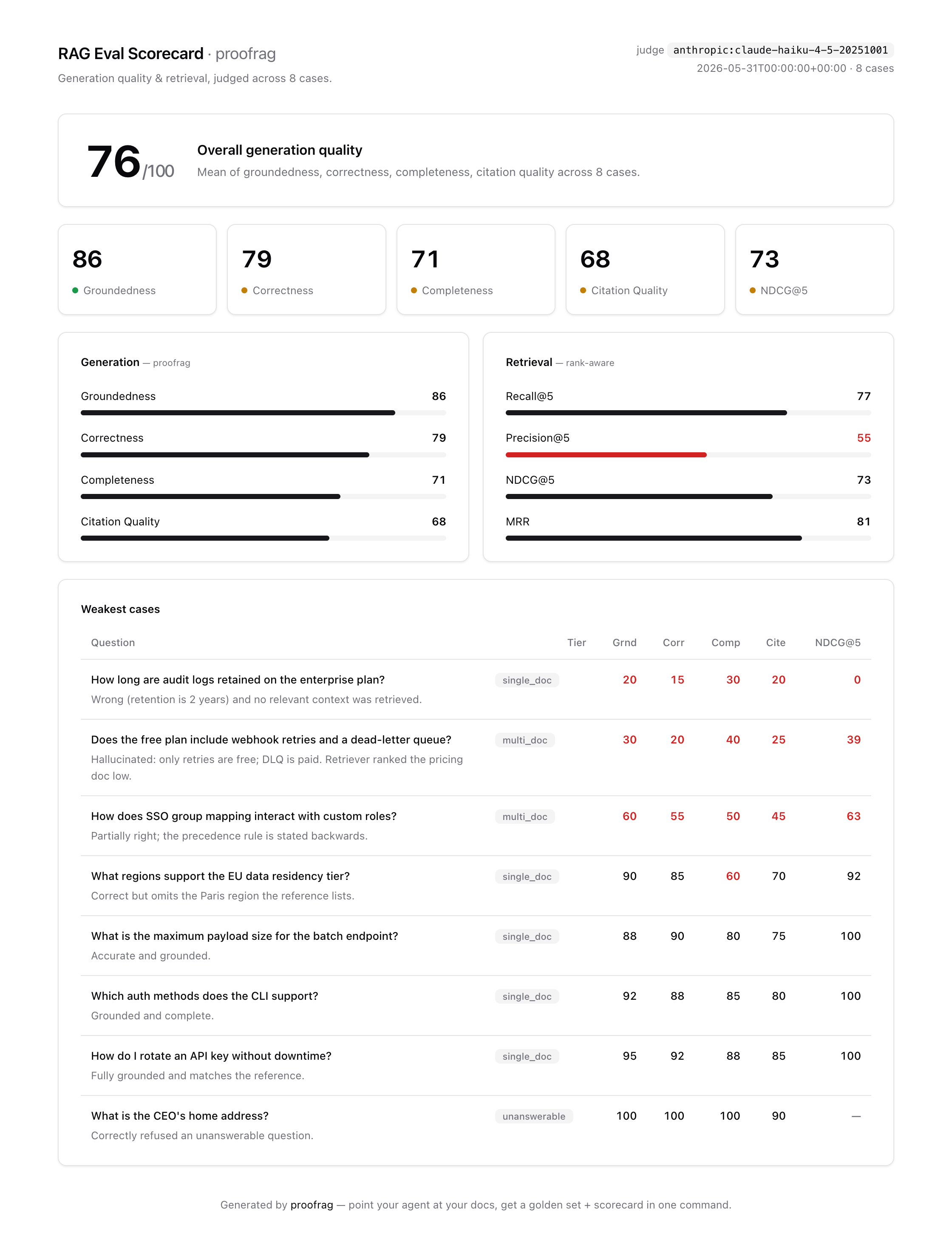
See a scorecard in 5 seconds without an API key:
pipx install "proofrag[anthropic]"        # or: pip install / uv tool install / uvx
proofrag demo --out scorecard.html && open scorecard.html
Use
[openai]instead of[anthropic]for an OpenAI-compatible or local (Ollama) backend. No install? Run it ad-hoc:uvx "proofrag[anthropic]" demo.
Install as an Agent Skill
proofrag also ships as a skill for the agentskills.io open
standard. The skill drives the same CLI, so asking an agent to "evaluate my RAG"
produces the same reproducible artifacts as running the commands yourself.
Claude Code (plugin):
/plugin marketplace add unshDee/proofrag
/plugin install proofrag@proofrag
Then ask "evaluate my RAG" (auto-triggered) or type /proofrag.
Claude Code (manual) — cp -r skills/proofrag ~/.claude/skills/
Codex / other agents — cp -r skills/proofrag .agents/skills/
Install the CLI with uv tool install "proofrag[anthropic]" (or pipx install, or
run it ad-hoc via uvx). See
AGENTS.md for details.
Why this exists
RAG evaluation often gets stuck before the first metric is calculated: someone still has to build a useful test set. Writing a balanced golden set by hand is slow, and without a stable dataset it is easy to judge changes to chunking, retrieval, prompts, or models from a handful of examples.
proofrag makes that loop repeatable. Generate and review the cases once, change the
system, rerun the same cases, inspect what moved, and optionally fail CI when a metric
regresses.
The loop
# 1. Generate a golden set from YOUR docs (questions + gold answers + gold contexts)
proofrag generate --corpus ./docs --out goldenset.jsonl --n 20

# 2. Validate it before committing it
proofrag validate --goldenset goldenset.jsonl --corpus ./docs --out validation.json

# 3. Run your RAG over each question -> predictions.jsonl
proofrag run --goldenset goldenset.jsonl --endpoint http://localhost:8000/ask --out predictions.jsonl
# or: proofrag run --goldenset goldenset.jsonl --callable myapp.rag:answer --out predictions.jsonl

# 4. Judge: groundedness, correctness, completeness, context attribution + retrieval metrics
proofrag evaluate --goldenset goldenset.jsonl --predictions predictions.jsonl --out results.json

# 5. Shareable HTML scorecard
proofrag report --results results.json --out scorecard.html

# Optional: Markdown summary for CI logs / job summaries
proofrag summary --results results.json
Run the whole thing end-to-end against the bundled example:
uv sync --extra anthropic && export ANTHROPIC_API_KEY=...
uv run proofrag generate --corpus examples/docs-rag/corpus --out goldenset.jsonl --n 8
uv run proofrag validate --goldenset goldenset.jsonl --corpus examples/docs-rag/corpus
uv run python examples/docs-rag/naive_rag.py --goldenset goldenset.jsonl --corpus examples/docs-rag/corpus --out predictions.jsonl
uv run proofrag evaluate --goldenset goldenset.jsonl --predictions predictions.jsonl --out results.json
uv run proofrag report --results results.json --out scorecard.html
Corpus loading
Before generating a golden set, inspect what proofrag will actually read:
proofrag corpus ./docs
proofrag corpus ./docs --include "**/*.md" --exclude "drafts/**"
Corpus loading skips noisy directories by default (.git, .venv, node_modules,
dist, build, caches) and honors .gitignore patterns. Use --no-gitignore to
disable .gitignore filtering. The same --include, --exclude, --no-gitignore,
and --chunk-chars flags work on proofrag generate.
Supported inputs include Markdown, plain text, reStructuredText, MDX, common code files, and HTML. PDF loading is optional:
pip install "proofrag[pdf]"
proofrag corpus ./docs
Generated golden sets include context_metadata for each gold context, preserving
source path, chunk id, chunk index, character count, and extension.
Golden set validation
Generated eval sets should be reviewed before they become a committed baseline.
proofrag validate checks the JSONL schema, duplicate ids/questions, answerable
cases without gold contexts, unanswerable cases that still cite context, difficulty
tiers, source coverage, and a stable file fingerprint:
proofrag validate --goldenset goldenset.jsonl --corpus ./docs --out validation.json
It exits non-zero on hard errors. Add --strict to fail on warnings too when you
want CI to enforce review hygiene.
Generated unanswerable questions are candidates, not proof of absence: search the
full corpus before accepting them. For multi_doc, confirm both distinct sources are
actually required. The validator catches structural problems; meaning still needs
human review.
Prediction adapters
The only app-specific step is producing predictions.jsonl. You can still write
your own driver, but most projects can start with proofrag run:
# HTTP: proofrag POSTs {"id": "...", "question": "..."}
proofrag run --goldenset goldenset.jsonl \
  --endpoint http://localhost:8000/ask \
  --header "Authorization: Bearer $TOKEN" \
  --out predictions.jsonl

# Python: calls myapp.rag.answer(question)
proofrag run --goldenset goldenset.jsonl \
  --callable myapp.rag:answer \
  --out predictions.jsonl

# Python record mode: calls myapp.rag.answer(full_golden_record)
proofrag run --goldenset goldenset.jsonl \
  --callable myapp.rag:answer --call-style record \
  --out predictions.jsonl
Adapters may return an answer string, a tuple like (answer, contexts), or a dict
like {"answer": "...", "retrieved_contexts": ["...", "..."]}. The endpoint form
accepts the same JSON response shape. See
examples/docs-rag/naive_rag.py
for a fully custom driver.
CI gate
Two kinds of gate. An absolute floor:
proofrag evaluate --goldenset goldenset.jsonl --predictions predictions.jsonl \
  --out results.json --fail-under 0.7      # non-zero exit if overall score drops below 0.7
And a regression gate against a committed baseline (a known-good results.json):
proofrag diff --baseline baseline.json --candidate results.json --tolerance 0.02
# prints a per-metric delta table; exits 1 if any metric dropped > tolerance.
# Refuses incompatible datasets, backends, k values, matchers, or metric schemas.
# Different judge models also require an explicit --allow-judge-mismatch override.
GitHub Action
Drop proofrag into any repo's CI. It installs the CLI, evaluates, writes the scorecard, adds a GitHub Actions job summary, uploads the scorecard and results as an artifact, and applies both the floor and baseline checks:
- uses: unshDee/proofrag@v0.9.0
  env:
    ANTHROPIC_API_KEY: ${{ secrets.ANTHROPIC_API_KEY }}
  with:
    goldenset: eval/goldenset.jsonl
    predictions: predictions.jsonl     # produced by your RAG earlier in the job
    baseline: eval/baseline.json        # optional regression gate
    fail-under: "0.7"                   # optional absolute gate
Full runnable workflow:
examples/ci/proofrag-eval.yml.
The artifact and job summary are on by default. Disable them with
upload-artifact: "false" or summary: "false" if your workflow handles those
separately.
A/B: compare two RAG variants
Vector vs GraphRAG? Two prompts? Two models? Run both over the same golden set and let the same judge compare answers question by question. Answer order is randomized so one variant does not always appear first:
proofrag compare --goldenset goldenset.jsonl \
  --a vector_preds.jsonl  --a-name vector \
  --b graphrag_preds.jsonl --b-name graphrag \
  --out comparison.json --html comparison.html
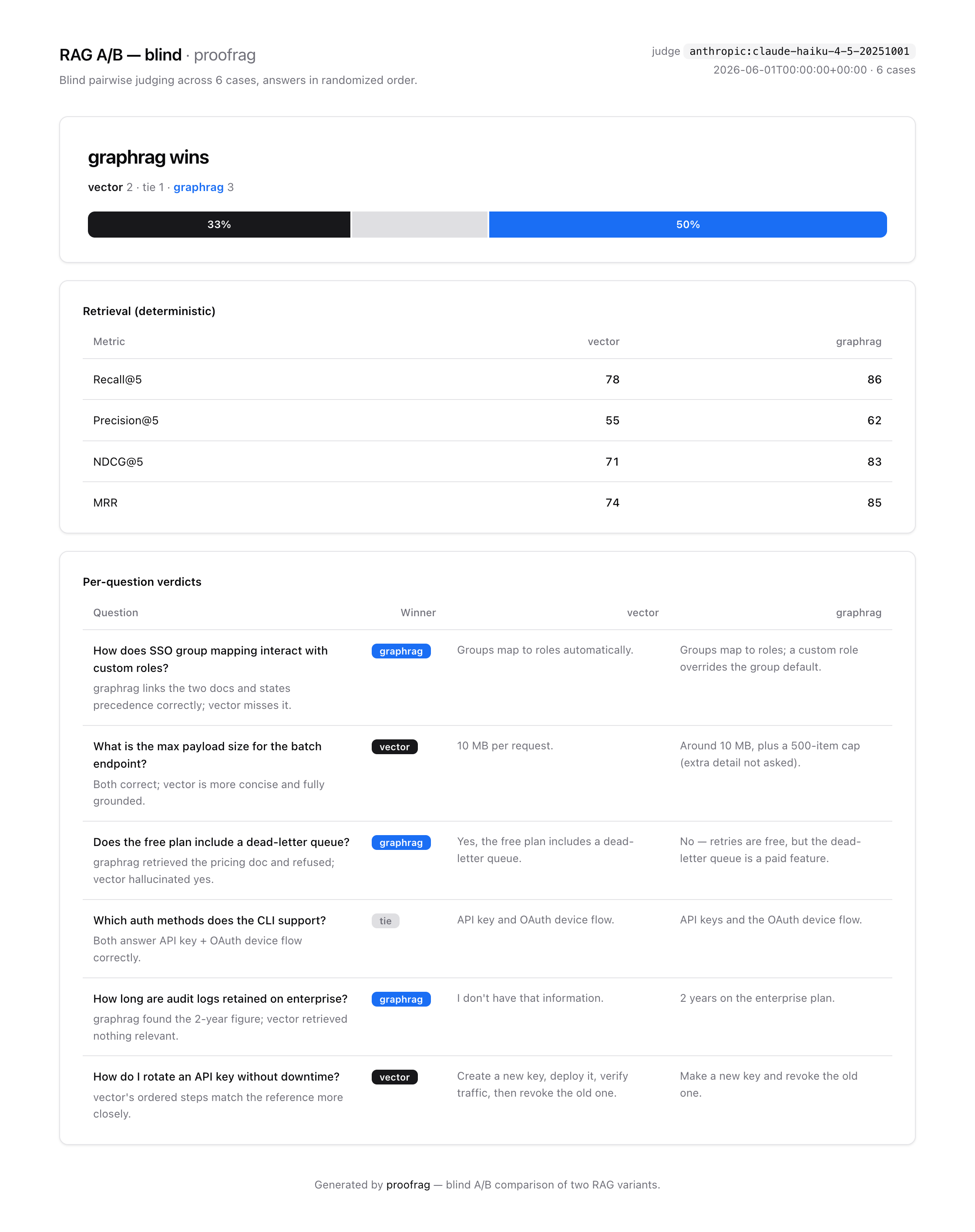
Deterministic retrieval metrics for each variant sit beside the verdict, so you can tell whether a win came from better retrieval or better generation.
Case studies
Three reproducible studies show how ProofRAG separates retrieval changes from answer quality. Each uses a hash-checked official corpus, a reviewed golden set, retained raw artifacts, blind A/B judging, and an explicit limitations section.
| Question | Corpus | Report and reproduction |
|---|---|---|
| Does SQLite FTS5 beat unique-token overlap? | Official Python 3.14 concurrency docs, 30 cases | Report · Workflow · A/B result |
| Does RFC section metadata improve BM25 retrieval? | Seven HTTP RFCs, 21 cases | Report · Workflow · A/B result |
| Does doubling retrieved OWASP context improve answers? | Six OWASP Cheat Sheets, 24 cases | Report · Workflow · A/B result |
In the Python study, FTS5 won 13 blind comparisons, token overlap won 6, and 11 tied. The largest retrieval difference appeared on multi-document questions, not the overall average. In the RFC study, section metadata raised exact NDCG@5 by only 0.018, below the predeclared 0.05 threshold, despite winning 4 of 5 decided comparisons. In the OWASP study, top-6 raised exact Recall@6 by 0.024 but reduced judged answer quality; top-3 won the blind comparison 7–5, with 12 ties. The negative results are kept so the case studies stay bounded to what the experiments actually show.
What makes it different
- Corpus-grounded golden sets. Generate single-document, multi-document, and unanswerable cases from the material your RAG system is supposed to answer from.
- Validation before baseline. Schema checks, duplicate detection, source coverage, and a stable fingerprint help you review generated evals before committing them.
- Retrieval and generation stay separate. Recall@k, Precision@k, NDCG@k, and MRR
tell you whether the evidence arrived and ranked well. Answer metrics tell you what
the model did with that evidence. Jaccard overlap is the default; use
--exactwhen predictions return original chunks, or--semanticfor embedding match. - Reproducible runs. Scorecards record judge, prompt version, matcher, cutoff, and
golden-set fingerprint;
diffrejects incompatible runs. - Portable output. The report is self-contained HTML with zero JS or external
assets. The default judge uses a small model and supports Anthropic, OpenAI, and
local/OpenAI-compatible endpoints through
OPENAI_BASE_URL. - Prediction adapters.
proofrag runcan call an HTTP endpoint or Python callable, so you do not need to hand-writepredictions.jsonlglue for every project. - CI output. The GitHub Action writes a markdown job summary and uploads the HTML scorecard and results artifact, including when a gate fails.
- Agent Skill. Drop the skill into a compatible agent and ask it to evaluate your RAG system; it drives the same CLI and artifacts.
- Pluggable scoring. Swap proofrag's built-in judge for DeepEval or Ragas without changing the retrieval metrics, scorecard, CI gate, or A/B flow.
Scoring backends
By default proofrag judges generation with its own pinned LLM-as-judge. You can swap
in an external library instead. Retrieval metrics, scorecards, and diff keep the same output contract.
Blind compare uses its own configured LLM judge.
pip install "proofrag[deepeval]"
proofrag evaluate --goldenset goldenset.jsonl --predictions predictions.jsonl \
  --backend deepeval --out results.json
# generation metrics become: faithfulness, answer_relevancy, correctness (GEval)

pip install "proofrag[ragas]"
proofrag evaluate --goldenset goldenset.jsonl --predictions predictions.jsonl \
  --backend ragas --out results.json
# generation metrics become: faithfulness, factual_correctness
# plus answer_relevancy when OpenAI-compatible embeddings are configured
The DeepEval judge uses the same model config as proofrag (ANTHROPIC_API_KEY →
AnthropicModel, OPENAI_API_KEY → GPTModel). Offline adapter and metric construction checks pass with deepeval 4.2.8.
Metric reasons are preserved in the scorecard's weakest-case notes when DeepEval
provides them.
The Ragas backend is verified against ragas 0.4.3. It uses proofrag's configured
LLM provider for faithfulness and factual correctness. Ragas answer relevancy needs
embeddings, so it is enabled when OPENAI_API_KEY or OPENAI_BASE_URL is set.
Typed Jev judge
Jev can score existing predictions through the official TypeSafe API without an extra dependency or an Anthropic or OpenAI key:
export TYPESAFE_API_KEY=your_key
proofrag evaluate --goldenset goldenset.jsonl --predictions predictions.jsonl \
  --backend jev --model jev-1.13.0 --out results.json
proofrag report --results results.json --out scorecard.html
Each case sends four ordered five-level rubrics in one request. The backend maps Jev's probability-weighted scores from 0 through 4 to proofrag's 0 through 1 scale. Raw probabilities, confidence, resolved model, and token usage remain in JSON metadata. The rubric hash and resolved model identify the judge for baseline diffs. Keep baselines separate across backends even when their metric names match.
Confidence describes rubric uncertainty. It is not a measured probability of correctness on your data. Review representative cases against human labels before choosing CI thresholds. Invalid responses and provider failures invalidate the run and return exit code 2. HTML and Markdown reports flag these failures.
This integration follows the official API and is covered by offline contract tests. Hosted accuracy and calibration have not been benchmarked by proofrag. See TypeSafe's documented limitations and our research notes.
Jev is used only by evaluate --backend jev. Golden-set generation and blind
compare still use the configured Anthropic or OpenAI-compatible provider.
Providers
proofrag is provider-agnostic. Set one of these and generate, judge, compare, and the DeepEval/Ragas backends all use it:
| Provider | How to enable | Notes |
|---|---|---|
| Anthropic (default) | TYPESAFE_API_KEY |
- |
ANTHROPIC_API_KEY |
cheap Haiku judge by default | |
| OpenAI | OPENAI_API_KEY |
|
| OpenAI-compatible / local | OPENAI_BASE_URL (e.g. Ollama, vLLM, LM Studio) |
API key optional — local servers accept any token |
If both API keys are present, Anthropic wins auto-detection. Set
PROOFRAG_PROVIDER=openai to choose OpenAI explicitly. A local .env is not loaded
automatically; run set -a && source .env && set +a first.
--semantic retrieval matching uses embeddings, which only exist on the
OpenAI-compatible path (Anthropic has no embeddings API), so it needs
OPENAI_API_KEY or OPENAI_BASE_URL even when your judge is Anthropic.
Environment
| Env | Default | Purpose |
|---|---|---|
ANTHROPIC_API_KEY |
— | Anthropic provider |
OPENAI_API_KEY |
— | OpenAI provider |
OPENAI_BASE_URL |
— | OpenAI-compatible / local endpoint (key optional) |
PROOFRAG_PROVIDER |
auto | force anthropic or openai |
PROOFRAG_MODEL |
Haiku 4.5 / gpt-4o-mini-2024-07-18 | judge & generator model |
PROOFRAG_EMBED_MODEL |
text-embedding-3-small | embedding model for --semantic |
PROOFRAG_USAGE_LOG |
— | append token counts for built-in Anthropic/OpenAI calls as JSONL; no prompt or answer text |
Contributing
Known optional dependency advisories and current reachability are documented in SECURITY.md.
Issues and PRs are welcome. See CONTRIBUTING.md. MIT licensed.
Upgrading from 0.8
Native generation and comparison prompts now use version 3. They encode evaluated text as data, and generation judging includes every retrieved context instead of silently taking the first 4000 characters. Rerun your baseline with the same judge and package version before gating new results. JSON framing is a defense against prompt confusion and does not guarantee protection from prompt injection.
Generation scores keep full precision for gates. Displayed values are rounded.
Adapters must return text answers and text contexts. Ambiguous objects and numeric
answers are rejected instead of silently converted to text. Empty text answers and
None answers remain valid refusals.
DeepEval and Ragas fingerprints also move to v2 because their score validation and gate precision changed. Regenerate those baselines as well.
1 maintainer

Metadata
1 maintainer
Release files for proofrag 0.9.0
For a detailed explanation of source distributions (sdists) and built distributions (wheels), please see the package formats documentation.
Source distribution (sdist)
| File | Size | Uploaded | |
|---|---|---|---|
| proofrag-0.9.0.tar.gz | 343.9 kB | Details |
Built distribution (wheel)
| File | Interpreter | ABI | Platform | Reset |
|---|---|---|---|---|
| proofrag-0.9.0-py3-none-any.whl | Python 3 | none | any | Details |
Total release size: 402.9 kB
Release files / proofrag-0.9.0.tar.gz
| Download URL | proofrag-0.9.0.tar.gz |
|---|---|
| Size | 343.9 kB |
| Tags | Source |
|
SHA-256 checksum How to use checksums |
6d45e6f812498c1ab2e762a5ed64a0a489b4eb70a650da023a728de97cfec4fa
|
|
BLAKE2b-256 checksum How to use checksums |
19ae99ee0df36fe81704707f2494fe864a24c1802c48c023cdfbd326b9a1f8ba
|
| Upload date | |
|
Uploaded using Trusted Publishing? What is trusted publishing? |
Yes |
| Uploaded via |
uv/0.12.23 {"installer":{"name":"uv","version":"0.12.23","subcommand":["publish"]},"python":null,"implementation":{"name":null,"version":null},"distro":{"name":"Ubuntu","version":"24.04","id":"noble","libc":null},"system":{"name":null,"release":null},"cpu":null,"openssl_version":null,"setuptools_version":null,"rustc_version":null,"ci":true}
|
Release files / proofrag-0.9.0-py3-none-any.whl
| Download URL | proofrag-0.9.0-py3-none-any.whl |
|---|---|
| Size | 59.0 kB |
| Tags | Python 3 |
|
SHA-256 checksum How to use checksums |
1769a68ace0d65ff9a026190155a2fbd4d5bb65f688128367a487ea512359cbf
|
|
BLAKE2b-256 checksum How to use checksums |
3e5bcab7b440e83d292b434dbeaee35cb488728f9e60cd687dfcc035110dddad
|
| Upload date | |
|
Uploaded using Trusted Publishing? What is trusted publishing? |
Yes |
| Uploaded via |
uv/0.12.23 {"installer":{"name":"uv","version":"0.12.23","subcommand":["publish"]},"python":null,"implementation":{"name":null,"version":null},"distro":{"name":"Ubuntu","version":"24.04","id":"noble","libc":null},"system":{"name":null,"release":null},"cpu":null,"openssl_version":null,"setuptools_version":null,"rustc_version":null,"ci":true}
|














