
Proofrun
Test API responses and workflows—not just status codes. Run locally, in CI, or continuously.



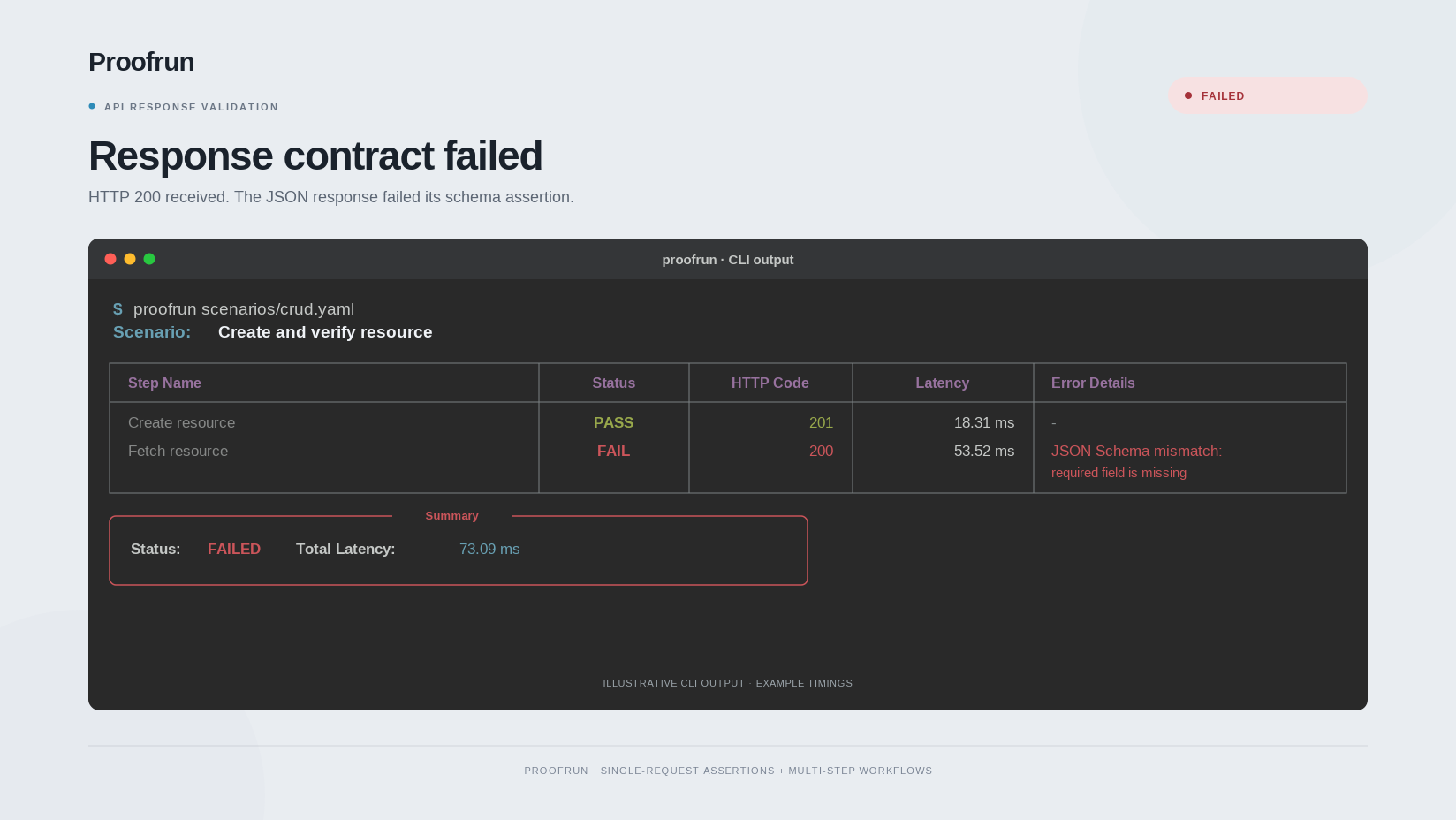
An endpoint can return 200 OK while its payload is missing a critical field. And even when individual endpoints respond, an API journey breaks when one step depends on data returned by another.
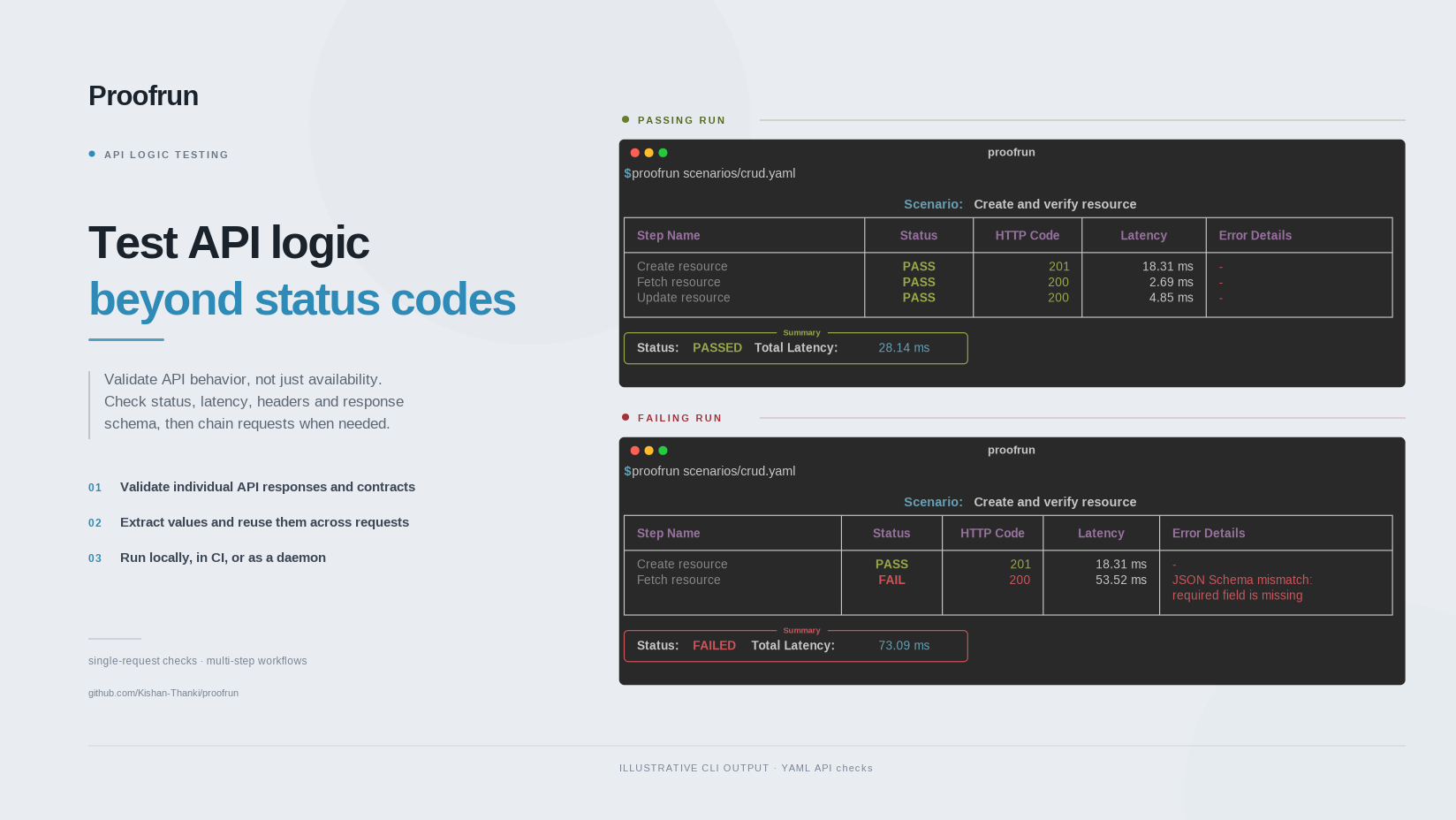
Proofrun validates individual API responses and multi-step workflows using clean, readable YAML scenarios.
- Check status codes, latency thresholds, headers, and JSON Schema contracts.
- Extract response values and pass them dynamically into subsequent steps.
- Run the exact same scenarios on your laptop, inside CI pipelines, or as a background daemon.
- No external services required: no PostgreSQL, Redis, or external cloud accounts required.
Quickstart (30 seconds)
1. Install
pip install proofrun
2. Define a Scenario (monitors.yaml)
version: "1.0"

global:
  base_url: "https://jsonplaceholder.typicode.com"

scenarios:
  - name: "Post API Contract"
    steps:
      - name: "Fetch post"
        request:
          method: GET
          path: /posts/1
        expect:
          status: 200
          max_latency_ms: 800
          schema:
            type: object
            required: [id, title, userId]
3. Run It
proofrun monitors.yaml
Multi-Step Workflows
A workflow connects dependent requests: authenticate, extract an ID or token, and use it downstream.
version: "1.0"

global:
  base_url: "https://api.example.com"
  timeout_seconds: 5

scenarios:
  - name: "Public Posts Journey"
    steps:
      - name: "Create post"
        request:
          method: POST
          path: /posts
          json:
            title: "Test Title"
            body: "Content"
            userId: 1
        expect:
          status: 201
        extract:
          post_id: "$.id"

      - name: "Fetch created post"
        request:
          method: GET
          path: "/posts/${post_id}"
        expect:
          status: 200
          schema:
            type: object
            required: [id]
Proofrun executes steps sequentially and stops at the first failure, clearly reporting where the journey broke.
Environment Variables & Secrets
Supply credentials securely using ${env.NAME}:
version: "1.0"

global:
  base_url: "https://api.example.com"
  headers:
    Authorization: "Bearer ${env.API_TOKEN}"

scenarios:
  - name: "Authenticated Account Check"
    steps:
      - name: "Get profile"
        request:
          method: GET
          path: /profile
        expect:
          status: 200
Continuous Daemon & Alerting
Run Proofrun as a continuous synthetic monitor with transition-based alerting and observability metrics:
# Run continuously as a background daemon
proofrun monitors.yaml --daemon --interval 60 --webhook-url https://hooks.example.com/alerts
- Transition-based alerts: Alerts only fire when a scenario status transitions (
HEALTHY -> FAILINGor recovers back toHEALTHY), eliminating alert fatigue. - Hot reload: Edits to scenario YAML are picked up live without downtime.
- Built-in observability: Serve metrics in standard text exposition format:
proofrun monitors.yaml --daemon --metrics-port 9464
curl http://127.0.0.1:9464/metrics
CI / CD Integration
Use Proofrun in GitHub Actions or any CI system. It exits 0 on success and 1 on failure:
- name: Validate scenario configuration
  run: proofrun monitors.yaml --validate

- name: Run synthetic tests
  run: proofrun monitors.yaml
  env:
    API_TOKEN: ${{ secrets.API_TOKEN }}
Docker
Official container images are published to GitHub Container Registry:
# Run one-off test
docker run --rm \
  -v "$PWD/monitors.yaml:/monitors.yaml:ro" \
  -e API_TOKEN \
  ghcr.io/kishan-thanki/proofrun /monitors.yaml

# Run as a continuous daemon with host loopback metrics
docker run -d --name proofrun --restart unless-stopped \
  -v "$PWD/monitors.yaml:/monitors.yaml:ro" \
  -e API_TOKEN \
  -e PROOFRUN_METRICS_PORT=9464 \
  -e PROOFRUN_METRICS_HOST=0.0.0.0 \
  -p 127.0.0.1:9464:9464 \
  ghcr.io/kishan-thanki/proofrun /monitors.yaml --daemon --allow-remote-metrics
CLI Overview
proofrun <config.yaml>                 # Run once (default)
proofrun <config.yaml> --once          # Run once explicitly
proofrun <config.yaml> --validate      # Validate YAML syntax and schemas without sending requests
proofrun <config.yaml> --daemon        # Run continuously as a monitoring daemon
proofrun <config.yaml> --daemon -i 30  # Override scenario intervals (30s)
proofrun <config.yaml> --daemon --webhook-url <url>
proofrun <config.yaml> --daemon --metrics-port 9464
proofrun <config.yaml> --daemon --metrics-port 9464 --metrics-host 0.0.0.0 --allow-remote-metrics
proofrun --version                     # Show installed version
Documentation & Reference
For detailed technical references, see:
- Full Configuration & Assertion Reference: Complete schema models, assertions, built-in dynamic variables (
${$uuid},${$timestamp}), retries, and thresholds. - Security Policy: Vulnerability disclosure, trust boundaries, and redaction details.
- Roadmap & Growth Path: Project roadmap, core philosophy, and upcoming capabilities.
License
1 maintainer

Metadata
1 maintainer
Release files for proofrun 0.3.0
For a detailed explanation of source distributions (sdists) and built distributions (wheels), please see the package formats documentation.
Source distribution (sdist)
| File | Size | Uploaded | Provenance | Actions |
|---|---|---|---|---|
| proofrun-0.3.0.tar.gz | 152.5 kB | With provenance | Details for proofrun-0.3.0.tar.gz |
Built distribution (wheel)
| File | Interpreter | ABI | Platform | Actions Reset |
|---|---|---|---|---|
| proofrun-0.3.0-py3-none-any.whl | Python 3 | none | any | Details for proofrun-0.3.0-py3-none-any.whl |
Total release size: 189.2 kB
Release files / proofrun-0.3.0.tar.gz
| Download URL | proofrun-0.3.0.tar.gz |
|---|---|
| Size | 152.5 kB |
| Tags | Source |
|
SHA-256 checksum How to use checksums |
06685c4cbcdae4454d36c9045398f1407494fe94f700dcde9efae249463a4e1d
|
|
BLAKE2b-256 checksum How to use checksums |
290bd1a08c512122e1a6ab2622891cb7375a4e28faf34c27f6659d82d38a5843
|
| Upload date | |
|
Uploaded using Trusted Publishing? What is trusted publishing? |
Yes |
| Uploaded via |
twine/7.0.0 CPython/3.13.14
|
Provenance
Provenance describes where a file came from. On PyPI, provenance is shared via attestations, which provide a verifiable record of the build or publishing details. View details, limitations and caveats.


PyPI Publish Attestation
PyPI verified that this artifact, at this checksum, originated from the publisher listed below.
Signed by GitHub Actions, verified by PyPI on Oct 25, 2026.
Transparency logRelease files / proofrun-0.3.0-py3-none-any.whl
| Download URL | proofrun-0.3.0-py3-none-any.whl |
|---|---|
| Size | 36.7 kB |
| Tags | Python 3 |
|
SHA-256 checksum How to use checksums |
6ed7935784f70e7f909c8d3325c8e0c1c2388094486268436c895df65f05dd79
|
|
BLAKE2b-256 checksum How to use checksums |
0833cc308a6e6d091afd08d1d452fa502eeb3182d889c47ec6e43a2b126c9cac
|
| Upload date | |
|
Uploaded using Trusted Publishing? What is trusted publishing? |
Yes |
| Uploaded via |
twine/7.0.0 CPython/3.13.14
|
Provenance
Provenance describes where a file came from. On PyPI, provenance is shared via attestations, which provide a verifiable record of the build or publishing details. View details, limitations and caveats.
PyPI Publish Attestation
PyPI verified that this artifact, at this checksum, originated from the publisher listed below.
Signed by GitHub Actions, verified by PyPI on Oct 25, 2026.
Transparency logSecurity for proofrun 0.3.0
Provenance
Provenance describes where a file came from. On PyPI, provenance is shared via attestations, which provide a verifiable record of the build or publishing details. View details, limitations and caveats.
Full provenance
Both files in this release have been uploaded with provenance metadata.
Attestation for proofrun-0.3.0.tar.gz
PyPI Publish Attestation
PyPI verified that this artifact, at this checksum, originated from the publisher listed below.
Signed by GitHub Actions, verified by PyPI on Oct 25, 2026.
Transparency logA note on package security
PyPI is a repository for distributing packages, not a service for auditing them. While third-party security researchers and our staff do their best to detect and remove malicious packages, PyPI cannot guarantee the quality, security or suitability of any given package.
To learn more about protecting yourself from malicious actors, visit our package security documentation.














