
Highly configurable belief propagation simulator for factor graphs

Project description
Belief Propagation Simulator - PropFlow
PropFlow is a Python toolkit for building and experimenting with belief propagation and other distributed constraint optimization (DCOP) algorithms on factor graphs. It was designed for research and education, providing a flexible framework for implementing and testing new policies and engine variants.
for more comprehensive documentation, please click here
Key Features
- Belief Propagation Variants: Simulates a variety of belief propagation algorithms, including Min-Sum, Max-Sum, and Sum-Product.
- Search-Based DCOP Solvers: Implements local search algorithms like the Distributed Stochastic Algorithm (DSA) and Maximum Gain Message (MGM).
- Extensible Policy Framework: A modular system for applying policies like message damping, factor splitting, and cost reduction to alter the behavior of the core algorithms.
- Dynamic Graph Construction: Tools for programmatically creating factor graphs with different topologies (e.g., cycles, random graphs) and custom cost functions.
- Simulation and Analysis: A
Simulatorclass for running multiple engine configurations in parallel and collecting results for comparison. - Debugging and Visualization: Integrated logging and tools for visualizing factor graphs and analysis results.
Installation
Install from PyPI (Recommended)
PropFlow is now available on PyPI! Install it with pip:
pip install propflow
PyPI Package: https://pypi.org/project/propflow/
Install from Source (Development)
For development or to get the latest changes, clone the repository and install in editable mode:
git clone https://github.com/OrMullerHahitti/Belief-Propagation-Simulator.git
cd Belief-Propagation-Simulator
pip install -e .
Getting Started: A Complete Example
Here's how to create a simple factor graph, run a Min-Sum engine, and get the results.
import numpy as np
from propflow import (
    FactorGraph,
    VariableAgent,
    FactorAgent,
    BPEngine,
    MinSumComputator,
    create_random_int_table,
)

# 1. Define Variables and Factors
var1 = VariableAgent(name="x1", domain=2)
var2 = VariableAgent(name="x2", domain=2)

# Create a factor with a cost table that prefers different assignments
# The cost table is a 2x2 matrix for the two variables, each with a domain of 2.
factor = FactorAgent(
    name="f12",
    domain=2,
    ct_creation_func=create_random_int_table,
    param={"low": 1, "high": 100} # Params for the factory
)

# 2. Create the Factor Graph
# A factor graph connects variables to factors.
edges = {factor: [var1, var2]}
factor_graph = FactorGraph(
    variable_li=[var1, var2],
    factor_li=[factor],
    edges=edges
)

# 3. Initialize and Run the Engine
# The engine orchestrates the message-passing process.
engine = BPEngine(
    factor_graph=factor_graph,
    computator=MinSumComputator() # Use the Min-Sum algorithm
)
engine.run(max_iter=10)

# 4. View the Results
print(f"Final Assignments: {engine.assignments}")
print(f"Final Global Cost: {engine.calculate_global_cost()}")
Advanced Usage
Search-Based Algorithms
PropFlow also supports local search algorithms for DCOPs.
- DSA (Distributed Stochastic Algorithm): A simple and distributed algorithm where agents make independent, probabilistic decisions.
- MGM (Maximum Gain Message): A coordinated algorithm where only the agent with the maximum potential cost reduction is allowed to change its value.
from propflow.search import DSAEngine, DSAComputator

# Use the same factor_graph from the previous example
dsa_computator = DSAComputator(probability=0.8)
dsa_engine = DSAEngine(factor_graph=factor_graph, computator=dsa_computator)
results = dsa_engine.run(max_iter=50)

print(f"DSA Best Assignment: {results['best_assignment']}")
print(f"DSA Best Cost: {results['best_cost']}")
Policies
You can modify the behavior of an engine by applying different policies. Policies are implemented as specialized engine classes.
- Damping: Smooths messages over iterations to prevent oscillations. Use
DampingEngine. - Factor Splitting: Splits factors into two to alter message flow. Use
SplitEngine. - Cost Reduction: Applies a one-time discount to costs. Use
CostReductionOnceEngine.
from propflow import DampingEngine, MinSumComputator

# Apply damping to the standard BP engine
damped_engine = DampingEngine(
    factor_graph=factor_graph,
    computator=MinSumComputator(),
    damping_factor=0.9
)
damped_engine.run(max_iter=20)
print(f"Damped Assignments: {damped_engine.assignments}")
Running Experiments
The Simulator class is designed to run experiments comparing multiple engine configurations across one or more graphs.
from propflow import (
    Simulator,
    FGBuilder,
    BPEngine,
    DampingEngine,
    SplitEngine,
    MinSumComputator,
    CTFactory,
)

# 1. Define Engine Configurations
engine_configs = {
    "Standard BP": {"class": BPEngine, "computator": MinSumComputator()},
    "Damped BP": {"class": DampingEngine, "computator": MinSumComputator(), "damping_factor": 0.5},
    "Split Factor BP": {"class": SplitEngine, "computator": MinSumComputator(), "split_factor": 0.6},
}

# 2. Create a list of graphs for the experiment
graphs = [
    FGBuilder.build_cycle_graph(
        num_vars=10,
        domain_size=3,
        ct_factory=CTFactory.random_int.fn,
        ct_params={"low": 0, "high": 100}
    ) for _ in range(5)
]

# 3. Run the simulations in parallel
simulator = Simulator(engine_configs)
results = simulator.run_simulations(graphs, max_iter=100)

# 4. Plot the average cost convergence
simulator.plot_results(verbose=True)
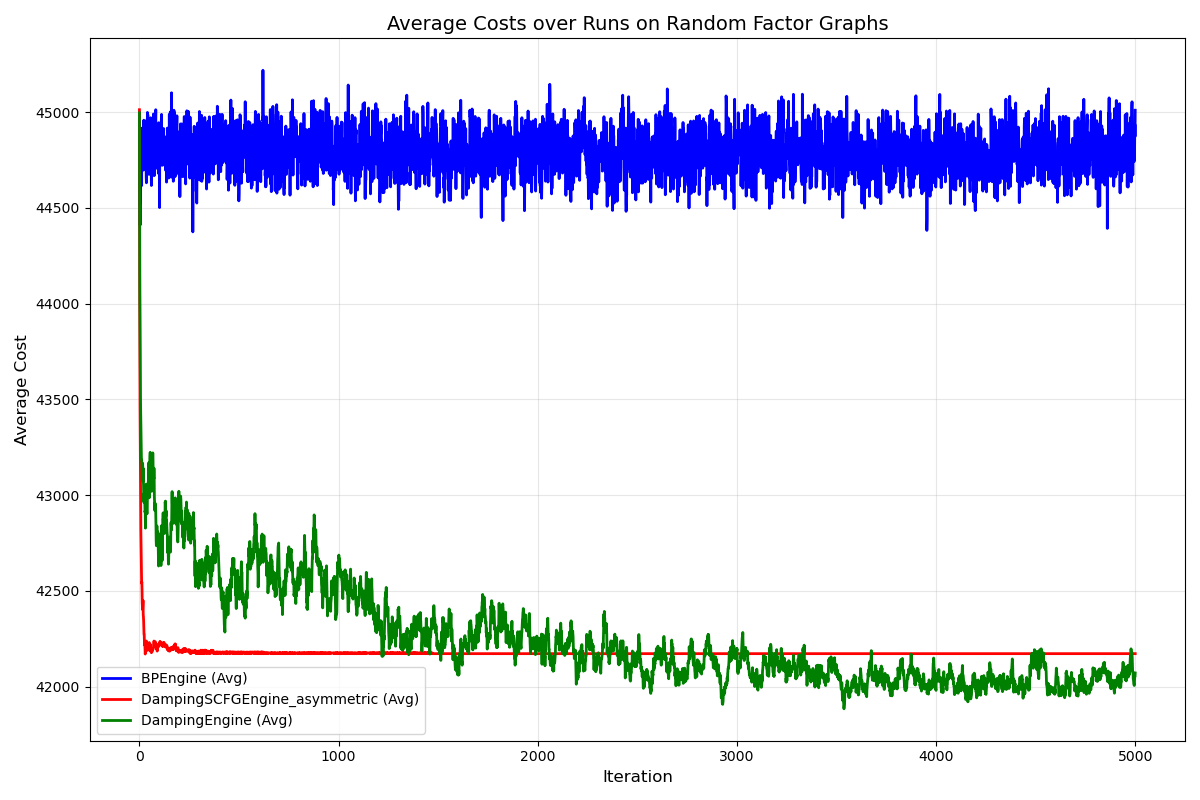
Preliminary Results
Results for 3 different variants of Min-Sum - regular, dampened, and using damping + splitting for 30 problems each, 90 simulations overall, with each one running 5000 steps (iterations). Using the following parameters: only binary constraints, domain size -10, density - 0.25, 50 Variable Nodes (approximately 306 Factor Nodes), and cost table generated from a uniform integer function with range [100, 200].


Download files
Download the file for your platform. If you're not sure which to choose, learn more about installing packages.
Source Distribution
Built Distribution
Filter files by name, interpreter, ABI, and platform.
If you're not sure about the file name format, learn more about wheel file names.
Copy a direct link to the current filters
File details
Details for the file propflow-0.1.2.tar.gz.
File metadata
- Download URL: propflow-0.1.2.tar.gz
- Upload date:
- Size: 171.6 kB
- Tags: Source
- Uploaded using Trusted Publishing? No
- Uploaded via: twine/6.2.0 CPython/3.13.7
File hashes
| Algorithm | Hash digest | |
|---|---|---|
| SHA256 |
4af4ace94cae6540f732b087915f63a6000df8a4a2e48136d785c5a78d077b72
|
|
| MD5 |
db79c16b01d12512a3c64549322068bd
|
|
| BLAKE2b-256 |
cef72959fb3d0935b3166fca2e1564b3f301ded71833296965a2ef5a21983fe8
|
File details
Details for the file propflow-0.1.2-py3-none-any.whl.
File metadata
- Download URL: propflow-0.1.2-py3-none-any.whl
- Upload date:
- Size: 144.1 kB
- Tags: Python 3
- Uploaded using Trusted Publishing? No
- Uploaded via: twine/6.2.0 CPython/3.13.7
File hashes
| Algorithm | Hash digest | |
|---|---|---|
| SHA256 |
38ec2157fe0aa25c3ddea4be24074a18c6aed6eb61186d755942a0850ff8253c
|
|
| MD5 |
a709ffe4fedc89ab0e37259317ef8987
|
|
| BLAKE2b-256 |
c2212cd9f90b6215212c7ed063c1b8a02bae2b5938f074e56a918caddf881868
|






