

prosediff









See what changed between two drafts, and have an AI tell you whether the revision is better: Word documents (.docx) first, OpenDocument (.odt) and Markdown too.
- An AI reviews the revision: Claude Code, ChatGPT through Codex, a local Ollama model (nothing leaves your computer) or any API model reads the changes and gives a verdict (Improves, Mixed or Worsens), what changed, what improved and what to fix.
- It marks each problem in the text: a numbered badge on the passage and a card in the margin saying what is wrong and the fix it proposes.
- It hands you back the document: the Word or LibreOffice file with the AI's comments, and its fixes as tracked changes to accept or reject one by one.
- It reviews a single file too, with no older version to compare, and can check whether the added text reads as AI-written.
- It finds moved paragraphs even when they were edited: a paragraph, sentence or passage moved elsewhere is shown at both ends as a move, the words changed on the way highlighted, where code diffs see an unrelated deletion and insertion (how).
- It is a git diff tool for Word files: after
prosediff --setup-git,git diff,git log -pandgit showprint .docx and .odt files as text instead of "Binary files differ", andgit difftool -t prosediffopens the side-by-side report (git integration).
Underneath is a diff made for prose, not code: a self-contained HTML report of two versions side by side, each paragraph facing the one it came from, changed words highlighted inside it. The versions are two Word or OpenDocument documents, two Markdown or text files, two folders, or commits of a git repository.
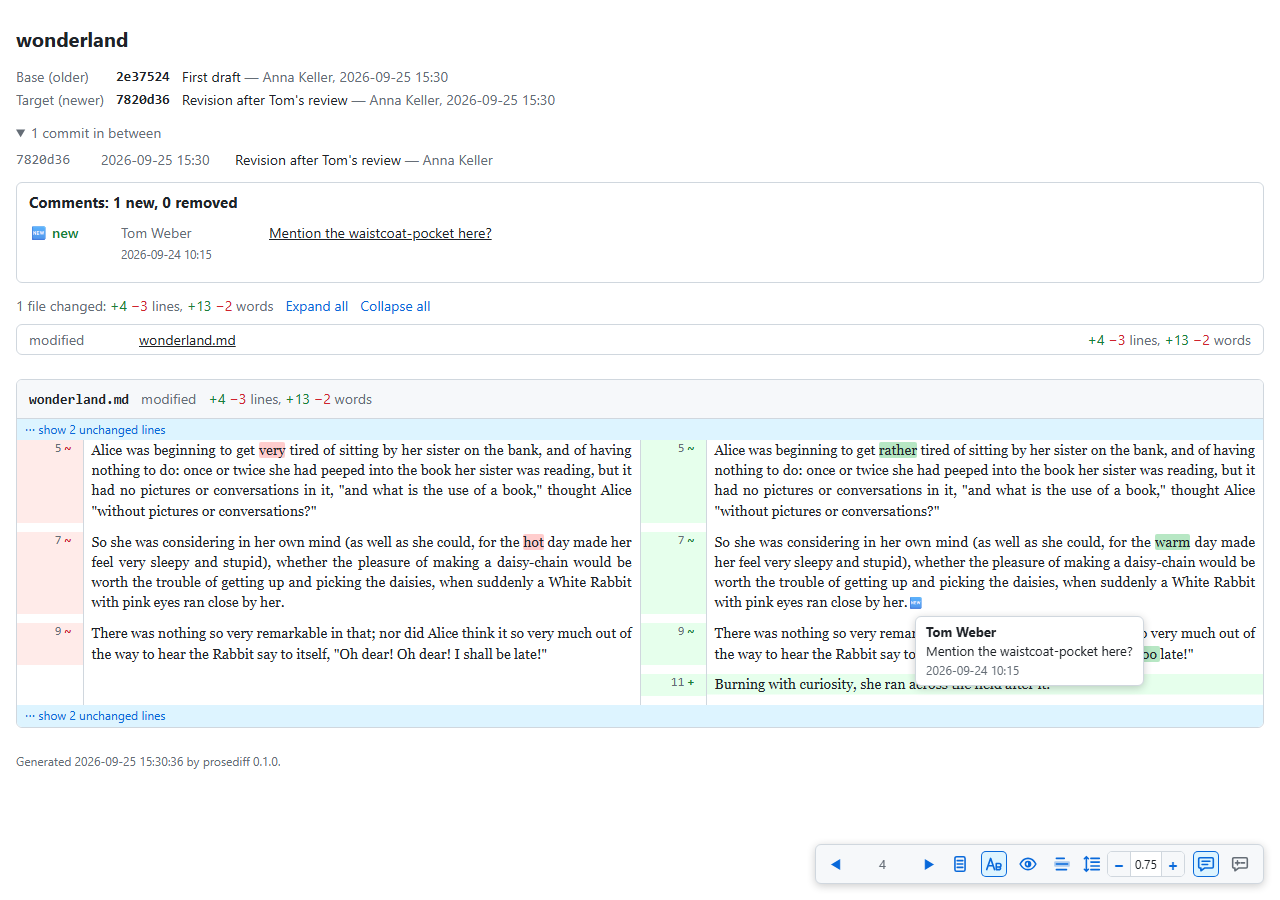
Why prosediff
- Code diff tools (
git diff, GitHub, diff2html, Meld) show a Word document as a binary file and a paragraph as one long changed line. Word's Compare Documents gives a third Word file full of revision marks, and cannot compare folders, git history or Markdown. - prosediff reads Word and OpenDocument files directly, whether or not Track Changes was on, and shows only the comments added or removed.
- It lines the versions up correctly: an edited paragraph faces the one it came from, however rewritten; an inserted or split paragraph does not shift the ones below.
- It can put tracked changes back: from a draft and a version returned without them, it writes the returned document with each change a tracked change, to accept or reject in Word or LibreOffice.
- The result is one HTML file: no server, no network, no Word needed to read it; attach it to an e-mail, or print it.
Install
uv tool install prosediff
This installs prosediff-gui (the window) and prosediff (the command line).
It needs Python 3.11 or later and git on PATH for
every comparison, files and folders included. The AI assessment is an
optional extra: "prosediff[claude]", "prosediff[codex]" or
"prosediff[models]" (Ollama and API models).
Usage
Run prosediff-gui, or double-click it (on Windows it opens no console).
In the window:
- Choose what to compare: two Files, two Folders, two versions in a Git repository, or One file for the AI to review alone.
- Optionally, pick an AI (Claude Code, Codex, Ollama or an API model), its model and effort.
- Click Compare (Ctrl+Enter). The report opens in the browser.
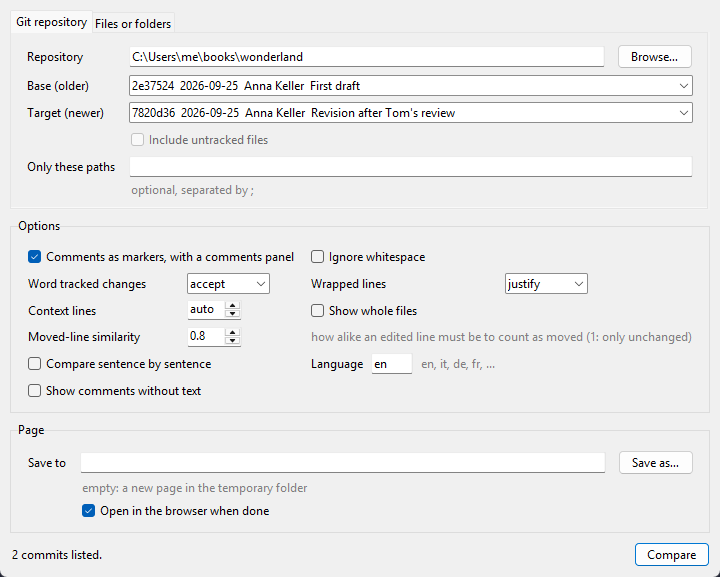
prosediff-gui OLD.docx NEW.docx opens the window with two files filled
in. Every option has a tooltip; The window describes them
all. Everything the window does is also on the command line, for scripts
and git: see Command line.
Documentation
- The window: every field and option of
prosediff-gui. - Command line: every option of
prosediff, examples, and git integration. - The HTML report: what it shows, and its keys.
- AI assessment: the AIs supported, what they are sent, the documents with the AI's comments and fixes.
- How it works: tracked-changes output, alignment, reading Word and OpenDocument files, and the Python API.
- Moved text: how moves are found, and the benchmark behind the default algorithms and thresholds.
Development
uv run pytest                            # the tests
uv run playwright install chromium       # once, for the browser tests
uv run ruff check && uv run ruff format --check
uv run --with pillow python docs/make_screenshots.py --assess claude   # the README screenshots
uv run --with pillow python docs/make_icon.py          # the window icons, from docs/logo.svg
The tests build throwaway repositories with GitPython and need git on
PATH; the browser tests need Playwright's Chromium, and are skipped
without it. The AI assessment is tested with a stand-in for the models, and
once with a real local one, the smallest there is (ollama pull gemma3:270m, 292 MB), skipped when Ollama or that model is missing; no
test calls Claude, Codex or a paid API. The Word tests write their documents with python-docx, or as raw
XML for what it cannot write (tracked changes, footnotes, equations), and
the OpenDocument tests as raw XML. The git tests keep git's global and
system settings out of the way. .github/workflows/tests.yml runs
the linter, and the tests on Windows, Linux and macOS with Python 3.11 and
3.14.
Two benchmarks guide the defaults: docs/passage_benchmark.py (moved
passages, report docs/passage_benchmark.txt) and
docs/word_matcher_benchmark.py (the word matchers, report and
recommendation in docs/word_matcher_benchmark.md). Their test set is kept
in docs/benchmark_data/: the Project Gutenberg books, as served, and the
simulated revisions made from them, so no run downloads or rebuilds them.
Acknowledgements
prosediff was inspired by diff2html (rtfpessoa/diff2html), whose side-by-side HTML view of a diff it carries over from code to prose.
The HTML report reads and writes the zips of the Word and LibreOffice
documents it offers with fflate
(0.8.3, MIT licence), whose browser build ships with prosediff
(src/prosediff/vendor/, its licence beside it).
prosediff was written with the help of Claude Code, Anthropic's AI coding assistant.
1 maintainer

Metadata
1 maintainer
Release files for prosediff 0.7.0
For a detailed explanation of source distributions (sdists) and built distributions (wheels), please see the package formats documentation.
Source distribution (sdist)
| File | Size | Uploaded | |
|---|---|---|---|
| prosediff-0.7.0.tar.gz | 797.7 kB | Details |
Built distribution (wheel)
| File | Interpreter | ABI | Platform | Reset |
|---|---|---|---|---|
| prosediff-0.7.0-py3-none-any.whl | Python 3 | none | any | Details |
Total release size: 1.6 MB
Release files / prosediff-0.7.0.tar.gz
| Download URL | prosediff-0.7.0.tar.gz |
|---|---|
| Size | 797.7 kB |
| Tags | Source |
|
SHA-256 checksum How to use checksums |
cae4de14749f5a7e0abd5aa6c394fe3469a8454fa115ff646d6141bd6354dc7a
|
|
BLAKE2b-256 checksum How to use checksums |
ee78b70d4c8e2e9db9ff159febb793a87ea70cbd0235c5df8f40105c5d651fdf
|
| Upload date | |
|
Uploaded using Trusted Publishing? What is trusted publishing? |
Yes |
| Uploaded via |
uv/0.12.21 {"installer":{"name":"uv","version":"0.12.21","subcommand":["publish"]},"python":null,"implementation":{"name":null,"version":null},"distro":{"name":"Ubuntu","version":"24.04","id":"noble","libc":null},"system":{"name":null,"release":null},"cpu":null,"openssl_version":null,"setuptools_version":null,"rustc_version":null,"ci":true}
|
Release files / prosediff-0.7.0-py3-none-any.whl
| Download URL | prosediff-0.7.0-py3-none-any.whl |
|---|---|
| Size | 810.7 kB |
| Tags | Python 3 |
|
SHA-256 checksum How to use checksums |
486eeea64ca8e43088b9984fcf5f6609290c89f2107e1c9150864491400bca65
|
|
BLAKE2b-256 checksum How to use checksums |
c4e774a4b5b231126092448b8712645f4688d4f13bc2d235f7f1f18450b9a1b9
|
| Upload date | |
|
Uploaded using Trusted Publishing? What is trusted publishing? |
Yes |
| Uploaded via |
uv/0.12.21 {"installer":{"name":"uv","version":"0.12.21","subcommand":["publish"]},"python":null,"implementation":{"name":null,"version":null},"distro":{"name":"Ubuntu","version":"24.04","id":"noble","libc":null},"system":{"name":null,"release":null},"cpu":null,"openssl_version":null,"setuptools_version":null,"rustc_version":null,"ci":true}
|














