
ProteinMotion
ProteinMotion is a Python package for animating proteins, DNA, and RNA. Load a structure or trajectory, choose a molecular representation, add animations and labels, and export a video. The scene API follows Manim's add, play, and wait syntax.




Documentation · Video examples · Reference manual · PyPI · Releases
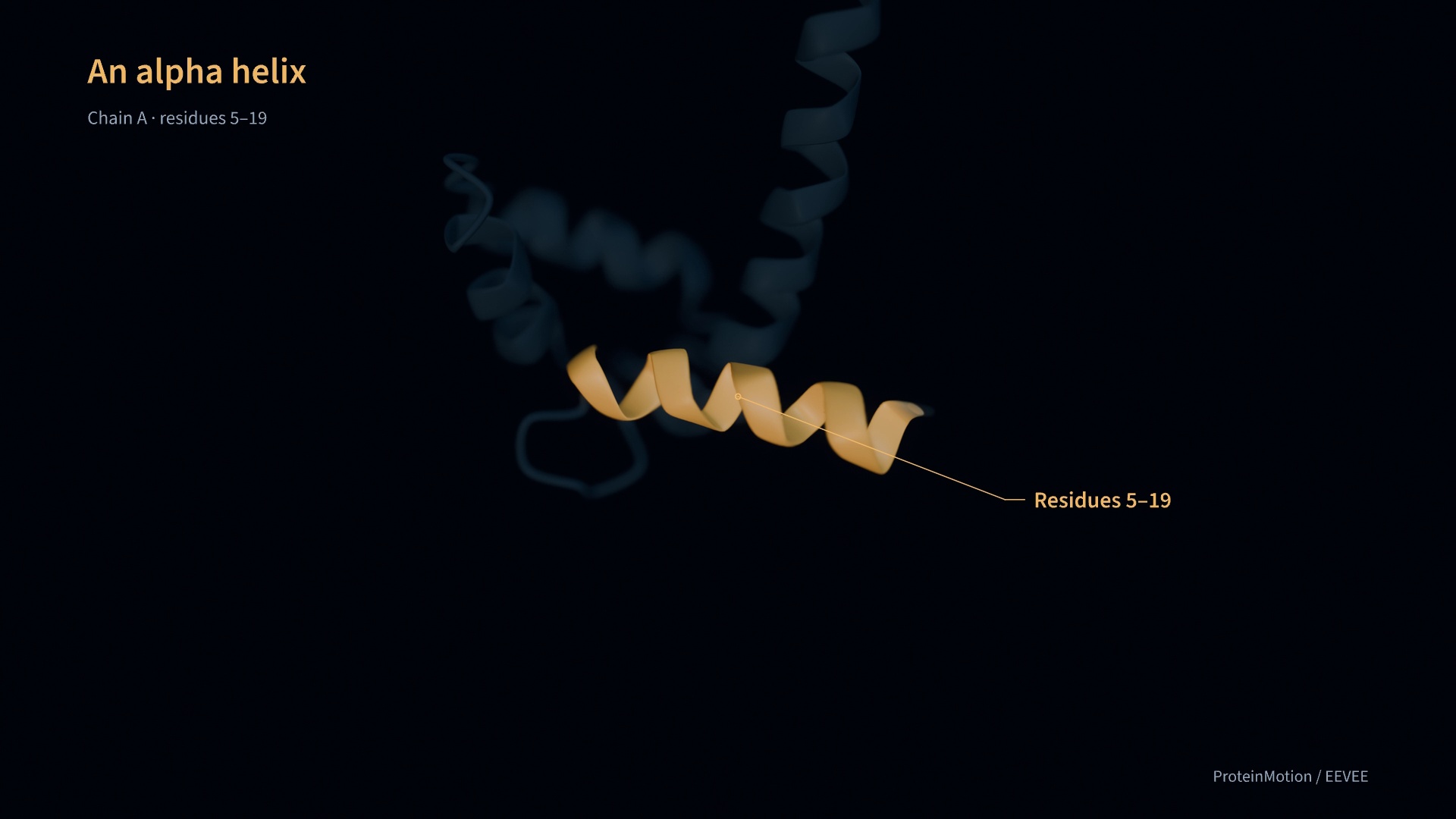
Calmodulin in focus is a 68-second EEVEE film at 1080p/60 fps. It shows helix close-ups, focus pulls, transparent surroundings, backbone atoms, and a surface colored by B factor. Full script and output · Python source
The calmodulin and troponin C demo also covers NMR conformations, backbone morphing, distance measurements, and interaction highlights.
Install
Use Python 3.11 or later and a GPU. Windows NVIDIA systems use Vulkan for rendering and NVENC for video encoding. macOS uses Metal and VideoToolbox; on Apple silicon, use an arm64 Python installation.
Install from PyPI into your Python environment:
python -m pip install proteinmotion
proteinmotion doctor --check-encoders
To make the proteinmotion command available from any directory, install it with pipx:
pipx install proteinmotion
pipx ensurepath
Open a new terminal after ensurepath. The pipx installation has its own Python environment. For scripts that import proteinmotion directly, use the pip command in the environment where you run those scripts.
To update an existing installation, run python -m pip install --upgrade proteinmotion or pipx upgrade proteinmotion, depending on how you installed it.
Install optional trajectory readers and the interactive preview with python -m pip install "proteinmotion[md,preview]", or pipx install "proteinmotion[md,preview]" for the global command.
On Windows, use 64-bit Python and a current NVIDIA driver. doctor --check-encoders checks the GPU and tests available video encoders. See Windows setup and GPU selection.
The package includes fonts, shaders, a sample structure, and a starter script. PyAV supplies the FFmpeg libraries used for video export. See the installation guide for virtual environments and platform setup.
Render a video
proteinmotion init my-movie
proteinmotion render my-movie/film.py ProteinMovie --fps 60 -o my-movie/film.mp4
init creates film.py and a ubiquitin structure in my-movie/. Edit the script to change the structure, selected residues, or animations.
A scene looks like this:
from proteinmotion import Protein, ProteinScene, Rotate, Colorize, Write


class MyMovie(ProteinScene):
    def construct(self):
        protein = Protein.from_file("protein.cif").cartoon()
        self.add(protein)
        self.camera.frame(protein)

        helix = protein.select(chain="A", residues=(23, 34))
        self.play(Rotate(protein, angle=1.2), run_time=3)
        self.play(Colorize(helix, "#50e0d0"), run_time=1.5)
        self.play(Write(helix.callout("α helix")), run_time=2)
        self.focus(helix, run_time=1.5)
        self.wait(2)
Use a structure file and residue selection that match your protein. Residue ranges use inclusive PDB author numbers. Coordinates are in ångströms; angles are in radians. Animations in one play() call run together. Successive calls run in sequence.
Render with Blender EEVEE
EEVEE adds depth of field with focus on a protein, residue, or selected region. Install Blender 4.5 or later separately. EEVEE is included in Blender. The default native renderer uses the Python dependencies installed above.
proteinmotion render my-movie/film.py ProteinMovie --renderer eevee --fps 60 -o film.mp4
ProteinMotion finds Blender on PATH, in standard Windows Program Files/Blender Foundation/Blender <version> folders, or at /Applications/Blender.app on macOS. For another location, pass --blender /path/to/blender or set PROTEINMOTION_BLENDER. On macOS, EEVEE uses Metal.
Set lens focus in your scene before the first animation:
self.camera.set_focus(protein, chain="A", residues=5, fstop=5.6)
self.camera.set_focus(protein, chain="A", residues=(10, 20), atoms="CA", fstop=4)
The selected atoms define the focus point and follow the protein during motion. The camera position and zoom stay fixed. Use FocusPull to animate a change of lens focus. See the EEVEE guide and rendered example for focus pulls, quality settings, and transparency behavior.
Features
- Representations: cartoon, ribbon, ball-and-stick, and molecular surfaces.
- Ligands and side chains: ligands, ions, and waters drawn as ball-and-stick over the cartoon. Side chains or any selected atoms can be shown or hidden residue by residue.
- DNA and RNA: nucleotide backbones with base slabs, filled rings, sticks, or ladder rods. Colors, opacity, labels, surfaces, trajectories, and EEVEE focus work with nucleotide selections.
- Animation: rotation, translation, camera movement, deformation, and transitions between representations.
- Residue styling: color and opacity changes, applied together or delayed by residue.
- Numerical properties: B factors, aligned RMSF, and imported residue values mapped to color and cartoon thickness.
- Plots: distance traces, live contact maps, sequence strips, and color legends synchronized with the movie.
- Density: MRC/CCP4 maps, animated contours, and moving slices, with map coordinates preserved.
- Labels: text writing and erasing, amino acid and nucleotide names, and callout lines that connect labels to selected regions.
- Rendering: native GPU rendering or Blender EEVEE with depth of field.
- Region tools: camera focus, 3D sphere, box, or atom highlights, and selection by ligand, ion, residue name, or distance.
- Measurements: distance labels, hydrogen-bond detection, and screened Coulomb estimates with imported charges.
- States and trajectories: multi-model PDB/mmCIF, NumPy arrays, and MDAnalysis readers for XTC, DCD, TRR, and other formats.
- Structure morphs: contact-map matching using protein Cα or DNA/RNA C1′ atoms, delayed motion along each chain, and fades for unmatched residues.
The guides explain the options and provide code examples. ProteinMotion runs as a standalone renderer. Its exported videos can be used in Manim or a video editor.
Use with an AI agent
The ProteinMotion Movies skill gives AI agents instructions and examples for writing scenes, rendering videos, and checking the results. Use it with an agent that can read local files and run Python commands.
Copy the skill to your agent's skills directory:
proteinmotion install-skill --path /path/to/skills/proteinmotion-movies
The installed skill includes its references and example files. For agents that read instructions directly, point them to SKILL.md and keep those files beside it.
Example request:
Use the ProteinMotion Movies skill to make a 20-second video from my structure. Show a cartoon, label chain A residues 23–34, zoom into that region, then switch to ball-and-stick.
The AI agent guide covers installation and example requests. Running proteinmotion install-skill with no path uses the Codex skills directory.
Examples
These scripts and their input structures are in the repository:
| Example | Source |
|---|---|
| DNA morphs with C1′ matching and delayed nucleotide motion | dna_morph.py |
| DNA base styles, strand transparency, and surfaces | dna_styles.py |
| tRNA regions, modified bases, and B-factor surfaces | rna_styles.py |
| Ca²⁺ ions and their coordinating side chains | ligands_and_side_chains.py |
| Calcium sites and a nucleotide pocket: 41-second film | binding_sites_film.py |
| B factors, residue colors, and cartoon thickness | numerical_properties.py |
| NMR playback with distance, contact, and sequence plots | synchronized_plots.py |
| Electron-density contours and slices | density_maps.py |
| Calmodulin in focus: 68-second EEVEE film | calmodulin_in_focus.py |
| EEVEE depth of field and residue focus | eevee_focus.py |
| Calmodulin and troponin C feature demo | feature_showcase.py |
| Residue colors, surfaces, distances, and interactions | molecular_tools.py |
| Text, residue labels, and callouts | labels_and_callouts.py |
| Camera focus, 3D highlights, and NMR states | nmr_regions.py |
| Contact-guided backbone and ball-and-stick morphs | backbone_morph.py |
| Hydrogen bonds in an idealized alpha helix | alpha_helix_hbonds.py |
| GroEL/GroES assembly | large_protein.py |
git clone https://github.com/pdpppd/proteinmotion.git
cd proteinmotion
python -m pip install -e '.[md,preview]'
proteinmotion render examples/nmr_regions.py RegionTour --fps 60 -o regions.mp4
Rendering and scientific methods
Rendering and export are tested on Apple silicon Macs and Windows with an NVIDIA RTX 5070 Ti. On the RTX, a 600-frame 1080p/60 fps Quickstart export took a median 1.92 seconds with NVENC versus 4.07 seconds with CPU encoding across three runs. This includes rendering, GPU readback, and encoding; scene construction is excluded. See benchmarks and test results for settings, hardware, and limits.
Morphs and NMR playback interpolate coordinates for visualization. Use an MD trajectory when you need motion from a simulation. Hydrogen bonds use geometric criteria. Electrostatic estimates use a screened Coulomb model and depend on the supplied charges. The rendering guide and interaction guide describe the methods and their limits.
Development
python -m pip install -e '.[dev,md,preview]'
ruff check src tests examples scripts skills
pytest
python -m build
Documentation is in docs/; the website is in website/. See CONTRIBUTING.md for setup and checks, and the writing guide for documentation style.
License
The package and website use the MIT license. Write timing is adapted from MIT-licensed Manim. The bundled Source Sans 3 fonts use the SIL Open Font License. See third-party notices and structure sources.
1 maintainer

Release files for proteinmotion 0.11.0
For a detailed explanation of source distributions (sdists) and built distributions (wheels), please see the package formats documentation.
Source distribution (sdist)
| File | Size | Uploaded | |
|---|---|---|---|
| proteinmotion-0.11.0.tar.gz | 8.8 MB | Details |
Built distribution (wheel)
| File | Interpreter | ABI | Platform | Reset |
|---|---|---|---|---|
| proteinmotion-0.11.0-py3-none-any.whl | Python 3 | none | any | Details |
Total release size: 9.4 MB
Release files / proteinmotion-0.11.0.tar.gz
| Download URL | proteinmotion-0.11.0.tar.gz |
|---|---|
| Size | 8.8 MB |
| Tags | Source |
|
SHA-256 checksum How to use checksums |
995f2cfab85a1bb0b106c09dbb7634503c2580d06e86d5d724a14b1547606a8f
|
|
BLAKE2b-256 checksum How to use checksums |
c38370802de999eb9eb5e6fe7779b3a3d1637f90393f4963dce5dff94a1cdcaf
|
| Upload date | |
|
Uploaded using Trusted Publishing? What is trusted publishing? |
Yes |
| Uploaded via |
twine/7.0.0 CPython/3.13.14
|
Provenance
Provenance describes where a file came from. On PyPI, provenance is shared via attestations, which provide a verifiable record of the build or publishing details. View details, limitations and caveats.


PyPI Publish Attestation
PyPI verified that this artifact, at this checksum, originated from the publisher listed below.
Signed by GitHub Actions, verified by PyPI on Sep 23, 2026.
Transparency logRelease files / proteinmotion-0.11.0-py3-none-any.whl
| Download URL | proteinmotion-0.11.0-py3-none-any.whl |
|---|---|
| Size | 576.3 kB |
| Tags | Python 3 |
|
SHA-256 checksum How to use checksums |
db3b986e219f3d3a2c36ec1e8d1f4aa9fab65ae111af4a7528ebb9debb4114e3
|
|
BLAKE2b-256 checksum How to use checksums |
3ddc8e6abfa0040bd3bdddb9e1e17ae0130a9751cad92befda63365833131024
|
| Upload date | |
|
Uploaded using Trusted Publishing? What is trusted publishing? |
Yes |
| Uploaded via |
twine/7.0.0 CPython/3.13.14
|
Provenance
Provenance describes where a file came from. On PyPI, provenance is shared via attestations, which provide a verifiable record of the build or publishing details. View details, limitations and caveats.
PyPI Publish Attestation
PyPI verified that this artifact, at this checksum, originated from the publisher listed below.
Signed by GitHub Actions, verified by PyPI on Sep 23, 2026.
Transparency log













