




Protobuf UML diagram
A tool to generate UML diagrams from Protobuf compiled Python modules.
[!NOTE] This tool expects compiled Python protobuf modules (
*_pb2.py). Installprotocseparately if you need to compile.protofiles.
Example
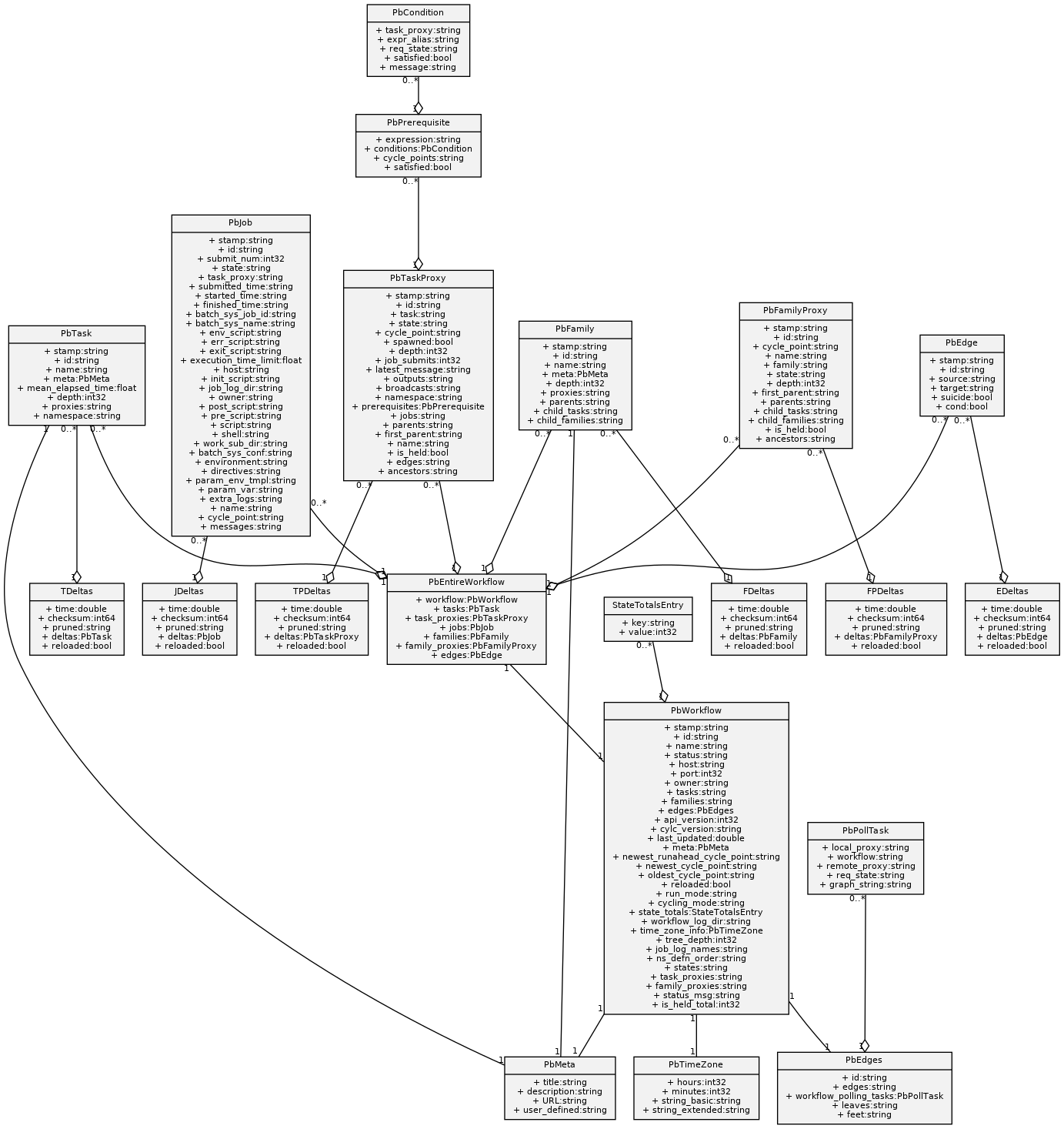
Generate a UML diagram from a compiled protobuf module:
protobuf-uml-diagram --proto "cylc.flow.ws_messages_pb2" --output /tmp/
Example logging output:
INFO:protobuf_uml_diagram:Imported: cylc.flow.ws_messages_pb2
INFO:protobuf_uml_diagram:Writing diagram to /tmp/ws_messages_pb2.png
Example output:
Installation
pip install protobuf-uml-diagram
Requirements
- Python >= 3.10
- protobuf >= 7.35.1
- Graphviz installed on the system
Quick start
Given a protobuf definition:
file issue_10.proto
issue_10.proto: ASCII text
Compile it:
protoc --python_out=./ issue_10.proto
Generate the UML diagram:
PYTHONPATH=. protobuf-uml-diagram --proto issue_10_pb2 --output /tmp
Example output:
INFO:protobuf_uml_diagram:Imported: issue_10_pb2
INFO:protobuf_uml_diagram:Writing diagram to /tmp/issue_10_pb2.png
Open the generated image:
eog /tmp/issue_10_pb2.png
The result should look like:

Names in diagrams
By default, diagrams use the full name of types (for example, SomeRequest.shipments).
You can use shorter field names with:
PYTHONPATH=. protobuf-uml-diagram \
    --proto issue_10_pb2 \
    --output /tmp \
    --full_names=false
[!WARNING] Using shorter names can make diagrams ambiguous when different fields have the same name but represent different concepts. See #10 and #78.
Example output:

Docker
The Docker image can generate UML diagrams directly from .proto files.
Build the image:
./dockerbuild.sh
Run it:
./dockerrun.sh <path_containing_proto_files> <output_path>
The container:
- Compiles the
.protofiles usingprotoc - Generates Python protobuf modules
- Produces PNG and SVG UML diagrams
Development
Clone the repository:
git clone https://github.com/kinow/protobuf-uml-diagram.git
cd protobuf-uml-diagram
Install development dependencies:
pip install -e ".[all]"
Run tests:
pytest
Run type checks:
mypy .[protobuf_uml_diagram.py](protobuf_uml_diagram.py)
Support
If this project is useful to you, you can support it:

License
Apache Licence 2.0
1 maintainer

Metadata
1 maintainer
Release files for protobuf-uml-diagram 0.16
For a detailed explanation of source distributions (sdists) and built distributions (wheels), please see the package formats documentation.
Source distribution (sdist)
| File | Size | Uploaded | |
|---|---|---|---|
| protobuf_uml_diagram-0.16.tar.gz | 9.7 kB | Details |
Built distribution (wheel)
| File | Interpreter | ABI | Platform | Reset |
|---|---|---|---|---|
| protobuf_uml_diagram-0.16-py3-none-any.whl | Python 3 | none | any | Details |
Total release size: 23.0 kB
Release files / protobuf_uml_diagram-0.16.tar.gz
| Download URL | protobuf_uml_diagram-0.16.tar.gz |
|---|---|
| Size | 9.7 kB |
| Tags | Source |
|
SHA-256 checksum How to use checksums |
51feaf615631c2dd7f0067cb707f7658acb0cd2a964ac3caacd977a665fa4014
|
|
BLAKE2b-256 checksum How to use checksums |
d71ea50656d2ecd58ad56f2c65987b4e4d2acec7b8ac5359220391473a7c0dca
|
| Upload date | |
|
Uploaded using Trusted Publishing? What is trusted publishing? |
No |
| Uploaded via |
twine/6.2.0 CPython/3.14.4
|
Release files / protobuf_uml_diagram-0.16-py3-none-any.whl
| Download URL | protobuf_uml_diagram-0.16-py3-none-any.whl |
|---|---|
| Size | 13.3 kB |
| Tags | Python 3 |
|
SHA-256 checksum How to use checksums |
6025d373efcd1ded59a4a7ca3cf319dfca12d477b92bccf9ad85ccdcd36db08d
|
|
BLAKE2b-256 checksum How to use checksums |
c8eb7d810d99d60aa1dfaf0b81bbda430c037306e339e8a33df1d02705b42197
|
| Upload date | |
|
Uploaded using Trusted Publishing? What is trusted publishing? |
No |
| Uploaded via |
twine/6.2.0 CPython/3.14.4
|














