
ProtoLink






ProtoLink is a lightweight, A2A-first Python framework for building pluggable agents and multi-agent systems. It began as an A2A-based alternative to chain-centric frameworks such as LangChain: instead of organizing an application around chains of model calls, ProtoLink treats each Agent as a self-contained runtime entity with identity, capabilities, lifecycle, tools, optional reasoning, and direct task-based communication.
A2A is the architectural core, not a bolt-on integration. ProtoLink's native AgentCard, Task, Message, Part, and Artifact runtime model was originally built on A2A 0.3, then extended for inference, tools, structured agent flows and operational modules without abandoning those protocol primitives. That choice keeps the Agent/Task API simple and the runtime pluggable; a2a=True translates the implemented HTTP surface between ProtoLink's native model and canonical A2A 1.0 JSON-RPC shapes for standard peers.
The agent is the stable composition surface. Plug in only what that agent needs: an API or local LLM, application knowledge for RAG, built-in, native, or MCP tools, a transport, registry, storage and state, telemetry, authentication, logging, policy, or durable run records. Every module is optional and replaceable through a small public interface.
ProtoLink is deliberately LLM-agnostic and local-first. Provider-native tool calling is used when available; a strict JSON action fallback keeps self-hosted and smaller models on Ollama, llama.cpp, LM Studio, vLLM, or custom backends inside the same infer loop. Changing the model does not require rewriting the agent, its tools, or its communication layer.
The base package has one runtime dependency: Pydantic. HTTP servers, gRPC, hosted model SDKs, MCP, telemetry providers, and other integrations are installed only when you choose them.
Simple by default. Explicit when it matters.
Get started · Concept · API documentation · Examples
Why ProtoLink?
- Pluggable by design - compose an agent from independent modules instead of adopting a mandatory stack.
- A small, stable API - string aliases cover the common path; concrete implementations expose full control when needed.
- Local first, distributed when needed - develop with no network or provider, then move the same task contract to HTTP, SSE JSON-RPC, WebSocket, or gRPC.
- Friendly to smaller models - one-action-at-a-time inference, schema validation, JSON fallback, and deterministic flows reduce reliance on hidden prompt behavior.
- Explicit and inspectable - tool calls, delegation, task state, policy decisions, approvals, runtime events, traces, and reports have typed representations.
- A2A at the core - agents communicate through cards, tasks, messages, parts, and artifacts rather than framework-private graph state.
Focus on the agent's role and capabilities. ProtoLink handles the infer loop, validated tool execution, delegation, communication, lifecycle, and the operational modules around them.
ProtoLink also works as an engine for coding agents and other agent applications. Authorized command execution, recoverable file edits, cancellation, and execution limits help applications handle real work reliably. Typed outcomes and completion checks distinguish an approved plan from an executed, verified result, while bounded workflows keep repair attempts under control. The same lifecycle, policy, and reporting primitives support research assistants, data processing, and operational automation. See the execution and recovery guide and runnable examples. Local command execution runs on the host and is not a sandbox.
Start with one agent
Install the base package:
uv add protolink
Register an ordinary typed function and call it:
from protolink import Agent, AgentCard

agent = Agent(
    card=AgentCard(
        name="calculator",
        description="Adds numbers",
        url="runtime://calculator",
    ),
    transport="runtime",
    verbosity=0,
)


@agent.tool
def add(a: int, b: int) -> int:
    """Add two integers."""
    return a + b


print(agent.sync.call_tool("add", a=2, b=3))  # 5
This example needs no model, API key, server, or network connection. The function name, docstring, and type hints become the tool's public metadata and argument schema. @agent.tool() also works; explicit names and descriptions remain available when needed. Register an existing function on any agent with agent.add_tool(add).
Choose the result you need:
| Goal | Blocking API | Result |
|---|---|---|
| Call a known tool | agent.sync.call_tool("add", a=2, b=3) |
The validated, authorized tool's raw result |
| Let a model respond or choose tools | agent.sync.invoke("What is 2 + 3?") |
Final part content; requires an LLM |
| Keep task state, artifacts, and metadata | agent.sync.run_task(task) |
The complete Task |
In async applications and notebooks with an active event loop, use await agent.call_tool(...), await agent.invoke(...), or await agent.run_task(...).
Add an LLM when you need inference. The mock backend lets you try the same API without a provider:
from protolink import create_llm

agent.llm = create_llm("mock", default_response="Hello from ProtoLink")
print(agent.sync.invoke("Say hello"))
invoke() and the retrieval helper ask() raise TaskExecutionError when execution returns a failed or canceled task; the exception's .task retains the details. run_task() returns task states for your application to inspect, and task.raise_for_status() adds the same explicit check. Exceptions raised directly by handlers keep their original types. See the Agent API.
Your first agent mesh
Two agents, one registry: discover a teammate and call its tools over HTTP. Install uv add "protolink[http]" and reuse add from above:
from protolink import Agent, AgentCard, Task
from protolink.discovery import Registry

registry = Registry(url="http://127.0.0.1:9000", transport="http")
calculator = Agent(
    AgentCard(name="calculator", description="Adds numbers", url="http://127.0.0.1:8001"),
    transport="http",
    registry=registry,
)
caller = Agent(
    {"name": "caller", "description": "Sends work", "url": "http://127.0.0.1:8002"},
    transport="http",
    registry=registry,
)
calculator.add_tool(add)

registry.start(background=True)
calculator.start(background=True)
caller.start(background=True)

try:
    peer = caller.sync.discover_agents({"name": "calculator"})[0]
    task = Task.create_tool_call(tool_name="add", args={"a": 2, "b": 3})
    result = caller.sync.call_agent(peer.url, task).raise_for_status()
    print(result.get_last_part_content().result)  # 5
finally:
    caller.stop()
    calculator.stop()
    registry.stop()
Agents register automatically, discover each other, and exchange tasks directly. Add models, tools, or more agents as you grow—the same API works across processes and machines.
Plug in only what the agent needs
The constructor is the composition surface. This expanded example uses a local Ollama model, registry discovery, SQLite state and run storage, local telemetry, authentication, file logging, dependency-free built-in web search, a native Python tool, and tools from an MCP server:
from protolink import (
    Agent,
    AgentCard,
    LocalTraceTelemetry,
    SQLiteRunStore,
    create_llm,
)
from protolink.logging import FileLogger
from protolink.security import APIKeyAuth
from protolink.storage import SQLiteStorage
from protolink.tools import web_search
from protolink.tools.adapters import MCPToolAdapter

planner_agent = Agent(
    card=AgentCard(
        name="planner",
        description="Plans and coordinates work",
        url="http://127.0.0.1:8000",
    ),
    llm=create_llm(
        "ollama",
        base_url="http://127.0.0.1:11434",
        model="gemma4:e4b",
    ),
    transport="http",
    registry="http",
    registry_url="http://127.0.0.1:9000",
    storage=SQLiteStorage("planner.db", namespace="planner"),
    state=["conversation"],
    run_store=SQLiteRunStore("runs.db"),
    telemetry=LocalTraceTelemetry(path="traces.jsonl"),
    authenticator=APIKeyAuth({"dev-key": []}),
    logger=FileLogger("planner.log"),
)

planner_agent.add_tool(web_search())


@planner_agent.tool(name="search_notes", description="Search local notes")
async def search_notes(query: str) -> str:
    return f"Results for {query}"


mcp_adapter = MCPToolAdapter(
    transport="stdio",
    command="python",
    args=["mcp_server.py"],
)
for tool in mcp_adapter.get_tools():
    planner_agent.add_tool(tool)

planner_agent.start()
Install the integrations used here with uv add "protolink[http,mcp]"; the Ollama server and example MCP process run separately. web_search() defaults to Brave and reads BRAVE_SEARCH_API_KEY only when invoked. Pass engine="wikipedia" for documented, keyless English Wikipedia search or engine="duckduckgo" for keyless, best-effort DuckDuckGo HTML search. Registering the tool performs no network request. Remove any constructor argument or tool you do not need, or replace it with your own implementation. Different agents in the same mesh can use different models, transports, credentials, storage, policies, and observability backends.
MCPToolAdapter supports local stdio and remote SSE servers. Once registered, MCP tools follow the same schema validation, policy, execution, and telemetry path as native Python tools.
| Plug-in surface | Built-in choices |
|---|---|
| LLMs | OpenAI, Anthropic, Gemini, Grok, DeepSeek, Hugging Face, Ollama, llama.cpp, LM Studio, vLLM, OpenAI-compatible servers, mock, custom |
| Knowledge and RAG | Dependency-free memory and SQLite indexes, Chroma, Pinecone, Qdrant, custom vector stores and retrievers |
| Tools | Built-in shell, Git, user feedback, calendar/email integrations, web search, URL fetch, calculator, clock, typed Python tools, MCP adapters, custom BaseTool implementations |
| Transports | Runtime, HTTP, SSE JSON-RPC, WebSocket, gRPC, custom transports |
| Registry | Local or network discovery through Registry and RegistryClient |
| State and storage | In-memory or SQLite state, conversation persistence, custom storage |
| Run storage | SQLiteRunStore or custom durable RunStore implementations |
| Telemetry | Dependency-free local traces, Langfuse, LangSmith, multi-telemetry, custom |
| Authentication | API keys, bearer JWT, basic auth, OAuth delegation, TLS |
| Logging | Colored console, text/JSON files, quiet logger, custom BaseLogger |
| Runtime control | Budgets, cancellation, policy, approvals, events, reports, replay, regression diffing, redaction |
Attach private or application-owned knowledge with the same progressive-control API:
from protolink import create_knowledge

knowledge = create_knowledge(
    "memory",
    name="product_docs",
    description="product manuals and troubleshooting guides",
    sources=["docs/"],
)
planner_agent.add_knowledge(knowledge)

answer = planner_agent.sync.ask("How do I reset a device?")
print(answer.text, answer.citations)
Agent.invoke() lets the model choose the automatically registered
search_product_docs tool. Agent.ask() always retrieves first and returns
the answer together with normalized hits and citations. Existing Chroma,
Pinecone, Qdrant, or custom search systems can be attached without moving
their data. See Retrieval-Augmented Generation.
LLM-agnostic, with a strong local focus
For LLM-backed agents, the infer loop is the heart of ProtoLink:
- The model proposes one next action, including a knowledge search when one is available.
- ProtoLink parses and validates it.
- The runtime executes a tool call, agent delegation, or final response.
- The structured result is added to the task context.
- The loop repeats until completion or a configured bound is reached.
Providers with reliable native tool calling use it. Local and smaller models can use the JSON fallback, which exposes the same tool_call, agent_call, and final action contract without depending on a provider-specific SDK feature.
agent_call has two delegation modes: tool_call asks another agent to execute one of its tools, while infer asks that agent's LLM to handle a prompt and initiates the other agent's infer loop.
from protolink import Agent, AgentCard, create_llm

local_agent = Agent(
    card=AgentCard(
        name="local-assistant",
        description="Runs against a local model server",
        url="runtime://local-assistant",
    ),
    transport="runtime",
    llm=create_llm(
        "ollama",
        base_url="http://127.0.0.1:11434",
        model="qwen3:4b",
    ),
)
Swap "ollama" for another built-in or custom LLM; the agent, tools, tasks, and flows do not change.
Progressive control
The common path stays small:
agent = Agent(card=card, transport="http")
The alias selects the communication boundary without changing the agent API:
| If you need... | Start with | Why |
|---|---|---|
| Agents in one Python process | "runtime" |
Lowest transport overhead, streaming, and no ports |
| A network service or optional A2A 1.0 endpoint | "http" |
Status, health, optional chat, and dashboard utilities; add a2a=True for A2A routes and outbound translation |
| Live progress for a browser or CLI | "sse" |
HTTP utilities plus a one-way event stream; no A2A adapter today |
| A persistent interactive connection | "websocket" |
Bidirectional streaming with low per-frame overhead after connection setup |
| Internal gRPC infrastructure | "grpc" |
Pooled RPCs, streaming, deadlines, standard health, and reflection |
These are qualitative protocol-overhead profiles, not benchmark results; model and tool latency commonly dominate an agent call. See the transport guide for the complete performance, utility, and deployment comparison.
When a boundary needs TLS, resource limits, retries, keepalive settings, or other operational controls, construct the transport and pass it to the same API:
from protolink import RetryPolicy, TLSConfig, TransportConfig, TransportLimits
from protolink.transport import HTTPTransport

transport = HTTPTransport(
    url=card.url,
    tls=TLSConfig(
        certfile="certs/agent.pem",
        keyfile="certs/agent-key.pem",
        cafile="certs/ca.pem",
    ),
    config=TransportConfig(
        limits=TransportLimits(max_concurrent_requests=200),
        retry=RetryPolicy(max_attempts=3),
    ),
)

agent = Agent(card=card, transport=transport)
AgentClient and Registry follow the same rule: pass a string for built-in defaults or a concrete implementation for full control. The façade does not change as deployment requirements grow.
Structured flows
Agents can choose their own next action, but not every workflow should be probabilistic. Pipeline, Parallel, Router, and Graph provide explicit, deterministic topology while keeping every step on the same Task -> Task contract.
from protolink import Pipeline, Task

review_flow = Pipeline(
    steps=[researcher_agent, reviewer_agent, planner_agent],
)

result = review_flow.sync.execute(
    Task.create_infer(prompt="Prepare the release plan"),
)
Flows can contain local agents, registry-resolved remote agents, or other nested flows. Semantic context injection tells each agent what the next step expects without coupling that agent to the overall topology. See structured flows and the runnable examples.
A2A primitives, standard wire compatibility
ProtoLink uses A2A's core AgentCard, Task, Message, Part, and Artifact concepts as first-class Python runtime primitives. Delegation, lifecycle transitions, structured flows, tool results, telemetry, and replay all operate on those explicit objects rather than escaping into a separate orchestration format.
Standard wire compatibility is explicit and additive:
a2a_agent = Agent(card=card, transport="http", a2a=True)

# "auto" prefers the full ProtoLink contract and discovers A2A-only peers.
result = await a2a_agent.call_agent(peer_url, task)

# Select the protocol explicitly when the peer protocol is already known.
result = await a2a_agent.call_agent(peer_url, task, protocol="a2a")
result = await a2a_agent.call_agent(peer_url, task, protocol="protolink")
An explicit protocol="a2a" choice bypasses the native-vs-A2A selection step,
but still fetches and validates the peer's standard Agent Card and compatible
JSON-RPC interface before sending work.
Agent-originated A2A discovery is always same-origin: an advertised interface
must match the Agent Card's origin. For a split-origin deployment you explicitly
trust, use a dedicated AgentClient(..., a2a_allow_cross_origin=True); see
A2A compatibility for the operational limits.
With the default a2a=False, HTTP behaves exactly as before: native tasks, status, health, chat, and control endpoints only. With a2a=True, the agent additionally serves the standard Agent Card and SendMessage, GetTask, ListTasks, and CancelTask JSON-RPC operations, and its client can translate outbound calls to A2A-only peers. Outbound ProtoLink infer instructions become A2A user text. Inbound A2A user text remains a normal ProtoLink text part for custom handlers; the default LLM engine recognizes the A2A metadata and treats that text as an inference request. Framework-specific tool-call and flow state should stay on the native protocol.
Compatibility is versioned and testable: the official A2A Technology Compatibility Kit measures the adapter against a pinned protocol surface. The A2A compatibility page records the exact binding, TCK commit, commands, current result, and the remaining upstream harness limitation.
Stream model output into your app
For an embedded Agent with capabilities={"streaming": True} on its card:
from protolink import RunHandle, Task

handle = RunHandle.start(agent, Task.create_infer(prompt="Explain this project."))
async for event in handle.events():
    if event.payload.get("llm_event_type") == "llm_chunk":
        print(event.payload["content"], end="", flush=True)
result = await handle.result()
llm_chunk delivers incremental text; llm_final carries the complete answer. Default JSON-action models stream raw JSON fragments. Ollama and other HTTP server streams require httpx (uv add protolink httpx), also included in the llms and http extras. Use await handle.cancel() to stop a run. See the complete streaming example and provider behavior.
Local telemetry and replay
ProtoLink includes dependency-free local tracing. Attach LocalTraceTelemetry, run a task, and replay the captured spans without sending data to an external service:
from protolink import Agent, AgentCard, LocalTraceTelemetry, create_llm

telemetry = LocalTraceTelemetry(path="traces.jsonl")
agent = Agent(
    AgentCard(name="debug", description="Debug agent", url="runtime://debug"),
    transport="runtime",
    llm=create_llm("mock", default_response="done"),
    telemetry=telemetry,
    verbosity=0,
)

result = agent.sync.invoke("Trace this task")
trace = telemetry.recorder.replay()[-1]
The same runtime contracts power cancellation, budgets, policy decisions, approval previews, run reports, redaction, read-only replay, and normalized report comparison for regression testing. Replay and comparison never re-execute model or tool calls: execute the candidate separately against controlled dependencies, record its report, and then diff it against the baseline. Normalization is limited to known ProtoLink report-envelope fields; application-owned payloads and report metadata remain exact unless you configure an ignore rule or numeric tolerance.
Dashboard developer tool
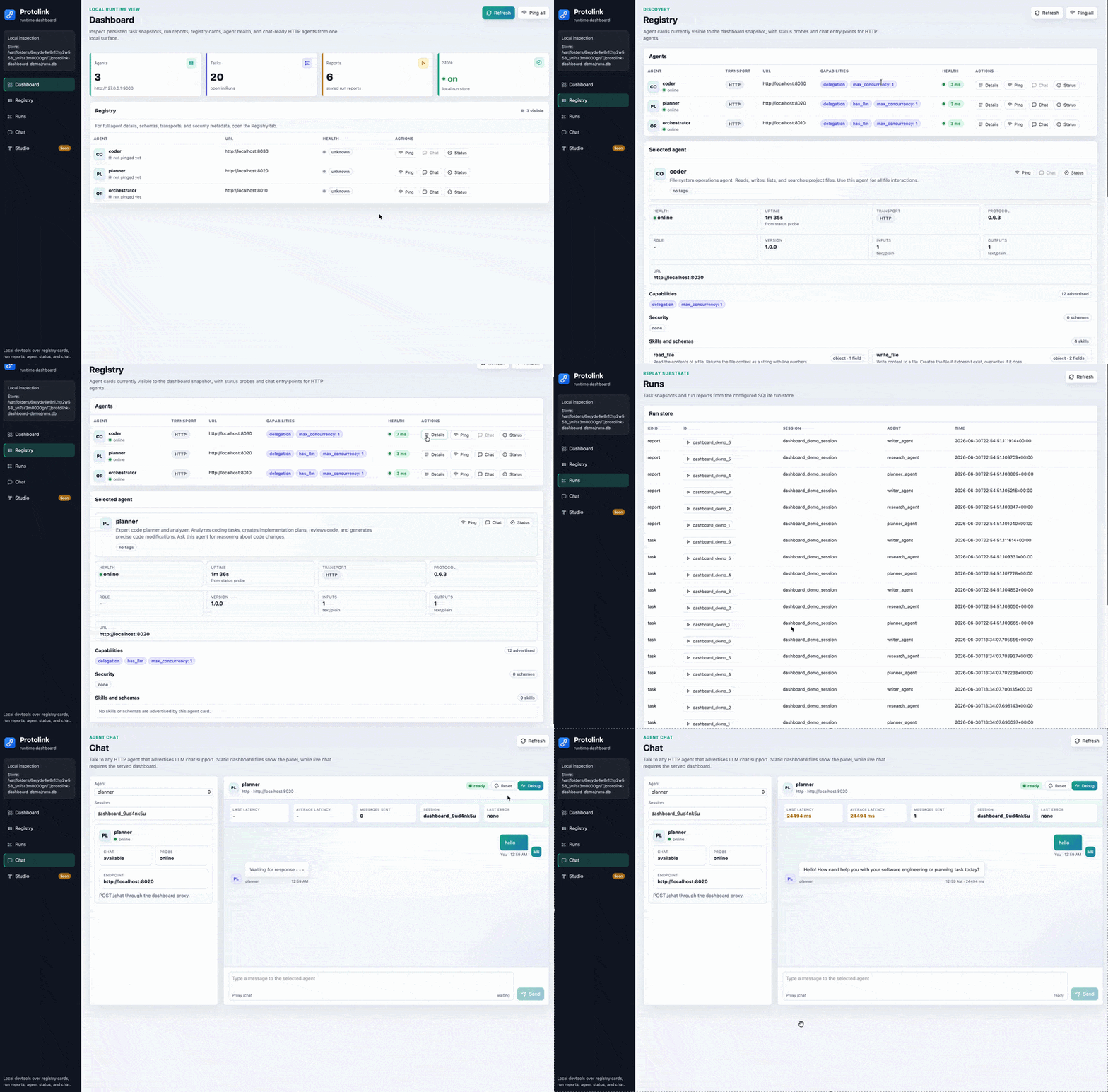
The protolink dashboard CLI command projects run-store and registry state into a dependency-free local browser UI:
protolink dashboard --store runs.db --registry-url http://127.0.0.1:9010 --open
It reads task snapshots and RunReport records from SQLiteRunStore, loads AgentCard entries from the registry, and provides local views for agent health, HTTP chat, task history, trace summaries, and run replay. It also includes Protolink Studio, an active visual builder for Agent, LLM, Tool, Registry, Flow, and operational Module nodes. Connect compatible nodes, configure transports and modules in the inspector, then generate ordinary Python that can be viewed, copied, or downloaded.
Open Studio from the sidebar or directly at http://127.0.0.1:8765/studio. A served dashboard can start and stop one generated project as a local subprocess and show its recent output; closing the dashboard stops that process and removes its temporary script. A static --output dashboard remains useful for visual blueprint editing and export, but Python generation and live execution require the local dashboard server. Generated Python uses Protolink's public constructors directly and contains logical agent, tool, module, registry, LLM, and flow definitions—not canvas IDs, coordinates, edges, or embedded blueprint JSON. Studio blueprints are declarative: raw secrets are rejected, so configure environment-variable names such as OPENAI_API_KEY and review the generated code before running integrations with external side effects.
The CLI also includes project scaffolding, environment diagnostics, registry inspection, run replay, and normalized report diffing:
protolink init agent
protolink doctor
protolink run list --store runs.db
protolink run diff baseline_run candidate_run --store runs.db
See the developer tools guide.
Infer-loop benchmark
The ProtoLink repository includes a closed-world regression benchmark for prompt and infer-loop changes. It exercises direct answers, local tools, directed and autonomous agent routing, dependent multi-step work, and grounding traps, then reports strict and recovered functional scores plus end-to-end, model-call, provider, and repeat/cache-sensitive timing.
python -m benchmarks.infer_loop --provider ollama --model gemma4:e4b --suite smoke
The benchmark is source-checkout tooling under benchmarks/, not part of the installable package. See the
infer-loop benchmark guide for suite sizes, scoring, Ollama configuration, timing,
baseline comparison, filtering, and CI thresholds.
Built-in tools and agents
General-purpose tools also work on any ordinary Agent: filesystem_tools() for scoped reads and
recoverable edits, storage_tools() for JSON values, http_tool() for configured APIs,
document_tools() for text/tables, and database_tools(SQLiteDatabase(...)) for read-only SQL.
See the Built-in Tools and run
python examples/generic_tools.py for one complete offline example. PDF/Word/spreadsheet parsers are
available through the optional protolink[documents] extra.
from protolink import Assistant, CodeAssistant
from protolink.tools import Gmail, GoogleCalendar

coder = CodeAssistant(llm=model, cwd=".", approval_handler=approve)
assistant = Assistant(llm=another_model, calendar=GoogleCalendar(token), email=Gmail(token))
answer = await assistant.invoke("What is on my calendar today?")
Supply your own models, OAuth token, and approval callback. These presets use the standard Agent API;
calendar/email reads are enabled by default, while writes need explicit opt-ins and approval. Choose
GoogleCalendar/Gmail, OutlookCalendar/OutlookEmail, or IMAPEmail for standard IMAP/SMTP.
Google and Microsoft adapters need pip install 'protolink[integrations]'; IMAP/SMTP uses the standard
library. Add ask_user=handle_question to await user feedback
inside the inference loop. Shell, Git, calendar, email, and question tools can also be registered separately.
See the Built-in Agents.
Run python examples/builtin_assistants.py for one complete offline test using a temporary repository,
mock model, and in-memory calendar/mailbox. Run python examples/service_backends.py to exercise all
five concrete service backends with offline HTTP and mail-server fixtures.
More examples
- Paired AI courtroom advocacy benchmark
- Built-in multi-engine web search
- Provider-free runtime mesh
- Normalized run regression diffing
- HTTP agent communication
- Production transport configuration
- Runtime policy and approvals
- Task cancellation
- Structured flows
- All examples
Contributing
Contributions are welcome. See CONTRIBUTING.md and the development guide.
ProtoLink is available under the MIT License.
1 maintainer

Release files for protolink 0.7.2
For a detailed explanation of source distributions (sdists) and built distributions (wheels), please see the package formats documentation.
Source distribution (sdist)
| File | Size | Uploaded | |
|---|---|---|---|
| protolink-0.7.2.tar.gz | 743.7 kB | Details |
Built distribution (wheel)
| File | Interpreter | ABI | Platform | Reset |
|---|---|---|---|---|
| protolink-0.7.2-py3-none-any.whl | Python 3 | none | any | Details |
Total release size: 1.4 MB
Release files / protolink-0.7.2.tar.gz
| Download URL | protolink-0.7.2.tar.gz |
|---|---|
| Size | 743.7 kB |
| Tags | Source |
|
SHA-256 checksum How to use checksums |
90d3ae8d11d20b241dc40b1afb2f5306e51f8f323b0fac2a36a5a5ac24f4798b
|
|
BLAKE2b-256 checksum How to use checksums |
88cd4d548a4a72b29cd74083eeda27d02e28ba0d958813dacdc37f1cff08a0bf
|
| Upload date | |
|
Uploaded using Trusted Publishing? What is trusted publishing? |
No |
| Uploaded via |
twine/6.2.0 CPython/3.13.2
|
Release files / protolink-0.7.2-py3-none-any.whl
| Download URL | protolink-0.7.2-py3-none-any.whl |
|---|---|
| Size | 670.1 kB |
| Tags | Python 3 |
|
SHA-256 checksum How to use checksums |
39445e96445be4b4ba6f1bccd18e59ba21ad0450f32ac4c6be31e2a8c34b0c21
|
|
BLAKE2b-256 checksum How to use checksums |
fcd02a146ab4be228eab71e947efdc10b6d640ed15dde97b802356bc1d85c329
|
| Upload date | |
|
Uploaded using Trusted Publishing? What is trusted publishing? |
No |
| Uploaded via |
twine/6.2.0 CPython/3.13.2
|














