
Proton Safe MCP
Website & download · En français





A client-agnostic FastMCP server for Proton Mail through the official Proton Mail Bridge. It can read and search mail and create drafts with attachments. It deliberately cannot send email — you review every draft in Proton Mail and press Send yourself.
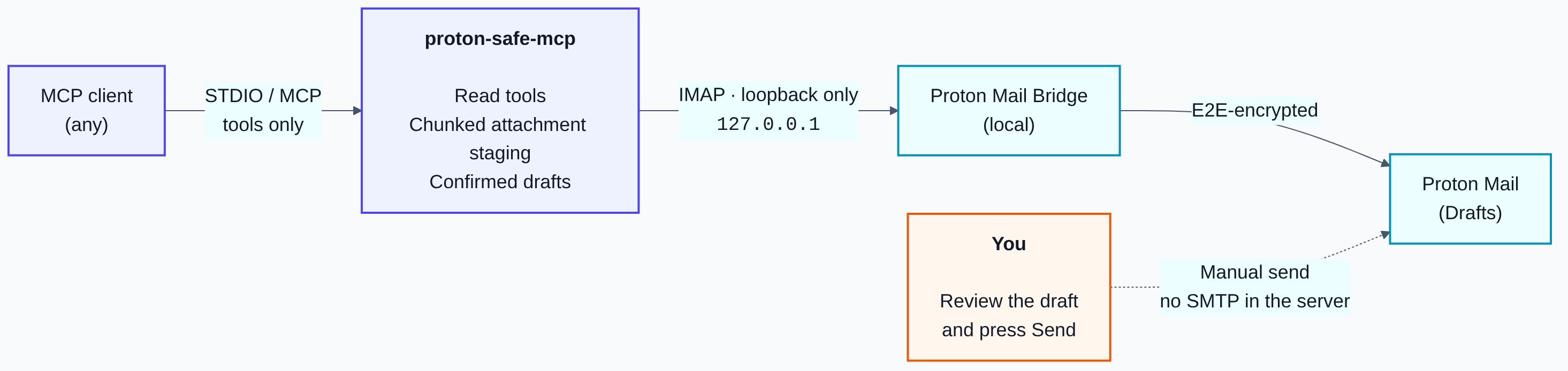
The server runs locally over STDIO for any MCP-compatible client (Claude Desktop, Claude Code, or anything else that speaks MCP). Received PDF, TXT, and CSV attachments can be inspected through bounded text extraction without exposing their raw bytes. Outgoing attachments are uploaded as bounded base64 chunks, so the server never receives or reads a client filesystem path.
Read the full documentation for setup, configuration, tool inputs, security boundaries, and troubleshooting.
Why "safe"?
Email is attacker-controlled input. Any sender can put adversarial instructions in a message body, and an AI agent that reads mail and holds write-capable tools is one prompt injection away from doing something you did not ask for. This project limits the blast radius by construction:
- No send. There is no SMTP client and no
send_messagetool in the codebase — a test asserts it. - No delete, no move, and no raw received-attachment download tool.
- Human in the loop. Draft creation requires explicit confirmation of the exact content in the conversation, and Proton Mail still requires manual review and sending.
- No filesystem access for clients. Attachment bytes are streamed in chunks with declared size and SHA-256 verification; paths are rejected.
- Loopback only. STDIO transport, no listening socket, and the Bridge host is hard-coded to
127.0.0.1.
These controls reduce risk but do not make email trusted. Never expose unrelated write-capable tools in the same unattended agent workflow.
Architecture
Security properties
- STDIO only: the server opens no listening network socket.
- Proton Bridge host is hard-coded to
127.0.0.1(PROTON_BRIDGE_HOSTis intentionally unsupported). - No SMTP client, send tool, delete tool, move tool, or raw received-attachment download tool.
- Message and attachment reads use
BODY.PEEK; attachment inspection returns bounded extracted text, metadata, and a SHA-256 digest, never raw bytes or files. - Attachment input is chunked base64 with declared size and SHA-256 verification.
- Only PDF, DOCX, XLSX, PPTX, TXT, CSV, PNG, and JPEG uploads are accepted.
- Attachment tokens are random, short-lived, single-use, and reverified before draft creation.
- Draft creation requires an explicit client assertion that the user confirmed the exact recipients, subject, body, and attachments in the conversation.
- The Bridge-generated IMAP password is stored in the operating-system keyring.
- Draft bodies are stored as plain text plus a server-generated HTML alternative that HTML-escapes the confirmed body, so quoted markup can never be rendered. Nothing is ever appended to a body server-side, including a reply quote.
- Proton Bridge does not preserve reply threading in saved drafts. Reply targets are refused unless the user explicitly accepts a possibly separate draft. Accepted replies submit headers only. Recipients are never derived from the message being replied to, its Message-ID is reverified at the IMAP write, and both identifiers are validated so neither can continue into a header of its own.
- Recipient, subject, and folder inputs are validated against header/criteria injection.
- State files are private to the Unix account (
0700directories,0600files,O_NOFOLLOW).
Requirements
- Linux with the official Proton Mail Bridge installed, signed in, and running (developed and tested on Ubuntu).
- A Proton plan that supports Bridge.
- Python 3.11–3.14 (tested in CI) for the command-line installation; bundled in the desktop installer.
uvfor the command-line installation.- A working Secret Service keyring (
gnome-keyringor compatible).
Installation
Desktop assistant — Ubuntu 24.04, x86_64
Download the installer,
open it with Ubuntu's package installer, then launch Proton Safe. The assistant guides
you through Bridge connection and plugin activation in a compatible local ChatGPT desktop
or Codex installation. Python and uv are included; no terminal setup is required.
You still need Proton Mail Bridge, a compatible Proton plan and a session keyring. See the desktop guide for prerequisites, screenshots and repair options. Checksums and build provenance are in the release.
Command-line installation — other MCP clients
Install the reviewed release from PyPI with uv:
uv tool install proton-safe-mcp==2.1.1
For development from source instead:
git clone https://github.com/fbossiere/proton-safe-mcp.git
cd proton-safe-mcp
uv sync --extra dev
Set the Proton address and Bridge IMAP port in the MCP process environment. No credential is ever set here:
export PROTON_BRIDGE_USER="your-address@proton.me"
export PROTON_IMAP_PORT="1143"
To draft as another Proton address of the same account, add the optional sender allowlist in that same environment, as comma-separated bare addresses:
export PROTON_BRIDGE_ALIASES="billing@example.com,legal@example.com"
Store the Bridge-generated IMAP password (shown in the Bridge UI), not your Proton account password:
proton-safe-mcp setup
The value shown by Bridge is installation-specific and works only against the local Bridge.
Register with an MCP client
Configure a local STDIO server with these logical fields. Use command -v proton-safe-mcp
to obtain the absolute command path when your client does not inherit your shell PATH:
{
  "name": "proton-safe",
  "transport": "stdio",
  "command": "/absolute/path/to/proton-safe-mcp",
  "args": ["serve"],
  "env": {
    "PROTON_BRIDGE_USER": "your-address@proton.me",
    "PROTON_IMAP_PORT": "1143"
  }
}
PROTON_BRIDGE_ALIASES goes in the same env block when a draft may use more than one From
address. See Sender addresses.
Do not put PROTON_BRIDGE_PASSWORD in the client configuration. The server reads it from the OS keyring established by setup.
Copy-paste instructions are available for Claude Code, Cursor, and VS Code.
AI coding agents can follow the safety-constrained llms-install.md guide.
Verify the complete local setup without printing credentials, addresses, or mailbox data:
proton-safe-mcp doctor
OpenAI plugin
The repository includes a private, local-first Proton Safe plugin for ChatGPT and Codex. It packages safety-focused mail review and draft workflows with the same restricted MCP server:
- ChatGPT desktop and Codex can launch the bundled STDIO configuration directly on the Bridge machine, with no tunnel or dedicated server;
- direct MCP registration remains available when the packaged workflow skills are not needed;
- ChatGPT web or a client on another machine can optionally reach the Bridge host through OpenAI Secure MCP Tunnel without an inbound port;
- a remote deployment still keeps
proton-safe-mcpand Proton Mail Bridge together, with IMAP fixed to127.0.0.1.
See the OpenAI plugin guide for local ChatGPT desktop/Codex installation, direct MCP registration, and the optional remote tunnel.
Plugin installed but no Proton tools? The bundled MCP configuration forwards
PROTON_BRIDGE_USERandPROTON_IMAP_PORTfrom the environment that started Codex; it does not define their values. On Ubuntu, a correct~/.config/environment.d/*.conffile can still require a user-manager reload, while GNOME and already-running terminals can keep their earlier environment. If a menu relaunch still has no tools, start ChatGPT once from a terminal that has loaded the file. That terminal launch is a diagnostic, not a requirement for every start; the troubleshooting guide also provides a persistent per-user menu launcher. Follow the privacy-safe Ubuntu recovery procedure or the FAQ before reinstalling anything.
Help test the onboarding. Linux and Proton Mail Bridge users can run the 10-minute external test and submit privacy-safe installation feedback.
Available MCP tools
| Category | Tool | Notes |
|---|---|---|
| Read-only mail | mailbox_status |
Bridge connectivity + INBOX counts |
list_folders |
||
list_sender_addresses |
The fixed From allowlist a draft may use | |
list_messages |
Never marks messages as read | |
search_messages |
Injection-safe IMAP TEXT search |
|
read_message |
Bounded plain text; no attachment bytes | |
extract_attachment_text |
Bounded PDF/TXT/CSV text; no raw bytes or files | |
get_reply_context |
Candidate reply recipients, Re: subject, and a bounded quote — all suggestions |
|
| Attachment staging | begin_attachment_upload |
Declares filename, type, size, SHA-256 |
upload_attachment_chunk |
Ordered base64 chunks | |
finish_attachment_upload |
Verifies hash, returns single-use token | |
discard_attachment |
||
| Drafts | create_confirmed_draft |
Requires exact confirmation; reply targets also require acceptance of a possibly separate draft |
There is deliberately no send_message tool.
Attachment and draft workflow
The MCP client only needs the ability to obtain the bytes of a file and call tools. There is no dependency on a particular client, service, or local directory.
- Calculate the exact byte length and SHA-256 of the file.
- Call
begin_attachment_upload(filename, content_type, size_bytes, sha256_hex). - Base64-encode consecutive binary chunks no larger than the returned
max_chunk_bytes. - Call
upload_attachment_chunk(upload_id, chunk_index, data_base64)for indexes0, 1, 2…. - Call
finish_attachment_upload(upload_id)and retain the returnedattachment_token. - Present the exact recipients, subject, complete body, and attachment list to the user.
- After explicit confirmation in the conversation, call
create_confirmed_draft(..., user_confirmed=true, attachment_tokens=[token]). - Open Proton Mail, review the draft, and send it manually.
Step 8 is the human gate, and it is the only one that matters: the server has no SMTP implementation, so a draft it creates cannot leave your account until you press Send in Proton Mail. Uploaded attachments expire after 30 minutes if no draft consumes them.
Local administration
proton-safe-mcp doctor   # check the local setup without printing private data
proton-safe-mcp setup    # store the Bridge-generated IMAP password in the OS keyring
proton-safe-mcp serve    # run the MCP server over STDIO
Configuration reference
| Variable | Default | Purpose |
|---|---|---|
PROTON_BRIDGE_USER |
required | Proton address configured in Bridge |
PROTON_BRIDGE_ALIASES |
empty | Comma-separated additional From addresses a draft may use |
PROTON_IMAP_PORT |
1143 |
Local Bridge IMAP port |
PROTON_MCP_STATE_DIR |
~/.local/state/proton-safe-mcp |
Private attachment staging state |
PROTON_MCP_MAX_ATTACHMENT_BYTES |
20971520 |
Maximum per file and per draft, capped at 25 MiB |
PROTON_MCP_MAX_RECEIVED_ATTACHMENT_BYTES |
10485760 |
Received-file extraction maximum, capped at 25 MiB |
PROTON_MCP_MAX_CHUNK_BYTES |
393216 |
Decoded chunk maximum, capped at 1 MiB |
PROTON_MCP_UPLOAD_TTL_SECONDS |
1800 |
Attachment staging lifetime |
PROTON_MCP_MAX_BODY_CHARS |
100000 |
Maximum outgoing draft body length |
PROTON_BRIDGE_HOST is intentionally unsupported.
For isolated containers without a Secret Service keyring, PROTON_BRIDGE_PASSWORD may contain
the Bridge-generated IMAP password. Avoid this fallback in desktop MCP client configuration:
environment values may be visible to the client process or its diagnostics.
Development
uv sync --extra dev
uv run pytest --cov      # tests with coverage
uv run ruff check .      # lint
uv run ruff format .     # format
uv run mypy              # strict type checking
Proton Bridge is not needed for development: the test suite fakes the IMAP layer. Tests cover path rejection, MIME restrictions, received-attachment size and format rejection, bounded PDF/text extraction, ordered chunks, size/hash verification, token consumption, header injection, draft confirmation, recipient and attachment bounds, and HTML-to-text sanitization.
See CONTRIBUTING.md for the design rules that reviews enforce.
Threat-model limitations
Read this before relying on the server in an autonomous workflow:
- A model necessarily sees any mail it reads and any attachment it creates or uploads.
- Extracted attachment text is attacker-controlled and may contain prompt injection. The server bounds the returned text but does not make it trustworthy or perform OCR or malware scanning.
- Uploaded attachment bytes are stored temporarily in files readable only by the Unix account. Use full-disk encryption.
- The server cannot inspect the surrounding conversation.
user_confirmed: trueis a client assertion, so the confirmation step depends on the client honoring the rule. It reduces accidents; it is not a boundary against a client under an attacker's influence. - A draft this server creates is inert until you send it, but it can still be crafted to look like something you wrote. Read drafts in Proton Mail before sending, especially recipients.
- Secure MCP Tunnel keeps the server off the public internet, but mail content returned to an OpenAI product still crosses the local Bridge boundary and is processed by that product.
- Tool annotations and conversational-confirmation instructions are client guidance, not authorization controls. What the server enforces is input validation and the absence of any send, delete, or move capability.
- Proton Bridge's self-signed TLS certificate is not verified. This is acceptable here only because the target host is unchangeably
127.0.0.1.
Security
To report a vulnerability, use GitHub private vulnerability reporting — never a public issue. See SECURITY.md.
License
MIT © 2026 Francois Bossiere.
This project is not affiliated with or endorsed by Proton AG. "Proton Mail" and "Proton Mail Bridge" are trademarks of Proton AG.
1 maintainer

Metadata
1 maintainer
Release files for proton-safe-mcp 2.1.1
For a detailed explanation of source distributions (sdists) and built distributions (wheels), please see the package formats documentation.
Source distribution (sdist)
| File | Size | Uploaded | |
|---|---|---|---|
| proton_safe_mcp-2.1.1.tar.gz | 992.0 kB | Details |
Built distribution (wheel)
| File | Interpreter | ABI | Platform | Reset |
|---|---|---|---|---|
| proton_safe_mcp-2.1.1-py3-none-any.whl | Python 3 | none | any | Details |
Total release size: 1.1 MB
Release files / proton_safe_mcp-2.1.1.tar.gz
| Download URL | proton_safe_mcp-2.1.1.tar.gz |
|---|---|
| Size | 992.0 kB |
| Tags | Source |
|
SHA-256 checksum How to use checksums |
9ad6dd73f7ef2abfbe08f9601304a8f58500daadc5b488775702c7444d459483
|
|
BLAKE2b-256 checksum How to use checksums |
610681ddd75079f28a09d557f4de69b000c33a357f989f53655dc91a6efe6c9d
|
| Upload date | |
|
Uploaded using Trusted Publishing? What is trusted publishing? |
Yes |
| Uploaded via |
twine/7.0.0 CPython/3.13.14
|
Provenance
Provenance describes where a file came from. On PyPI, provenance is shared via attestations, which provide a verifiable record of the build or publishing details. View details, limitations and caveats.


PyPI Publish Attestation
PyPI verified that this artifact, at this checksum, originated from the publisher listed below.
Signed by GitHub Actions, verified by PyPI on Sep 13, 2026.
Transparency logRelease files / proton_safe_mcp-2.1.1-py3-none-any.whl
| Download URL | proton_safe_mcp-2.1.1-py3-none-any.whl |
|---|---|
| Size | 110.2 kB |
| Tags | Python 3 |
|
SHA-256 checksum How to use checksums |
46c03e89b2959346a164d8e445695e83a6a20267fc5cc12e50b2e53ddb9af3e7
|
|
BLAKE2b-256 checksum How to use checksums |
31bea21458eead99b3671d2f64ee91af577d6077d0a75902882433c1e838c2f9
|
| Upload date | |
|
Uploaded using Trusted Publishing? What is trusted publishing? |
Yes |
| Uploaded via |
twine/7.0.0 CPython/3.13.14
|
Provenance
Provenance describes where a file came from. On PyPI, provenance is shared via attestations, which provide a verifiable record of the build or publishing details. View details, limitations and caveats.
PyPI Publish Attestation
PyPI verified that this artifact, at this checksum, originated from the publisher listed below.
Signed by GitHub Actions, verified by PyPI on Sep 13, 2026.
Transparency log













