
Installing proxbox-api (Plugin backend made using FastAPI)
Unrestricted SSH, Proxmox console creation, and the two legacy synchronization
WebSockets now default to refusal with PROXBOX_EXECUTION_MODE=rpc_only.
Compatibility deployments must explicitly choose legacy; there is no hot
activation or automatic fallback. Missing PROXBOX_EXECUTION_GENERATION keeps
cutover unready without preventing inventory startup. Read the
interactive boundary and companion prerequisites
before rollout. This scoped boundary does not certify all-operation RPC readiness.
Integrations Architecture
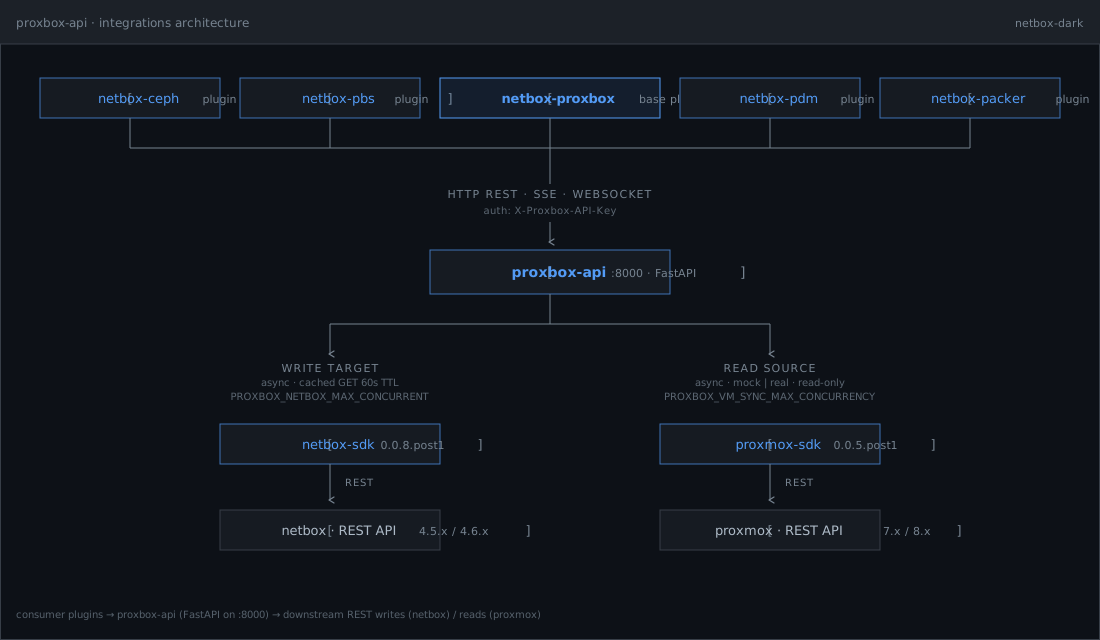
proxbox-api sits between consumer NetBox plugins (top tier) and the
downstream REST surfaces it talks to (bottom tier):
- Top — consumer plugins:
netbox-ceph,netbox-pbs,netbox-proxbox(base plugin),netbox-pdm,netbox-packer. They reachproxbox-apiover HTTP REST / SSE / WebSocket, authenticated with theX-Proxbox-API-Keyheader. - Middle —
proxbox-api: FastAPI app on:8000. Owns the SSE and WebSocket sync streams, runtime tunables, and the API-key auth surface. - Bottom — downstream SDKs:
- Write target —
netbox-sdk→netbox · REST API(4.5.x / 4.6.x). Async with a cached GET layer (60s TTL); concurrency capped byPROXBOX_NETBOX_MAX_CONCURRENT. - Read source —
proxmox-sdk→proxmox · REST API(8.1 / 8.2 / 8.3 / latest, perSUPPORTED_PROXMOX_VERSIONSinproxbox_api/constants.py). PVE 9.x route groups (HA rules, firewall writes, SDN controllers/zones/VNets/subnets/fabrics, datacenter CPU models, access token regeneration, CRS config) are implemented and degrade gracefully on older clusters. Async, read-only for discovery,mock | realmodes; concurrency capped byPROXBOX_VM_SYNC_MAX_CONCURRENCY. - Firecracker host-agent —
/cloud/firecracker/provisionand/cloud/firecracker/provision/streamcall the selected host-agent VM to health-check KVM, read capacity, prepare kernel/rootfs assets, create the micro-VM, and optionally start it. NetBox inventory still lives innetbox-proxbox; this service owns the host-agent HTTP contract and validates caller-supplied host-agent URLs with its SSRF guard before making outbound requests.
- Write target —
The interactive version of this diagram lives at emersonfelipesp.com/proxbox-api.
Tooling: uv + Ruff + ty
This repo uses uv to install Python and dependencies, Ruff for linting and formatting, and ty for type checking.
proxbox-api supports POSIX runtimes only. Production containers target Linux,
and development and test workflows support Linux and macOS. Windows is not a
supported service runtime because database ownership, authentication lockout,
and generated-artifact quarantine depend on POSIX advisory file locks.
# Runtime only
uv sync

# Tests + Ruff (matches CI)
uv sync --extra test --group dev

# Documentation (MkDocs)
uv sync --extra docs --group dev
uv run ruff check .
uv run ruff format .
uv run ty check proxbox_api/types proxbox_api/utils/retry.py proxbox_api/schemas/sync.py \
  proxbox_api/database_protocols.py proxbox_api/utils/async_compat.py \
  proxbox_api/ceph/endpoint_binding.py proxbox_api/ceph/v2_schemas.py \
  proxbox_api/ceph/v2_engine.py proxbox_api/ceph/v2_routes.py \
  proxbox_api/ceph/v2_providers/base.py proxbox_api/ceph/v2_providers/proxmox.py \
  proxbox_api/ceph/v2_providers/proxmox_writer.py
uv run pytest tests
uv run mkdocs serve   # after syncing with --extra docs
Documentation (MkDocs Material)
Project documentation is available under docs/ and built with MkDocs Material.
The mounted operation inventory
publishes the actual ordered HTTP and WebSocket registrations for all twenty-two
reviewed feature-mode inputs. Generate or verify it explicitly with
python scripts/mounted_operation_inventory.py generate or verify in the
unchanged locked environment. The separate readiness command fails while
caller, effect, authorization, transport, and audit coverage remains unresolved.
Inventory generation does not authorize execution or activate the RPC-only cutover.
The VM reconciliation engine is documented in
docs/sync/reconciliation-architecture.md.
Python is the default engine; the optional Rust engine is for compare-mode validation and explicit
opt-in testing.
Firecracker host-agent provisioning is documented in
docs/operations/firecracker.md, including
the Cloud endpoints, SSE events, request shape, and response shape.
The private Proxmox console-session broker and standalone browser-safe relay are documented in
docs/api/console-sessions.md, including the
trusted-relay boundary, vncproxy/termproxy selection, ticket normalization,
WebSocket authentication, encrypted shared one-use state, exact HTTPS Origin
binding, server-side RFB 3.8 authentication, endpoint TLS policy, secret
handling, and regression coverage. The standalone contract returns only an
opaque token, expiry, console type, and /proxmox/console/browser-stream path;
the token is offered only as a dedicated WebSocket protocol and never appears
in the URI. The browser never receives the Proxmox ticket, URL, host, port,
cookie, or authorization value, and upstream redirects are refused before
credentials can be replayed.
The fail-closed Ceph v2 write flow is documented in
docs/operations/ceph-write-approvals.md:
private full-schema endpoint/session binding, current allow_writes, canonical
plans with a stable server-keyed endpoint revision, two-person one-time
approval, exact plan-bound nodes, strict per-operation SDK payloads, append-only
dispatch/task evidence, owner-bound durable run leases, atomic permanent
provider-global task claims, explicit SDK-proven synchronous completions,
repeated-cancellation-safe checkpoints, serialized heartbeat/session use,
unique node-consistent UPIDs, recursive secret/fallback redaction,
cross-endpoint legacy-collision refusal, ambiguity-safe recovery, and staged
rollout/rollback. Mutation remains default-off until both Ceph write and
trusted-actor-gateway flags are enabled; Dashboard/external apply remains
closed until durable provider authority exists.
The Cloud Image Pipeline exposes a versioned, endpoint-scoped read-only
preflight at POST /cloud/templates/images/preflight. Its v1 findings validate
the exact persisted endpoint session, node, provider-derived storage content
(iso only for ISO media, VM images, plus provider-derived snippets), and VMID through the
authoritative cluster/nextid?vmid= read without requiring allow_writes;
malformed upstream collections, denied VMID checks, and missing storage health
state fail closed as unsupported.
An executable workflow first renders a non-executing build plan to obtain its
opaque, domain-separated HMAC recipe_digest, submits that binding to
preflight, and receives a signed five-minute plan_token. Execution must
present the token; proxbox-api authenticates endpoint configuration (including
the narrow packer capability) with a separate keyed binding, reruns preflight,
refreshes broad then narrow endpoint authority again immediately before the
write boundary, then consumes the plan into a durable
single-owner endpoint_id:vmid lease.
Executable template-image writes require two independent endpoint assertions:
the broad ProxmoxEndpoint.allow_writes flag and the default-off
allow_packer_template_builds capability. The latter authorizes only
netbox-packer template creation and is rechecked after the signed preflight's
authoritative endpoint refresh and again after host-key pinning, immediately
before the SSH child starts. Direct SDK template-image writes resolve enabled
authority before opening a session, then refresh both gates and compare the
original endpoint-configuration digest before download/import, VM creation, and
template conversion, so revocation or endpoint identity drift wins.
Operation state is available at GET /cloud/templates/images/operations/{id}
and a running unit can be stopped through the corresponding /cancel route.
Build responses use the secret-safe v2 contract; raw scripts, cloud-init, URLs, and process output
are omitted unless a protected operator explicitly requests a sensitive
preview with execute=false. Execution additionally requires one complete
enabled persisted endpoint/node SSH binding; caller SSH fields cannot retarget
the request, and the persisted host-key fingerprint is verified before strict
OpenSSH execution isolated from ambient SSH config and proxies. The private key
must be a root/service-owned regular non-symlink file with no group/world
permissions; it is opened with O_NOFOLLOW, verified with fstat, and
inherited through /proc/self/fd so a pathname swap cannot replace it. The executor
uses an async, uniquely named systemd-run unit, drains output into bounded
counts without retaining it, and never reports completion until a final
Proxmox API read verifies the expected artifact. Cancellation, timeout, or
failed verification leaves a durable recovery_required record and never
deletes a partial artifact. Recovery, cancellation, unknown state, and lease
expiry retain the target blocker until a future explicit reconciliation flow;
this change adds no destructive recovery action. Repeated request cancellation
cannot interrupt mandatory process/unit cleanup, journal transitions, or
session close, and cancel/completion transitions use compare-and-swap ordering. Generated
snippet files use encoded fixed writes and exact pvesm path volume targets;
source-tree builds use fixed root-owned server recipes and artifacts rather
than caller paths or shell commands; all providers stage in private randomized
mktemp directories.
Validation errors never reflect Pydantic request input or cloud-image secrets. See
docs/api/http-reference.md.
Remote Cloud Image execution is a fail-closed rollout. The checked-in
netbox-packer-shaped fixture is producer-owned compatibility intent, not proof
from the downstream consumer. Keep PROXBOX_ENABLE_CLOUD_IMAGE_EXECUTION
unset/false until a compatible netbox-packer release with endpoint-bound
authorization is deployed and validated against the released proxbox-api
contract. Enabling execution does not replace either endpoint write gate.
PBS, PDM, Ceph, intent, SSH, and the broader cloud management route groups are
indexed in docs/api/service-routes.md, including
PROXBOX_FEATURES sidecar-only behavior.
NetBox connection lifecycle and diagnostics
NetBox endpoint create and update responses include an advisory authenticated
reachability probe. Operators can repeat the same request-private check with
GET /netbox/endpoint/{netbox_id}/probe; it uses a 10-second request timeout,
separately bounds temporary-client cleanup to one second, redacts credentials, and never
rolls back a durable endpoint write. A failed result is cached for 30 seconds by the
exact URL, TLS policy, and credential fingerprint so sync dependencies can fail fast
with HTTP 502 for connection failures or HTTP 504 for timeouts.
Normal NetBox SDK facades are cached by endpoint ID plus configuration fingerprint. Endpoint mutation retires obsolete generations atomically without closing a transport that an in-flight request may still use. The last application lifespan closes current and retired clients outside the cache lock, completes cleanup through cancellation, and retains failed closures for a later retry. NetBox transport failures keep non-empty, secret-safe operation and exception detail so backend retries and plugin stage retries remain observable.
VM interface sync strategy
VM network sync accepts vm_interface_sync_strategy on the VM sync and
interface/IP stream routes. The default guest_os_model keeps core NetBox
virtualization.VMInterface records named from Proxmox config (net0,
net1, ...) and writes guest OS interfaces (ens18, eth0, ...) to the
netbox-proxbox plugin endpoints when QEMU guest-agent data is available. Guest
address rows reference the same core ipam.IPAddress IDs already reconciled on
the VMInterface; proxbox-api does not create duplicate IPAM records for the
guest side.
legacy_rename preserves the deprecated behavior where
use_guest_agent_interface_name=true renames the core VMInterface to the guest
OS name. The backend logs a deprecation warning when that strategy is selected.
Local docs build
uv sync --extra docs --group dev
uv run mkdocs serve
Languages
- English (default)
- Brazilian Portuguese (
pt-BR) as optional translation
Using docker (recommended)
All images are Alpine-based (smaller footprint), built from this repository with uv and uv.lock in a multi-stage Dockerfile. Three Python-only variants are published to Docker Hub by default, plus opt-in experimental PyO3/Rust variants:
| Variant | Tags | Description |
|---|---|---|
| Raw (default) | latest, <version> |
Pure uvicorn, HTTP only. Smallest image. |
| Nginx | latest-nginx, <version>-nginx |
nginx terminates HTTPS via mkcert; proxies to uvicorn. |
| Granian | latest-granian, <version>-granian |
Granian (Rust ASGI server) with native TLS via mkcert. No nginx. |
| Raw PyO3/Rust (experimental) | experimental, pyo3-rust, <version>-pyo3-rust |
Raw image with the optional PyO3 reconciliation engine installed; select it through NetBox plugin settings. |
| Nginx PyO3/Rust (experimental) | experimental-nginx, pyo3-rust-nginx, <version>-pyo3-rust-nginx |
nginx image with the optional PyO3 reconciliation engine installed; select it through NetBox plugin settings. |
| Granian PyO3/Rust (experimental) | experimental-granian, pyo3-rust-granian, <version>-pyo3-rust-granian |
granian image with the optional PyO3 reconciliation engine installed; select it through NetBox plugin settings. |
Upgrade note: before v0.0.7,
latestwas the nginx+HTTP image. It is now the raw uvicorn image. Pulllatest-nginxfor the previous behavior.
Raw image (default)
Plain uvicorn on HTTP — the simplest option for local dev or when you put your own proxy in front.
docker pull emersonfelipesp/proxbox-api:latest
docker run -d -p 8000:8000 --name proxbox-api emersonfelipesp/proxbox-api:latest
Build from source:
docker build -t proxbox-api:raw .
docker run -d -p 8000:8000 proxbox-api:raw
Nginx image (nginx + mkcert HTTPS + uvicorn)
nginx terminates HTTPS on PORT (default 8000) using certificates from mkcert and proxies to uvicorn on 127.0.0.1:8001. supervisord manages both processes. The nginx config disables proxy buffering so chunked / SSE responses flow through unmodified.
Plain HTTP requests to the TLS port return a structured JSON 400 body
({"error":"plain_http_on_https_port", ...}) instead of nginx's stock 400 page,
so clients can detect the misconfiguration. When wiring this image into the
NetBox netbox-proxbox plugin (>= 0.0.16), set Use HTTPS ✓ and (if using
the bundled mkcert cert) Verify SSL ✗ on the FastAPI endpoint —
netbox-proxbox#352.
docker pull emersonfelipesp/proxbox-api:latest-nginx
docker run -d -p 8443:8000 --name proxbox-api-nginx \
  emersonfelipesp/proxbox-api:latest-nginx
PROXBOX_TRUSTED_PROXIES is the single policy that permits the application to
use a proxy's forwarded client address for rate limits and lockouts. The
bundled supervisor/nginx topology protects its loopback Uvicorn listener and
prepends 127.0.0.1/32 automatically. A custom command supplied to the nginx
image skips that topology and retains an empty trust default. Uvicorn
proxy-header rewriting is disabled in every shipped image.
Build from source:
docker build --target nginx -t proxbox-api:nginx .
docker run -d -p 8443:8000 proxbox-api:nginx
Granian image (granian + mkcert HTTPS)
Granian is a Rust-based ASGI server with native HTTP/2, WebSocket, and TLS support. This variant eliminates nginx and supervisord — a single granian process handles everything.
docker pull emersonfelipesp/proxbox-api:latest-granian
docker run -d -p 8443:8000 --name proxbox-api-granian \
  emersonfelipesp/proxbox-api:latest-granian
Build from source:
docker build --target granian -t proxbox-api:granian .
docker run -d -p 8443:8000 proxbox-api:granian
Experimental PyO3/Rust images
The default images above continue to use the Python reconciliation engine. To opt in to the native PyO3/Rust implementation, run one of the experimental tags. The raw alias is the easiest path:
docker pull emersonfelipesp/proxbox-api:pyo3-rust
docker run -d -p 8000:8000 --name proxbox-api-rust \
  emersonfelipesp/proxbox-api:pyo3-rust
Equivalent HTTPS variants are available as pyo3-rust-nginx and
pyo3-rust-granian. These images include the local proxbox-reconcile-rs
native extension. Select compare or rust with the DB-backed
reconciliation_engine NetBox plugin setting; environment variables do not
override this production setting. Set the plugin value back to python to
roll back immediately.
Docker runtime environment variables
Common to all images, including the experimental PyO3/Rust variants:
| Variable | Default | Description |
|---|---|---|
PORT |
8000 |
Port the server listens on |
PROXBOX_BIND_HOST |
0.0.0.0 |
Bind address for the API server. Set to :: for IPv4 + IPv6 dual-stack. Honored by the raw and granian images; the nginx image listens on both stacks unconditionally. |
PROXBOX_TRUSTED_PROXIES |
unset; bundled nginx topology prepends 127.0.0.1/32 |
Application-level CIDRs allowed to supply X-Forwarded-For; Uvicorn preprocessing is disabled. Custom commands receive no implicit loopback trust. |
UVICORN_WORKERS |
1 |
Worker count for the raw-image entrypoint. The emergency fresh-database override requires this to be explicitly 1. |
PROXBOX_DATABASE_PATH |
unset | Optional absolute SQLite path. Without either database variable, containers use /data/database.db; non-container launches use $XDG_DATA_HOME/proxbox/database.db or ~/.local/share/proxbox/database.db. |
DATABASE_URL |
— | Compatibility input for an absolute local SQLite URL. If the path variable is also set, both must identify the same file. |
PROXBOX_ALLOW_FRESH_DATABASE_WITH_LEGACY |
— | Emergency exact-value 1 override for one audited, explicitly single-worker startup while a legacy database remains. Set UVICORN_WORKERS=1; remove the override after first-key registration. A durable sibling marker prevents reuse. |
PROXBOX_LOG_LEVEL |
INFO |
Console log verbosity. Valid values: DEBUG, INFO, WARNING, ERROR, CRITICAL. Set to DEBUG for verbose tracing (also enables full netbox_sdk.client request tracing). The in-memory log buffer and rotating file handler are unaffected. |
mkcert-specific (only for nginx and granian):
| Variable | Default | Description |
|---|---|---|
MKCERT_CERT_DIR |
/certs |
Directory where certs are stored |
MKCERT_EXTRA_NAMES |
— | Extra SANs (commas or spaces), e.g. proxbox.lan,10.0.0.5 |
CAROOT |
— | Mount a volume here to persist the local CA across container restarts |
docker run -d -p 8443:8000 --name proxbox-api-tls \
  -e MKCERT_EXTRA_NAMES='myhost.local,192.168.1.10' \
  emersonfelipesp/proxbox-api:latest-nginx
Database Persistence
The container supplies /data/database.db as an internal fallback without
setting either operator-facing database variable, and /data is declared as a
volume mount point. A custom DATABASE_URL therefore works by itself. Startup refuses relative paths,
conflicting database settings, read-only targets, and filesystems that cannot
perform a SQLite WAL write. It also refuses raw ? URL delimiters and fresh
targets that would bypass legacy API-key history. A persistent sibling
.startup.lock serializes probe, schema creation, and migrations across
workers. It never falls back to the container working directory.
Mount a volume for persistence:
docker run -d -p 8000:8000 \
  -v proxbox-data:/data \
  --name proxbox-api \
  emersonfelipesp/proxbox-api:latest
Or mount a host directory:
docker run -d -p 8000:8000 \
  -v /host/path/to/data:/data \
  --name proxbox-api \
  emersonfelipesp/proxbox-api:latest
The mounted directory must be writable by the service account. A permissions or read-only-mount problem stops the service before it accepts requests; inspect the startup log instead of expecting an empty fallback database.
Override the database path (optional):
If you prefer a custom database location, set PROXBOX_DATABASE_PATH:
docker run -d -p 8000:8000 \
  -e PROXBOX_DATABASE_PATH=/custom/path/database.db \
  -v /custom/path:/custom/path \
  --name proxbox-api \
  emersonfelipesp/proxbox-api:latest
Existing deployments that use SQLAlchemy URLs may instead set an absolute
SQLite DATABASE_URL, for example
sqlite:////custom/path/database.db. If both operator variables are explicitly set, they must
resolve to the same file or startup fails. See Database Operations
for systemd configuration, migration, backup, and recovery procedures.
With Docker Compose:
services:
  proxbox-api:
    image: emersonfelipesp/proxbox-api:latest
    ports:
      - "8000:8000"
    volumes:
      - proxbox-data:/data
    environment:
      - PROXBOX_BIND_HOST=0.0.0.0

volumes:
  proxbox-data:
Binding to IPv6 / dual-stack
docker run -d -p 8000:8000 -e PROXBOX_BIND_HOST=:: \
  emersonfelipesp/proxbox-api:latest
In Docker Compose environment: list-form, the value is taken verbatim — quotes are NOT stripped — so - PROXBOX_BIND_HOST="::" arrives in the container as the literal string "::". The container sanitizes surrounding quotes defensively, but the recommended forms are:
environment:
  - PROXBOX_BIND_HOST=::          # list-form: NO quotes
environment:
  PROXBOX_BIND_HOST: "::"         # map-form: YAML strips the quotes
To run a shell instead of starting the server, pass a command (the entrypoint delegates to it):
docker run --rm emersonfelipesp/proxbox-api:latest-nginx sh
Installing from PyPI
The package is published to PyPI as proxbox-api.
pip install proxbox-api
Or with uv:
uv add proxbox-api
Start the server after installing:
python -m uvicorn proxbox_api.main:app --no-proxy-headers --host 0.0.0.0 --port 8000
Using git repository
Clone the repository
git clone https://github.com/emersonfelipesp/proxbox-api.git
Change to project root folder
cd proxbox-api
Install dependencies
From the repository root (where pyproject.toml lives):
uv sync
Start the FastAPI app (recommended)
From the repository root:
uv run fastapi run proxbox_api.main:app --no-proxy-headers --host 0.0.0.0 --port 8000
-
--host 0.0.0.0will make the app available on all host network interfaces, which my not be recommended. Just pass your desired IP like--host <YOUR-IP>and it will also work. -
--port 8000is the default port, but you can change it if needed. Just to remember to update it on NetBox also, at FastAPI Endpoint model.
Cache Configuration (optional)
Control NetBox API request caching to optimize sync performance:
# 5-minute TTL (default is 60 seconds)
export PROXBOX_NETBOX_GET_CACHE_TTL=300

# Disable caching entirely
export PROXBOX_NETBOX_GET_CACHE_TTL=0

# Increase max entries (default 4096)
export PROXBOX_NETBOX_GET_CACHE_MAX_ENTRIES=8192

# Set max cache size in bytes (default 52428800 = 50MB)
export PROXBOX_NETBOX_GET_CACHE_MAX_BYTES=104857600  # 100MB

# Enable debug logging
export PROXBOX_DEBUG_CACHE=1

uv run fastapi run proxbox_api.main:app --no-proxy-headers --host 0.0.0.0 --port 8000
Cache metrics are available at GET /cache and GET /cache/metrics/prometheus.
Backup Sync Throttling (optional)
Control backup synchronization batch size and delay to prevent overwhelming NetBox's PostgreSQL connection pool:
# Batch size for backup sync (default 5, was 10 before fix)
export PROXBOX_BACKUP_BATCH_SIZE=5

# Delay between batches in milliseconds (default 200ms)
export PROXBOX_BACKUP_BATCH_DELAY_MS=200

uv run fastapi run proxbox_api.main:app --no-proxy-headers --host 0.0.0.0 --port 8000
Why adjust these?
- Smaller batch size (3-5): Use when NetBox has limited PostgreSQL connections or many concurrent users
- Larger batch size (10-20): Safe if NetBox has a large PostgreSQL pool (50+ connections) and dedicated hardware
- Longer delay (500-1000ms): Helps when "database unavailable" errors appear during full sync
- Shorter delay (0-100ms): Faster sync when NetBox is lightly loaded
Symptoms of incorrect tuning:
- HTTP 500 "database unavailable" during backup/VM sync → decrease batch size, increase delay
- HTTP 502 "Response ended prematurely" → decrease batch size, increase delay
- Slow sync performance on powerful hardware → increase batch size, decrease delay
NetBox PostgreSQL Connection Pool
proxbox-api holds at most PROXBOX_NETBOX_MAX_CONCURRENT in-flight NetBox
requests per worker at a time. Peak PostgreSQL connections across the whole
deployment equal roughly:
peak_connections ≈ PROXBOX_NETBOX_MAX_CONCURRENT × uvicorn_workers
Key concurrency tunables:
| Env var | Default | Effect |
|---|---|---|
PROXBOX_NETBOX_MAX_CONCURRENT |
1 | Caps concurrent NetBox HTTP requests per worker. This is the primary lever for PostgreSQL connection usage. |
PROXBOX_NETBOX_WRITE_CONCURRENCY |
8 | Caps simultaneous VM create/update operations per sync pass (semaphore-bounded). |
PROXBOX_NETBOX_GET_CACHE_TTL |
60 s | GET cache TTL. Raising this reduces total NetBox requests — a cache hit costs zero connections. |
When netbox_overwhelmed errors appear:
# Primary fix: reduce write concurrency (VM sync)
export PROXBOX_NETBOX_WRITE_CONCURRENCY=4

# Extend GET cache to reduce read traffic
export PROXBOX_NETBOX_GET_CACHE_TTL=300

# Already the default — keep max concurrent at 1
export PROXBOX_NETBOX_MAX_CONCURRENT=1
For deployments with many concurrent clients, placing PgBouncer in
transaction mode in front of PostgreSQL significantly raises the effective
connection headroom. With PgBouncer active, set CONN_MAX_AGE=0 in NetBox's
configuration.py and you can safely raise PROXBOX_NETBOX_MAX_CONCURRENT to
2–4.
See docs/getting-started/configuration.md for the full tunables table, peak connection formula, sizing guidance by cluster size, and PgBouncer sample configuration.
Alternative: pip editable install
pip install -e .
fastapi run proxbox_api.main:app --no-proxy-headers --host 0.0.0.0 --port 8000
Or with uvicorn:
uvicorn proxbox_api.main:app --no-proxy-headers --host 0.0.0.0 --port 8000
HTTPS without Docker
Local development: mkcert
Install the local CA in your system trust store, generate a cert, then point uvicorn at the PEM files:
mkcert -install
mkcert proxbox.backend.local localhost 127.0.0.1 ::1
From the repository root (adjust paths to the files mkcert printed):
uv run uvicorn proxbox_api.main:app --no-proxy-headers --host 127.0.0.1 --port 8000 --reload \
  --ssl-keyfile=./proxbox.backend.local+3-key.pem \
  --ssl-certfile=./proxbox.backend.local+3.pem
NetBox plugin layout (paths differ): example with --app-dir and module path as in your install:
/opt/netbox/venv/bin/uvicorn netbox-proxbox.proxbox_api.proxbox_api.main:app \
  --no-proxy-headers \
  --host 127.0.0.1 --port 8000 --app-dir /opt/netbox/netbox \
  --ssl-keyfile=/path/to/localhost+2-key.pem \
  --ssl-certfile=/path/to/localhost+2.pem
Optional nginx in front of that uvicorn: copy or adapt a site config that proxy_passes to http://127.0.0.1:8000 and terminates TLS on 443 (same idea as TLS with a real certificate below).
TLS with a real certificate (no Docker)
Use Let’s Encrypt, a corporate CA, or any PEM full chain + private key. Prefer terminating TLS in nginx or Caddy and keeping the app on plain HTTP on localhost; uvicorn TLS is fine for small setups if you accept Python as the TLS endpoint.
1. Certificate files
- Let’s Encrypt (Certbot): typically
/etc/letsencrypt/live/<your-domain>/fullchain.pemandprivkey.pem. Renew withcertbot renew; reload nginx (or your proxy) after renewal. - Corporate / manual: use the PEM the CA gave you: certificate file must include the full chain (leaf + intermediates) in one file, plus the unencrypted private key (or use
--ssl-keyfile-passwordwith uvicorn if the key is encrypted).
2. Recommended: reverse proxy on the same host
Run the API on HTTP bound to loopback only, proxy from 443:
uv run uvicorn proxbox_api.main:app --no-proxy-headers --host 127.0.0.1 --port 8000
Example nginx server block (replace domain and paths):
server {
    listen 443 ssl http2;
    server_name api.example.com;

    ssl_certificate     /etc/letsencrypt/live/api.example.com/fullchain.pem;
    ssl_certificate_key /etc/letsencrypt/live/api.example.com/privkey.pem;

    location / {
        proxy_pass http://127.0.0.1:8000;
        proxy_http_version 1.1;
        proxy_set_header Host $host;
        proxy_set_header X-Real-IP $remote_addr;
        proxy_set_header X-Forwarded-For $proxy_add_x_forwarded_for;
        proxy_set_header X-Forwarded-Proto $scheme;
        proxy_set_header Upgrade $http_upgrade;
        proxy_set_header Connection $connection_upgrade;
        proxy_read_timeout 86400;
        proxy_send_timeout 86400;
        proxy_buffering off;
    }
}
For Connection $connection_upgrade, add at http level:
map $http_upgrade $connection_upgrade {
    default upgrade;
    ''      close;
}
Reload nginx after editing. Point NetBox’s FastAPI endpoint at https://api.example.com (and port 443 or your chosen HTTPS port).
3. Alternative: uvicorn serves TLS directly
uv run uvicorn proxbox_api.main:app --no-proxy-headers --host 0.0.0.0 --port 8443 \
  --ssl-certfile=/etc/letsencrypt/live/api.example.com/fullchain.pem \
  --ssl-keyfile=/etc/letsencrypt/live/api.example.com/privkey.pem
Ensure the user running uvicorn can read the key (often root owns /etc/letsencrypt; use group ACLs, a deploy user + copied certs, or hitch/proxy instead). Use fullchain.pem for --ssl-certfile so clients receive the full chain.
LLM Agent Safety
Before calling any destructive verb, read
AGENTS.md§"LLM Agent Safety Guardrails".
README is intentionally the short first-read pointer for agents. All write verbs (start, stop, snapshot, migrate, delete) require ProxmoxEndpoint.allow_writes=True (database default: False) and an X-Proxbox-Actor attribution header. A 403 writes_disabled_for_endpoint response is a hard stop; the full protocol lives in AGENTS.md §"LLM Agent Safety Guardrails".
LLM agents MUST NOT:
- Autonomously set
allow_writes=Trueon any endpoint - Invoke
DELETE /proxmox/{vm_type}/{vmid}or any snapshot/backup delete without explicit human confirmation
The enforcement point is proxbox_api/database.py::ProxmoxEndpoint.allow_writes (field default False) and proxbox_api/routes/proxmox_actions.py::_gate (403 gate). Pinned by tests/test_static_guardrails.py.
1 maintainer

Metadata
1 maintainer
Release files for proxbox-api 0.0.25
For a detailed explanation of source distributions (sdists) and built distributions (wheels), please see the package formats documentation.
Source distribution (sdist)
| File | Size | Uploaded | |
|---|---|---|---|
| proxbox_api-0.0.25.tar.gz | 10.0 MB | Details |
Built distribution (wheel)
| File | Interpreter | ABI | Platform | Reset |
|---|---|---|---|---|
| proxbox_api-0.0.25-py3-none-any.whl | Python 3 | none | any | Details |
Total release size: 20.0 MB
Release files / proxbox_api-0.0.25.tar.gz
| Download URL | proxbox_api-0.0.25.tar.gz |
|---|---|
| Size | 10.0 MB |
| Tags | Source |
|
SHA-256 checksum How to use checksums |
43d950f9a5b9cb343519bc0e511a4759ee7af8d5a8548b19e5fcf95cd9b57cec
|
|
BLAKE2b-256 checksum How to use checksums |
d0a8d9a01647596d0af6ab674d7754a9d0e4ab2530e386fe0ade2b76d42d9735
|
| Upload date | |
|
Uploaded using Trusted Publishing? What is trusted publishing? |
No |
| Uploaded via |
twine/6.2.0 CPython/3.13.15
|
Release files / proxbox_api-0.0.25-py3-none-any.whl
| Download URL | proxbox_api-0.0.25-py3-none-any.whl |
|---|---|
| Size | 10.0 MB |
| Tags | Python 3 |
|
SHA-256 checksum How to use checksums |
c2277d5feae2c44c5cf1720bbbbc228ac419d0dbb8baed6210a9b9b641084ebf
|
|
BLAKE2b-256 checksum How to use checksums |
14e8386254824fe0a4c625f88c07beb303241da3bd0dce949a4fd59bd01ee7a4
|
| Upload date | |
|
Uploaded using Trusted Publishing? What is trusted publishing? |
No |
| Uploaded via |
twine/6.2.0 CPython/3.13.15
|














