
proxmox-info



A CLI utility to return various info from the Proxmox API.
Currently, it only reports storage vs machines info.
Table of contents
Features
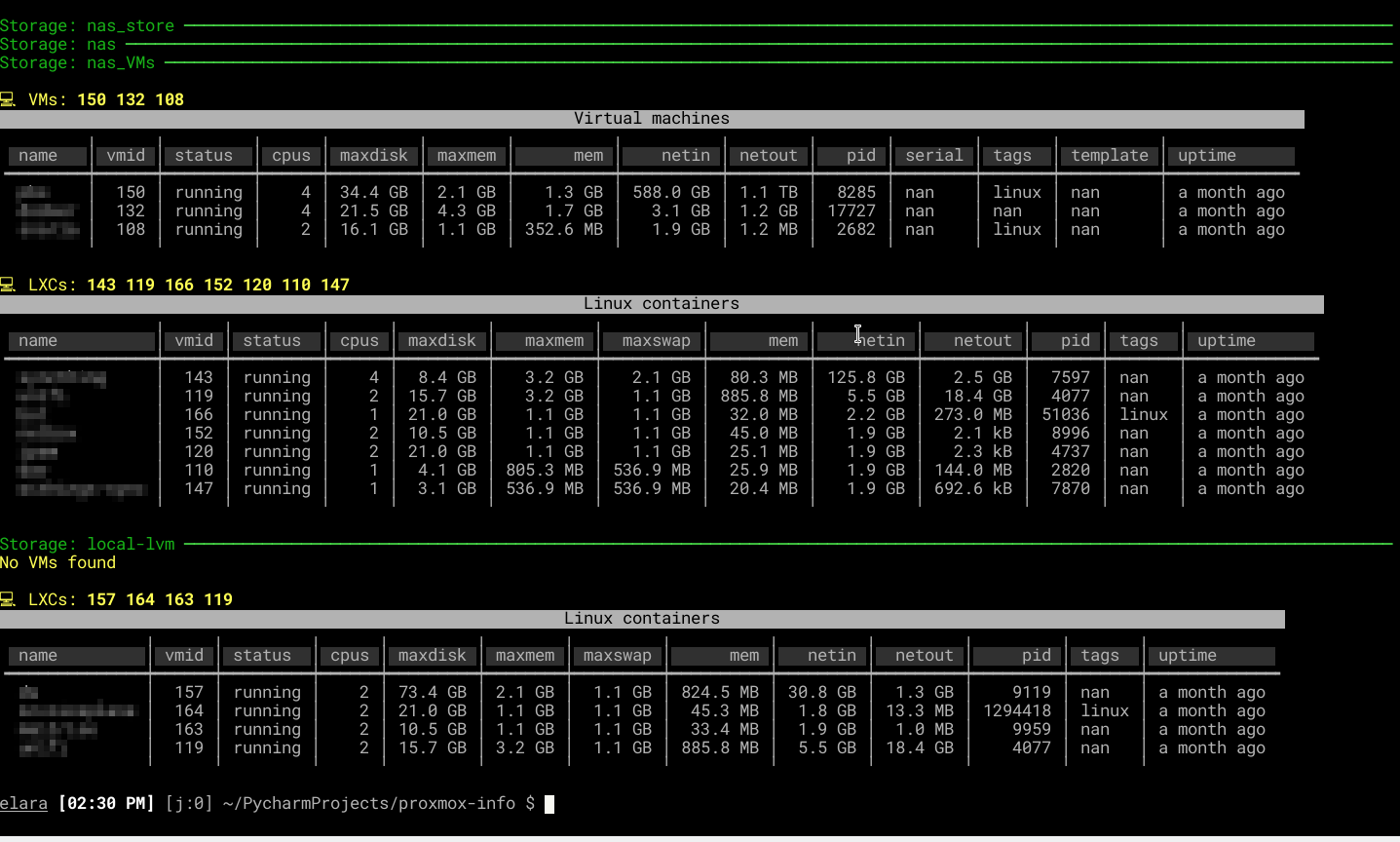
- Per-datastore VM/container listing — see which QEMU VMs and LXC containers live on each storage volume
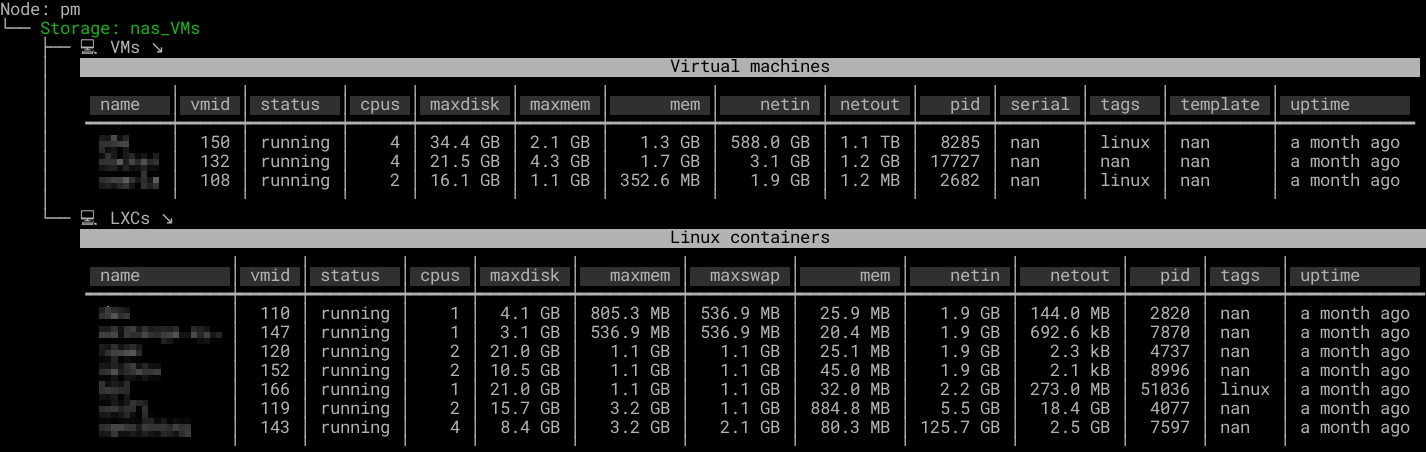
- Two output modes — clean table view or hierarchical tree view
- Multiple node support — aggregates across all Proxmox nodes in your cluster
- Status filtering — show only running machines, stopped machines, or all
- Human-readable output — automatic formatting of sizes and uptimes via
--human - Pager support — pipe through your system pager with
--pager - Config file or CLI args — YAML config with Dynaconf, or override everything on the command line
Purpose and uses
Ever needed to get a list of VMs or containers per datastore?
Why? Perhaps you need to shutdown that storage for maintenance, upgrades etc., and need to move all running machines off it (a la vSphere storage vMotion).
Then this is the tool for you.
Screenshots
Default table view — VMs and containers listed per datastore with status, CPU, memory, disk, and network columns:
Tree view — hierarchical display of node > storage > machine type > machine details:
Installation
The recommended way to install proxmox-info is to use pipx.
After getting pipx installed, simply run:
username@proxmox:~$ pipx install proxmox-info
Please don't use pip system-wide.
You can of course also install it using classic virtualenvs.
Configuration
Overview
proxmox-info is configured with a YAML-style file. An example:
host: zzz
user: zap
password: some_password
Location
The default location for the configuration is /etc/proxmox_info.yml, or proxmox_info.yml in the current
working directory, but this can also be specified on the commandline.
If a non-absolute path is given, Dynaconf will iterate upwards: it will look at each parent up to the root of the
system. For each visited folder, it will also try looking inside a /config folder.
Supported versions
proxmox-info supports the following VE versions:
| VE version | Debian version | Python version | VE EoL |
|---|---|---|---|
| 8 | 12 (Bookworm) | 3.11 | TBA |
| 7 | 11 (Bullseye) | 3.9 | 2024-07 |
1 maintainer

Metadata
1 maintainer
Release files for proxmox-info 1.1.2
For a detailed explanation of source distributions (sdists) and built distributions (wheels), please see the package formats documentation.
Source distribution (sdist)
| File | Size | Uploaded | |
|---|---|---|---|
| proxmox_info-1.1.2.tar.gz | 248.8 kB | Details |
Built distribution (wheel)
| File | Interpreter | ABI | Platform | Reset |
|---|---|---|---|---|
| proxmox_info-1.1.2-py3-none-any.whl | Python 3 | none | any | Details |
Total release size: 268.9 kB
Release files / proxmox_info-1.1.2.tar.gz
| Download URL | proxmox_info-1.1.2.tar.gz |
|---|---|
| Size | 248.8 kB |
| Tags | Source |
|
SHA-256 checksum How to use checksums |
7ea955a11d6ea8089aadf1bf0841e963ec65d5389c736c46861e37b88d081bcb
|
|
BLAKE2b-256 checksum How to use checksums |
160f7409a58cf90212ca90448eac39e5186bb80aaae2d54effddd5b083296fec
|
| Upload date | |
|
Uploaded using Trusted Publishing? What is trusted publishing? |
No |
| Uploaded via |
Hatch/1.16.5 cpython/3.14.5 HTTPX/0.28.1
|
Release files / proxmox_info-1.1.2-py3-none-any.whl
| Download URL | proxmox_info-1.1.2-py3-none-any.whl |
|---|---|
| Size | 20.1 kB |
| Tags | Python 3 |
|
SHA-256 checksum How to use checksums |
a88a02ace12b6f2f70a75f6466b55c37c9906d44b1d76c03e5f62404a2bf4481
|
|
BLAKE2b-256 checksum How to use checksums |
d5863e5838a92075c6ece1dfcadc503d989a4f531e821d76141685ed85753e76
|
| Upload date | |
|
Uploaded using Trusted Publishing? What is trusted publishing? |
No |
| Uploaded via |
Hatch/1.16.5 cpython/3.14.5 HTTPX/0.28.1
|














