
The QA agent for your vibe-coded app. Apache-2.0 MCP server.
Verified details
These details have been verified by PyPIProject links
GitHub Statistics
Maintainers

Project description
prufa-mcp — the QA agent for your vibe-coded app
"Median 5 hours from vulnerability disclosure to mass automated exploitation." — Patchstack 2026 State of WordPress Security
Vibe-coded apps ship faster than humans can review. Prufa is the agent that audits them — tracking pixels, broken flows, consent violations, console errors — before the 5-hour window opens.
30-second demo
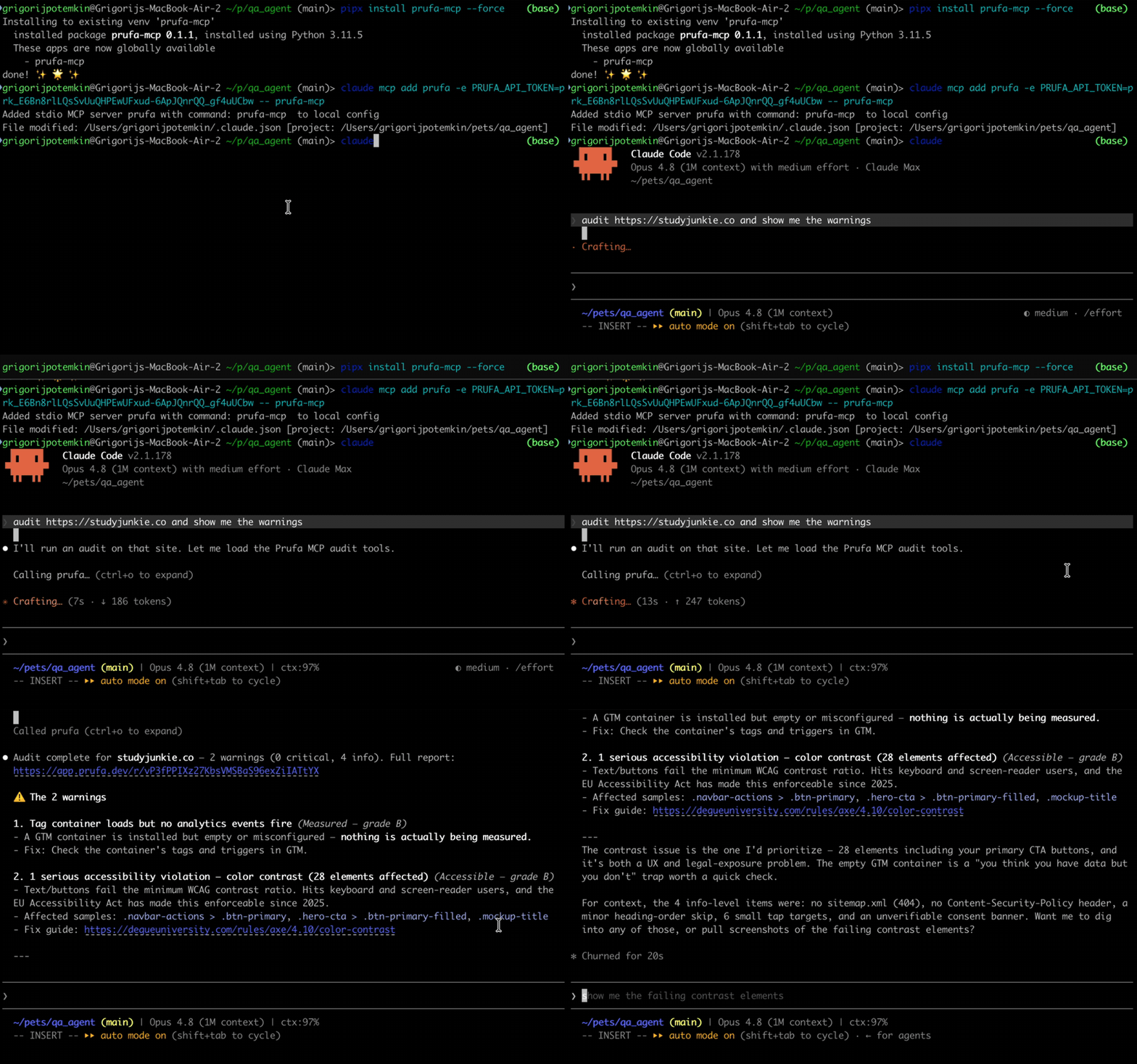
Install
The package is on PyPI (v0.1.3). Install it
globally with pipx (recommended — installs into an isolated venv and exposes
the prufa-mcp binary on your PATH) or into a project venv with pip:
# Recommended — global install, isolated venv
pipx install prufa-mcp

# Or, into your project venv
pip install prufa-mcp

# Verify the binary is on PATH
which prufa-mcp
# Should print something like: /Users/you/.local/bin/prufa-mcp
You also need a free Prufa API key. The first audit is free, no card required.
- Sign in at prufa.dev (Google OAuth)
- Create an API key from the dashboard — or via the CLI:
prufa keys mint "<name>"
Wire into your agent
The MCP server runs as a stdio subprocess, spawned by your agent on first use.
The cleanest way to register it is claude mcp add (Claude Code's built-in
command — it writes the config to ~/.claude.json correctly, which the
~/.claude/mcp.json path does NOT).
Claude Code (recommended path)
# Get the absolute path of the binary (use whatever `which prufa-mcp` returned)
PRUFA_BIN=$(which prufa-mcp)

# Add the MCP server. The token stays out of your shell history.
read -s -p "Prufa API token: " PRUFA_TOKEN && echo
claude mcp add \
  --scope user \
  --env "PRUFA_API_TOKEN=$PRUFA_TOKEN" \
  prufa \
  -- "$PRUFA_BIN"
Restart Claude Code (config is read at startup), then verify:
/mcp
You should see prufa listed as Connected, with prufa_run_audit and
prufa_get_report as available tools.
Cursor / Cline / Continue (hand-edit .mcp.json)
In your project root or in ~/.config/Claude/ etc.:
{
  "mcpServers": {
    "prufa": {
      "command": "/Users/you/.local/bin/prufa-mcp",
      "env": {
        "PRUFA_API_TOKEN": "your-prufa-api-key"
      }
    }
  }
}
Restart the host app. The command path must be the absolute binary path
(not ~, not $()) — those don't expand in MCP config.
Use it
In your agent:
> audit https://my-vibe-coded-app.com and show me the criticals
> run prufa on my staging deploy
> fetch the report for the audit I just ran
prufa_run_audit with wait=true (the default) blocks until the audit
completes and returns the JSON report directly — typically 25–60s for a public
page. If you set wait=false, the call returns immediately with the queued
state plus a share_token you can poll with prufa_get_report.
What you get (the OSS surface)
| Tool | What it does |
|---|---|
prufa_run_audit(url, wait=true) |
Triggers a public-page audit, polls until done, returns findings JSON. The wait flag is honored — it actually blocks. |
prufa_get_report(report_id) |
Fetches a report. report_id is EITHER the run UUID (from prufa_run_audit's run_id field) OR the share_token (the slug from /r/<token> in the audit creation report_url). The slug is what you'll see most often — use that. |
The other ~13 tools (workspace setup, flows, monitors, alerts, billing) live in the hosted product at prufa.dev.
Examples
Three runnable scripts in examples/:
examples/nextjs-app/— audit a deployed Next.js appexamples/vite-spa/— audit a Vite SPA (focuses on client-side routing audits)examples/stripe-checkout/— audit a Stripe-checkout page (payment-flow verification)
Each is a copy-pasteable demo:
export PRUFA_API_TOKEN=...
python examples/nextjs-app/audit.py https://your-nextjs-app.com
GitHub Action
Add PR-time audits to any repo:
# .github/workflows/prufa-scan.yml
name: Prufa scan
on: [pull_request]
jobs:
  audit:
    runs-on: ubuntu-latest
    steps:
      - uses: actions/checkout@v4
      - uses: actions/setup-python@v5
        with:
          python-version: "3.11"
      - run: pip install prufa-mcp
      - name: Run audit
        env:
          PRUFA_API_TOKEN: ${{ secrets.PRUFA_API_TOKEN }}
        run: |
          python -c "
          import asyncio, json, sys
          from prufa_mcp.audit import run_audit
          result = asyncio.run(run_audit(url='${{ secrets.STAGING_URL }}', wait=True))
          print(json.dumps(result, indent=2))
          criticals = [f for f in result.get('findings', []) if f.get('severity') == 'critical']
          if criticals:
              print(f'::error::Prufa found {len(criticals)} critical finding(s)', file=sys.stderr)
              sys.exit(1)
          "
See examples/prufa-scan.yml for the full template.
SLO
- Hosted audit API: 30-second p95 for
wait=trueon public pages. - OSS MCP server: thin client — its only SLO is "responds to MCP
list_toolsandcall_toolwithin 1 second" (the heavy work happens server-side).
Versioning
Published via Trusted Publishing from
the GitHub Action on every v* tag. Install a specific version with
pipx install prufa-mcp==0.1.3 or pip install prufa-mcp==0.1.3.
License
Apache-2.0. See LICENSE.
Project details
Verified details
These details have been verified by PyPIProject links
GitHub Statistics
Maintainers


Download files
Download the file for your platform. If you're not sure which to choose, learn more about installing packages.
Source Distribution
Built Distribution
Filter files by name, interpreter, ABI, and platform.
If you're not sure about the file name format, learn more about wheel file names.
Copy a direct link to the current filters
File details
Details for the file prufa_mcp-0.1.4.tar.gz.
File metadata
- Download URL: prufa_mcp-0.1.4.tar.gz
- Upload date:
- Size: 14.9 kB
- Tags: Source
- Uploaded using Trusted Publishing? Yes
- Uploaded via: twine/6.1.0 CPython/3.13.12
File hashes
| Algorithm | Hash digest | |
|---|---|---|
| SHA256 |
1c113c86ee85c9b0dd6735346144033a8a01c414474041cdba90d2004603a13b
|
|
| MD5 |
2bbfc6bd53e10f783344da3a47c36f74
|
|
| BLAKE2b-256 |
91384b9cb42f69ccbb566a86f89df3bd1f728fdeafdb4f7e876c065fa01f1a44
|
Provenance
The following attestation bundles were made for prufa_mcp-0.1.4.tar.gz:
Publisher:
publish.yml on prufa-dev/prufa-mcp
-
Statement:
-
Statement type:
https://in-toto.io/Statement/v1 -
Predicate type:
https://docs.pypi.org/attestations/publish/v1 -
Subject name:
prufa_mcp-0.1.4.tar.gz -
Subject digest:
1c113c86ee85c9b0dd6735346144033a8a01c414474041cdba90d2004603a13b - Sigstore transparency entry: 1834803575
- Sigstore integration time:
-
Permalink:
prufa-dev/prufa-mcp@21a8f267881b083511743b98d9c4d5c911f7be3c -
Branch / Tag:
refs/tags/v0.1.4 - Owner: https://github.com/prufa-dev
-
Access:
public
-
Token Issuer:
https://token.actions.githubusercontent.com -
Runner Environment:
github-hosted -
Publication workflow:
publish.yml@21a8f267881b083511743b98d9c4d5c911f7be3c -
Trigger Event:
push
-
Statement type:
File details
Details for the file prufa_mcp-0.1.4-py3-none-any.whl.
File metadata
- Download URL: prufa_mcp-0.1.4-py3-none-any.whl
- Upload date:
- Size: 13.5 kB
- Tags: Python 3
- Uploaded using Trusted Publishing? Yes
- Uploaded via: twine/6.1.0 CPython/3.13.12
File hashes
| Algorithm | Hash digest | |
|---|---|---|
| SHA256 |
6c8dbdbc97b4ba1a425158fcdae3bc3b27a29c40e41f7e20e2b3fd31e48314eb
|
|
| MD5 |
c31870f4fcc056fb9a03272ce9732371
|
|
| BLAKE2b-256 |
b540313b00769e12ff7ef49de5306197df6cb85a33e887f749ddb013b0d50a43
|
Provenance
The following attestation bundles were made for prufa_mcp-0.1.4-py3-none-any.whl:
Publisher:
publish.yml on prufa-dev/prufa-mcp
-
Statement:
-
Statement type:
https://in-toto.io/Statement/v1 -
Predicate type:
https://docs.pypi.org/attestations/publish/v1 -
Subject name:
prufa_mcp-0.1.4-py3-none-any.whl -
Subject digest:
6c8dbdbc97b4ba1a425158fcdae3bc3b27a29c40e41f7e20e2b3fd31e48314eb - Sigstore transparency entry: 1834803737
- Sigstore integration time:
-
Permalink:
prufa-dev/prufa-mcp@21a8f267881b083511743b98d9c4d5c911f7be3c -
Branch / Tag:
refs/tags/v0.1.4 - Owner: https://github.com/prufa-dev
-
Access:
public
-
Token Issuer:
https://token.actions.githubusercontent.com -
Runner Environment:
github-hosted -
Publication workflow:
publish.yml@21a8f267881b083511743b98d9c4d5c911f7be3c -
Trigger Event:
push
-
Statement type:






