
Sample SDKs for PS by APIMatic

Project description
Getting Started with Paysecure API Documentation - Live
Introduction
Overview
Paysecure is a payment gateway optimization and intelligence service that merchants can use to provide a remote and frictionless payment experience.
This documentation will help you get started with integrating Paysecure but if you have any questions, please do not hesitate to reach out to us via email at info@paysecure.net
Please be advised that our support team is only available during standard business hours.
Environments
These are the BaseUrls for the APIs on different environments:
| Environment | Base URL |
|---|---|
| Production | https://api.paysecure.net/api/v1 |
| Sandbox | https://api.paysecure.net/api/v1 Note: set the Sandbox flag true (checked) in your merchant account. As shown in the image below |
Authentication
To access the API, you must acquire your unique API key from the merchant dashboard -> API Keys section in your account. Make sure to use this key as a bearer token in the Authorization header for every request you send.
AUTHORIZATION: Bearer Token
Token: {{APIKey}} .
Access your sandbox API key credentials by navigating to your merchant login and checking the 'is sandbox' option, located in the top right corner under merchant profile.
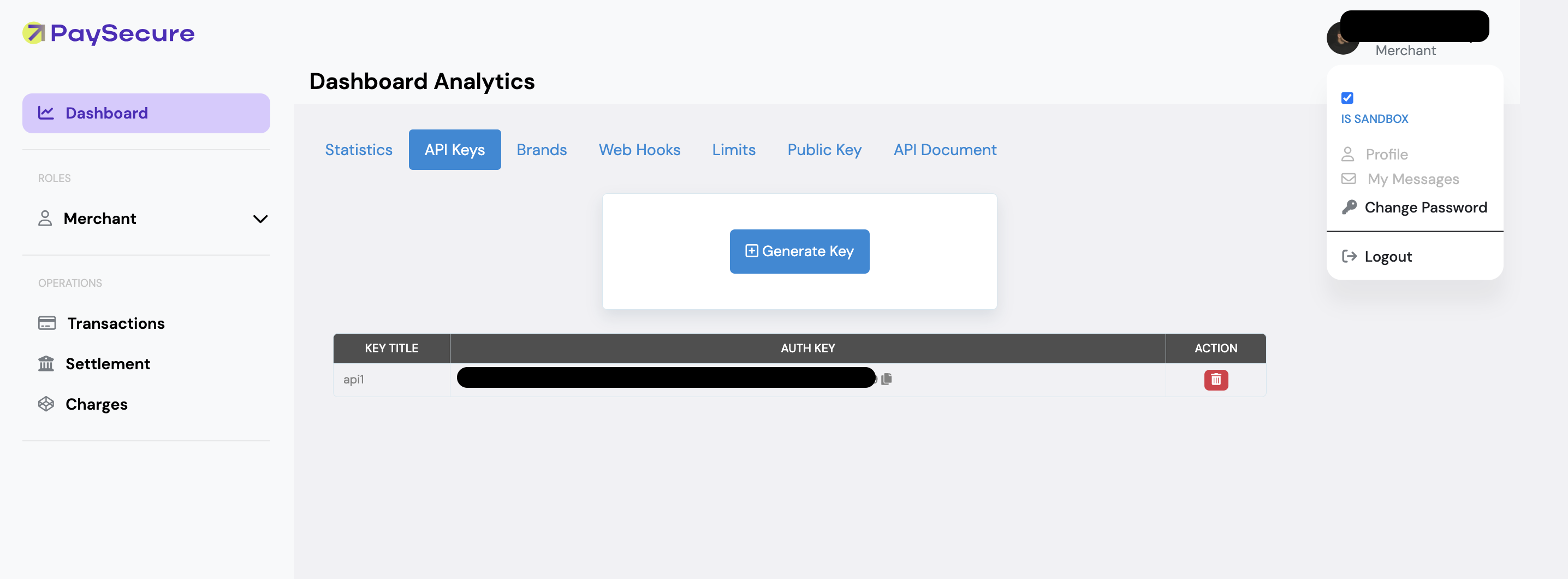
To get to the live API key, uncheck the 'Is Sandbox' option in the top right corner of your merchant dashboard. After unchecking, the page will refresh, and you can generate an API key for live transactions in this environment."
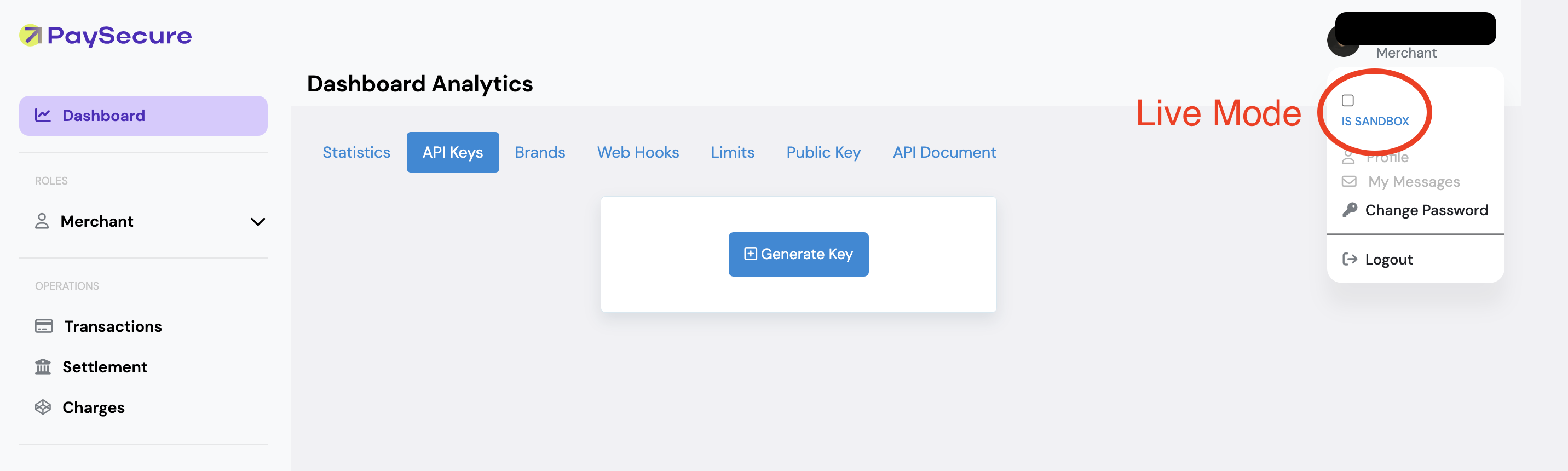
Reiterating, the API keys in Sandbox mode are for testing (when 'is sandbox' is CHECKED in the top right corner under merchant profile). The live API key credentials are for processing actual card transactions in Live mode (when 'is sandbox' is UNCHECKED in the same location)
Request Headers
Use these headers on every API call unless noted.
| Header | Value | Required | Notes |
|---|---|---|---|
Content-Type |
application/json |
Yes | All endpoints. Send JSON payloads. |
Authorization |
Bearer {MERCHANT_API_KEY} |
Yes | All endpoints. Replace with your merchant API key. |
BrandId |
{YOUR_BRAND_ID} |
Conditional | Session and CustomerAPIs. optional in customer APIs but Mandatory in Session APIs |
Install the Package
The package is compatible with Python versions 3.7+.
Install the package from PyPi using the following pip command:
pip install ps-apimatic-sdk==0.0.2
You can also view the package at: https://pypi.python.org/pypi/ps-apimatic-sdk/0.0.2
Initialize the API Client
Note: Documentation for the client can be found here.
The following parameters are configurable for the API Client:
| Parameter | Type | Description |
|---|---|---|
| environment | Environment |
The API environment. Default: Environment.PRODUCTION |
| http_client_instance | Union[Session, HttpClientProvider] |
The Http Client passed from the sdk user for making requests |
| override_http_client_configuration | bool |
The value which determines to override properties of the passed Http Client from the sdk user |
| http_call_back | HttpCallBack |
The callback value that is invoked before and after an HTTP call is made to an endpoint |
| timeout | float |
The value to use for connection timeout. Default: 30 |
| max_retries | int |
The number of times to retry an endpoint call if it fails. Default: 0 |
| backoff_factor | float |
A backoff factor to apply between attempts after the second try. Default: 2 |
| retry_statuses | Array of int |
The http statuses on which retry is to be done. Default: [408, 413, 429, 500, 502, 503, 504, 521, 522, 524] |
| retry_methods | Array of string |
The http methods on which retry is to be done. Default: ["GET", "PUT"] |
| proxy_settings | ProxySettings |
Optional proxy configuration to route HTTP requests through a proxy server. |
| logging_configuration | LoggingConfiguration |
The SDK logging configuration for API calls |
| bearer_auth_credentials | BearerAuthCredentials |
The credential object for OAuth 2 Bearer token |
The API client can be initialized as follows:
Code-Based Client Initialization
import logging

from paysecureapidocumentationlive.configuration import Environment
from paysecureapidocumentationlive.http.auth.oauth_2 import BearerAuthCredentials
from paysecureapidocumentationlive.logging.configuration.api_logging_configuration import LoggingConfiguration
from paysecureapidocumentationlive.logging.configuration.api_logging_configuration import RequestLoggingConfiguration
from paysecureapidocumentationlive.logging.configuration.api_logging_configuration import ResponseLoggingConfiguration
from paysecureapidocumentationlive.paysecureapidocumentationlive_client import PaysecureapidocumentationliveClient

client = PaysecureapidocumentationliveClient(
    bearer_auth_credentials=BearerAuthCredentials(
        access_token='AccessToken'
    ),
    environment=Environment.PRODUCTION,
    logging_configuration=LoggingConfiguration(
        log_level=logging.INFO,
        request_logging_config=RequestLoggingConfiguration(
            log_body=True
        ),
        response_logging_config=ResponseLoggingConfiguration(
            log_headers=True
        )
    )
)
Environment-Based Client Initialization
from paysecureapidocumentationlive.paysecureapidocumentationlive_client import PaysecureapidocumentationliveClient

# Specify the path to your .env file if it’s located outside the project’s root directory.
client = PaysecureapidocumentationliveClient.from_environment(dotenv_path='/path/to/.env')
See the Environment-Based Client Initialization section for details.
Environments
The SDK can be configured to use a different environment for making API calls. Available environments are:
Fields
| Name | Description |
|---|---|
| PRODUCTION | Default |
Authorization
This API uses the following authentication schemes.
List of APIs
- Payin AP Is
- Payout AP Is
- Get Balance API
- Refund API
- 🌎 Paypal Wallet
- 💳 Virtual Cards Payout
- Trust Score
- Cashier AP Is
- Transaction Reporting
- Get Balance API V2-Orchestration
- Global Collection
- Payout Manual Review
- AP Is
- Payout
- Payin
- API
SDK Infrastructure
Configuration
- ProxySettings
- Environment-Based Client Initialization
- AbstractLogger
- LoggingConfiguration
- RequestLoggingConfiguration
- ResponseLoggingConfiguration
HTTP
Utilities
Release history Release notifications | RSS feed


Download files
Download the file for your platform. If you're not sure which to choose, learn more about installing packages.
Source Distribution
Built Distribution
Filter files by name, interpreter, ABI, and platform.
If you're not sure about the file name format, learn more about wheel file names.
Copy a direct link to the current filters
File details
Details for the file ps_apimatic_sdk-0.0.2.tar.gz.
File metadata
- Download URL: ps_apimatic_sdk-0.0.2.tar.gz
- Upload date:
- Size: 258.9 kB
- Tags: Source
- Uploaded using Trusted Publishing? No
- Uploaded via: twine/6.2.0 CPython/3.9.13
File hashes
| Algorithm | Hash digest | |
|---|---|---|
| SHA256 |
419246bc7b4639be04fba4a8d6f2f228abc40dc3a9cc4414869bbed609906189
|
|
| MD5 |
dfa4322aa66acf4b1f06bc7c8b5f6eca
|
|
| BLAKE2b-256 |
7df5635cbe0f3a04f13463642fff5662a21d3141546355a1ba7934305a611988
|
File details
Details for the file ps_apimatic_sdk-0.0.2-py3-none-any.whl.
File metadata
- Download URL: ps_apimatic_sdk-0.0.2-py3-none-any.whl
- Upload date:
- Size: 789.9 kB
- Tags: Python 3
- Uploaded using Trusted Publishing? No
- Uploaded via: twine/6.2.0 CPython/3.9.13
File hashes
| Algorithm | Hash digest | |
|---|---|---|
| SHA256 |
13b00d0e808293f158ae1b36611d9f930511e3b80145edd1a7b922af5a8ad0dc
|
|
| MD5 |
d512e10b2c2635c848b55d7a68d7ad53
|
|
| BLAKE2b-256 |
85ae2cc7d3d34a9722769feb557bd17479b5ed7bf0357b6d8d0c5bda02ea0f2a
|






