
psd-export
- Fast multi-threaded exporting of PSDs with
[tagged]layers for variants. - Special named layers can be used to apply filters like mosaic or gaussian blur, or whatever else you can hook in.
- This tool is primarily meant to be compatible with PSDs exported from
PaintTool SAIv2andClip Studio Paint.
Why
For my art workflow, I typically make a bunch variation layers and also need to apply mosaics to all of them. As a manual process, exporting every variant can take several minutes, with lots of clicking everywhere to turn layers on and off (potentially missing layers by accident) and then adding mosaics can be another 10 or 20 minutes of extra work. If I find I need to change something in my pictures and export again, I have to repeat this whole ordeal. This script puts this export process on the order of seconds, saving me a lot of time and pain.
Installation
- Install python: https://www.python.org/downloads/
- Run
pip install psd-exportto install the script. - Run
psd-exportto export any PSD files in the current directory. - Run
psd-export --helpfor more command line arguments.
Building from source
- Install a C compiler (like MSVC, GCC, Clang)
- Install extra dependencies:
pip install setuptools wheel cython numpy - Install this repository locally:
pip install -e . - If you modify a Cython file (.pyx), then rebuild it with:
python setup.py build_ext --inplace
Building/installing with Nix
- This project is a Nix flake, so you can run flake commands to interact with the package
nix run,nix build, etc.
Setting up the PSD
Automatic Exporting
Primary tags
- Add tags surrounded by
[]to the names of layers that you want as part of an exported picture.- A layer name can contain anything else outside of tags:
scene [1], which will be ignored.
- A layer name can contain anything else outside of tags:
- Because whitespace is used to delimit arguments to filters, a tag's name will not include anything after a space, for example:
[blur 50]the tag name will beblur, and50is an argument toblur.
- Each set of primary tagged layers will be turned on and off and then exported in turn.
- That means multiple layers can have the same tag, so you can toggle layers in your foreground and background together, for example:
- A layer named
foreground [1]and a separate layer namedbackground [1]
- A layer named
- That means multiple layers can have the same tag, so you can toggle layers in your foreground and background together, for example:
- A layer can have multiple tags in the name:
scene [1][2]- This will export with this layer visible for both tags.
- A primary tag is not necessary. If no primary tag is provided, then the whole picture is exported as is.
Secondary tags
- Tags with an
@in the name will be treated as secondary tags. - Text before the
@is the tag name, and text after the@is the exclusion group.- The exclusion group can be empty.
- Valid secondary tag names:
[jp@],[jp@text]
- These tags will be exported in combination with primary tags, for example:
- If you have layers tagged
[1],[thing@][jp@text], and[en@text], then what will be exported is1,1-thing,1-thing-jp,1-thing-en,1-jp,1-en - Because
[jp@text]and[en@text]share the same exclusion grouptext, they will never be enabled together. - If there was a second primary tag
[2]for example, the whole set of combinations would be exported again but with2instead of1
- If you have layers tagged
Image filters
- Tags with special names will be treated as filters on the colors below them.
- Filters can double as export tags too.
- If you want a filter to not be treated as an export tag, you can preceed it with
#to set the ignore flag, for example[#censor] - Filters can have arguments as well to control their behavior, separated by spaces, for example
[#censor 50] - If you want the filter to apply to layers outside of the group it is in, then the group blend mode should be set to
pass-through, otherwise it may blend with transparent black pixels if the filter is over a transparent part of a group. The blur and motion blur filters apply to alpha as well, so they should behave as expected in isolated groups. - If multiple filters are enabled in one layer, they will be applied from left to right on top of each result, example:
[#censor][#blur]will apply a mosaic, and then a blur on top of that mosaic.
- Blend modes and clipping layers applied directly to filter layers are ignored.
Available default filters:
[censor mosaic_factor apply_to_alpha]- If the
mosaic_factorargument is omitted, then it is defaulted to 100, which means 1/100th the smallest dimension, (or 4 pixels, whichever is larger) in order to be Pixiv compliant. apply_to_alphadefaults to False. Any value is treated as True.- Typically you will want this filter to be a secondary tag, for example:
[censor@], so you can have censored and uncensored outputs.
- If the
[blur size]- The
sizeargument defaults to 50 if omitted. - This filter is best used to create a non-destructive blur, such as for a background layer. You can fill an entire layer and set it to
[#blur 8]for example.
- The
[motion-blur angle size]angleis in degrees, starting from horizontal to the right; Default 0.sizedefaults to 50.- Best used for non-destructive blur:
[#motion-blur 45 20]
Adding a new filter:
In your own script:
# my-export.py
from psd_export import (export, filters, util, blendfuncs)
import numpy as np

my_arg1_default = 1.0

# Register the filter with this decorator:
@filters.filter('my-filter')
# Only positional arguments work right now. The result of this function replaces the destination color and alpha.
def some_filter(color_dst, color_src, alpha_dst, alpha_src, arg1=None, arg2=100, *_):
    # Cast arguments to your desired types, as they will come in as strings.
    if arg1 is None:
        arg1 = my_arg1_default
    arg1 = float(arg1)
    # Manipulate color and alpha numpy arrays, in-place if you want.
    color = np.subtract(arg1, color, out=color)
    color = blendfuncs.lerp(color_dst, color, alpha_src)
    # Always return the same shaped arrays as a tuple:
    return color, alpha

if __name__ == '__main__':
    # Add your own command line arguments if needed.
    export.arg_parser.add_argument('--my-arg1', default=my_arg1_default, type=float,
        help='Set the arg1 default parameter.')
    args = export.arg_parser.parse_args()
    my_arg1_default = args.my_arg1

    export.main()
Apply it to a layer in your PSD, for example:
[my-filter 20.4] or [#my-filter], etc.
Examples
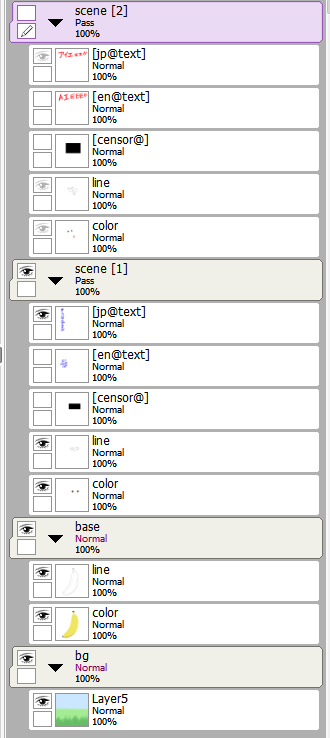
In the layers below, there are 2 primary tags and 3 secondary tags (with two unique exclusion groups):
Primary tags: 1, 2
Secondary tags: jp, en, censor
Exclusion groups: text, <empty>
Groups with primary tags will be exported again even if the secondary tag does not exist under that group! This keeps the exported folders uniformly sized for publishing, so different folders may appear to have duplicate outputs.
Example layer configuration in SAI:
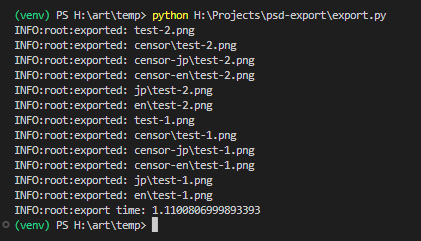
Example output from script, showing every valid combination:
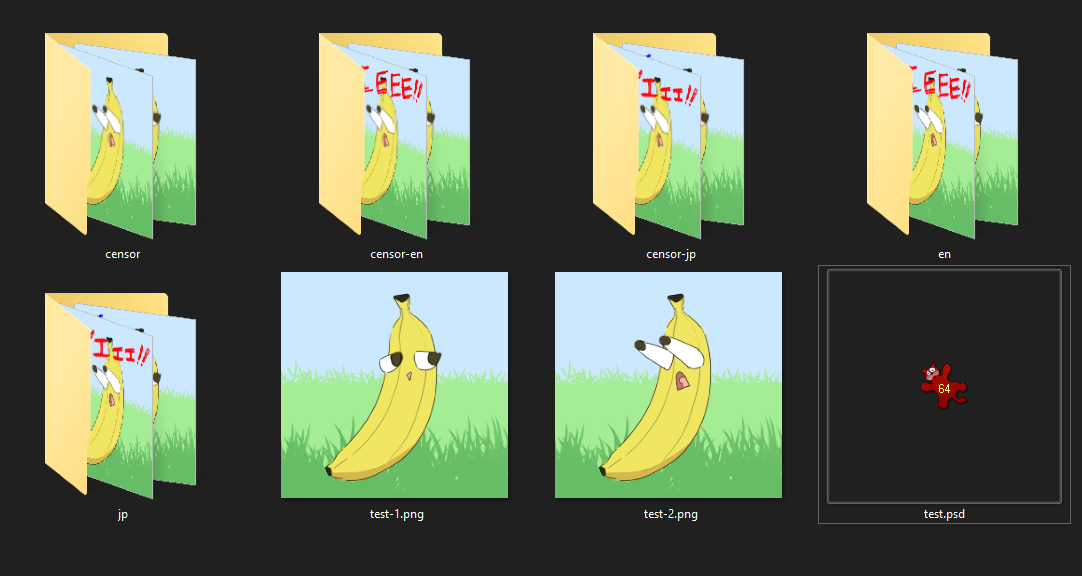
Folder after exporting everything:
Example of a layer with the tag [censor@] (the layer does not need to be set to visible before exporting):

After exporting:

Blendmode status:
| Blendmode | Status |
|---|---|
| Normal | Pass |
| Multiply | Pass |
| Screen | Pass |
| Overlay | Pass |
| Linear Burn (Shade) | Pass |
| Linear Dodge (Shine) | Pass |
| Linear Light (Shade/Shine) | Pass |
| Color Burn (Burn) | Pass |
| Color Dodge (Dodge) | Pass |
| Vivid Light (Burn/Dodge) | Pass |
| Soft Light | Pass |
| Hard Light | Pass |
| Pin Light | Pass |
| Hard Mix | Small precision error for near-black colors, can look slightly different from SAI |
| Darken | Pass |
| Lighten | Pass |
| Darken Color | Pass |
| Lighten Color | Pass |
| Difference | Pass |
| Exclude | Pass |
| Subtract | Pass |
| Divide | Pass |
| Hue | Pass |
| Saturation | Pass |
| Color | Pass |
| Luminosity | Pass |
| [TS] Linear Burn (Shade) | Pass |
| [TS] Linear Dodge (Shine) | Pass |
| [TS] Linear Light (Shade/Shine) | Pass |
| [TS] Color Burn (Burn) | Small precision error for near-black colors, can look slightly different from SAI |
| [TS] Color Dodge (Dodge) | Pass |
| [TS] Vivid Light (Burn/Dodge) | Pass |
| [TS] Hard Mix | Small precision error for near-black colors, can look slightly different from SAI |
| [TS] Difference | Pass |
Missing PSD features:
- Other things that are not implemented (also not implemented in
psd-tools):- Adjustment layers (gradient map, color balance, etc.)
- Layer effects (shadow, glow, overlay, strokes, etc.)
- Font rendering
- Probably some other things I'm unaware of.
TODO:
- Fix blend modes that don't quite work properly. This is low priority because I hardly use these modes myself or merge the results when painting.
- Binary package export
1 maintainer

Metadata
1 maintainer
Release files for psd-export 1.1.2
For a detailed explanation of source distributions (sdists) and built distributions (wheels), please see the package formats documentation.
Source distribution (sdist)
| File | Size | Uploaded | |
|---|---|---|---|
| psd_export-1.1.2.tar.gz | 389.2 kB | Details |
Built distributions (wheels)
Total release size: 8.9 MB
Release files / psd_export-1.1.2.tar.gz
| Download URL | psd_export-1.1.2.tar.gz |
|---|---|
| Size | 389.2 kB |
| Tags | Source |
|
SHA-256 checksum How to use checksums |
417f77e05d75d882834e4f76b20b9a9645e74507cbedad18bc3deec6cc748d48
|
|
BLAKE2b-256 checksum How to use checksums |
e5b056f7eb90509bf30b38d407e7a4219a3a67ab17b555d6730a446a0a513e9e
|
| Upload date | |
|
Uploaded using Trusted Publishing? What is trusted publishing? |
No |
| Uploaded via |
twine/6.2.0 CPython/3.9.25
|
Release files / psd_export-1.1.2-cp313-cp313-win_amd64.whl
| Download URL | psd_export-1.1.2-cp313-cp313-win_amd64.whl |
|---|---|
| Size | 546.7 kB |
| Tags | CPython 3.13 Windows x86-64 |
|
SHA-256 checksum How to use checksums |
186d844bf7e22c49d89baeba9bd8cfbcc807801afc352280bf2e2cf278a10ae8
|
|
BLAKE2b-256 checksum How to use checksums |
4bf26fffbe8eb6984a815ac311add9dc8733bf0026262bcd3c37ebbe3130b1e0
|
| Upload date | |
|
Uploaded using Trusted Publishing? What is trusted publishing? |
No |
| Uploaded via |
twine/6.2.0 CPython/3.9.25
|
Release files / psd_export-1.1.2-cp313-cp313-win32.whl
| Download URL | psd_export-1.1.2-cp313-cp313-win32.whl |
|---|---|
| Size | 519.6 kB |
| Tags | CPython 3.13 Windows x86-32 |
|
SHA-256 checksum How to use checksums |
048e6cd6041e189cc8f208f62e057fc5208e35f3df84067f5ea3492352fdc26c
|
|
BLAKE2b-256 checksum How to use checksums |
af062def1860d7525032326b263cc05a625d0ca39dd50b2521d58df0b7dac2bd
|
| Upload date | |
|
Uploaded using Trusted Publishing? What is trusted publishing? |
No |
| Uploaded via |
twine/6.2.0 CPython/3.9.25
|
Release files / psd_export-1.1.2-cp313-cp313-musllinux_1_2_x86_64.whl
| Download URL | psd_export-1.1.2-cp313-cp313-musllinux_1_2_x86_64.whl |
|---|---|
| Size | 1.6 MB |
| Tags | CPython 3.13 Linux musl 1.2+ x86-64 |
|
SHA-256 checksum How to use checksums |
a7f92a6a41971d28f92fa899aaf300878eef38e4dea241725053a12e6db6123f
|
|
BLAKE2b-256 checksum How to use checksums |
dfafefd40099f2f965994229fd03dca2195439b785de1b071b67c53b16771b3b
|
| Upload date | |
|
Uploaded using Trusted Publishing? What is trusted publishing? |
No |
| Uploaded via |
twine/6.2.0 CPython/3.9.25
|
Release files / psd_export-1.1.2-cp313-cp313-musllinux_1_2_aarch64.whl
| Download URL | psd_export-1.1.2-cp313-cp313-musllinux_1_2_aarch64.whl |
|---|---|
| Size | 1.6 MB |
| Tags | CPython 3.13 Linux musl 1.2+ ARM64 |
|
SHA-256 checksum How to use checksums |
3dea23ef3b422bdc591961931c09e1fccb29243461ccc1a81f1cfc5059d80b1c
|
|
BLAKE2b-256 checksum How to use checksums |
ec5237721572801cd7b3cfdccef9085ad5bd9d423b102ca80bfd3789c53c4820
|
| Upload date | |
|
Uploaded using Trusted Publishing? What is trusted publishing? |
No |
| Uploaded via |
twine/6.2.0 CPython/3.9.25
|
Release files / psd_export-1.1.2-cp313-cp313-manylinux2014_x86_64.manylinux_2_17_x86_64.manylinux_2_28_x86_64.whl
| Download URL | psd_export-1.1.2-cp313-cp313-manylinux2014_x86_64.manylinux_2_17_x86_64.manylinux_2_28_x86_64.whl |
|---|---|
| Size | 1.6 MB |
| Tags | CPython 3.13 Linux glibc 2.17+ x86-64 Linux glibc 2.28+ x86-64 |
|
SHA-256 checksum How to use checksums |
85f4c3d2b6f5ad1848a76fe09d0b93ec834d339c245c918bef9c2ad383568055
|
|
BLAKE2b-256 checksum How to use checksums |
be02bf45b758bc6d50b7ea68dded67ef09af3cd15be067dde46d18a52b35028c
|
| Upload date | |
|
Uploaded using Trusted Publishing? What is trusted publishing? |
No |
| Uploaded via |
twine/6.2.0 CPython/3.9.25
|
Release files / psd_export-1.1.2-cp313-cp313-manylinux2014_aarch64.manylinux_2_17_aarch64.manylinux_2_28_aarch64.whl
| Download URL | psd_export-1.1.2-cp313-cp313-manylinux2014_aarch64.manylinux_2_17_aarch64.manylinux_2_28_aarch64.whl |
|---|---|
| Size | 1.6 MB |
| Tags | CPython 3.13 Linux glibc 2.17+ ARM64 Linux glibc 2.28+ ARM64 |
|
SHA-256 checksum How to use checksums |
6190ee52a64ee259c57ce14766a2c22b512e76359cc2c94f4736c2a46aebddc6
|
|
BLAKE2b-256 checksum How to use checksums |
19c3dc008dda0003219af5d7fae4c4a80322da747fc94c98075d43de1c21b0dc
|
| Upload date | |
|
Uploaded using Trusted Publishing? What is trusted publishing? |
No |
| Uploaded via |
twine/6.2.0 CPython/3.9.25
|
Release files / psd_export-1.1.2-cp313-cp313-macosx_11_0_arm64.whl
| Download URL | psd_export-1.1.2-cp313-cp313-macosx_11_0_arm64.whl |
|---|---|
| Size | 559.7 kB |
| Tags | CPython 3.13 macOS 11.0+ ARM64 |
|
SHA-256 checksum How to use checksums |
9e51f268017fe9f688269427ade35ae1c20b5c8e55f1f0fdac57843e959a4b6a
|
|
BLAKE2b-256 checksum How to use checksums |
9d5cea8035a69c2c64509cbd2e1347df8013bb14a75a4b42571751270d81626e
|
| Upload date | |
|
Uploaded using Trusted Publishing? What is trusted publishing? |
No |
| Uploaded via |
twine/6.2.0 CPython/3.9.25
|
Release files / psd_export-1.1.2-cp313-cp313-macosx_10_13_x86_64.whl
| Download URL | psd_export-1.1.2-cp313-cp313-macosx_10_13_x86_64.whl |
|---|---|
| Size | 567.9 kB |
| Tags | CPython 3.13 macOS 10.13+ x86-64 |
|
SHA-256 checksum How to use checksums |
416b458ce9eaea7d8fb97d378f00105f65ebe19e6d5f4f1ddcad70e71ed09795
|
|
BLAKE2b-256 checksum How to use checksums |
12c27d6a52134da12b86ae5098b337b60b1251f2d597822f68f2dcf014214e38
|
| Upload date | |
|
Uploaded using Trusted Publishing? What is trusted publishing? |
No |
| Uploaded via |
twine/6.2.0 CPython/3.9.25
|














