
Rich terminal process viewer
Verified details
These details have been verified by PyPIProject links
GitHub Statistics
Maintainers

Project description
psinfo
A rich terminal process viewer. Search, filter, and watch running processes with colour-coded output.
psinfo is for when you have a specific question — "what's on port 8080", "how much memory is Chrome using across all its helpers", "is nginx running and what's it doing" — and want a clean answer without launching a full process manager or constructing a ps aux | grep | awk pipeline.
Install
pip install psinfo
Or install as an isolated CLI tool with pipx:
pipx install psinfo
Quick Start
psinfo nginx               # search by process name
psinfo -u jdoe             # all processes owned by a user
psinfo -p 8080             # process listening on a port
psinfo -P 1234             # single process by PID
Flags
| Flag | Short | Description |
|---|---|---|
name |
Search by process name or command | |
-u, --user USERNAME |
-u |
Filter by username |
-p, --port PORT |
-p |
Find process listening on port |
-P, --pid PID |
-P |
Show process by PID |
-w, --watch [N] |
-w |
Live refresh every N seconds (default: 2) |
-s, --sort cpu|mem |
-s |
Sort order (default: cpu) |
-t, --tree |
-t |
Group results by process tree hierarchy |
-T, --top N |
-T |
Show only the top N results |
-e, --expand |
-e |
Expand command line arguments to full width |
Examples
psinfo nginx               # search by process name
psinfo -u jdoe             # all processes owned by a user
psinfo -p 8080             # find process on port 8080
psinfo -P 1234             # show specific PID
psinfo nginx -w            # watch nginx processes
psinfo nginx -w 5 -s mem   # watch nginx, sort by memory, 5s interval
psinfo nginx -t -w         # nginx with tree view
Output
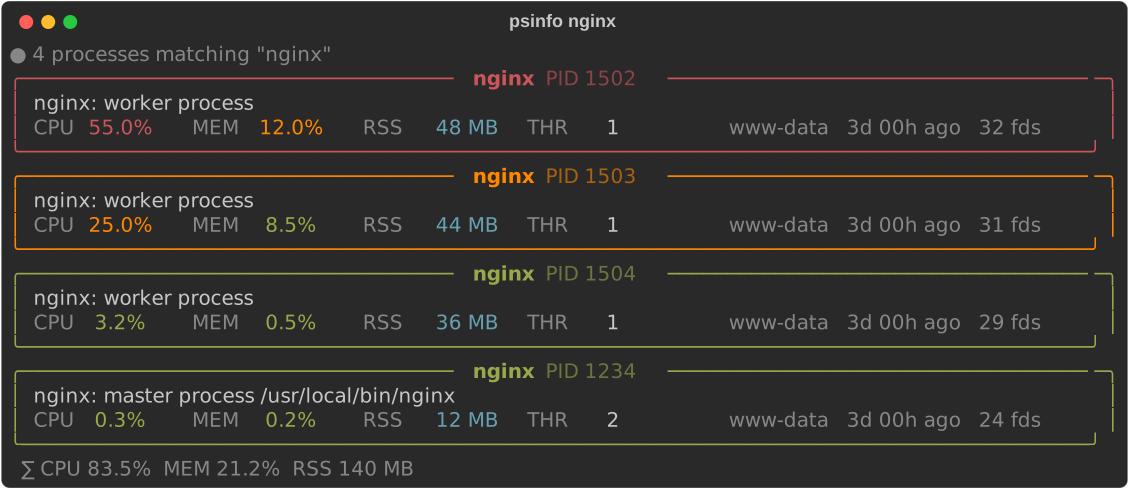
Card View (default)
Each matching process is shown as a panel. The highest-CPU process gets a green border. Metrics are colour-coded: green (< 10%), orange (≥ 10%), red (≥ 50%).
Tree View (-t)
Results are grouped by parent/child relationships. Parent nodes show their own CPU plus a ∑ total across the whole subtree.

Requirements
- Python 3.9+
Platform Support
| Platform | Status | Notes |
|---|---|---|
| macOS | ✓ | --port requires sudo |
| Linux | ✓ | |
| Windows | ✓ | Shows handles instead of file descriptors |
License
MIT — see LICENSE.
Project details
Verified details
These details have been verified by PyPIProject links
GitHub Statistics
Maintainers
Release history Release notifications | RSS feed


Download files
Download the file for your platform. If you're not sure which to choose, learn more about installing packages.
Source Distribution
Built Distribution
Filter files by name, interpreter, ABI, and platform.
If you're not sure about the file name format, learn more about wheel file names.
Copy a direct link to the current filters
File details
Details for the file psinfo-1.1.2.tar.gz.
File metadata
- Download URL: psinfo-1.1.2.tar.gz
- Upload date:
- Size: 7.0 kB
- Tags: Source
- Uploaded using Trusted Publishing? Yes
- Uploaded via: twine/6.1.0 CPython/3.13.7
File hashes
| Algorithm | Hash digest | |
|---|---|---|
| SHA256 |
560cc6bb051af41ea73c3c38b1e119555d8d1569b5d9ba9ecd706ec065ecba18
|
|
| MD5 |
26a4022de1deffe22cff2ffd9112655f
|
|
| BLAKE2b-256 |
13068dc8b1027d90df95a6a0b01f936b92a1c1004d6b63c7c8c30e837be72c13
|
Provenance
The following attestation bundles were made for psinfo-1.1.2.tar.gz:
Publisher:
release.yml on dblore/psinfo
-
Statement:
-
Statement type:
https://in-toto.io/Statement/v1 -
Predicate type:
https://docs.pypi.org/attestations/publish/v1 -
Subject name:
psinfo-1.1.2.tar.gz -
Subject digest:
560cc6bb051af41ea73c3c38b1e119555d8d1569b5d9ba9ecd706ec065ecba18 - Sigstore transparency entry: 1234199238
- Sigstore integration time:
-
Permalink:
dblore/psinfo@a809ab45d930cff8c9222acaff4a102b1dc83e40 -
Branch / Tag:
refs/heads/main - Owner: https://github.com/dblore
-
Access:
public
-
Token Issuer:
https://token.actions.githubusercontent.com -
Runner Environment:
github-hosted -
Publication workflow:
release.yml@a809ab45d930cff8c9222acaff4a102b1dc83e40 -
Trigger Event:
push
-
Statement type:
File details
Details for the file psinfo-1.1.2-py3-none-any.whl.
File metadata
- Download URL: psinfo-1.1.2-py3-none-any.whl
- Upload date:
- Size: 3.6 kB
- Tags: Python 3
- Uploaded using Trusted Publishing? Yes
- Uploaded via: twine/6.1.0 CPython/3.13.7
File hashes
| Algorithm | Hash digest | |
|---|---|---|
| SHA256 |
4f2b29acd486aa610fd90c97857be7c613b0472fa4a5b95b929bc65ef7d85eca
|
|
| MD5 |
768e652d2298b207d598b574a2d16beb
|
|
| BLAKE2b-256 |
2784756b676d76f97857ab29c8786f73734b0d9db7a52ca2cb93161fc7cda3f6
|
Provenance
The following attestation bundles were made for psinfo-1.1.2-py3-none-any.whl:
Publisher:
release.yml on dblore/psinfo
-
Statement:
-
Statement type:
https://in-toto.io/Statement/v1 -
Predicate type:
https://docs.pypi.org/attestations/publish/v1 -
Subject name:
psinfo-1.1.2-py3-none-any.whl -
Subject digest:
4f2b29acd486aa610fd90c97857be7c613b0472fa4a5b95b929bc65ef7d85eca - Sigstore transparency entry: 1234199499
- Sigstore integration time:
-
Permalink:
dblore/psinfo@a809ab45d930cff8c9222acaff4a102b1dc83e40 -
Branch / Tag:
refs/heads/main - Owner: https://github.com/dblore
-
Access:
public
-
Token Issuer:
https://token.actions.githubusercontent.com -
Runner Environment:
github-hosted -
Publication workflow:
release.yml@a809ab45d930cff8c9222acaff4a102b1dc83e40 -
Trigger Event:
push
-
Statement type:






