
PSN Trophy Tracker TUI — sync and browse your PlayStation trophies from the terminal
Verified details
These details have been verified by PyPIProject links
GitHub Statistics
Maintainers

Project description
psnTUI
A terminal UI for browsing and syncing your PlayStation trophies — built for
people who live in the terminal and want their trophy data without opening
a browser or a bloated companion app.
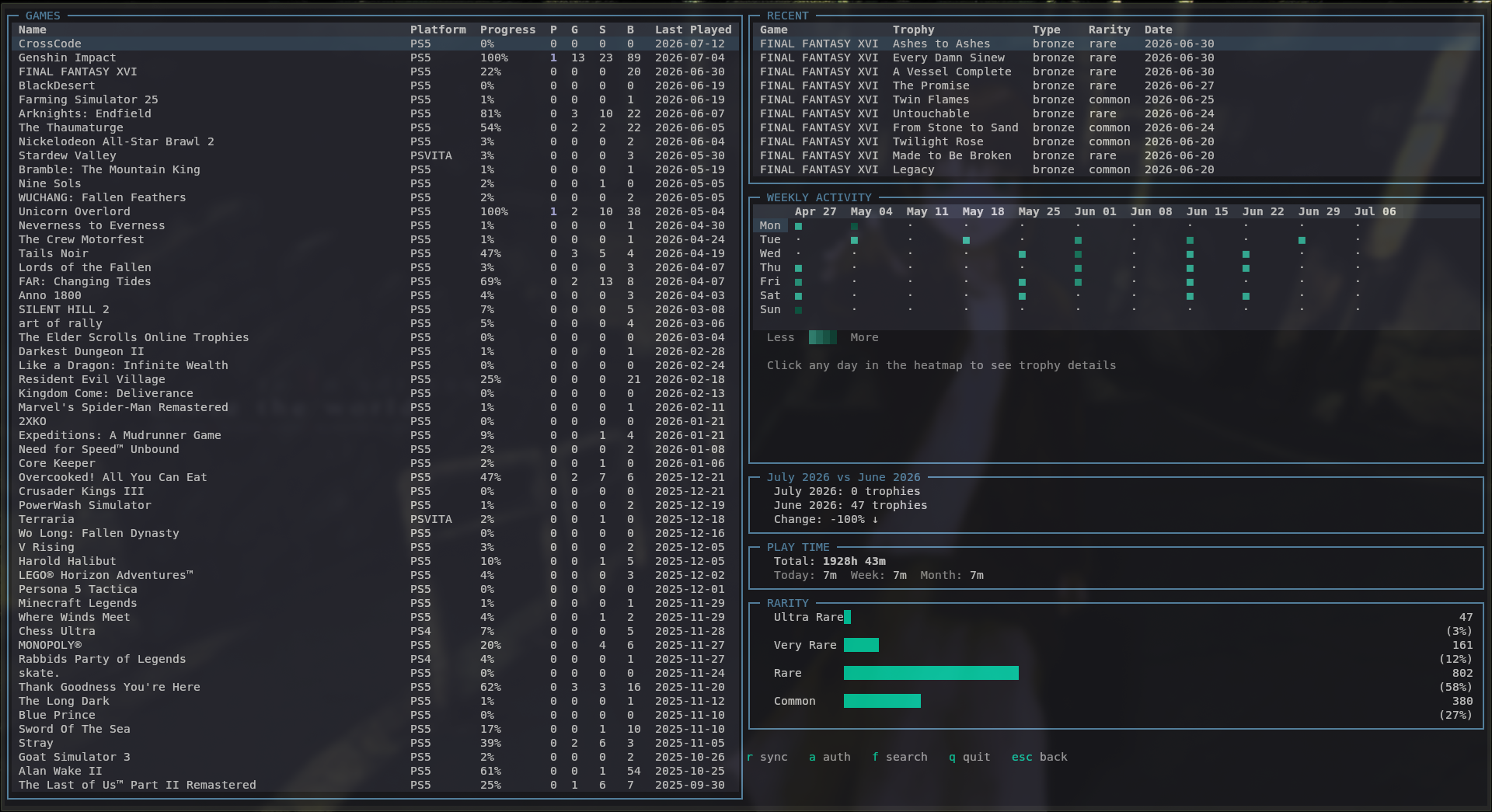
Features
- Sync trophies from PSN — incremental, only re-fetches games that changed since the last sync
- Game library — progress, trophy counts (platinum/gold/silver/bronze), last activity
- Trophy detail — per-game list with rarity, earn rate, earned date
- Weekly activity heatmap — 11-week view, click any day to see what you earned
- Month comparison — current month vs previous month
- Rarity distribution — ultra rare / very rare / rare / common breakdown
- Play time tracking — total, today, this week, this month, per game (PS4/PS5 only)
- In-app search — jump to any game in your library without scrolling
- Headless sync — scheduled background sync via systemd (Linux) or Task Scheduler (Windows)
- Keyboard-first, no mouse required
Installation
Recommended — works the same on Linux, macOS, and Windows:
pipx install psntui
pipx installs the app in its own isolated environment and puts it on your PATH, so you don't need to manage a virtualenv yourself.
Alternatively, with uv:
uv tool install psntui
Or plain pip, if you already manage your own virtual environment:
pip install psntui
From source:
git clone https://github.com/TripShuti/psnTUI
cd psnTUI
pipx install .
Usage
First run
psntui
On first launch you'll land on the auth screen. Paste your NPSSO token and
click Validate & Save (or press Skip to browse the empty UI first).
Getting your NPSSO token
- Log in at https://ca.account.sony.com
- Visit https://ca.account.sony.com/api/v1/ssocookie
- Copy the 64-character value of
npssofrom the returned JSON
This token grants access to your PSN account data — treat it like a password. psnTUI stores it locally with owner-only file permissions and never sends it anywhere except Sony's own API.
Controls
| Key | Action |
|---|---|
r |
Sync trophies from PSN |
a |
Auth screen |
f |
Search games |
q |
Quit |
Esc |
Back (from game detail / search) |
| Click | Select game / trophy / heatmap day |
Headless sync — Linux (systemd)
bash systemd/install.sh
Installs a user timer that syncs every 4 hours (15 minutes after boot).
Check it:
systemctl --user status psntui-sync.timer
journalctl --user -u psntui-sync.service -n 20
Manual trigger on any platform:
psntui --sync
Headless sync — Windows (Task Scheduler)
# Run once
psntui --sync

# Create a recurring task, every 4 hours
$action = New-ScheduledTaskAction -Execute "psntui" -Argument "--sync"
$trigger = New-ScheduledTaskTrigger -RepetitionInterval (New-TimeSpan -Hours 4) -AtStartup
Register-ScheduledTask -TaskName "psnTUI Sync" -Action $action -Trigger $trigger -RunLevel Highest
Data storage
| OS | Location |
|---|---|
| Linux | ~/.config/psntui/ |
| macOS | ~/Library/Application Support/psntui/ |
| Windows | %APPDATA%\psntui\ |
SQLite database with WAL mode. Your NPSSO token lives in config.json in
the same directory, with 0600 permissions on Linux/macOS.
Requirements
- Python ≥ 3.11
- A terminal with Unicode and TrueColor support (Windows Terminal, any
modern Linux/macOS terminal — legacy
cmd.exeis not recommended) - A PlayStation Network account with games on PS4/PS5
- An NPSSO token (see above)
Development
git clone https://github.com/TripShuti/psnTUI
cd psnTUI
python -m venv .venv && source .venv/bin/activate
pip install -e .
pytest tests/
Disclaimer
psnTUI uses psnawp, an unofficial, reverse-engineered wrapper around the PlayStation Network API. This is not affiliated with or endorsed by Sony Interactive Entertainment. Use at your own discretion — aggressive sync frequency may trigger PSN rate limiting.
License
MIT
Project details
Verified details
These details have been verified by PyPIProject links
GitHub Statistics
Maintainers


Download files
Download the file for your platform. If you're not sure which to choose, learn more about installing packages.
Source Distribution
Built Distribution
Filter files by name, interpreter, ABI, and platform.
If you're not sure about the file name format, learn more about wheel file names.
Copy a direct link to the current filters
File details
Details for the file psntui-0.1.5.tar.gz.
File metadata
- Download URL: psntui-0.1.5.tar.gz
- Upload date:
- Size: 22.1 kB
- Tags: Source
- Uploaded using Trusted Publishing? Yes
- Uploaded via: twine/6.1.0 CPython/3.13.12
File hashes
| Algorithm | Hash digest | |
|---|---|---|
| SHA256 |
5334c74c06e0a49578b84331760db85838dd62f56985b6a3bd6d947f36d78cab
|
|
| MD5 |
10e60a6c606b44bb6c9c775c5478e61c
|
|
| BLAKE2b-256 |
a100bceaed0408759a678f4b1a2ede2da0f4cab92cb6d40070b72cbc2abcfd91
|
Provenance
The following attestation bundles were made for psntui-0.1.5.tar.gz:
Publisher:
workflow.yml on TripShuti/psnTUI
-
Statement:
-
Statement type:
https://in-toto.io/Statement/v1 -
Predicate type:
https://docs.pypi.org/attestations/publish/v1 -
Subject name:
psntui-0.1.5.tar.gz -
Subject digest:
5334c74c06e0a49578b84331760db85838dd62f56985b6a3bd6d947f36d78cab - Sigstore transparency entry: 2152410635
- Sigstore integration time:
-
Permalink:
TripShuti/psnTUI@3295fec7af93b5363f5df56803eda44a5ca649be -
Branch / Tag:
refs/tags/v0.1.5 - Owner: https://github.com/TripShuti
-
Access:
public
-
Token Issuer:
https://token.actions.githubusercontent.com -
Runner Environment:
github-hosted -
Publication workflow:
workflow.yml@3295fec7af93b5363f5df56803eda44a5ca649be -
Trigger Event:
release
-
Statement type:
File details
Details for the file psntui-0.1.5-py3-none-any.whl.
File metadata
- Download URL: psntui-0.1.5-py3-none-any.whl
- Upload date:
- Size: 22.0 kB
- Tags: Python 3
- Uploaded using Trusted Publishing? Yes
- Uploaded via: twine/6.1.0 CPython/3.13.12
File hashes
| Algorithm | Hash digest | |
|---|---|---|
| SHA256 |
bc217813800f9570518a46b705e4cae03645ff566623ae7430955a8f1d61398d
|
|
| MD5 |
fdbd1ea88a2dec0f5e8538661d89ffbb
|
|
| BLAKE2b-256 |
7aeaf6b2aa1bca8174182bc622622f1e24d22def1ca12ce4f5542fc1dddc4ac2
|
Provenance
The following attestation bundles were made for psntui-0.1.5-py3-none-any.whl:
Publisher:
workflow.yml on TripShuti/psnTUI
-
Statement:
-
Statement type:
https://in-toto.io/Statement/v1 -
Predicate type:
https://docs.pypi.org/attestations/publish/v1 -
Subject name:
psntui-0.1.5-py3-none-any.whl -
Subject digest:
bc217813800f9570518a46b705e4cae03645ff566623ae7430955a8f1d61398d - Sigstore transparency entry: 2152410658
- Sigstore integration time:
-
Permalink:
TripShuti/psnTUI@3295fec7af93b5363f5df56803eda44a5ca649be -
Branch / Tag:
refs/tags/v0.1.5 - Owner: https://github.com/TripShuti
-
Access:
public
-
Token Issuer:
https://token.actions.githubusercontent.com -
Runner Environment:
github-hosted -
Publication workflow:
workflow.yml@3295fec7af93b5363f5df56803eda44a5ca649be -
Trigger Event:
release
-
Statement type:






