
color-picker
The PSO2 color picker is a command line tool for generating the PSO2 color palette given some RGB value. Currently, this is a toy project that works as follows:
- Install the color-picker tool:
pip install pso2-color-picker - Execute the color-picker tool:
color-picker - Follow the prompts
- "Please provide file name (include .png)": [insert name of output file (e.g. nagatoro-hair.png)]
- "Please enter a color as comma-separated RGB" [insert color (e.g. 123, 234, 12)]
If done correctly, a window should pop up with an image like the following:
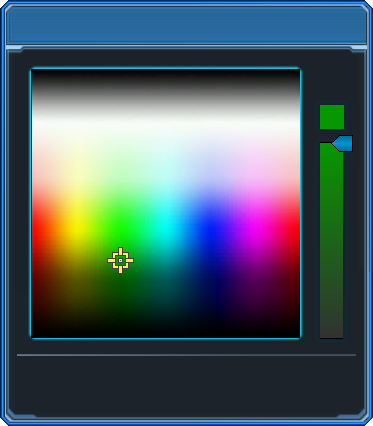
Likewise, a file will be saved at the location you ran the script with the file name you provided in Step 3i.
Let us know if you like it! Given enough community support, we would be happy to extend this tool to be more user-friendly.
1 maintainer

Metadata
1 maintainer
Release files for pso2-color-picker 0.1.3
For a detailed explanation of source distributions (sdists) and built distributions (wheels), please see the package formats documentation.
Source distribution (sdist)
| File | Size | Uploaded | |
|---|---|---|---|
| pso2-color-picker-0.1.3.tar.gz | 163.7 kB | Details |
Built distribution (wheel)
| File | Interpreter | ABI | Platform | Reset |
|---|---|---|---|---|
| pso2_color_picker-0.1.3-py3-none-any.whl | Python 3 | none | any | Details |
Total release size: 327.4 kB
Release files / pso2-color-picker-0.1.3.tar.gz
| Download URL | pso2-color-picker-0.1.3.tar.gz |
|---|---|
| Size | 163.7 kB |
| Tags | Source |
|
SHA-256 checksum How to use checksums |
5a1e00c71ea6a8cfbe803be22b20152c4db4e8830211b6ae28c3d19242a53111
|
|
BLAKE2b-256 checksum How to use checksums |
e33619ebebb019d265999a5d5b5cd6f5a934a16724913c0a8faa2f8158e642cf
|
| Upload date | |
|
Uploaded using Trusted Publishing? What is trusted publishing? |
No |
| Uploaded via |
twine/3.2.0 pkginfo/1.6.1 requests/2.25.0 setuptools/50.3.2 requests-toolbelt/0.9.1 tqdm/4.54.0 CPython/3.8.6
|
Release files / pso2_color_picker-0.1.3-py3-none-any.whl
| Download URL | pso2_color_picker-0.1.3-py3-none-any.whl |
|---|---|
| Size | 163.8 kB |
| Tags | Python 3 |
|
SHA-256 checksum How to use checksums |
96a4af19a98506813c80d5d1a301caf3216f24f227447389ab28cb06ccd6b8b1
|
|
BLAKE2b-256 checksum How to use checksums |
f4829c7386ec4772abbc6da3478ec19339e140485ac277277f9a6ea619488a75
|
| Upload date | |
|
Uploaded using Trusted Publishing? What is trusted publishing? |
No |
| Uploaded via |
twine/3.2.0 pkginfo/1.6.1 requests/2.25.0 setuptools/50.3.2 requests-toolbelt/0.9.1 tqdm/4.54.0 CPython/3.8.6
|














