
python telegram bot menu pagination



Description
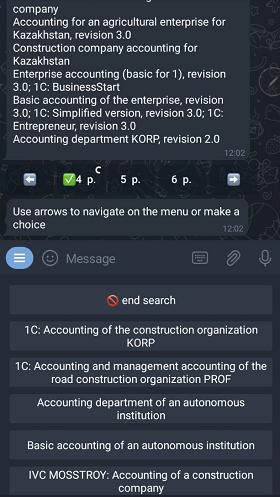
Makes a google style pagination line for a list of items.

In other words it builds a menu for navigation if you have a lot of search results or whatever list of anything
Installation
pip install ptb-menu-navigation
or if you are working with source code and use Poetry tool:
make install
Usage
from paginator import get_menu
Use get_menu function to create a line of pages
Example:
from paginator import get_menu
from dataclasses import dataclass

# Define initial menu settings in the dataclass.
@dataclass
class Menu:
    items_per_page: int = 10
    pages_per_line: int = 3
    navigation_signature: str = '±'
    page_label: str = ' p. '

# Add the initial call of get_menu
def handling_input(update, context):
    # ...
    # On first invocation
    navigation = get_menu(total_items=len(search_results),
                          current_page=1,
                          menu_settings=Menu)
    # ...

# Add a callback to handle a page switching
def navigate(update, context):
    # ...
    navigation = get_menu(total_items=len(search_results),
                          current_page=int(current_page),
                          menu_settings=Menu)
    # ...
where search_results is a list of strings and current_page
is a number extracted from a callback_data.
See examples/search_bot.py
Demo bot launch
Create a .env file with a TOKEN variable
inside of an /examples for launching
the
demo bot.
eg:
TOKEN=<YOUR_TELEGRAM_BOT_TOKEN_FROM_BOT_FATHER>
You may also provide some additional menu values in the same .env file:
ITEMS_PER_PAGE=1
PAGES_PER_LINE=1
NAVIGATION_SIGNATURE="±"
PAGE_LABEL=" p. "
1 maintainer

Metadata
1 maintainer
Release files for ptb-menu-pagination 0.2.2
For a detailed explanation of source distributions (sdists) and built distributions (wheels), please see the package formats documentation.
Source distribution (sdist)
| File | Size | Uploaded | |
|---|---|---|---|
| ptb-menu-pagination-0.2.2.tar.gz | 5.1 kB | Details |
Built distribution (wheel)
| File | Interpreter | ABI | Platform | Reset |
|---|---|---|---|---|
| ptb_menu_pagination-0.2.2-py3-none-any.whl | Python 3 | none | any | Details |
Total release size: 10.9 kB














