
PTestGen
PTestGen takes an exam from the course material to the marks in the gradebook:
- It writes or generates the questions, as Markdown you can read and edit.
- It exports printable PDF exams (multiple choice and open answers, several shuffled versions) or Moodle/Wooclap quizzes.
- It reads the scanned exams, grades the open answers with an LLM, and gives statistics per question.
- It combines everything into the marks you upload.
It drives two companion packages, installed with it:
- pexams: PDF layout and scan reading.
- pevaluate: LLM grading of open answers, blank-paper exams and submissions such as notebooks and reports.
With an agent (recommended)
The tools are meant to be operated by a coding agent (Claude Code or similar) while the teacher decides. Install the package and its agent skill:
pip install ptestgen
ptestgen skill install          # copies the skill to ~/.claude/skills/ptestgen (--dir for another place)
Then ask in plain words, for example:
- "Make a 10-minute quiz with 3 open questions about this lab notebook, for 30 students."
- "Here are the scans of today's exam: correct them and grade the open answers."
- "Grade the notebooks in this Moodle zip on completeness and combine them with the exam, 30/70."
- "Do the same as last year for this course."
The skill tells the agent how to do each of these:
- Setup: installing Playwright and Poppler, the API keys, and choosing models with their measured costs.
- Before exporting: what to ask (number of students and versions, spare answer sheets, instructions).
- After each step: where the PDFs and results are, and how to check them.
- Corrections: how to fix a grade, an ID or a question (voiding) without losing work.
- Recording: keeping everything in a course record for the next year.
ptestgen --agents prints the skill.
The workflow
| Stage | Command | Main outputs |
|---|---|---|
| Questions | written by hand / ptestgen generate |
exam.md (editable) and exam.tsv (history and statistics of each question) |
| Exam PDFs | ptestgen export pexams |
exam_pexams_output/: exam_model_N.pdf, all_exams.pdf, solutions and box positions |
| Online quiz | ptestgen export moodle_xml | gift | wooclap |
import files |
| Scan correction | ptestgen correct pexams |
marks, statistics report, one crop per open answer |
| Online results | ptestgen correct moodle | wooclap |
the same statistics from the quiz export |
| Open answers | pevaluate exam-open / exam-free |
grade, feedback and transcription per answer; one PDF per student |
| Submissions | pevaluate <folder> |
feedback and mark per notebook or report |
| Marks | pevaluate combine-marks, moodle-csv |
filled gradebook / Moodle worksheet |
| Course record | ptestgen course … |
ai4exams.yaml: commands, files, decisions, costs, teacher edits |
Installation
Python 3.10 or later (tested on 3.11).
pip install ptestgen                     # also installs pexams and pevaluate
python -m playwright install chromium    # renders the PDFs
Reading scanned PDFs needs Poppler: brew install poppler (macOS), sudo apt install poppler-utils (Linux) or conda install -c conda-forge poppler. The local TrOCR reader for exam headers, used only without an API key, is optional: pip install "pexams[trocr]".
API keys go in a .env file outside the repository (see .env.example):
ANTHROPIC_API_KEYfor Claude, used for grading and reading the scans.OPENROUTER_API_KEYfor other models, used for question generation by default.
Any variable name works with --api-key-env NAME. The tools look for .env in the current folder and its parents.
Questions
One Markdown file per exam, one ## id {attributes} block per question:
## q_regularization {points=1}
What is the main purpose of regularization?
* To reduce overfitting
* To increase the number of parameters
* To speed up training

**Explanation:**
It penalises complexity, which reduces the variance of the model.

## q_threshold {type=open_answer points=2 lines=6}
With the lab's utility matrix the optimal threshold was 0.28. Why is it lower than 0.5?

**Expected answer:**
False negatives cost more than false positives, so the model should predict the positive class earlier.

**Rubric:**
- 50 %: asymmetric costs.
- 50 %: lower threshold means more positives predicted.
- Multiple choice: the first option is the correct one; it is shuffled in each exam version.
- Open answers (
type=open_answer): the box size is set bylines, at 7 mm per line. - Not printed:
**Explanation:**,**Expected answer:**and**Rubric:**are used for feedback and grading. - Question ids must be unique.
Text can use Markdown: emphasis, inline code and code blocks, images with optional size and position, and LaTeX between $ (inline) or $$ (display). The full format is in the pexams README and in the skill's references/question-format.md.
ptestgen generate
Generates questions from documents (PDF, DOCX, PPTX, MD, IPYNB, TXT, RTF), from images, or from instructions alone. It runs three LLM agents:
- a generator;
- an optional reviewer that improves clarity and distractors;
- an optional evaluator that scores difficulty, pedagogical value, clarity and distractor plausibility.
Treat the evaluator's scores as hints for review, not as criteria.
ptestgen generate slides.pptx -o generated/topic.md -n 10 --question-type mixed --language Spanish \
    --generator-instructions "Focus on LDA and LSA" --evaluate-initial
| Option | Meaning |
|---|---|
-o PATH |
Output .md (and .tsv next to it). |
-n N, --question-type multiple_choice|open_answer|mixed |
How many questions, of which type. |
-i IMG …, --num-questions-per-image N |
Questions about specific images (sent to a vision model one at a time). |
--include-images |
Also send images extracted from the documents as context. |
--generator-instructions, --reviewer-instructions, --evaluator-instructions |
Extra instructions for each agent. |
--provider openrouter|anthropic, --generator-model, --reviewer-model, --evaluator-model |
The provider only picks the default models: OpenRouter google/gemini-3.1-pro-preview (generator) and google/gemini-3.8-flash (reviewer, evaluator); Anthropic claude-sonnet-5-5 and claude-haiku-5-5. Any model id works: bare claude-… ids go to the Anthropic API, others to OpenRouter. Defaults can also be set in .env (OPENROUTER_GENERATOR_MODEL, ANTHROPIC_REVIEWER_MODEL, …). |
--api-key-env NAME, --effort low|medium|high |
Key variable and reasoning effort (also PTESTGEN_ANTHROPIC_API_KEY_ENV, PTESTGEN_OPENROUTER_API_KEY_ENV, PTESTGEN_EFFORT in .env). |
--use-llm-review / --no-use-llm-review, --evaluate-initial, --evaluate-reviewed |
Turn the agents on or off. |
--language |
Language of the questions. |
Documents are converted to Markdown first by pevaluate's parser:
- Through PyMuPDF4LLM: PDF.
- Through python-docx / python-pptx: DOCX and PPTX.
- Through nbconvert: notebooks.
Extracted images are referenced, not sent, unless you pass --include-images.
The agents use the same LLM client as grading, with structured output (JSON schema) and the same traceability: llm_calls.jsonl and run_manifest.json next to the questions file.
Every stage (generated, reviewed, manually edited, final) is kept in the .tsv, with the changes between stages. After correction, the .tsv also gets the statistics.
Exam PDFs: ptestgen export pexams
ptestgen export pexams exam.md --exam-title "Midterm" --exam-course "Course" --exam-date 2026-11-05 \
    --num-models 2 --total-students 30 --extra-model-templates 2 --lang es --custom-header header.md --fill-answer-space
| Option | Meaning |
|---|---|
--num-models N |
Versions with shuffled questions and options (default 1). |
--total-students N |
Also writes all_exams.pdf: N exams, alternating the models, ready to print. |
--extra-model-templates N |
Spare answer sheets per model, appended to all_exams.pdf. |
--lang CODE |
Language of the printed labels (es, en, ca…). |
--exam-title, --exam-course, --exam-date, --custom-header FILE.md |
Header and instructions. |
--columns 1|2|3, --font-size 9pt |
Layout. |
--mc-total-points X, --show-points auto|always|never |
Points: total for the multiple-choice part, and whether to print [1.5 pt]. |
--fill-answer-space |
Open-answer boxes grow to fill the free space of their page. |
--shuffle-questions [SEED], --shuffle-answers [SEED], --num-final-questions N |
Order and selection. |
--generate-fakes N, --generate-references |
Simulated scans, to test the correction before the exam. |
Layout:
- Multiple choice gets a bubble answer sheet.
- Open questions get boxes, which never cross a page break.
- Fiducial marks: every page carries four, so scans can be straightened.
- No multiple choice: the student header (model, ID, name, signature) goes on the first question page.
Outputs: the folder exam_pexams_output/ holds:
exam_model_N.pdf, andall_exams.pdfwhen--total-studentsis set;exam_model_N_questions.json, the solutions;open_answer_areas.json.
Keep the folder that was printed: the scans can only be read with it.
The same .md exports to moodle_xml, gift (recommended for Moodle), wooclap (use --shuffle-answers: Wooclap does not shuffle) and rexams. Moodle XML and GIFT render the text like the PDF (code, math for Moodle's MathJax filter) and embed every image with its size and position; R/exams takes the images of the question text; Wooclap takes no images. If the .tsv does not exist yet, export creates it from the Markdown.
Correction
Scanned exams: ptestgen correct pexams
ptestgen correct pexams exam.md --input-path scans/ --exam-dir exam_pexams_output --output-dir correction \
    --penalty 0.33333 --api-key-env ANTHROPIC_API_KEY [--input-csv roster.xlsx --id-column ID --name-column Name --mark-column Mark]
- Scans: 300 dpi, grayscale, PDF.
--input-pathtakes one or more PDFs or folders, read in order as one batch. - Headers: the model, ID and name are read by a vision LLM (
--id-reader llm, default Claude Opus 5.5 at low effort, about $0.002 per exam);--id-reader trocris local and much less reliable. - Class list: with
--input-csv, students are matched by ID, then by name. Unmatched scans stop the run and are listed instudent_matches.csv. - Penalty:
--penaltyis a fraction of the question's points per wrong multiple-choice answer; blanks cost nothing. - Voiding questions:
--void-questions 3,7removes them for everyone.--void-questions-nicely 11counts them only for students they help. Add--only-analysisto recompute without reading the scans again. - Fixing misreads: edit
correction_results.csv(a misread ID or answer), then rerun with--only-analysis. - Layout check: crops whose printed box is not found are flagged
layout_check=box_not_foundin the index. This usually means the exam folder is not the printed version.
Outputs in --output-dir:
| File | Content |
|---|---|
correction_results.csv |
One row per exam: student (final and as read), model, answers. |
final_marks.csv, mark_distribution_0_10.png |
Multiple-choice marks. |
question_stats.csv, stats_report.pdf |
Answer distribution, difficulty and discrimination per question. |
open_responses/, open_responses_index.csv |
One crop per open answer, for pevaluate exam-open. |
scanned_pages/ |
Each exam's pages, named by student. |
run_manifest.json, llm_calls.jsonl |
Traceability (below). |
The statistics are also written into the question .tsv.
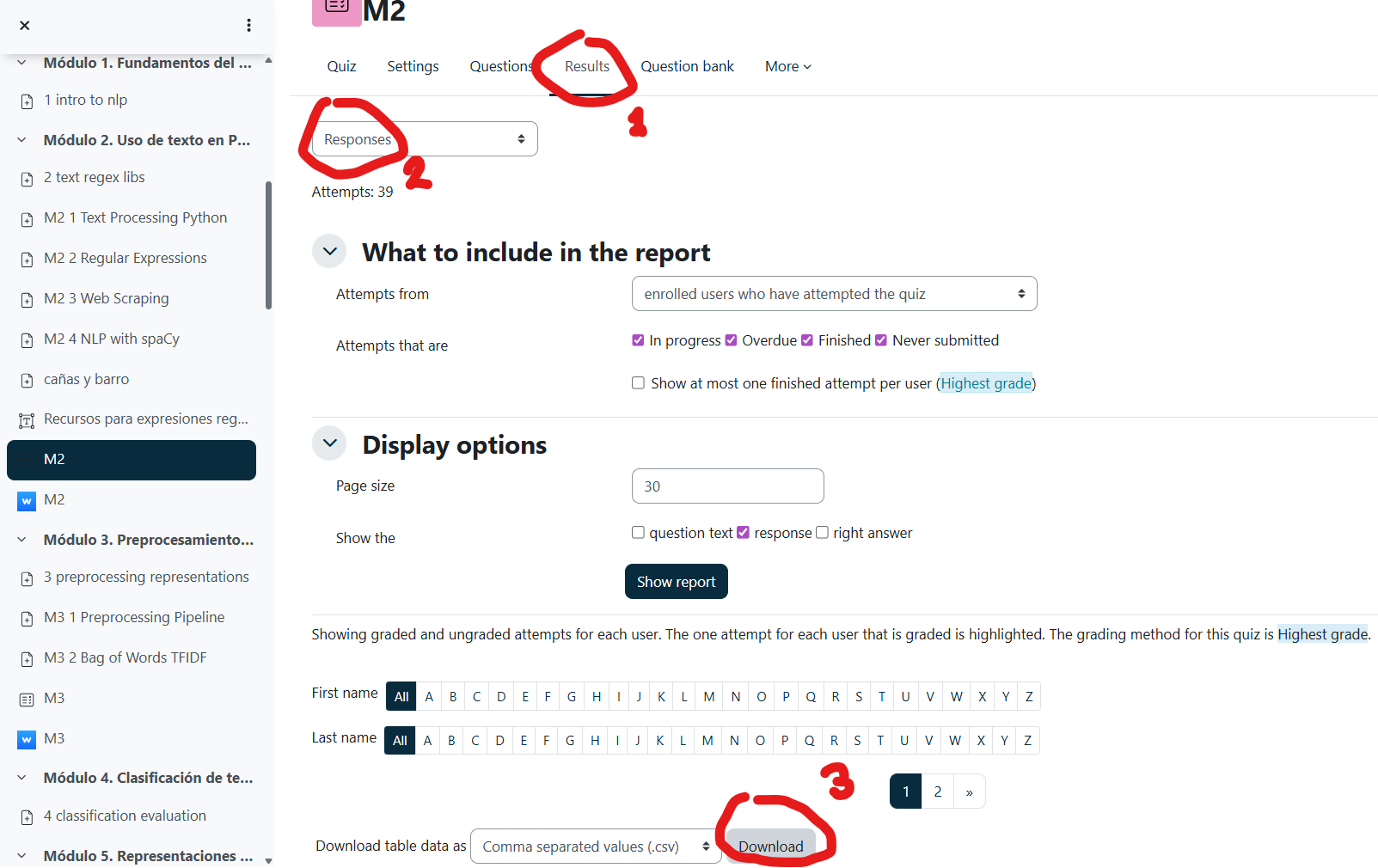
Online quizzes: ptestgen correct moodle / wooclap
These read the quiz results export and produce the same statistics:
- Moodle: Results → Responses → Download.
- Wooclap: View results → Export to Excel.
ptestgen correct moodle exam.md --results responses.csv --output-dir results [--question-order 3,1,2] [--penalty 0.25]
ptestgen correct wooclap exam.md --results results.xlsx --output-dir results [--fuzzy-threshold 80]
How answers are matched:
- Moodle: answer columns are mapped to the questions by position.
- Wooclap: columns are mapped by question text (exact, then fuzzy).
- Both: answers are matched to the options in the same way, exact first, then fuzzy.
Open answers, blank-paper exams and submissions
These are graded by pevaluate:
| Command | What it grades |
|---|---|
pevaluate exam-open --index-csv correction/open_responses_index.csv --exam-dir exam_pexams_output --output-dir correction/open [--mc-correction-dir correction] |
Each crop, against the expected answer and rubric. Writes the score, a one-line feedback and a transcription, plus per-student PDFs. With --mc-correction-dir, overall_marks.csv also includes the multiple-choice part. |
pevaluate exam-free --input-path scans.pdf --exam-dir … --pages-per-exam 2 |
Exams written on blank paper. Answers are matched to questions by content. |
pevaluate <folder> --rubric rubric.txt --example example.txt |
Submissions (e.g. a Moodle "download all" zip of notebooks). |
pevaluate combine-marks …, pevaluate moodle-csv … |
Weighted final marks with feedback in the gradebook export, or a filled Moodle worksheet. |
Grades are kept in editable YAML files (open_evaluations.yaml, feedback/*.yaml). Rerunning the same command keeps the teacher's edits. The model's original grade stays in each grader block, so changes can be measured.
Course record: ai4exams.yaml
One YAML file per course records everything needed to repeat or report the work:
- each step's command and arguments, with its folder and outputs;
- decisions, such as voided questions and grading policy;
- whether an exam was printed or published, which locks it against accidental re-export;
- computed metrics and teacher edits.
| Command | Does |
|---|---|
ptestgen course init --name "Course" --year 2026-2027 |
Creates the file from a commented template. |
ptestgen course validate |
Checks the schema, the paths and steps not run yet, and catches API keys pasted by mistake. |
ptestgen course show [P1.correct] |
Shows an overview, or one step's exact command, output and the warnings for rerunning it. |
ptestgen course run P1.correct [--dry-run] [--yes] [--unlock] |
Runs a step with the .env loaded. It refuses locked steps, and asks before overwriting. |
ptestgen course metrics [--write] |
Per step: models and versions, LLM calls, tokens, cost, latency, marks. |
ptestgen course edits [--write] |
Where the final grade differs from the model's, and where a scanned ID was corrected. |
The schema and an example are in the skill's references/course-yaml.md.
Models and costs
Measured on one course: 21 notebooks and 27 three-question handwritten exams per session, with Opus 5.5 at medium effort as the reference.
| Task | Default | Cheaper, measured |
|---|---|---|
| Exam headers | Opus 5.5, low effort (~$0.002/exam) | Sonnet/Haiku misread more names |
| Open answers (81) | Opus 5.5, medium, 900 px crops (~$1.30) | Sonnet 5.5 high ( |
| Notebooks (21) | Opus 5.5, medium, compacted (~$3.40) | Sonnet 5.5 high (~$1.70, 0.20/10); never Sonnet medium (skims) |
Bare claude-... model ids use the Anthropic API. Any other id (e.g. google/gemini-3.8-flash) goes through OpenRouter.
Traceability
Every output folder has two files:
run_manifest.json: the command, Python version, package versions and git commits, model, effort, and SHA-256 of the inputs.llm_calls.jsonl: one line per call, with the model requested and served, effort, request id, tokens, latency, and hashes of the prompt, images and response.
Each graded answer or submission keeps a grader block with the model, effort, time and the model's original grade. ptestgen course metrics and edits aggregate all this per course.
Other commands
| Command | Does |
|---|---|
ptestgen evaluate exam.md --stages generated reviewed final [--missing-only] |
Runs the evaluator agent on the questions. |
ptestgen split all.md --splits 0.5 3 -1 --output-dir splits |
Splits a test (e.g. into a final and a make-up exam), keeping each question's history. |
ptestgen merge a.md b.md -o all.md |
Merges tests, keeping each question's history. |
ptestgen shuffle exam.md --seed 42 --yes |
Shuffles the questions of a Markdown file in place. |
ptestgen test |
End-to-end run with real LLM calls: generate, split, merge, export, simulated scans, correct. Writes to generated_test/. |
ptestgen skill install | path, ptestgen --agents |
The agent skill. |
Development
pip install -e ../pexams -e ../pevaluate -e .
python -m pytest -q --ignore=tests/test_llm_online.py --ignore=tests/test_correct_online.py
Pushing to main runs the tests, and publishes to PyPI when the version in pyproject.toml is new. ptestgen's CI installs pexams and pevaluate from PyPI, so release in this order:
- pexams;
- pevaluate, once pexams is on PyPI;
- ptestgen, with its
pexams>=/pevaluate>=pins bumped.
1 maintainer

Metadata
1 maintainer
Release files for ptestgen 0.7.0
For a detailed explanation of source distributions (sdists) and built distributions (wheels), please see the package formats documentation.
Source distribution (sdist)
| File | Size | Uploaded | Provenance | Actions |
|---|---|---|---|---|
| ptestgen-0.7.0.tar.gz | 224.9 kB | With provenance | Details for ptestgen-0.7.0.tar.gz |
Built distribution (wheel)
| File | Interpreter | ABI | Platform | Actions Reset |
|---|---|---|---|---|
| ptestgen-0.7.0-py3-none-any.whl | Python 3 | none | any | Details for ptestgen-0.7.0-py3-none-any.whl |
Total release size: 442.4 kB
Release files / ptestgen-0.7.0.tar.gz
| Download URL | ptestgen-0.7.0.tar.gz |
|---|---|
| Size | 224.9 kB |
| Tags | Source |
|
SHA-256 checksum How to use checksums |
f9f9da1f2699368af5b220ac4bc45917ba83df1e830dc71a36c59ff30a4af92f
|
|
BLAKE2b-256 checksum How to use checksums |
5d522dce5933bbaca841d0a549f087aeb80fc3583f2dd85717a50a60874772b2
|
| Upload date | |
|
Uploaded using Trusted Publishing? What is trusted publishing? |
Yes |
| Uploaded via |
twine/7.0.0 CPython/3.13.16
|
Provenance
Provenance describes where a file came from. On PyPI, provenance is shared via attestations, which provide a verifiable record of the build or publishing details. View details, limitations and caveats.


PyPI Publish Attestation
PyPI verified that this artifact, at this checksum, originated from the publisher listed below.
Signed by GitHub Actions, verified by PyPI on Oct 28, 2026.
Transparency logRelease files / ptestgen-0.7.0-py3-none-any.whl
| Download URL | ptestgen-0.7.0-py3-none-any.whl |
|---|---|
| Size | 217.6 kB |
| Tags | Python 3 |
|
SHA-256 checksum How to use checksums |
f164c0b9d003555d76d9512d7afb584636e78ac253590cbf3c6488e799bcf25a
|
|
BLAKE2b-256 checksum How to use checksums |
3aaa17152227471abbfe156481ea0d0688bba803f7041cbc5c3e29a8283df3df
|
| Upload date | |
|
Uploaded using Trusted Publishing? What is trusted publishing? |
Yes |
| Uploaded via |
twine/7.0.0 CPython/3.13.16
|
Provenance
Provenance describes where a file came from. On PyPI, provenance is shared via attestations, which provide a verifiable record of the build or publishing details. View details, limitations and caveats.
PyPI Publish Attestation
PyPI verified that this artifact, at this checksum, originated from the publisher listed below.
Signed by GitHub Actions, verified by PyPI on Oct 28, 2026.
Transparency logSecurity for ptestgen 0.7.0
Provenance
Provenance describes where a file came from. On PyPI, provenance is shared via attestations, which provide a verifiable record of the build or publishing details. View details, limitations and caveats.
Full provenance
Both files in this release have been uploaded with provenance metadata.
Attestation for ptestgen-0.7.0.tar.gz
PyPI Publish Attestation
PyPI verified that this artifact, at this checksum, originated from the publisher listed below.
Signed by GitHub Actions, verified by PyPI on Oct 28, 2026.
Transparency logA note on package security
PyPI is a repository for distributing packages, not a service for auditing them. While third-party security researchers and our staff do their best to detect and remove malicious packages, PyPI cannot guarantee the quality, security or suitability of any given package.
To learn more about protecting yourself from malicious actors, visit our package security documentation.














