
ptui
A fast, keyboard-driven terminal UI for
papis.
Beta. Not on PyPI yet.




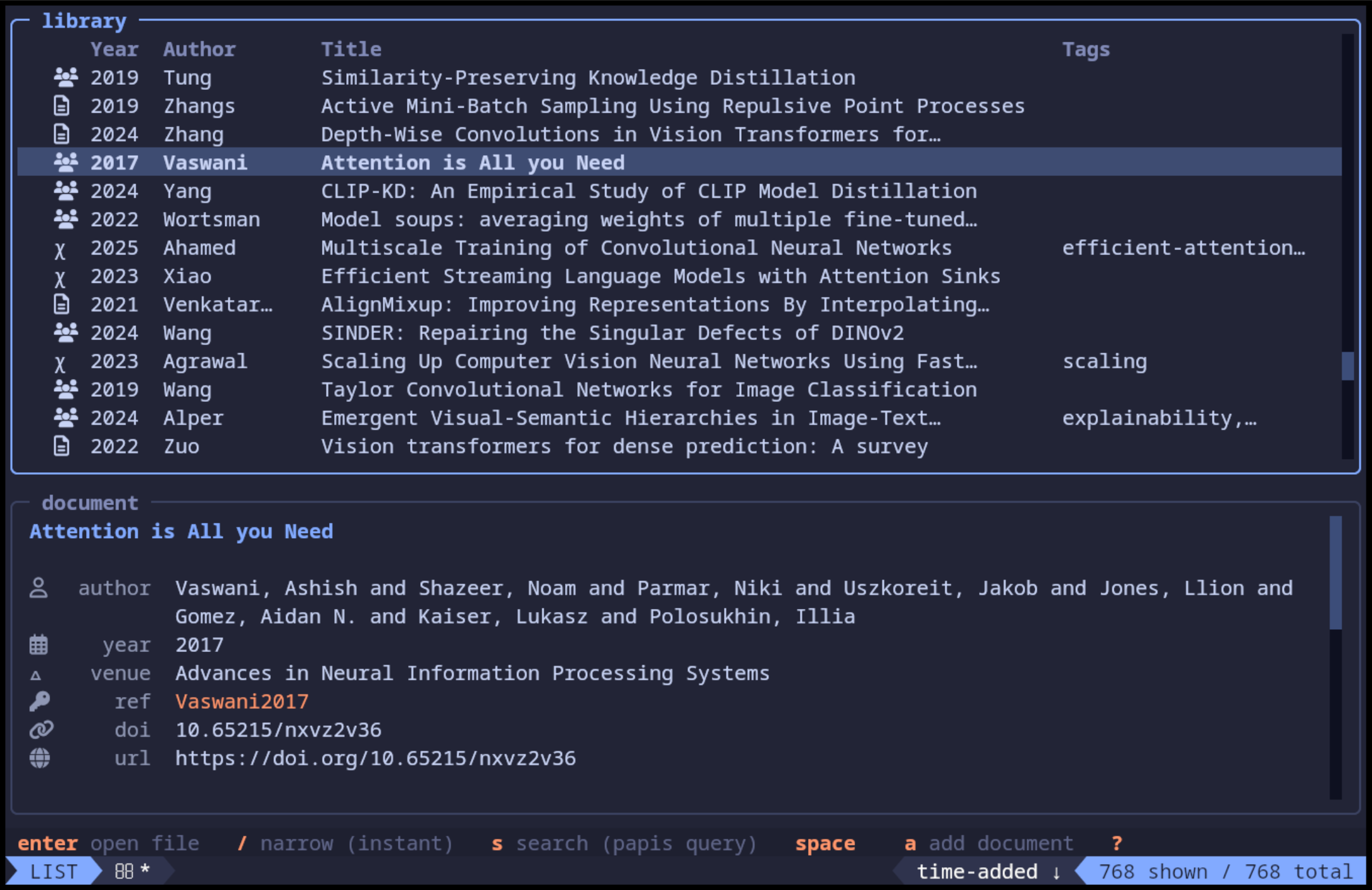
papis keeps your library as plain folders, one info.yaml per paper, and its
command line is good for scripts. ptui is for working in that library by hand:
find a paper in a few keystrokes, read the abstract, open the PDF, tag it, copy
its BibTeX. It reads and writes the same files papis does, so the papis
command keeps working next to it.
The keys are vim-like, and you can start without learning them. Press a prefix
such as g or c and a menu shows what can follow. ? lists every key of the
pane you are in, and : finds any command by name.
Install
You need Python 3.13 or newer and uv.
git clone https://github.com/tobna/ptui
cd ptui
uv sync
uv run ptui
uv tool install --editable . gives you a ptui command that works in any
directory. If you have no papis library yet, uv run papis init /path/to/library creates one.
Running it as papis ptui
papis finds ptui only when both are installed in the same environment. From the
checkout, uv run papis ptui works. If your papis came from pipx, add ptui to
it:
pipx inject --editable --include-apps papis /path/to/ptui
What it does
Search
Two layers. s asks papis for the scope, and / filters it as you type
(vision -survey year:>2023). The status bar shows both, so you can tell why a
paper is not in the list.
Filter terms, sorting and saved searches
In /, every term has to match: -word excludes, "two words" is a phrase,
field:value looks in one field, and year:>2023 or year:2020..2024
compares numbers. a:, t:, y: and k: are short for author, title, year
and tags, in / and in s. escape drops the filter.
S picks the sort and ctrl+s reverses it. \ s saves the scope and sort
under a name, and g s brings it back. In a search prompt, up recalls
earlier queries; type a few letters first to see only those that start with
them. g r jumps to a citekey, and you can paste a whole \cite{key}.
With general.persist_state = true, ptui starts where your last session in
that library ended.
Marks
Marks belong to papers, so sorting and filtering keep them. A command acts on
the marked papers, or on the one under the cursor when nothing is marked.
Ranges, marking by query, and batch confirms
space marks and moves on. v marks everything the cursor passes until you
press v or escape again, like vim's visual mode, and V unmarks the same
way. m a marks the filtered list, m q marks by a query without changing
the view, m i inverts, m c clears, and g m shows only the marked papers.
Field edits, deletes, moves, f r, f n, :lib.backfill_dates and doctor
fixes ask first when they would change more than one paper, and the count
includes marked papers the filter hides.
Editing
c t tags, c s sets the reading status, c r rates, and c f sets any
field. e opens info.yaml in your editor, and E a form over the common
fields.
Tags, field types, the editor and the form
c t adds tags and keeps the ones already there. Tags are separated by commas,
so machine learning, cv is two tags. c T removes tags. A rating goes from
0 to 5, and 0 clears it. ptui writes the type papis declares for a field, so
year stays a number and tags a list. An empty value removes the field.
If you save YAML in the editor that no longer parses, ptui says so and shows
the paper as it was until you fix the file. The form covers title, authors,
year, tags, citekey, DOI and URL, and edit.mode = "structured" swaps e and
E. g n opens the paper's notes.
Updating from the source
c u fetches the paper again from its DOI, its arXiv id or a Crossref search.
It fills in the fields the paper lacks and asks about each field where the
source disagrees with what you have; papis update --auto would overwrite
them. A Crossref search lists its hits, so you pick the right paper first.
Adding papers
a adds a paper from a file, your inbox, an arXiv id, a DOI, an ISBN, a URL, a
.bib, a Crossref search and more. A form shows what was found before
anything is written, and if the library already has the paper, ptui asks
first.
Every source, duplicates, and the date added
The sources are a file, your inbox (~/Downloads unless you set
files.inbox), a URL, a .bib file, an arXiv id, a DOI, an ISBN, a PubMed id,
a DBLP key, a Zenodo record, a Crossref search, a PDF to read a DOI or arXiv id
from, or an existing papis folder or library. i goes straight to the inbox,
and :doc.add arxiv 2607.00687 skips both questions. An arXiv import brings
the PDF along. A papis importer plugin ptui does not list joins them with one
line under [add.sources] in config.toml (CONFIG.md).
ptui counts a paper as already there when the DOI, ISBN, arXiv id, URL or title matches, and asks whether to go to it, add it anyway or cancel.
ptui stamps time-added on what it adds, so the default sort puts new papers
on top. papis stamps only papers added with papis add, so run
:lib.backfill_dates once to date the older ones by when their info.yaml
last changed.
Merging, deleting and undo
m m merges duplicates into one paper and d d deletes, and u undoes
either. Deleted and merged-away folders wait in a trash for 30 days.
What a merge keeps, what undo covers, and the trash
A merge is for a paper you have twice, say from arXiv and from the
proceedings. You choose which citekey survives, each real disagreement is one
question, and every file is kept. The delete dialog has a checkbox for each
file; only files in a folder ptui manages start ticked. :doc.move moves
papers to another papis library.
u undoes and ctrl+r redoes, up to 50 steps in a session. That covers field
edits, the form, c u, everything in the files pane, f n, f r, doctor
fixes, deletes and merges. f a, edits made in your editor and :doc.move
cannot be undone.
The trash is ~/.local/share/ptui/trash. At startup ptui deletes what has
been there more than 30 days and says so in the log, and :lib.empty_trash
empties it when you ask. If the library is a git repository,
undo.strategy = "git" makes each delete a commit that u reverts. Files
still go to the trash, since a PDF folder outside the library is not in the
repository.
Files
o opens the PDF and f a attaches a file or URL. Placement rules decide
where files belong, and f r moves them there. 3 opens a pane with the
paper's files, to reorder, rename, repoint or detach them.
Opening, the files pane, and a rule that moves PDFs
o (or enter) opens the main file with papis's opentool, f o picks one
when there are several, O opens the folder and b the URL or DOI. f a
works as papis addto does.
In the files pane, x takes a file off the list and leaves it on disk, K
and J move it (the first one is the main file), p points a broken entry at
another file, r renames to papis's naming scheme, and m applies the
placement rules.
The rules are [[files.rules]] in config.toml, tried in order, and the first
match wins. The shipped ones leave every file where papis put it, so nothing
moves until you write a rule that does. This one keeps all PDFs in one folder
outside the library:
[files]
pdf_root = "~/papers"

[[files.rules]]
name = "pdfs to one folder"
match = ["*.pdf"]
op = "move"
dest = "{pdf_root}/{doc[ref]}.pdf"
path_style = "absolute"
A move never overwrites an existing file.
The doctor
papis's doctor checks every paper in the background, and the list marks the
ones with problems. ! ! shows only those. Nothing is fixed until you ask:
! f fixes the paper, and ! o one finding you pick.
Copying and exporting
y y copies \cite{key}, y b the BibTeX, and y e exports in any format
papis has an exporter for. ptui uses wl-copy, xclip or pbcopy when one
is installed, and otherwise the terminal (OSC 52), which also works over SSH.
Safe writes
Before each write, ptui checks that info.yaml has not changed since it read
it. If something else changed it (a sync, a script, papis itself), ptui
reloads that paper and asks you to do it again. Your comments and keys ptui
does not know survive the write, except with f a, which is papis addto.
Looks
Themes, previewed as you move through \ t. Nerd-font icons, or plain
characters with ui.icons = false. On a narrow terminal the info pane moves
under the list.
Panes, columns and the mouse
There are four panes: the list (1), info (2), files (3) and the log
(4). tab, h and l move between them. z z switches between side by
side and stacked, z i hides the info pane, and z + and z - move the
split. The columns are papis format strings in [[list.columns]], and
list.row_height = 2 gives long titles a second line. ui.mouse = false
leaves the mouse to the terminal so you can select text.
First steps
ptui                  # your default papis library
ptui -l work          # the library papis calls "work"
ptui tags:to-read     # start with a papis query as the scope
| Keys | What happens |
|---|---|
s a:nauen enter |
ask papis for one author's papers |
/ vision -survey enter |
keep those with "vision" and without "survey" |
space space |
mark two papers |
c t to-read enter |
tag both (ptui asks first, since it is two papers) |
y b |
copy their BibTeX |
o |
open the PDF of the paper under the cursor |
q quits. Every key is in KEYS.md.
Configuration
ptui reads config.toml and keys.toml from the ptui folder in papis's
config folder, usually ~/.config/papis/ptui/. Neither has to exist: write
only what you want to change. CONFIG.md lists every setting with
its default, and KEYS.md every key binding and how yours combine
with the shipped ones.
To run your own script from ptui, name it in config.toml. It becomes the
command shell.move_to_papers, which : lists; bind it in keys.toml and
? shows it too. It runs in the library folder with the terminal; end the
line with ; read to read its output before ptui comes back. rescan = true
rescans the library afterwards, for a script that changes it:
# config.toml
[shell]
move_to_papers = { line = "move_to_papers", rescan = true }

# keys.toml
[global]
"\\ m" = { cmd = "shell.move_to_papers", desc = "move to papers" }
Development
uv sync
uv run pytest
uv run ruff check --fix && uv run ruff format
uv run python scripts/keydoc.py      # regenerate KEYS.md after changing keys.toml
uv run python scripts/configdoc.py   # regenerate CONFIG.md after changing config.toml
CI runs the tests with coverage on the Python in .python-version for every push and pull
request, and they fail while KEYS.md or CONFIG.md is out of date.
SPEC.md says how ptui is meant to behave, and
CLAUDE.md holds notes on the code for coding agents.
License
MIT, see LICENSE.
1 maintainer

Metadata
1 maintainer
Release files for ptui 0.3.0
For a detailed explanation of source distributions (sdists) and built distributions (wheels), please see the package formats documentation.
Source distribution (sdist)
| File | Size | Uploaded | Provenance | Actions |
|---|---|---|---|---|
| ptui-0.3.0.tar.gz | 127.4 kB | Without provenance | Details for ptui-0.3.0.tar.gz |
Built distribution (wheel)
| File | Interpreter | ABI | Platform | Actions Reset |
|---|---|---|---|---|
| ptui-0.3.0-py3-none-any.whl | Python 3 | none | any | Details for ptui-0.3.0-py3-none-any.whl |
Total release size: 262.2 kB
Release files / ptui-0.3.0.tar.gz
| Download URL | ptui-0.3.0.tar.gz |
|---|---|
| Size | 127.4 kB |
| Tags | Source |
|
SHA-256 checksum How to use checksums |
fc7e1cbba449a9650db687a6023be337e58e7b4fd7d9c22eda2849e0ed1630b9
|
|
BLAKE2b-256 checksum How to use checksums |
710409d902c1650c5a8eda2ea4ab91694433368c926e66e59e007685f34fac9d
|
| Upload date | |
|
Uploaded using Trusted Publishing? What is trusted publishing? |
Yes |
| Uploaded via |
uv/0.13.9 {"installer":{"name":"uv","version":"0.13.9","subcommand":["publish"]},"python":null,"implementation":{"name":null,"version":null},"distro":{"name":"Ubuntu","version":"26.04","id":"resolute","libc":null},"system":{"name":null,"release":null},"cpu":null,"openssl_version":null,"setuptools_version":null,"rustc_version":null,"ci":true}
|
Release files / ptui-0.3.0-py3-none-any.whl
| Download URL | ptui-0.3.0-py3-none-any.whl |
|---|---|
| Size | 134.8 kB |
| Tags | Python 3 |
|
SHA-256 checksum How to use checksums |
eaddba52a843c29290c54227c054932cfe133a0ba8e2f89805ca6abdcbd54b51
|
|
BLAKE2b-256 checksum How to use checksums |
a53f1169f1ec8da712617840de283c13534347a13e27f10c42b1bf951e73268a
|
| Upload date | |
|
Uploaded using Trusted Publishing? What is trusted publishing? |
Yes |
| Uploaded via |
uv/0.13.9 {"installer":{"name":"uv","version":"0.13.9","subcommand":["publish"]},"python":null,"implementation":{"name":null,"version":null},"distro":{"name":"Ubuntu","version":"26.04","id":"resolute","libc":null},"system":{"name":null,"release":null},"cpu":null,"openssl_version":null,"setuptools_version":null,"rustc_version":null,"ci":true}
|
Security for ptui 0.3.0
Provenance
Provenance describes where a file came from. On PyPI, provenance is shared via attestations, which provide a verifiable record of the build or publishing details. View details, limitations and caveats.
No provenance found
None of the files in this release were uploaded with provenance metadata.
A note on package security
PyPI is a repository for distributing packages, not a service for auditing them. While third-party security researchers and our staff do their best to detect and remove malicious packages, PyPI cannot guarantee the quality, security or suitability of any given package.
To learn more about protecting yourself from malicious actors, visit our package security documentation.













