
PtyLab.py: Unified Ptychography Toolbox




Key Features | Getting Started | Installation | Documentation
PtyLab is an inverse modeling toolbox for Conventional (CPM) and Fourier (FPM) ptychography in a unified framework. See the paper for details.
Key Features
- Classic engines: ePIE, mPIE, mqNewton, qNewton
- Advanced corrections: position correction, defocus correction (zPIE), angle correction (aPIE), orthogonal probe relaxation (OPR)
- Multi-modal: multi-slice, multi-wavelength, mixed-state object and probe
- Multiple propagators: Fraunhofer, Fresnel, Angular Spectrum (ASP), scaled ASP, polychromatic variants
- GPU acceleration: same code runs on CPU and GPU (NumPy/CuPy)
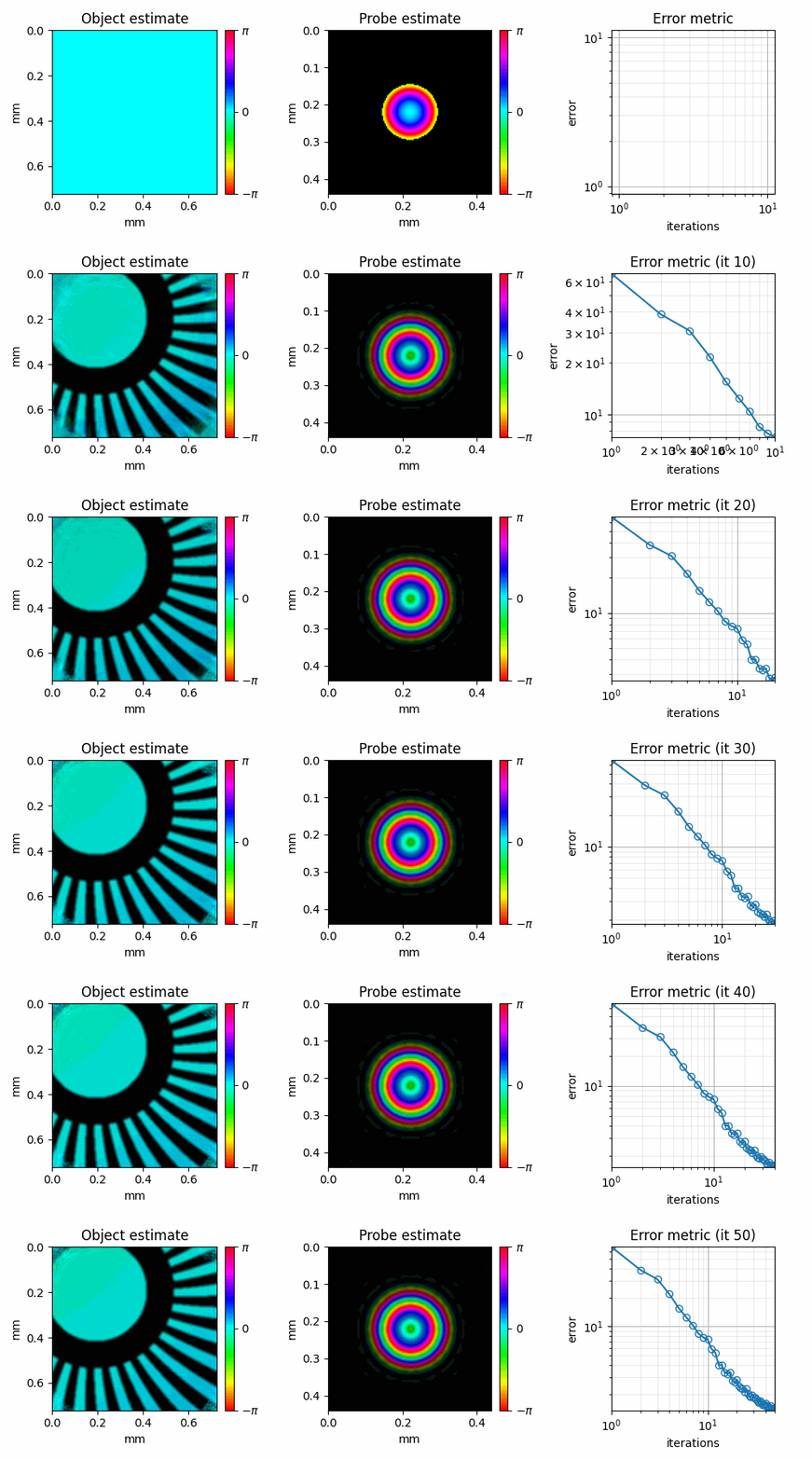
- Live monitor: follow the object, probe, error metric and any corrected parameters (scan positions, sample-detector distance, wavelength, angle) as the iterations run
- Differentiable ptychography (work in progress): Optional Gradient-based reconstruction module with custom models, losses and constraints leveraging automatic differentiation of PyTorch.
How it works
PtyLab.py is built around a 6D array (nlambda, nosm, npsm, nslice, N, N), i.e. wavelengths, object and probe state mixtures, depth slices, then the frame.
As shown below, the data flow to a reconstruction involves five core classes: ExperimentalData, Reconstruction, Params, Engine and Monitor.
flowchart LR
    file[(HDF5 data)] --> exp[ExperimentalData]
    exp --> recon["Reconstruction<br/>(object, probe)"]
    exp & recon & params[Params] --> engine["Engine<br/>(ePIE, mPIE, ...)"]
    engine -.->|updates| recon
    engine <-->|each iteration| corr["Optional Corrections: positions, distance, angle"]
    engine -.-> mon[Monitor<br/>live plots]
    corr -.-> mon
    engine -->|reconstruct| out["Saved to HDF5<br/>object, probe, error, corrected parameters"]
Getting started
Try the demo in Google Colab:

To explore more features, we have extensive examples in our documentation.
Installation
Install from PyPI within your virtual environment (assuming you have installed uv):
uv pip install -U ptylab
For GPU support (Linux or Windows):
uv pip install -U "ptylab[gpu]"
Check whether the GPU is correctly configured with ptylab check gpu. For other extras such as torch and gui, see the installation guide.
Contributing
Contributions are welcome! See the contributing guide for the development setup, tests and how to open a pull request.
Citation
If you use this package, please cite:
@article{Loetgering:23,
        author = {Lars Loetgering and Mengqi Du and Dirk Boonzajer Flaes and Tomas Aidukas and Felix Wechsler and Daniel S. Penagos Molina and Max Rose and Antonios Pelekanidis and Wilhelm Eschen and J\"{u}rgen Hess and Thomas Wilhein and Rainer Heintzmann and Jan Rothhardt and Stefan Witte},
        journal = {Opt. Express},
        number = {9},
        pages = {13763--13797},
        publisher = {Optica Publishing Group},
        title = {PtyLab.m/py/jl: a cross-platform, open-source inverse modeling toolbox for conventional and Fourier ptychography},
        volume = {31},
        month = {Apr},
        year = {2023},
        doi = {10.1364/OE.485370},
}
2 maintainers


Metadata
2 maintainers
Release files for ptylab 0.4.0
For a detailed explanation of source distributions (sdists) and built distributions (wheels), please see the package formats documentation.
Source distribution (sdist)
| File | Size | Uploaded | Provenance | Actions |
|---|---|---|---|---|
| ptylab-0.4.0.tar.gz | 201.4 kB | With provenance | Details for ptylab-0.4.0.tar.gz |
Built distribution (wheel)
| File | Interpreter | ABI | Platform | Actions Reset |
|---|---|---|---|---|
| ptylab-0.4.0-py3-none-any.whl | Python 3 | none | any | Details for ptylab-0.4.0-py3-none-any.whl |
Total release size: 428.7 kB
Release files / ptylab-0.4.0.tar.gz
| Download URL | ptylab-0.4.0.tar.gz |
|---|---|
| Size | 201.4 kB |
| Tags | Source |
|
SHA-256 checksum How to use checksums |
722cd9f58e7d21f06951c013aa1399fe8e268ae3ddcc73cac11a1eec2a0c3050
|
|
BLAKE2b-256 checksum How to use checksums |
eb7edac40650555115d74df75556c14624cf47f11148a3f7ab34171fb0c27e8a
|
| Upload date | |
|
Uploaded using Trusted Publishing? What is trusted publishing? |
Yes |
| Uploaded via |
twine/7.0.0 CPython/3.13.16
|
Provenance
Provenance describes where a file came from. On PyPI, provenance is shared via attestations, which provide a verifiable record of the build or publishing details. View details, limitations and caveats.


PyPI Publish Attestation
PyPI verified that this artifact, at this checksum, originated from the publisher listed below.
Signed by GitHub Actions, verified by PyPI on Nov 2, 2026.
Transparency logRelease files / ptylab-0.4.0-py3-none-any.whl
| Download URL | ptylab-0.4.0-py3-none-any.whl |
|---|---|
| Size | 227.2 kB |
| Tags | Python 3 |
|
SHA-256 checksum How to use checksums |
e8ffcc174a849a5b4b2da5699a4336bb5f72cb1f7a33b502458c5d0771d7356d
|
|
BLAKE2b-256 checksum How to use checksums |
bcf810dd274bf2a4c1b17fb41192369ba192cbb6fcc655a927fe19ab69261ced
|
| Upload date | |
|
Uploaded using Trusted Publishing? What is trusted publishing? |
Yes |
| Uploaded via |
twine/7.0.0 CPython/3.13.16
|
Provenance
Provenance describes where a file came from. On PyPI, provenance is shared via attestations, which provide a verifiable record of the build or publishing details. View details, limitations and caveats.
PyPI Publish Attestation
PyPI verified that this artifact, at this checksum, originated from the publisher listed below.
Signed by GitHub Actions, verified by PyPI on Nov 2, 2026.
Transparency logSecurity for ptylab 0.4.0
Provenance
Provenance describes where a file came from. On PyPI, provenance is shared via attestations, which provide a verifiable record of the build or publishing details. View details, limitations and caveats.
Full provenance
Both files in this release have been uploaded with provenance metadata.
Attestation for ptylab-0.4.0.tar.gz
PyPI Publish Attestation
PyPI verified that this artifact, at this checksum, originated from the publisher listed below.
Signed by GitHub Actions, verified by PyPI on Nov 2, 2026.
Transparency logA note on package security
PyPI is a repository for distributing packages, not a service for auditing them. While third-party security researchers and our staff do their best to detect and remove malicious packages, PyPI cannot guarantee the quality, security or suitability of any given package.
To learn more about protecting yourself from malicious actors, visit our package security documentation.














