
PTYOLOX Garage
PTYOLOX Garage is a practical desktop and Python toolkit for training, testing, and exporting object-detection models with Pixeltable YOLOX. It provides an Ultralytics-style API and a bilingual tkinter GUI for repeatable local and offline workflows.
Features
- Prepare Label Studio COCO exports for training
- Train YOLOX nano, tiny, s, m, l, and x models with staged epoch schedules
- Run inference on images, NumPy arrays, directories, and USB cameras
- Save portable CPU-compatible
.ptmodel packages by default - Export trained models to ONNX
- Switch the GUI between English and Japanese
- Store reusable CPU/GPU configuration profiles
Requirements
- Python 3.10–3.13
- Windows 11 is the primary supported platform
- NVIDIA CUDA GPU is recommended for training; CPU inference is supported
On Linux, tkinter may need to be installed through the operating-system package manager.
Installation
From PyPI:
pip install ptyolox-garage
For development with uv:
git clone https://github.com/Moge800/ptyolox-garage.git
cd ptyolox-garage
uv sync --group dev
PyTorch builds are hardware-specific. Install the appropriate PyTorch build from the official selector when CUDA support is required.
Model Security
PyTorch checkpoint files such as .pt can execute arbitrary code when loaded. Only open model files from a trusted source. The GUI asks for confirmation before loading a model file; cancel the dialog when you cannot verify its origin.
GUI
ptyolox-garage
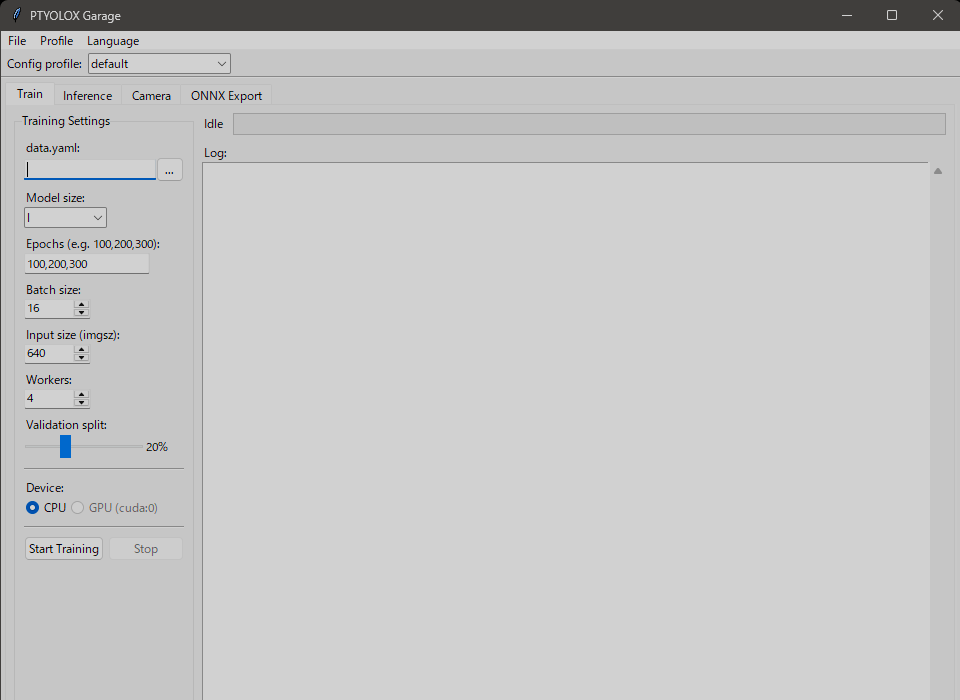
The GUI contains four work areas: training, image inference, live camera inference, and ONNX export. The initial language follows the operating-system locale and can be changed from the Language menu.
Configuration is stored in the operating system's user configuration directory. On Windows, the default location is %APPDATA%\ptyolox-garage\config.ini.
Python API
from ptyolox_garage import YOLOX

# Train from a Label Studio COCO export.
model = YOLOX("l")
model.train(
    data="data.yaml",
    epochs=[100, 200, 300],
    device="cuda:0",
    batch=16,
)

# Run inference.
model = YOLOX("best_model.pt")
results = model.predict("image.jpg", conf=0.3)
annotated = results[0].plot()

# Save a model that can be loaded on a CPU-only machine.
model.save("deployment_model.pt")

# Export to ONNX.
model.export(format="onnx")
Dataset Configuration
data.yaml points to a Label Studio COCO export and its image directory:
coco_json: C:/datasets/widgets/result.json
images_dir: C:/datasets/widgets/images
output_dir: C:/datasets/widgets/prepared
val_split: 0.2
PTYOLOX Garage remaps COCO category IDs, validates image paths, creates train/validation splits, and writes the directory structure expected by Pixeltable YOLOX.
Model Sizes
| Name | Depth | Width |
|---|---|---|
nano |
0.33 | 0.25 |
tiny |
0.33 | 0.375 |
s |
0.33 | 0.50 |
m |
0.67 | 0.75 |
l |
1.00 | 1.00 |
x |
1.33 | 1.25 |
Development
uv sync --group dev
uv run pytest
uv run ruff check .
uv build
Detailed guides are available in the English documentation and Japanese documentation.
Attribution
PTYOLOX Garage is built on Pixeltable YOLOX, which is derived from Megvii YOLOX. PTYOLOX Garage is an independent project and is not an official Pixeltable product.
License
Licensed under the Apache License 2.0. See NOTICE for attribution.
1 maintainer

Metadata
1 maintainer
Release files for ptyolox-garage 0.3.0
For a detailed explanation of source distributions (sdists) and built distributions (wheels), please see the package formats documentation.
Source distribution (sdist)
| File | Size | Uploaded | |
|---|---|---|---|
| ptyolox_garage-0.3.0.tar.gz | 201.4 kB | Details |
Built distribution (wheel)
| File | Interpreter | ABI | Platform | Reset |
|---|---|---|---|---|
| ptyolox_garage-0.3.0-py3-none-any.whl | Python 3 | none | any | Details |
Total release size: 245.5 kB
Release files / ptyolox_garage-0.3.0.tar.gz
| Download URL | ptyolox_garage-0.3.0.tar.gz |
|---|---|
| Size | 201.4 kB |
| Tags | Source |
|
SHA-256 checksum How to use checksums |
43b68be39b42f00eb1dd1f3c931e70f855d3da55a09c1f230c719a138b5891da
|
|
BLAKE2b-256 checksum How to use checksums |
974f0b6973a6e287ad9cda2bde8f5e082e92e9678d98732b2dd19e0bdb653fba
|
| Upload date | |
|
Uploaded using Trusted Publishing? What is trusted publishing? |
Yes |
| Uploaded via |
twine/7.0.0 CPython/3.13.14
|
Provenance
Provenance describes where a file came from. On PyPI, provenance is shared via attestations, which provide a verifiable record of the build or publishing details. View details, limitations and caveats.


PyPI Publish Attestation
PyPI verified that this artifact, at this checksum, originated from the publisher listed below.
Signed by GitHub Actions, verified by PyPI on Aug 20, 2026.
Transparency logRelease files / ptyolox_garage-0.3.0-py3-none-any.whl
| Download URL | ptyolox_garage-0.3.0-py3-none-any.whl |
|---|---|
| Size | 44.1 kB |
| Tags | Python 3 |
|
SHA-256 checksum How to use checksums |
4ace353a9f7dd499d2a28996b80649d935247e5f97fd59a77a8d8645b0215c8f
|
|
BLAKE2b-256 checksum How to use checksums |
1b995d6a5327ec30204b425d72a6e29b4423b71d7ebd45989935798628705bf6
|
| Upload date | |
|
Uploaded using Trusted Publishing? What is trusted publishing? |
Yes |
| Uploaded via |
twine/7.0.0 CPython/3.13.14
|
Provenance
Provenance describes where a file came from. On PyPI, provenance is shared via attestations, which provide a verifiable record of the build or publishing details. View details, limitations and caveats.
PyPI Publish Attestation
PyPI verified that this artifact, at this checksum, originated from the publisher listed below.
Signed by GitHub Actions, verified by PyPI on Aug 20, 2026.
Transparency log













