
Fix ollama pull TLS timeout and disconnects — resumable Ollama model downloader for slow connections
Verified details
These details have been verified by PyPIProject links
GitHub Statistics
Maintainers

Project description
Pullama 🦙 Ollama Model Downloader & Installer
The ollama pull alternative built for slow, unstable, and limited internet connections.
If ollama pull keeps restarting, times out, or disconnects mid-download — Pullama fixes that.
It resumes interrupted downloads automatically, supports parallel connections via aria2, and installs models directly into Ollama when done, Works on slow connections, unstable Wi-Fi, mobile data, and VPNs.
# Common Ollama pull errors Pullama solves:
net/http: TLS handshake timeout
context deadline exceeded
download interrupted, starting from scratch
Install
pip install pullama-cli
For faster, more reliable downloads — install aria2 (optional but recommended):
# Linux (Debian/Ubuntu)
sudo apt install aria2

# macOS
brew install aria2

# Windows
winget install aria2
With aria2, Pullama downloads Ollama models using multiple parallel connections — significantly faster and more resilient on slow or throttled connections.
Quick Start
Download & install ollama models in one command
pullama pull tinyllama:latest
pullama pull gemma2:2b
pullama pull deepseek-r1:7b
Pullama downloads the model and installs it into Ollama automatically. Then:
ollama run tinyllama:latest
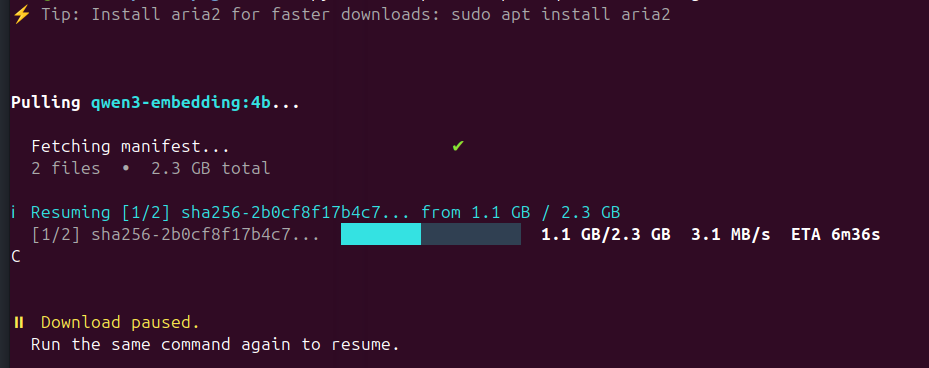
Resume interrupted Ollama model downloads
If your connection drops, just run the same command again — Pullama resumes from where it stopped:
pullama pull gemma2:2b
# ... connection drops at 60% ...

pullama pull gemma2:2b
# ℹ Resuming from 1.1 GB / 1.7 GB
No flags, no setup. Works after power cuts, network switches, sleep, or days later.
This is the core feature ollama pull is missing — once it disconnects, you lose everything.
Pullama vs ollama pull
| Feature | ollama pull |
pullama |
|---|---|---|
| Resume interrupted download | ❌ | ✅ |
| Parallel chunk downloads (aria2) | ❌ | ✅ |
| Offline / manual install | ❌ | ✅ |
| Download without Ollama installed | ❌ | ✅ |
| Export ollama model to another machine | ❌ | ✅ |
| Track download progress across sessions | ❌ | ✅ |
| Works on slow / unstable connections | ⚠️ unreliable | ✅ |
| SHA256 verification | ❌ | ✅ |
Commands
Track your downloads
pullama list
  Model                  Size       Downloaded       Installed
  ────────────────────────────────────────────────────────────
  tinyllama:latest        608 MB    608/608 MB  ✔   ✔ yes
  gemma2:2b               1.7 GB    856 MB/1.7 GB   ✗ no
Get direct download URLs
For users who prefer to download Ollama models manually with wget, curl, IDM, or any other download manager:
pullama get gemma2:2b
Prints direct blob URLs and ready-to-use curl commands — useful for downloading ollama models on a separate machine or through a proxy.
Manual Ollama model installation
Already downloaded the files? Install them into Ollama without re-downloading:
pullama install --model gemma2:2b --blobsPath ./downloads
Download Ollama models without ollama (offline install)
Pullama works even if Ollama isn't installed yet. It saves the model files locally so you can install them later — or copy them to another machine or a friend with no internet:
pullama pull gemma2:2b
# ⚠ Ollama not found — downloading to: ~/pullama-models/gemma2-2b/
# ✔ gemma2:2b downloaded!
#   Saved to: ~/pullama-models/gemma2-2b/
#
#   Once Ollama is installed, run:
#     pullama install --model gemma2:2b --blobsPath ~/pullama-models/gemma2-2b/
Copy the folder to a USB drive, give it to a friend, install on an air-gapped machine — it just works.
How it works
Ollama stores models as SHA256-named blob files. Pullama downloads each blob directly into Ollama's models directory (~/.ollama/models or /usr/share/ollama/.ollama/models for system installs) and writes the manifest last — so Ollama only sees the model once everything is verified complete.
If a download is interrupted, the partial blob stays on disk. On the next run, Pullama checks the existing file size and sends an HTTP Range: bytes=X- request to continue exactly where it stopped — no re-downloading from zero.
With aria2: splits each file into 4 parallel chunks. Bypasses per-connection throttling and dramatically improves speed on slow connections.
Without aria2: uses Python's built-in HTTP client with the same resume logic.
Model name format
tinyllama:latest                    # official model, explicit tag
gemma2:2b                           # official model
deepseek-r1:7b                      # official model
huihui_ai/deepseek-r1:8b            # community model (namespace/model:tag)
Platform support
| Platform | Supported |
|---|---|
| Linux | ✔ |
| macOS | ✔ |
| Windows | ✔ |
License
MIT
Credits
Pullama started as a fork of oget by fr0stb1rd. The original idea of fetching direct download URLs from the Ollama registry belongs to them. Pullama extends it with resumable downloads, automatic Ollama install, aria2 support, state tracking, smart path detection, and a fully rewritten CLI built for slow and unstable connections.
Project details
Verified details
These details have been verified by PyPIProject links
GitHub Statistics
Maintainers
Release history Release notifications | RSS feed


Download files
Download the file for your platform. If you're not sure which to choose, learn more about installing packages.
Source Distribution
Built Distribution
Filter files by name, interpreter, ABI, and platform.
If you're not sure about the file name format, learn more about wheel file names.
Copy a direct link to the current filters
File details
Details for the file pullama_cli-1.0.0.tar.gz.
File metadata
- Download URL: pullama_cli-1.0.0.tar.gz
- Upload date:
- Size: 14.0 kB
- Tags: Source
- Uploaded using Trusted Publishing? Yes
- Uploaded via: twine/6.1.0 CPython/3.13.7
File hashes
| Algorithm | Hash digest | |
|---|---|---|
| SHA256 |
bd66946a95b7f6c5459136c11c98b276577833583ecb6e1a74038a9bdb820eff
|
|
| MD5 |
c2dbc7f590d9ecbcac9f002751e26fc0
|
|
| BLAKE2b-256 |
07ee1256b04723e1c33cb4efd001bdb3afcbefb1cd4602610e5ee37a592ec927
|
Provenance
The following attestation bundles were made for pullama_cli-1.0.0.tar.gz:
Publisher:
publish.yml on Steve-sy/pullama
-
Statement:
-
Statement type:
https://in-toto.io/Statement/v1 -
Predicate type:
https://docs.pypi.org/attestations/publish/v1 -
Subject name:
pullama_cli-1.0.0.tar.gz -
Subject digest:
bd66946a95b7f6c5459136c11c98b276577833583ecb6e1a74038a9bdb820eff - Sigstore transparency entry: 1190844812
- Sigstore integration time:
-
Permalink:
Steve-sy/pullama@1e167a8997632d4d63c96998ed2399e602aaae11 -
Branch / Tag:
refs/tags/v1.0.1 - Owner: https://github.com/Steve-sy
-
Access:
public
-
Token Issuer:
https://token.actions.githubusercontent.com -
Runner Environment:
github-hosted -
Publication workflow:
publish.yml@1e167a8997632d4d63c96998ed2399e602aaae11 -
Trigger Event:
release
-
Statement type:
File details
Details for the file pullama_cli-1.0.0-py3-none-any.whl.
File metadata
- Download URL: pullama_cli-1.0.0-py3-none-any.whl
- Upload date:
- Size: 13.0 kB
- Tags: Python 3
- Uploaded using Trusted Publishing? Yes
- Uploaded via: twine/6.1.0 CPython/3.13.7
File hashes
| Algorithm | Hash digest | |
|---|---|---|
| SHA256 |
5c40db350eb7b9cd454a9df3b3fda937bdfde1d29d3fc511193da287d86f0a2a
|
|
| MD5 |
3d13d8d0198e594b91eab0ed079cab9b
|
|
| BLAKE2b-256 |
d93495c2ecb54c459df6e26fc4c8d237949aee67fffff0066e2e1383787acdff
|
Provenance
The following attestation bundles were made for pullama_cli-1.0.0-py3-none-any.whl:
Publisher:
publish.yml on Steve-sy/pullama
-
Statement:
-
Statement type:
https://in-toto.io/Statement/v1 -
Predicate type:
https://docs.pypi.org/attestations/publish/v1 -
Subject name:
pullama_cli-1.0.0-py3-none-any.whl -
Subject digest:
5c40db350eb7b9cd454a9df3b3fda937bdfde1d29d3fc511193da287d86f0a2a - Sigstore transparency entry: 1190844828
- Sigstore integration time:
-
Permalink:
Steve-sy/pullama@1e167a8997632d4d63c96998ed2399e602aaae11 -
Branch / Tag:
refs/tags/v1.0.1 - Owner: https://github.com/Steve-sy
-
Access:
public
-
Token Issuer:
https://token.actions.githubusercontent.com -
Runner Environment:
github-hosted -
Publication workflow:
publish.yml@1e167a8997632d4d63c96998ed2399e602aaae11 -
Trigger Event:
release
-
Statement type:






