
This project has been archived by its maintainers, and is no longer receiving any updates.

- Badges:
- CI:
- Documentation:
- Downloads:
- Source:
- Benchmarks:
- Chat channel:
- Mailing list:
- Stack overflow:
questions tagged python-pulsar
- Design by:
- Platforms:
Linux, OSX, Windows. Python 3.5 and above
- Keywords:
python, asyncio, multiprocessing, client/server, asynchronous, concurrency, actor, thread, process, socket, wsgi, websocket, redis, json-rpc










An example of a web server written with pulsar which responds with “Hello World!” for every request:
from pulsar.apps import wsgi

def hello(environ, start_response):
    data = b'Hello World!\n'
    response_headers = [
        ('Content-type','text/plain'),
        ('Content-Length', str(len(data)))
    ]
    start_response('200 OK', response_headers)
    return [data]


if __name__ == '__main__':
    wsgi.WSGIServer(callable=hello).start()
Pulsar’s goal is to provide an easy way to build scalable network programs. In the Hello world! web server example above, many client connections can be handled concurrently. Pulsar tells the operating system (through epoll or select) that it should be notified when a new connection is made, and then it goes to sleep.
Pulsar uses the asyncio module from the standard python library and it can be configured to run in multi-processing mode.
Another example of pulsar framework is the asynchronous HttpClient:
from pulsar.apps import http

async with http.HttpClient() as session:
    response1 = await session.get('https://github.com/timeline.json')
    response2 = await session.get('https://api.github.com/emojis.json')
The http client maintains connections alive (by default 15 seconds) and therefore any requests that you make within a session will automatically reuse the appropriate connection. All connections are released once the session exits the asynchronous with block.
Installing
Pulsar has one hard dependency:
install via pip:
pip install pulsar
or download the tarball from pypi.
To speedup pulsar by a factor of 2 or more these soft dependencies are recommended
Applications
Pulsar design allows for a host of different asynchronous applications to be implemented in an elegant and efficient way. Out of the box it is shipped with the the following:
Socket servers
Data stores (with async Redis client)
Examples
Check out the examples directory for various working applications. It includes:
Hello world! wsgi example
An Httpbin WSGI application
An HTTP Proxy server
A JSON-RPC Calculator server
Websocket random graph.
Websocket chat room.
Design
Pulsar internals are based on actors primitive. Actors are the atoms of pulsar’s concurrent computation, they do not share state between them, communication is achieved via asynchronous inter-process message passing, implemented using the standard python socket library.
Two special classes of actors are the Arbiter, used as a singleton, and the Monitor, a manager of several actors performing similar functions. The Arbiter runs the main eventloop and it controls the life of all actors. Monitors manage group of actors performing similar functions, You can think of them as a pool of actors.
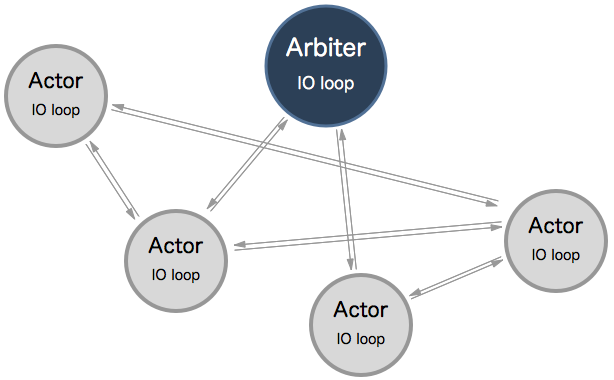
More information about design and philosophy in the documentation.
Add-ons
Pulsar checks if some additional libraries are available at runtime, and uses them to add additional functionalities or improve performance:
greenlet: required by the pulsar.apps.greenio module and useful for developing implicit asynchronous applications
uvloop: if available it is possible to use it as the default event loop for actors by passing --io uv in the command line (or event_loop="uv" in the config file)
httptools: if available, the default Http Parser for both client and server is replaced by the C implementation in this package
setproctitle: if installed, pulsar can use it to change the processes names of the running application
psutil: if installed, a system key is available in the dictionary returned by Actor info method
python-certifi: The HttpClient will attempt to use certificates from certifi if it is present on the system
ujson: if installed it is used instead of the native json module
unidecode: to enhance the slugify function
Running Tests
Pulsar test suite uses the pulsar test application. To run tests:
python setup.py test
For options and help type:
python setup.py test --help
flake8 check (requires flake8 package):
flake8
Contributing
Development of pulsar happens at Github. We very much welcome your contribution of course. To do so, simply follow these guidelines:
Fork pulsar on github
Create a topic branch git checkout -b my_branch
Push to your branch git push origin my_branch
Create an issue at https://github.com/quantmind/pulsar/issues with pull request for the dev branch.
Alternatively, if you need to report a bug or an unexpected behaviour, make sure to include a mcve in your issue.
A good pull request should:
Cover one bug fix or new feature only
Include tests to cover the new code (inside the tests directory)
Preferably have one commit only (you can use rebase to combine several commits into one)
Make sure flake8 tests pass
License
This software is licensed under the BSD 3-clause License. See the LICENSE file in the top distribution directory for the full license text.
1 maintainer

Metadata
1 maintainer
Release files for pulsar 2.0.2
For a detailed explanation of source distributions (sdists) and built distributions (wheels), please see the package formats documentation.
Source distribution (sdist)
| File | Size | Uploaded | |
|---|---|---|---|
| pulsar-2.0.2.tar.gz | 1.7 MB | Details |
Built distributions (wheels)
| File | Reset | |||
|---|---|---|---|---|
| pulsar-2.0.2-py3-none-any.whl | Python 3 | none | any | Details |
| pulsar-2.0.2-cp36-cp36m-manylinux1_x86_64.whl | CPython 3.6 | CPython 3.6 pymalloc | Linux glibc 2.5+ x86-64 | Details |
| pulsar-2.0.2-cp36-cp36m-manylinux1_i686.whl | CPython 3.6 | CPython 3.6 pymalloc | Linux glibc 2.5+ x86-32 | Details |
| pulsar-2.0.2-cp36-cp36m-macosx_10_12_x86_64.whl | CPython 3.6 | CPython 3.6 pymalloc | macOS 10.12+ x86-64 | Details |
| pulsar-2.0.2-cp35-cp35m-manylinux1_x86_64.whl | CPython 3.5 | CPython 3.5 pymalloc | Linux glibc 2.5+ x86-64 | Details |
| pulsar-2.0.2-cp35-cp35m-manylinux1_i686.whl | CPython 3.5 | CPython 3.5 pymalloc | Linux glibc 2.5+ x86-32 | Details |
| pulsar-2.0.2-cp35-cp35m-macosx_10_12_x86_64.whl | CPython 3.5 | CPython 3.5 pymalloc | macOS 10.12+ x86-64 | Details |
Total release size: 7.9 MB
Release files / pulsar-2.0.2.tar.gz
| Download URL | pulsar-2.0.2.tar.gz |
|---|---|
| Size | 1.7 MB |
| Tags | Source |
|
SHA-256 checksum How to use checksums |
8120782a4daaeaf9717f800d901895a8d131ecfef8f26f5141416b640f9e31d3
|
|
BLAKE2b-256 checksum How to use checksums |
d56af930223a3df2933a76f117e1b16a6b0eb88d263daf51619b0d016745143b
|
| Upload date | |
|
Uploaded using Trusted Publishing? What is trusted publishing? |
No |
Release files / pulsar-2.0.2-py3-none-any.whl
| Download URL | pulsar-2.0.2-py3-none-any.whl |
|---|---|
| Size | 280.9 kB |
| Tags | Python 3 |
|
SHA-256 checksum How to use checksums |
a4628052976fac46a421c132afb1587377088f804be16884f6b9d3fc9a4ad59b
|
|
BLAKE2b-256 checksum How to use checksums |
f433dc7326eaffc79d82dd793ee58f6402f3e7a1ffb2606f0fe8ebcd34a7bbfc
|
| Upload date | |
|
Uploaded using Trusted Publishing? What is trusted publishing? |
No |
Release files / pulsar-2.0.2-cp36-cp36m-manylinux1_x86_64.whl
| Download URL | pulsar-2.0.2-cp36-cp36m-manylinux1_x86_64.whl |
|---|---|
| Size | 1.3 MB |
| Tags | CPython 3.6 CPython 3.6 pymalloc Linux glibc 2.5+ x86-64 |
|
SHA-256 checksum How to use checksums |
56fc8cee816ef06f92863efd1198e135b4603d3772c38b111e1a77d323172afb
|
|
BLAKE2b-256 checksum How to use checksums |
7146abcf7f8a03b17f840a99020f8467344aa998eb5b46f22b66830c7119fed6
|
| Upload date | |
|
Uploaded using Trusted Publishing? What is trusted publishing? |
No |
Release files / pulsar-2.0.2-cp36-cp36m-manylinux1_i686.whl
| Download URL | pulsar-2.0.2-cp36-cp36m-manylinux1_i686.whl |
|---|---|
| Size | 1.2 MB |
| Tags | CPython 3.6 CPython 3.6 pymalloc Linux glibc 2.5+ x86-32 |
|
SHA-256 checksum How to use checksums |
39fd6453a3fcf7f4705d99dbce55ab2443c28d7822403ceadbac8936080eff22
|
|
BLAKE2b-256 checksum How to use checksums |
04716f724524a5be3b2750a1ae37f8fc6c11ca84faf563ed486d86b083516e7e
|
| Upload date | |
|
Uploaded using Trusted Publishing? What is trusted publishing? |
No |
Release files / pulsar-2.0.2-cp36-cp36m-macosx_10_12_x86_64.whl
| Download URL | pulsar-2.0.2-cp36-cp36m-macosx_10_12_x86_64.whl |
|---|---|
| Size | 523.5 kB |
| Tags | CPython 3.6 CPython 3.6 pymalloc macOS 10.12+ x86-64 |
|
SHA-256 checksum How to use checksums |
f1e3d53fa5ebc796b727cb15669f512414f9c4dfe70eeb22f377107933c21ee3
|
|
BLAKE2b-256 checksum How to use checksums |
851544b5acea45d677f0cf8193f29918c5fda3eb12beb33e4205a824efe85a5c
|
| Upload date | |
|
Uploaded using Trusted Publishing? What is trusted publishing? |
No |
Release files / pulsar-2.0.2-cp35-cp35m-manylinux1_x86_64.whl
| Download URL | pulsar-2.0.2-cp35-cp35m-manylinux1_x86_64.whl |
|---|---|
| Size | 1.2 MB |
| Tags | CPython 3.5 CPython 3.5 pymalloc Linux glibc 2.5+ x86-64 |
|
SHA-256 checksum How to use checksums |
3d3631e01bad9bdb19416485c6661a00d832a78917c6829c035632006597097f
|
|
BLAKE2b-256 checksum How to use checksums |
bfaa09dc2a226bb54572e491a66324ea51a9fa265c07b6076fe6862695c26071
|
| Upload date | |
|
Uploaded using Trusted Publishing? What is trusted publishing? |
No |
Release files / pulsar-2.0.2-cp35-cp35m-manylinux1_i686.whl
| Download URL | pulsar-2.0.2-cp35-cp35m-manylinux1_i686.whl |
|---|---|
| Size | 1.1 MB |
| Tags | CPython 3.5 CPython 3.5 pymalloc Linux glibc 2.5+ x86-32 |
|
SHA-256 checksum How to use checksums |
a8effe3fbada36d62d00316ae55d24546cad98fc8c26bc1e26a083ddb6d75a68
|
|
BLAKE2b-256 checksum How to use checksums |
7637f20f9104f0ab52baf972871597ab513c0529e695c2eaec6029ba0a4e8ce2
|
| Upload date | |
|
Uploaded using Trusted Publishing? What is trusted publishing? |
No |
Release files / pulsar-2.0.2-cp35-cp35m-macosx_10_12_x86_64.whl
| Download URL | pulsar-2.0.2-cp35-cp35m-macosx_10_12_x86_64.whl |
|---|---|
| Size | 523.8 kB |
| Tags | CPython 3.5 CPython 3.5 pymalloc macOS 10.12+ x86-64 |
|
SHA-256 checksum How to use checksums |
1e79f22afe267c1dae96efa31cdacda9df3febbd0d2396578c485263abc97894
|
|
BLAKE2b-256 checksum How to use checksums |
a3238ec24577def457d0fe92063776afdfdab6928619a76f23dd82f847e98064
|
| Upload date | |
|
Uploaded using Trusted Publishing? What is trusted publishing? |
No |














