
pulse-viewers
Inventzia's Pulse Run Viewer
Viewing utilities for Pulse applications.
This repository hosts the viewers built over the artifacts a Pulse run leaves behind. It is a home
for several of them; today it holds one, the Events Viewer, with the shared contracts and
readers that any further viewer builds on. The design rationale is in
docs/viewer.md.
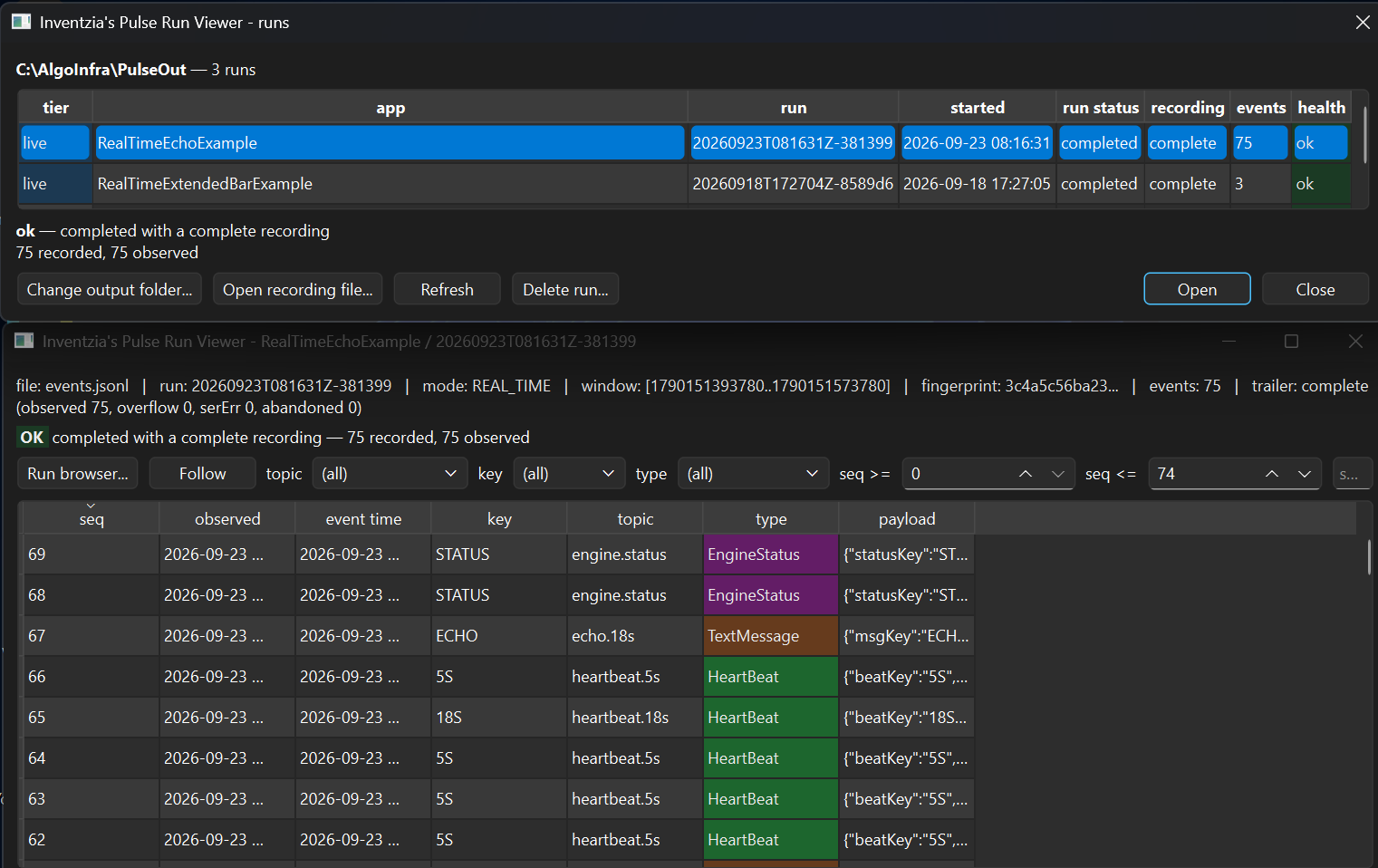
The run browser (top) lists every run under the output root with its health verdict; each run opens
in its own window (bottom). Here a real-time run shows its two heartbeats, an actor's echo, and the
engine's own lifecycle — EngineStatus events on engine.status — interleaved in one stream,
coloured by type.
Part of the Inventzia Pulse ecosystem
Pulse provides typed events, an event-driven engine for replay, simulation and real-time applications, and desktop tools for inspecting recorded runs. Use the components you need.
| Package | Purpose | Choose it when… |
|---|---|---|
pulse-data |
Shared typed events, schemas and serialization for Python and Java | You need Pulse data types or want to define extensions |
pulse-beacon |
Event-driven execution with Python/Java interoperability and run recording | You want to build and run an application |
pulse-viewers |
Desktop tools for browsing runs and inspecting recorded events | You want to examine or follow a recording |
Beacon depends on Data; Viewers reads Beacon's recorded files and can run independently, including on another machine — which is why Data and Beacon release together on one version while Viewers versions on its own.
New to Pulse? The ecosystem overview has a quickstart that runs an example and opens its recording.
Quickstart
pip install pulse-viewers
pulse-events-viewer
That opens the run browser. Point it at your Pulse output folder with Change output folder...
— it remembers the choice — or set PULSE_OUTPUT beforehand. Runs appear newest first with their
health; pick one and it opens in its own window. A run still being written is followed live.
No Pulse runs yet? The viewer works on any recording, and one can be generated without a JVM:
python -m inventzia.pulse.viewers.contract.event_record /tmp/sample.jsonl
pulse-events-viewer /tmp/sample.jsonl
Requirements: Python 3.11+ and a desktop session (the viewer is a Qt application). It needs neither a JVM nor pulse-beacon — it reads what a run has already written.
Installing the other components
# Build and run applications from Python; installs pulse-data too.
# Requires Java 17+.
pip install "pulse-beacon[jpype]"

# Inspect recordings on a desktop; no Java required.
pip install pulse-viewers
pulse-events-viewer

# Use only the shared event types and serialization.
pip install pulse-data
What a Pulse viewer is
Every viewer here follows the same three rules. They are what keep a viewer from becoming a second engine.
1. A viewer is an out-of-process reader. It never links pulse-beacon, never starts a JVM, and never participates in a run. Qt stays out of pulse-data and pulse-beacon entirely — the dependency never points that way.
2. A viewer reads a run's recorded artifacts, not the engine's internals or its human logs. So
the artifact format is the real interface, and it comes first. Each run writes a standardized
directory (see pulse-output.md):
$PULSE_OUTPUT/<tier>/<app>/<runId>/
    run.json        manifest: mode, window, provenance, status and counts
    events.jsonl    the event recording
    console.log     the run's human log
tier is historical for deterministic replays and live for real-time runs.
3. A viewer reports a run's health honestly. run.json carries the engine outcome
(runStatus) and the recording outcome (recordingStatus) as separate fields, because either can
fail while the other succeeds, plus counts that always balance
(observed = events + overflow + serializationErrors + abandoned). A viewer must surface a partial
or failed recording as such, never present it as complete.
Shared contents
Everything installable lives under src/inventzia/pulse/viewers/, a PEP 420 namespace package
alongside inventzia.pulse.data and inventzia.pulse.beacon.
run_browser.py: the run picker, shared by every viewer — choosing a run is not specific to any one of them. Lists whatlist_runs()finds under the output root and classifies each run's health (ok/partial/broken/running/unknown) from its manifest, keeping the engine outcome and the recording outcome separate. Its logic half imports no Qt, sopython -m inventzia.pulse.viewers.run_browser [--root PATH]gives a console listing anywhere.live_tail.py: the reader for a recording still being written — partial trailing line, truncation, rotation, malformed records. Qt-free, so it can be driven by a timer or a test.contract/run_layout.py: the Pulse output layout in one place — resolve$PULSE_OUTPUT, create and finalize run directories, read manifests, andlist_runs()to enumerate every run under the root, newest first. The Java mirror of this lives in pulse-beacon asRunLayout; the two are kept byte-for-byte compatible.contract/event_record.py: the Python side of the recording contract — build, write, read and validate records, plusmake_sample()to emit a demo recording so a viewer can be developed without a JVM.contract/event-record.schema.json: the authoritative record contract (JSON Schema 2020-12), the kindsheader/event/trailer. Shipped as package data so validation works from an installed wheel.
Install from a checkout
pip install -e .              # plus `pytest` to run the suite
conda env update -f py_environment.yml     # or enrich the shared `pulse` conda env
pulse-viewers depends on neither pulse-data nor pulse-beacon: a viewer reads a run's artifacts as plain JSON and never links the engine, so the only dependencies are PySide6 and jsonschema.
Viewers
Events Viewer (pulse-events-viewer)
Reads one run's event recording and shows the dispatch stream.
pulse-events-viewer                     # browse $PULSE_OUTPUT and pick a run
pulse-events-viewer --root PATH         # browse a specific output root
pulse-events-viewer recording.jsonl     # open one recording directly
With no argument it opens the run browser, which is the application's hub rather than a one-shot
picker: it stays open, and each run you open gets its own detached window, so several runs can be
compared side by side. Closing a viewer leaves the browser and the other viewers alone, and closing
the browser leaves the viewers open; Run browser... in any viewer brings it back.
A run is chosen by what it is — app, time, health — rather than by remembering a path. The chosen
run's verdict travels into its window's header bar, where the engine outcome and the recording
outcome stay separate and a partial capture is labelled partial. A recording opened as a bare
.jsonl has no manifest, so its health comes from the trailer instead.
Only the two columns that carry meaning are coloured: the tier (grey for historical, blue for
live) and the health verdict. Both palettes follow the desktop theme.
Following a live run. A run whose manifest still says running is being written now, so opening
it starts following: new events are taken up as they arrive, the filters grow with them, and the
follow stops by itself when the recorder writes its trailer. Follow pauses and resumes it, and any
finished recording can be followed on demand. The status line reports rows, unreadable lines and
re-opens, so a lossy or damaged tail is visible rather than silent. The reader
(live_tail.py, Qt-free) handles a partial trailing line, truncation, rotation and malformed
records — see docs/viewer.md section 5.
Engine lifecycle in the stream. When a run records the engine's status topic, its transitions
(BLANK -> INITIALIZED, PRESTART -> STARTED, ... STOPPED -> COMPLETE, for the engine and each
gateway) arrive as ordinary EngineStatus events, filterable and colourable like any other type.
Deleting a run. Delete run... removes the selected run directory after confirming. It refuses
anything that is not a tier/app/runId directory inside the output root.
The output root can be chosen in the browser itself (Change output folder...) and is remembered
between sessions, so nothing has to be configured before the first launch; a remembered choice takes
precedence over $PULSE_OUTPUT, and an explicit --root over both. Open recording file... opens a
single events.jsonl from anywhere.
It validates the recording (diagnostics to the console, run metadata in the header bar), shows the
events newest-first by dispatch seq, colours each data type, and opens the selected event's
payload in a detail tree. Filter by topic, key, type, a seq range, or free text; click a column
header to sort (sorting by type groups by type and orders by seq within). Bounded retention,
batched inserts, and lazy payload parsing are in place for the larger recordings of later phases.
There is no synthetic fallback: if a recording is needed without a JVM, generate one explicitly with
python -m inventzia.pulse.viewers.contract.event_record, which writes into the platform's temp
directory (pass a path to choose your own).
The recording contract
A recording is JSONL, one JSON object per line:
- one
headerline: run metadata (runId, operating mode, window, type-universe fingerprint and provider ids fromRunInfo, source identity); - then
eventlines, ordered byseq(the dispatch sequence, the authoritative order); - then a
trailerline: completion status and the accounting totals.
Each event carries seq, observedAt, eventTime, topic, key, typeId, and payload (the
datum's fields as a JSON object). typeId is flat so the viewer can filter and colour without
parsing the payload; unknown types stay fully inspectable as generic JSON.
Producing a recording
Python (no JVM), for viewer development:
python -m inventzia.pulse.viewers.contract.event_record [outfile.jsonl]
Java: the recorder now ships in pulse-beacon as
com.inventzia.pulse.beacon.core.gateway.recording.EventRecorderGateway, driven by the launcher-side
run package, so a normal run writes its recording into the output layout with no extra wiring.
reference/EventRecorderGateway.java is the original draft, kept outside the package for reference
only — pulse-beacon is authoritative and the two have diverged.
Two limits remain while the recorder is a subscriber sink rather than an engine tap (Stage A):
- Beacon routing is one subscriber per
(topic, key), so the recorder cannot be registered on a route that already has a sink. Use it only on routes with no other consumer. - Its
seqis recorder-local (the order this gateway received events on its subscribed routes), not the engine's global dispatch sequence.
Both facts are written into run.json's recording descriptor, so a reader never mistakes a
partial recording for the complete engine stream. The global sequence and all-routes capture arrive
with the engine event tap (Stage B).
Why not the existing JsonlWriterGateway
JsonlWriterGateway.onEvent writes bare codec.toJson(payload) with no topic, no type
discriminator, and no time, and it serializes on the dispatch thread. Mixed event types cannot be
told apart from that file, and it does not meet the recorder performance contract. Its format is
left unchanged (backward compatible); recording is a new, separate writer.
Next
recording contract -> offline viewer -> run browser -> live file following is done, through
live following. What comes next is driven by what the recording itself can offer: pulse-beacon's
Stage B engine event tap will give a global dispatch sequence across all routes, replacing the
selected-routes, recorder-local sequence this version reads (both declared in every run.json, so
the viewer already reports which it is looking at).
Development
pip install -e . pytest
pytest                      # Qt runs offscreen; conftest.py sets QT_QPA_PLATFORM
The suite is built around a corpus of deliberately damaged runs — a crashed engine, a failed recorder, a lossy capture, counts that contradict themselves, a run that never finalized, one with no manifest, one with no events at all. A viewer's job is to open the run someone is worried about, so those are the cases worth testing; two healthy runs would prove very little. Colour is checked by measuring WCAG contrast in both light and dark palettes rather than by eye, and live following is driven against a file being written underneath the reader.
CI runs the suite on Python 3.11 and 3.12, then builds the distribution and smoke-tests the installed wheel from a directory with no source tree in sight — so an accidental source-path dependency fails there rather than in someone's install.
License
Dual-licensed: GNU Affero General Public License v3.0 (see LICENSE-AGPL-3.0) or a commercial license from Inventzia Science and Technology Ltd. (see LICENSE-COMMERCIAL.txt and COMMERCIAL.md).
Third-party components are recorded in NOTICE. Packaging note: PySide6 is LGPL, and those obligations attach only to distributing it — declaring it as a dependency (a wheel on PyPI, a conda recipe) ships a name, not the library, so nothing is owed; bundling Qt's binaries into a frozen build (PyInstaller and friends) does convey it, and then the licence texts, the notice, and the recipient's right to relink against their own Qt all apply. Also prefer non-Qt charting (pyqtgraph, matplotlib): some Qt modules, Qt Charts among them, are GPL-or-commercial rather than LGPL, and GPL would reach our own code.
Contributions require a DCO sign-off (git commit -s); see CLA.md. Security reports:
SECURITY.md.
1 maintainer

Release files for pulse-viewers 0.1.0
For a detailed explanation of source distributions (sdists) and built distributions (wheels), please see the package formats documentation.
Source distribution (sdist)
| File | Size | Uploaded | |
|---|---|---|---|
| pulse_viewers-0.1.0.tar.gz | 64.5 kB | Details |
Built distribution (wheel)
| File | Interpreter | ABI | Platform | Reset |
|---|---|---|---|---|
| pulse_viewers-0.1.0-py3-none-any.whl | Python 3 | none | any | Details |
Total release size: 118.7 kB
Release files / pulse_viewers-0.1.0.tar.gz
| Download URL | pulse_viewers-0.1.0.tar.gz |
|---|---|
| Size | 64.5 kB |
| Tags | Source |
|
SHA-256 checksum How to use checksums |
521bb1ab8c55c1d95c92547a7ecef838f0ddac715b10684feabe2d62c116d224
|
|
BLAKE2b-256 checksum How to use checksums |
195a5329f87e7288b4296bd1115c7a4202e4ccab9bf71f38b96a6ddef403fcf8
|
| Upload date | |
|
Uploaded using Trusted Publishing? What is trusted publishing? |
No |
| Uploaded via |
twine/6.2.0 CPython/3.11.15
|
Release files / pulse_viewers-0.1.0-py3-none-any.whl
| Download URL | pulse_viewers-0.1.0-py3-none-any.whl |
|---|---|
| Size | 54.2 kB |
| Tags | Python 3 |
|
SHA-256 checksum How to use checksums |
058b3180b036ff5c386fe6faa46f033d8c17fcb25b470de479a4dfcd0626f907
|
|
BLAKE2b-256 checksum How to use checksums |
00b798b6233e1fef292b331a00412ab01d0f8e7c29f544abb50c413f74ace759
|
| Upload date | |
|
Uploaded using Trusted Publishing? What is trusted publishing? |
No |
| Uploaded via |
twine/6.2.0 CPython/3.11.15
|













