






pulserver lets you run your own sequence on a clinical scanner as if it were
a product sequence: the operator edits it in the scanner UI, and the images
come back to the console. Sequences are exchanged as Pulseq, so any tool that
writes a .seq file (pypulseqpp, MATLAB Pulseq, BART's seq...) can provide
one; pypulseqpp is the one pulserver uses natively.
You write two Python plugins, one that designs the sequence and one that reconstructs it. pulserver does everything in between: it answers the scanner UI, checks the sequence, converts it into the form the scanner plays, and routes the raw data back to your reconstruction.
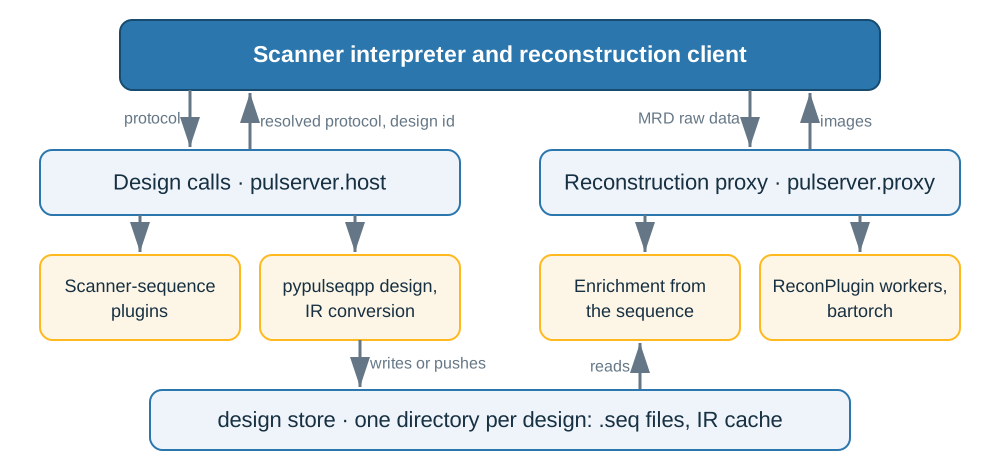
The scanner side is a vendor interpreter, a small program on the scanner that calls pulserver. pulserver itself never touches the hardware.
How it works
- The operator opens your sequence. The scanner asks pulserver which parameters to show (TE, TR, flip angle, matrix...), and pulserver reads them from your sequence plugin.
- Every time the operator changes a value, pulserver asks your plugin whether the protocol is feasible and what it achieves (the TE, the TR, the scan time), and sends that back to the scanner. How your plugin answers is up to you: design one TR, or compute the times from the block durations. If the value is impossible, the scanner shows your error message instead.
- When the operator presses Scan, pulserver designs the whole sequence, runs the checks (timing, gradient and slew limits, PNS, mechanical resonance, acoustic noise) and converts it into the cache the interpreter plays, shifted to the prescribed field of view.
- The scanner plays it and streams the raw data to pulserver.
- pulserver fills in everything the sequence knows and the scanner does not: the MRD header (encoding spaces, matrix, field of view), and on every readout its acquisition header, flags, encoding counters from the sequence's labels, and trajectory. Your recon plugin receives these enriched readouts, sorts them into k-space and reconstructs as soon as a slice or volume is complete.
- Your plugin returns images; pulserver turns them into DICOM and sends them back to the console.
The sequence plugin
A sequence plugin takes a pypulseqpp sequence function, a function that returns
a Sequence, and tells the scanner which of its arguments the operator can
edit:
# sequences/gre.py
from pypulseqpp.sequences.sequence.gre2D_sequence import gre2d
from pulserver.design import Evaluation, FloatParam, SequencePlugin, TimeParam, UIParam


class Gre(SequencePlugin):
    app = gre2d
    protocol = {
        # ms on the scanner UI, µs on the wire, s for gre2d
        UIParam.TE: TimeParam("te", range_min=2000, range_max=20000),
        UIParam.FLIP: FloatParam(
            "flip_angle_deg", unit="deg", range_min=1, range_max=90
        ),
    }

    def evaluate(self, system, protocol):
        arguments = protocol.arguments  # SI units, as gre2d takes them
        one_line = arguments | {"ry": 128, "n_acs_y": 0, "n_dummy": 0}  # one TR
        seq = self.app(system, **one_line)
        return Evaluation(protocol.replace({UIParam.TE: seq.definitions["TE"][0]}))
protocolmaps each scanner UI button (aUIParamkey) to the argument of your function it sets, with its unit and range (a*Paramvalue). Arguments you leave out keep the function's defaults.evaluateruns on every edit, so keep it fast. Here it designs one line and reads back the TE; it could equally compute the TR from block durations, or accept the requested TR when it is feasible. To refuse a value, raise; the message goes to the operator.- The whole scan is built only when the operator starts it, by calling your function with the final protocol.
pulserver ships a plugin for each of pypulseqpp's 28 built-in sequences
(Cartesian, radial, spiral, PROPELLER, EPI, FSE, MPRAGE, bSSFP, ZTE), so
--plugin gre2d works without writing anything.
The recon plugin
The reconstruction side follows Gadgetron and ISMRMRD: the data arrive as an MRD stream (a header, then one acquisition per readout), and a recon plugin handles them as they arrive, much like a Gadgetron gadget chain. Any framework can do the maths; this one uses bartorch:
# recon/pics.py
import torch
import bartorch.tools as bt

from bartorch import apps, priors
from pulserver import recon


class Pics(recon.ReconPlugin):
    def recon(self, context, branch, data):
        kspace = torch.from_numpy(data.data.kspace)[:, None]  # (coils, z, y, x)
        maps = bt.ecalib(kspace, maps=1)
        image = apps.pics(kspace, maps, regularizers=priors.Wavelet((-1, -2), 0.005))
        return recon.ReconResult(image.abs().squeeze(0).numpy())


PLUGIN = Pics()
- The plugin places each readout in k-space as it arrives, by its encoding
counters, and
reconis called once per slice or volume, when the flag that closes it arrives. By default that is the end of the scan; passtriggers={"imaging": AcquisitionFlag.LAST_IN_SLICE}to reconstruct slice by slice. - The flags and counters come from the labels in your sequence
(
pp.make_label, as in PyPulseq), so a correctly labelled sequence needs no sorting code in the reconstruction. - Return a
ReconResult; pulserver writes the image header (position, orientation, field of view) from the sequence and the scanner.
The scanner chooses the recon by name, independently of the sequence, so one recon can serve many sequences.
Try it without a scanner
The virtual scanner plays your sequence on a phantom and streams the data to your recon, through exactly the path a real scan takes:
pip install pulserver bartorch
printf '[Limits]\nB0: 3.0\n[Limits End]\n' > system.txt
pulserver proxy --store designs --port 9002 --plugins recon &
pulserver scan --plugins sequences --plugin gre --reconstruction pics \
  --limits system.txt --store designs --recon 127.0.0.1:9002 --output images
Or skip the install and try it in your browser: https://pulserver.github.io/MaRGE/.
On a real scanner
You need the vendor interpreter for your scanner, which calls
pulserver design for steps 1 to 3 and streams the raw data to
pulserver proxy for steps 4 to 6. Running the services
explains how to set both up.
pulserver's checks compute estimates. Passing them does not establish scanner or patient safety: SAR and RF and gradient heating are checked by the scanner's own routines.
Learn more
- Course: six lessons from a protocol to an image.
- Documentation, for every option and API detail.
How to cite
If you use pulserver in your work, please cite:
@inproceedings{cencini2025pulserver,
  title     = {Pulserver: an open-source Pulseq-based client-server framework for vendor agnostic, interactive {MR} sequence design},
  author    = {Cencini, Matteo and Wang, Kang and Huang, Sherry and Schulte, Rolf F. and Sprenger, Tim
               and Noll, Douglas C. and Tosetti, Michela and Nielsen, Jon-Fredrik},
  booktitle = {Proceedings of the International Society for Magnetic Resonance in Medicine},
  pages     = {1275},
  year      = {2025}
}
pulserver builds on Pulseq (Layton et al., 2017) and the ISMRM raw data format (Inati et al., 2017); please cite those too.
License
MIT, see LICENSE.
1 maintainer

Metadata
1 maintainer
Release files for pulserver 0.0.2
For a detailed explanation of source distributions (sdists) and built distributions (wheels), please see the package formats documentation.
Source distribution (sdist)
| File | Size | Uploaded | |
|---|---|---|---|
| pulserver-0.0.2.tar.gz | 1.1 MB | Details |
Built distributions (wheels)
Total release size: 10.8 MB
Release files / pulserver-0.0.2.tar.gz
| Download URL | pulserver-0.0.2.tar.gz |
|---|---|
| Size | 1.1 MB |
| Tags | Source |
|
SHA-256 checksum How to use checksums |
9d4825ddedc9b5c24568a9d13f47621c16dd24b50771cfae6bc6cac352ba6284
|
|
BLAKE2b-256 checksum How to use checksums |
0dc604b141105be72f360071553ec867e162e70e80a9127dd296b04ce3cff1d7
|
| Upload date | |
|
Uploaded using Trusted Publishing? What is trusted publishing? |
Yes |
| Uploaded via |
twine/7.0.0 CPython/3.13.14
|
Provenance
Provenance describes where a file came from. On PyPI, provenance is shared via attestations, which provide a verifiable record of the build or publishing details. View details, limitations and caveats.


PyPI Publish Attestation
PyPI verified that this artifact, at this checksum, originated from the publisher listed below.
Signed by GitHub Actions, verified by PyPI on Oct 12, 2026.
Transparency logRelease files / pulserver-0.0.2-cp314-cp314-manylinux_2_26_x86_64.manylinux_2_28_x86_64.whl
| Download URL | pulserver-0.0.2-cp314-cp314-manylinux_2_26_x86_64.manylinux_2_28_x86_64.whl |
|---|---|
| Size | 1.2 MB |
| Tags | CPython 3.14 Linux glibc 2.26+ x86-64 Linux glibc 2.28+ x86-64 |
|
SHA-256 checksum How to use checksums |
c66b9d259adc4f6bbfe3827185e9a52b98eb7f5f1965425b8b46d2c59a767abe
|
|
BLAKE2b-256 checksum How to use checksums |
b3f1984da71c199dd199b92bff4514b5b7d949360aa67c39b4bacc7736ff0efe
|
| Upload date | |
|
Uploaded using Trusted Publishing? What is trusted publishing? |
Yes |
| Uploaded via |
twine/7.0.0 CPython/3.13.14
|
Provenance
Provenance describes where a file came from. On PyPI, provenance is shared via attestations, which provide a verifiable record of the build or publishing details. View details, limitations and caveats.
PyPI Publish Attestation
PyPI verified that this artifact, at this checksum, originated from the publisher listed below.
Signed by GitHub Actions, verified by PyPI on Oct 12, 2026.
Transparency logRelease files / pulserver-0.0.2-cp314-cp314-macosx_11_0_arm64.whl
| Download URL | pulserver-0.0.2-cp314-cp314-macosx_11_0_arm64.whl |
|---|---|
| Size | 701.7 kB |
| Tags | CPython 3.14 macOS 11.0+ ARM64 |
|
SHA-256 checksum How to use checksums |
4a03d0b2212cd58e224d36331bfa346d59016f4ed6061a76f5ac2ecec165cd28
|
|
BLAKE2b-256 checksum How to use checksums |
b11502b5347d0b4264dd911deb81597cc4a0b5d9bb233d8252ab683f9872fa55
|
| Upload date | |
|
Uploaded using Trusted Publishing? What is trusted publishing? |
Yes |
| Uploaded via |
twine/7.0.0 CPython/3.13.14
|
Provenance
Provenance describes where a file came from. On PyPI, provenance is shared via attestations, which provide a verifiable record of the build or publishing details. View details, limitations and caveats.
PyPI Publish Attestation
PyPI verified that this artifact, at this checksum, originated from the publisher listed below.
Signed by GitHub Actions, verified by PyPI on Oct 12, 2026.
Transparency logRelease files / pulserver-0.0.2-cp313-cp313-manylinux_2_26_x86_64.manylinux_2_28_x86_64.whl
| Download URL | pulserver-0.0.2-cp313-cp313-manylinux_2_26_x86_64.manylinux_2_28_x86_64.whl |
|---|---|
| Size | 1.2 MB |
| Tags | CPython 3.13 Linux glibc 2.26+ x86-64 Linux glibc 2.28+ x86-64 |
|
SHA-256 checksum How to use checksums |
262150296e41cfceae27d86494c5eacc9ec231d92bde97162c6297e6400738eb
|
|
BLAKE2b-256 checksum How to use checksums |
8993a6c8293da7fac1e79a0c78a36609f3598b3edc01ffb4af2195d5cb1fa336
|
| Upload date | |
|
Uploaded using Trusted Publishing? What is trusted publishing? |
Yes |
| Uploaded via |
twine/7.0.0 CPython/3.13.14
|
Provenance
Provenance describes where a file came from. On PyPI, provenance is shared via attestations, which provide a verifiable record of the build or publishing details. View details, limitations and caveats.
PyPI Publish Attestation
PyPI verified that this artifact, at this checksum, originated from the publisher listed below.
Signed by GitHub Actions, verified by PyPI on Oct 12, 2026.
Transparency logRelease files / pulserver-0.0.2-cp313-cp313-macosx_11_0_arm64.whl
| Download URL | pulserver-0.0.2-cp313-cp313-macosx_11_0_arm64.whl |
|---|---|
| Size | 700.9 kB |
| Tags | CPython 3.13 macOS 11.0+ ARM64 |
|
SHA-256 checksum How to use checksums |
75cede7dc0469b242963fb0e9f311efb5d47d6e83d6d9dcc8049d495014dded3
|
|
BLAKE2b-256 checksum How to use checksums |
ec93ab73b208dd603a5e1a6342cd72876584af7f82b6340662f3c51e2476dc87
|
| Upload date | |
|
Uploaded using Trusted Publishing? What is trusted publishing? |
Yes |
| Uploaded via |
twine/7.0.0 CPython/3.13.14
|
Provenance
Provenance describes where a file came from. On PyPI, provenance is shared via attestations, which provide a verifiable record of the build or publishing details. View details, limitations and caveats.
PyPI Publish Attestation
PyPI verified that this artifact, at this checksum, originated from the publisher listed below.
Signed by GitHub Actions, verified by PyPI on Oct 12, 2026.
Transparency logRelease files / pulserver-0.0.2-cp312-cp312-manylinux_2_26_x86_64.manylinux_2_28_x86_64.whl
| Download URL | pulserver-0.0.2-cp312-cp312-manylinux_2_26_x86_64.manylinux_2_28_x86_64.whl |
|---|---|
| Size | 1.2 MB |
| Tags | CPython 3.12 Linux glibc 2.26+ x86-64 Linux glibc 2.28+ x86-64 |
|
SHA-256 checksum How to use checksums |
f9cb7eb0f9859cc4fd4951d12ba41198c549fda7751b032bceff030485e73677
|
|
BLAKE2b-256 checksum How to use checksums |
962e17046229587fe5b042cff0e7a54b93ff6598fde8d02bc8f947eae7269e47
|
| Upload date | |
|
Uploaded using Trusted Publishing? What is trusted publishing? |
Yes |
| Uploaded via |
twine/7.0.0 CPython/3.13.14
|
Provenance
Provenance describes where a file came from. On PyPI, provenance is shared via attestations, which provide a verifiable record of the build or publishing details. View details, limitations and caveats.
PyPI Publish Attestation
PyPI verified that this artifact, at this checksum, originated from the publisher listed below.
Signed by GitHub Actions, verified by PyPI on Oct 12, 2026.
Transparency logRelease files / pulserver-0.0.2-cp312-cp312-macosx_11_0_arm64.whl
| Download URL | pulserver-0.0.2-cp312-cp312-macosx_11_0_arm64.whl |
|---|---|
| Size | 701.0 kB |
| Tags | CPython 3.12 macOS 11.0+ ARM64 |
|
SHA-256 checksum How to use checksums |
e23a1f6e0a3b8ae69112a13d74b7a1c57f2effa53ce68fd6ee49b85077888176
|
|
BLAKE2b-256 checksum How to use checksums |
aa37d961c25af2897fad7777871578c03da1007975138dcfa99ea01e03181547
|
| Upload date | |
|
Uploaded using Trusted Publishing? What is trusted publishing? |
Yes |
| Uploaded via |
twine/7.0.0 CPython/3.13.14
|
Provenance
Provenance describes where a file came from. On PyPI, provenance is shared via attestations, which provide a verifiable record of the build or publishing details. View details, limitations and caveats.
PyPI Publish Attestation
PyPI verified that this artifact, at this checksum, originated from the publisher listed below.
Signed by GitHub Actions, verified by PyPI on Oct 12, 2026.
Transparency logRelease files / pulserver-0.0.2-cp311-cp311-manylinux_2_26_x86_64.manylinux_2_28_x86_64.whl
| Download URL | pulserver-0.0.2-cp311-cp311-manylinux_2_26_x86_64.manylinux_2_28_x86_64.whl |
|---|---|
| Size | 1.2 MB |
| Tags | CPython 3.11 Linux glibc 2.26+ x86-64 Linux glibc 2.28+ x86-64 |
|
SHA-256 checksum How to use checksums |
44a5e67c85cd994d936c171287b03b6baa791f85521a4a4cb190372f0ddc52be
|
|
BLAKE2b-256 checksum How to use checksums |
db01b184d853d99898c0a03d0c76930e009bcbc902e85dd3b376b197f7dd9aef
|
| Upload date | |
|
Uploaded using Trusted Publishing? What is trusted publishing? |
Yes |
| Uploaded via |
twine/7.0.0 CPython/3.13.14
|
Provenance
Provenance describes where a file came from. On PyPI, provenance is shared via attestations, which provide a verifiable record of the build or publishing details. View details, limitations and caveats.
PyPI Publish Attestation
PyPI verified that this artifact, at this checksum, originated from the publisher listed below.
Signed by GitHub Actions, verified by PyPI on Oct 12, 2026.
Transparency logRelease files / pulserver-0.0.2-cp311-cp311-macosx_11_0_arm64.whl
| Download URL | pulserver-0.0.2-cp311-cp311-macosx_11_0_arm64.whl |
|---|---|
| Size | 698.8 kB |
| Tags | CPython 3.11 macOS 11.0+ ARM64 |
|
SHA-256 checksum How to use checksums |
0d8ec4e33a83498310396fc472e43e88a12f472564e0af157b2c445e891dedc8
|
|
BLAKE2b-256 checksum How to use checksums |
7143be774a62cc20872f6b46d4eda8eced4c88b14c74c74f9890867b7a808b13
|
| Upload date | |
|
Uploaded using Trusted Publishing? What is trusted publishing? |
Yes |
| Uploaded via |
twine/7.0.0 CPython/3.13.14
|
Provenance
Provenance describes where a file came from. On PyPI, provenance is shared via attestations, which provide a verifiable record of the build or publishing details. View details, limitations and caveats.
PyPI Publish Attestation
PyPI verified that this artifact, at this checksum, originated from the publisher listed below.
Signed by GitHub Actions, verified by PyPI on Oct 12, 2026.
Transparency logRelease files / pulserver-0.0.2-cp310-cp310-manylinux_2_26_x86_64.manylinux_2_28_x86_64.whl
| Download URL | pulserver-0.0.2-cp310-cp310-manylinux_2_26_x86_64.manylinux_2_28_x86_64.whl |
|---|---|
| Size | 1.2 MB |
| Tags | CPython 3.10 Linux glibc 2.26+ x86-64 Linux glibc 2.28+ x86-64 |
|
SHA-256 checksum How to use checksums |
d0af1bdfd5977120c3ed7b2072acb9f73add5ed0adfba4d75fa4ec9f8ce60722
|
|
BLAKE2b-256 checksum How to use checksums |
a757b7a3c209666b42d053bc942f9b8e54007263e4b6dee8826de60dd54107c0
|
| Upload date | |
|
Uploaded using Trusted Publishing? What is trusted publishing? |
Yes |
| Uploaded via |
twine/7.0.0 CPython/3.13.14
|
Provenance
Provenance describes where a file came from. On PyPI, provenance is shared via attestations, which provide a verifiable record of the build or publishing details. View details, limitations and caveats.
PyPI Publish Attestation
PyPI verified that this artifact, at this checksum, originated from the publisher listed below.
Signed by GitHub Actions, verified by PyPI on Oct 12, 2026.
Transparency logRelease files / pulserver-0.0.2-cp310-cp310-macosx_11_0_arm64.whl
| Download URL | pulserver-0.0.2-cp310-cp310-macosx_11_0_arm64.whl |
|---|---|
| Size | 697.6 kB |
| Tags | CPython 3.10 macOS 11.0+ ARM64 |
|
SHA-256 checksum How to use checksums |
4af8cc79218f8a7d3ca2bff7075a25b1e5c8411633cd27fdff3e94f2a0fbf863
|
|
BLAKE2b-256 checksum How to use checksums |
d4fa0ee3c020dd1345dbd344bd75380e911bdd868c43c7d2e36dd07301774d57
|
| Upload date | |
|
Uploaded using Trusted Publishing? What is trusted publishing? |
Yes |
| Uploaded via |
twine/7.0.0 CPython/3.13.14
|
Provenance
Provenance describes where a file came from. On PyPI, provenance is shared via attestations, which provide a verifiable record of the build or publishing details. View details, limitations and caveats.
PyPI Publish Attestation
PyPI verified that this artifact, at this checksum, originated from the publisher listed below.
Signed by GitHub Actions, verified by PyPI on Oct 12, 2026.
Transparency log













