
This release is a pre-release and may not be stable for production use.










Pulumi's Infrastructure as Code SDK is the easiest way to create and deploy cloud software that use containers, serverless functions, hosted services, and infrastructure, on any cloud.
Simply write code in your favorite language and Pulumi automatically provisions and manages your AWS, Azure, Google Cloud Platform, and/or Kubernetes resources, using an infrastructure-as-code approach. Skip the YAML, and use standard language features like loops, functions, classes, and package management that you already know and love.
For example, create three web servers:
let aws = require("@pulumi/aws");
let sg = new aws.ec2.SecurityGroup("web-sg", {
ingress: [{ protocol: "tcp", fromPort: 80, toPort: 80, cidrBlocks: ["0.0.0.0/0"]}],
});
for (let i = 0; i < 3; i++) {
new aws.ec2.Instance(`web-${i}`, {
ami: "ami-7172b611",
instanceType: "t2.micro",
securityGroups: [ sg.name ],
userData: `#!/bin/bash
echo "Hello, World!" > index.html
nohup python -m SimpleHTTPServer 80 &`,
});
}
Or a simple serverless timer that archives Hacker News every day at 8:30AM:
const aws = require("@pulumi/aws");
const snapshots = new aws.dynamodb.Table("snapshots", {
attributes: [{ name: "id", type: "S", }],
hashKey: "id", billingMode: "PAY_PER_REQUEST",
});
aws.cloudwatch.onSchedule("daily-yc-snapshot", "cron(30 8 * * ? *)", () => {
require("https").get("https://news.ycombinator.com", res => {
let content = "";
res.setEncoding("utf8");
res.on("data", chunk => content += chunk);
res.on("end", () => new aws.sdk.DynamoDB.DocumentClient().put({
TableName: snapshots.name.get(),
Item: { date: Date.now(), content },
}).promise());
}).end();
});
Many examples are available spanning containers, serverless, and infrastructure in pulumi/examples.
Pulumi is open source under the Apache 2.0 license, supports many languages and clouds, and is easy to extend. This
repo contains the pulumi CLI, language SDKs, and core Pulumi engine, and individual libraries are in their own repos.
Welcome
-
Getting Started: get up and running quickly.
-
Tutorials: walk through end-to-end workflows for creating containers, serverless functions, and other cloud services and infrastructure.
-
Examples: browse a number of useful examples across many languages, clouds, and scenarios including containers, serverless, and infrastructure.
-
Reference Docs: read conceptual documentation, in addition to details on how to configure Pulumi to deploy into your AWS, Azure, or Google Cloud accounts, and/or Kubernetes cluster.
-
Community Slack: join us over at our community Slack channel. Any and all discussion or questions are welcome.
-
GitHub Discussions: Ask your questions or share what you're building with Pulumi.
-
Roadmap: check out what's on the roadmap for the Pulumi project over the coming months.
Getting Started

See the Get Started guide to quickly get started with Pulumi on your platform and cloud of choice.
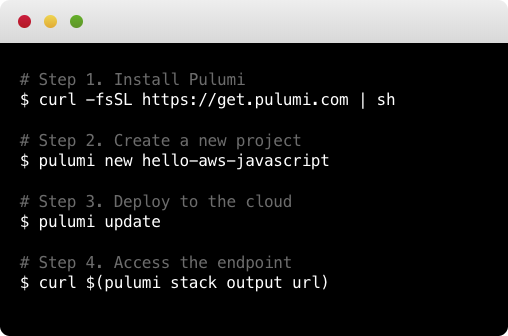
Otherwise, the following steps demonstrate how to deploy your first Pulumi program, using AWS Serverless Lambdas, in minutes:
-
Install:
To install the latest Pulumi release, run the following (see full installation instructions for additional installation options):
$ curl -fsSL https://get.pulumi.com/ | sh
-
Create a Project:
After installing, you can get started with the
pulumi newcommand:$ mkdir pulumi-demo && cd pulumi-demo $ pulumi new hello-aws-javascript
The
newcommand offers templates for all languages and clouds. Run it without an argument and it'll prompt you with available projects. This command created an AWS Serverless Lambda project written in JavaScript. -
Deploy to the Cloud:
Run
pulumi upto get your code to the cloud:$ pulumi up
This makes all cloud resources needed to run your code. Simply make edits to your project, and subsequent
pulumi ups will compute the minimal diff to deploy your changes. -
Use Your Program:
Now that your code is deployed, you can interact with it. In the above example, we can curl the endpoint:
$ curl $(pulumi stack output url)
-
Access the Logs:
If you're using containers or functions, Pulumi's unified logging command will show all of your logs:
$ pulumi logs -f
-
Destroy your Resources:
After you're done, you can remove all resources created by your program:
$ pulumi destroy -y
To learn more, head over to pulumi.com for much more information, including tutorials, examples, and details of the core Pulumi CLI and programming model concepts.
Platform
CLI
| Architecture | Build Status |
|---|---|
| Linux/macOS x64 |  |
| Windows x64 |  |
Languages
| Language | Status | Runtime | |
|---|---|---|---|
 |
JavaScript | Stable | Node.js 12+ |
 |
TypeScript | Stable | Node.js 12+ |
 |
Python | Stable | Python 3.6+ |
 |
Go | Stable | Go 1.14+ |
 |
.NET (C#/F#/VB.NET) | Stable | .NET Core 3.1+ |
Clouds
See Supported Clouds for the full list of supported cloud and infrastructure providers.
Contributing
Please See CONTRIBUTING.md for information on building Pulumi from source or contributing improvements.
1 maintainer

Metadata
1 maintainer
Release files for pulumi 3.14.0a1633113182
For a detailed explanation of source distributions (sdists) and built distributions (wheels), please see the package formats documentation.
Built distribution (wheel)
| File | Interpreter | ABI | Platform | Reset |
|---|---|---|---|---|
| pulumi-3.14.0a1633113182-py2.py3-none-any.whl | Python 2, Python 3 | none | any | Details |
Release files / pulumi-3.14.0a1633113182-py2.py3-none-any.whl
| Download URL | pulumi-3.14.0a1633113182-py2.py3-none-any.whl |
|---|---|
| Size | 167.9 kB |
| Tags | Python 2 Python 3 |
|
SHA-256 checksum How to use checksums |
be4a85ee1f039a7127b9ab286d5c0c1767ca6fb776d7be037a25b547693a5a43
|
|
BLAKE2b-256 checksum How to use checksums |
70235d5268becb2c43c21e5797e85d955c512b185fa998ea8d059a33f608831c
|
| Upload date | |
|
Uploaded using Trusted Publishing? What is trusted publishing? |
No |
| Uploaded via |
twine/3.4.2 importlib_metadata/4.8.1 pkginfo/1.7.1 requests/2.26.0 requests-toolbelt/0.9.1 tqdm/4.62.3 CPython/3.9.7
|
Security for pulumi 3.14.0a1633113182
Provenance
Provenance describes where a file came from. On PyPI, provenance is shared via attestations, which provide a verifiable record of the build or publishing details. View details, limitations and caveats.
No provenance found
None of the files in this release were uploaded with provenance metadata.
A note on package security
PyPI is a repository for distributing packages, not a service for auditing them. While third-party security researchers and our staff do their best to detect and remove malicious packages, PyPI cannot guarantee the quality, security or suitability of any given package.














