
Punch TCP connections through NATs and firewalls by simultaneous open, with T-STUN server's assist

Project description
Punchhole
This a POC implementation of TCP hole punching technique using TCP simultaneous open(TCP SO) as means of firewall or NAT traversal.
TCP SO was introduced with the first TCP specification in 1981 (RFC 793) and is still supported by almost all compliant operating systems.
RFC 793 Figure 8:
      TCP A                                            TCP B

  1.  CLOSED                                           CLOSED

  2.  SYN-SENT     --> <SEQ=100><CTL=SYN>              ...

  3.  SYN-RECEIVED <-- <SEQ=300><CTL=SYN>              <-- SYN-SENT

  4.               ... <SEQ=100><CTL=SYN>              --> SYN-RECEIVED

  5.  SYN-RECEIVED --> <SEQ=100><ACK=301><CTL=SYN,ACK> ...

  6.  ESTABLISHED  <-- <SEQ=300><ACK=101><CTL=SYN,ACK> <-- SYN-RECEIVED

  7.               ... <SEQ=101><ACK=301><CTL=ACK>     --> ESTABLISHED

                Simultaneous Connection Synchronization
In order to do TCP SO, both peers need to exchange their local ports to
determine the port to connect() to.
  TCP A                             TCP B
socket()
                                  socket()
bind()
               exchange ports     bind()
getsockname() ──────┐
                    │         ┌── getsockname()
connect() <─────────┼─────────┘
                    └───────────> connect()
This can be done manually by human operators. In the following example, person A tells the other that they're opening on 12345/tcp. Person B tells the other they're opening on 54321/tcp. After they have exchanged the information, they're able to attempt TCP SO like so:
Host A:
echo 'Hello, person B!' | ncat --source-port 12345 HOST_B 54321
Host B:
echo 'Hello, person A!' | ncat --source-port 54321 HOST_A 12345
These will work even if one or both parties are behind a stateful firewall.
The following advanced example illustrates how TCP SO can be used to connect to a SSH server behind a NAT or firewall:
Host A(SSH server):
socat TCP:HOST_B:54321,sourceport=54321,forever TCP:localhost:22
Host B:
socat TCP-LISTEN:2121 TCP:HOST_A:54321,sourceport=54321 &
    ssh user@localhost -p 2121
Trivial STUN (T-STUN)
However, the plot thickens when NAT gets involved.
Some NATs attempt to preserve the port number used internally when assigning a mapping to an external IP address and port (e.g., x1=x1', x2=x2').
A NAT that does not attempt to make the external port numbers match the internal port numbers in any case is referred to as "no port preservation".
In the case of "no port preservation", interactions with a STUN server is required to examine the external port allocated by the NAT.
Because the standard STUN protocol(RFC 5389) is a binary protocol, it is difficult to implement it in interpreted/scripting languages such as Python and Javascript(WebSocket). T-STUN is a text-based dumbed-down alternative to STUN.
T-STUN is essentially a event-based matchmaking protocol. It automates the local port number exchange and external port discovery.
T-STUN works as follows:
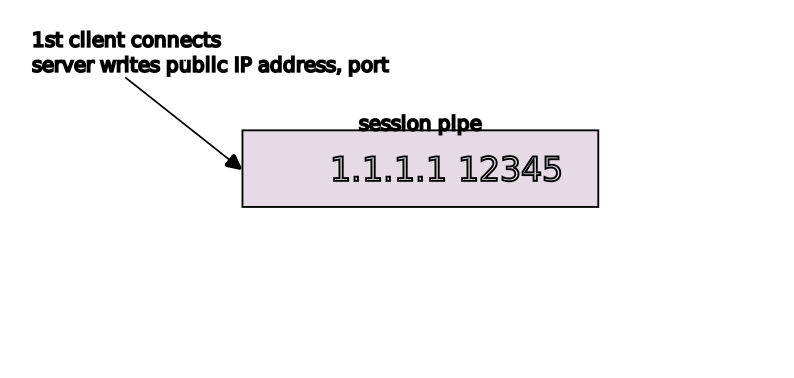
- The first client connects to the server, sends the session key(32 bytes fixed-length)
- The server process creates a pipe and writes the client's address and port. The execution of the server process blocks until the second server process consumes the data in the pipe
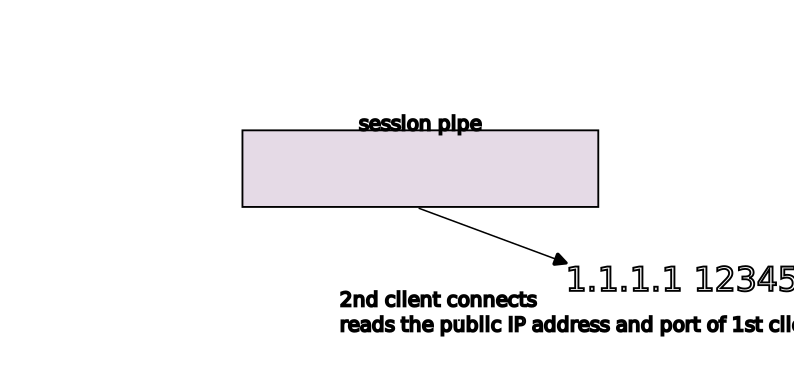
- The first client connects to the server, sends the session key
- The server process reads from the existing pipe and writes the client's address and port. The second client now has the first client's public IP address and port
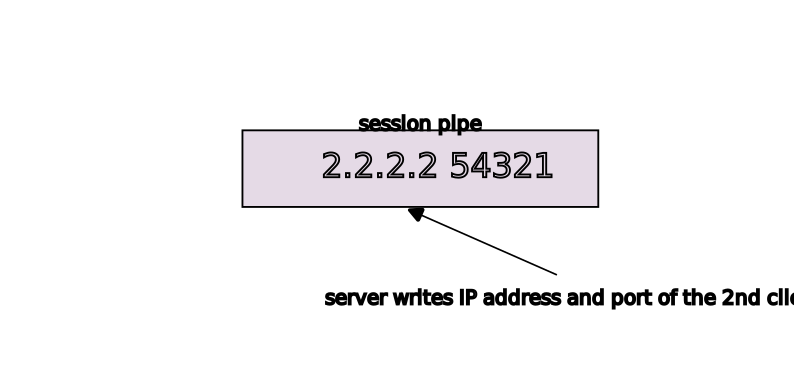
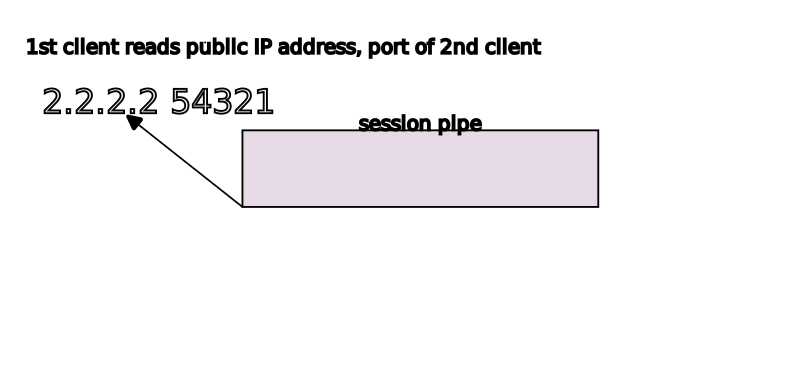
- The other server process resumes execution. The server sends the second client's public IP address and port
- Both peers proceed to do TCP SO
OS Support
tstun server runs on Linux. It should be able to run on other Unices as well,
but it's only been tested on Linux.
punchhole.tcp client should run on almost all platforms including Windows and
POSIX.
INSTALL
pip install -U punchhole
tstun server
T-STUN uses 3477/tcp.
Service scripts:
USAGE
$ python -m punchhole.tcp -h
Usage: holepunch.tcp <-46> [-T TSTUN_HOST] [-P TSTUN_PORT] [-H BIND_ADDR] [-h] [KEY]
KEY:      user-supplied paring key.
          One will be generated for you if not supplied
Options:
  -h             print this message and exit normally
  -T TSTUN_HOST  T-STUN server host
  -P TSTUN_PORT  T-STUN server port
  -H BIND_ADDR   bind to local address
  -s             send only mode (stdin -> remote)
  -r             receive only mode (remote -> stdout)
Examples
A demo T-STUN server instance is hosted on garbo.d.snart.me, which is use in
the following examples.
Simple chat
punchhole.tcp runs in bidirectional mode by default. Like ncat, it can be
used to make a simple chat session over a TCP connection.
A:
$ python -m punchhole.tcp -4T garbo.d.snart.me
Generated KEY: EXAMPLE_KEY_DO_NOT_USE_THIS
holepunch.tcp: Server socket bound to: ('0.0.0.0', 46695)
holepunch.tcp: Waiting for TSTUN on ('garbo.d.snart.me', 3477) ...
...
B:
$ python -m punchhole.tcp -4T garbo.d.snart.me EXAMPLE_KEY_DO_NOT_USE_THIS
...
File transfer: one file from A to B
A:
python -m punchhole.tcp -4sT garbo.d.snart.me EXAMPLE_KEY_DO_NOT_USE_THIS < file
B:
python -m punchhole.tcp -4rT garbo.d.snart.me EXAMPLE_KEY_DO_NOT_USE_THIS > file
File exchange
A:
python -m punchhole.tcp -4T garbo.d.snart.me EXAMPLE_KEY_DO_NOT_USE_THIS < to_send > received
B:
python -m punchhole.tcp -4T garbo.d.snart.me EXAMPLE_KEY_DO_NOT_USE_THIS < to_send > received
CAVEATS
There's a reason why TCP SO is not widely used.
https://en.wikipedia.org/wiki/TCP_hole_punching
Other requirements on the NAT to comply with TCP simultaneous open
For the TCP simultaneous open to work, the NAT should:
- not send an RST as a response to an incoming SYN packet that is not part of any mapping
- accept an incoming SYN for a public endpoint when the NAT has previously seen an outgoing SYN for the same endpoint
This is enough to guarantee that NATs behave nicely with respect to the TCP simultaneous open.
Unfortunately, not all NATs are like this. Additionally, there are a few more edge case conditions where STUN or T-STUN wouldn't work, one being "hairpin double NAT situation".
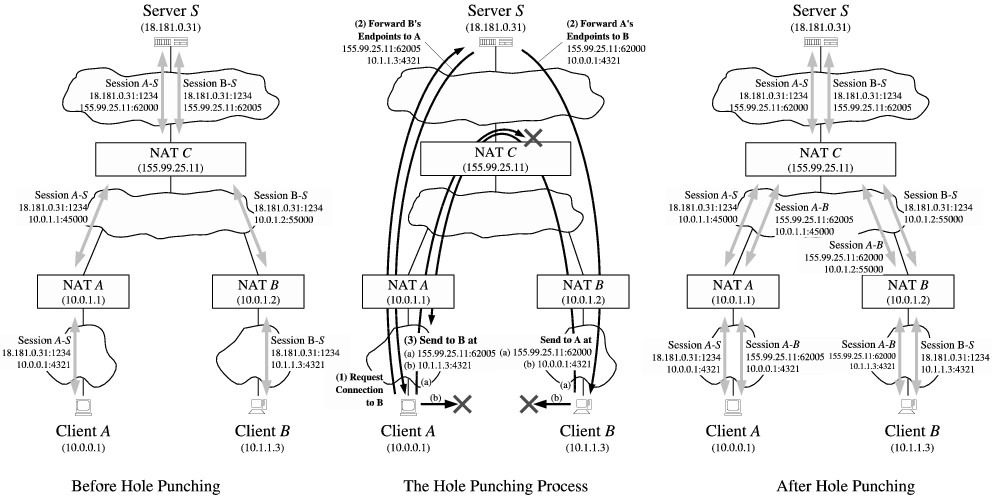
https://bford.info/pub/net/p2pnat/
If you get OSError: Connection refused, it is most likely the case. In this
case, the only way to do TCP SO is through the manual method mentioned earlier.
Release history Release notifications | RSS feed


Download files
Download the file for your platform. If you're not sure which to choose, learn more about installing packages.
Source Distributions
Built Distribution
Filter files by name, interpreter, ABI, and platform.
If you're not sure about the file name format, learn more about wheel file names.
Copy a direct link to the current filters
File details
Details for the file punchhole-0.0.2-py3-none-any.whl.
File metadata
- Download URL: punchhole-0.0.2-py3-none-any.whl
- Upload date:
- Size: 11.8 kB
- Tags: Python 3
- Uploaded using Trusted Publishing? No
- Uploaded via: twine/6.1.0 CPython/3.13.7
File hashes
| Algorithm | Hash digest | |
|---|---|---|
| SHA256 |
837b210d619f159ddd4458d529e1a505c86130b0f933bccba5f6693591fd35d7
|
|
| MD5 |
77fabefb161a0831a3a59ddf6f0a1f5b
|
|
| BLAKE2b-256 |
7d03e485adc3b025687173c358233637c5ab388779f130a38ee59d26e170906a
|






