
z-spec
Type-check, animate, and model-check Z specifications and B machines.



Platforms: macOS, Linux
z-spec is a toolkit for formal specifications written in Z and the B-Method.
It provides a z-spec command-line tool, an MCP server (zspec) that AI
coding agents can call, and an optional Claude Code plugin whose slash
commands help you write specs and derive code and tests from them. It
type-checks specs with fuzz,
animates and model-checks them with ProB, and shows
the results in a Lux window when Lux is
running.
Quick Start
curl -fsSL https://raw.githubusercontent.com/punt-labs/z-spec/38d8814/install.sh | sh
This installs uv and Python 3.13 if they are missing, the z-spec CLI,
probcli (the ProB command-line tool), and fuzz (built from source), then the
Claude Code plugin, and finally runs z-spec doctor. If claude or git is
not installed, the plugin step is skipped and the CLI is still installed.
To install the CLI only — for agents other than Claude Code (Codex, Cursor, a
plain terminal) or where policy blocks plugin installation — pass
--no-plugin through the pipe with sh -s --:
curl -fsSL https://raw.githubusercontent.com/punt-labs/z-spec/38d8814/install.sh | sh -s -- --no-plugin
Where passing arguments is awkward (templated CI, proxies), set
ZSPEC_NO_PLUGIN=1 instead. It takes effect only when set to exactly 1:
curl -fsSL https://raw.githubusercontent.com/punt-labs/z-spec/38d8814/install.sh | ZSPEC_NO_PLUGIN=1 sh
Manual install (if you already have uv)
uv tool install punt-z-spec
claude plugin marketplace add punt-labs/claude-plugins
claude plugin install z-spec@punt-labs
z-spec doctor
A manual install does not install fuzz or probcli; run /z-spec:setup all in
Claude Code to install them.
Verify before running
curl -fsSL https://raw.githubusercontent.com/punt-labs/z-spec/38d8814/install.sh -o install.sh
shasum -a 256 install.sh
cat install.sh
sh install.sh
Then, inside Claude Code, in the repository you want to specify:
-
Turn z-spec on for this repository. The MCP tools refuse to run in a repository where z-spec is not enabled (see Setup).
/z-spec:enable
-
Install Lean 4 and any of fuzz or probcli that is still missing. Lean is needed only by
/z-spec:prove,/z-spec:oracle, and/z-spec:refine --lean; skip this step if you do not use them./z-spec:setup all
-
Generate a first spec from your code:
/z-spec:code2model the user authentication system
-
Type-check it:
/z-spec:check docs/auth.tex
-
Animate and model-check it:
/z-spec:test docs/auth.tex
Features
- Generate Z specs from a codebase or a system description (
/z-spec:code2model) - Type-check with fuzz (
/z-spec:check) - Animate and model-check with probcli (
/z-spec:test) - Derive test cases from a spec with the Test Template Framework (
/z-spec:partition) - Generate code and tests from a spec (
/z-spec:model2code) - Audit test coverage against the spec's constraints (
/z-spec:audit) - Generate Lean 4 proof obligations and build them with Lake, Lean's build tool (
/z-spec:prove) - Generate runtime contracts (preconditions, postconditions, invariants) from a spec (
/z-spec:contracts) - Property-based testing that runs generated operation sequences against code and an executable Lean model, and compares the results (
/z-spec:oracle) - Check data refinement: map code state to spec state with an abstraction function and check that each operation gives the same result either way (
/z-spec:refine) - Elaborate a spec with narrative from design documents (
/z-spec:elaborate) - ProB-compatible output: generated specs avoid B keyword conflicts, bound integers, and use flat schemas
- B-Method support (alpha): create, type-check, animate, and refine B machines (
/z-spec:b-create,/z-spec:b-check,/z-spec:b-animate,/z-spec:b-refine)
What It Looks Like
A Generated Spec
\begin{schema}{State}
level : \nat \\
attempts : \nat \\
correct : \nat
\where
level \geq 1 \\
level \leq 26 \\
correct \leq attempts \\
attempts \leq 10000
\end{schema}

\begin{schema}{AdvanceLevel}
\Delta State \\
accuracy? : \nat
\where
accuracy? \geq 90 \\
accuracy? \leq 100 \\
level < 26 \\
level' = level + 1 \\
attempts' = attempts \\
correct' = correct
\end{schema}
A Derived Partition Table
/z-spec:partition applies the Test Template Framework (TTF) to derive conformance test cases from the spec's predicates:
- DNF decomposition — split disjunctions into separate behavior branches
- Standard partitions — type-based equivalence classes (endpoints, midpoints, every constructor)
- Boundary analysis — values at and around each constraint edge
For the AdvanceLevel schema above:
| # | Class | Inputs | Pre-state | Expected |
|---|---|---|---|---|
| 1 | Happy path | accuracy=95 | level=5 | level'=6 |
| 2 | Boundary: min accuracy | accuracy=90 | level=5 | level'=6 |
| 3 | Boundary: max level | accuracy=95 | level=25 | level'=26 |
| 4 | Rejected: low accuracy | accuracy=89 | level=5 | no change |
| 5 | Rejected: at max | accuracy=95 | level=26 | no change |
Add --code swift (or python, typescript, kotlin) to generate executable test cases.
Visual Exploration With Lux
show displays a spec in a Lux window. The window always has a Spec tab, which
shows the Z model with collapsible sections. It adds a tab for each report
saved beside the spec: Fuzz (type-check), ProB (states explored, transitions
covered, checks passed, operation coverage), Partition, and Audit. When the
ProB report contains a counter-example, a Counter-Example tab shows the trace
step by step, with state values and the violated invariant. If Lux is not
running, show returns an error and nothing else is affected.
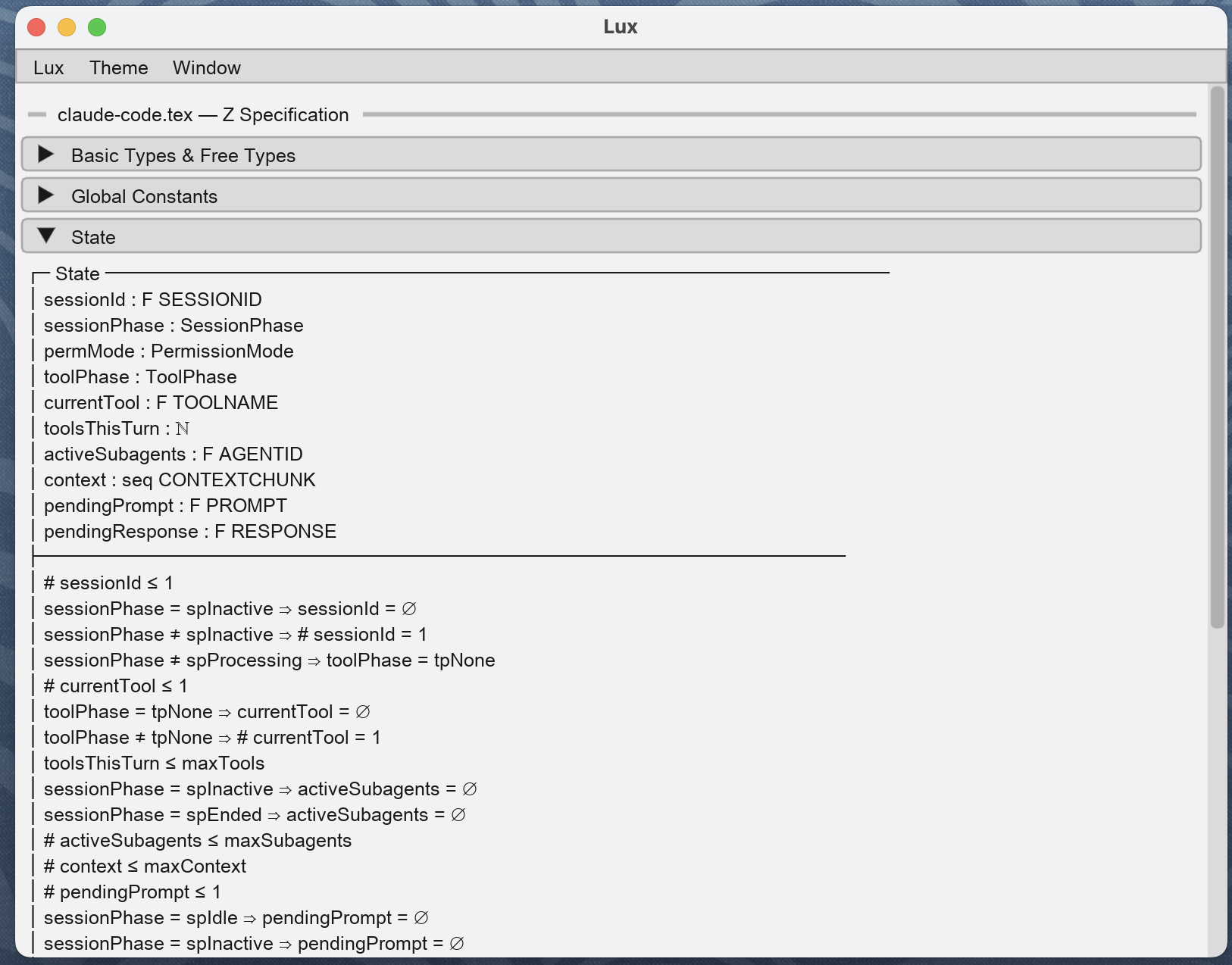
A Z specification rendered in Lux, with collapsible sections for state schemas, invariants, and global constants. Run show again after editing the spec to refresh the window.
Commands
Setup
| Command | Description |
|---|---|
/z-spec:setup [check|fuzz|probcli|lean|all] |
Check or install fuzz, probcli, and Lean 4 (no argument is the same as check) |
/z-spec:doctor |
Check environment health |
/z-spec:enable |
Turn z-spec on in this repository |
/z-spec:disable |
Turn z-spec off in this repository |
/z-spec:help |
Interactive getting-started tutorial for your own spec |
/z-spec:cleanup [dir] |
Remove TeX tooling files (keeps .tex and .pdf) |
Z Specification
| Command | Description |
|---|---|
/z-spec:code2model [focus] |
Create a Z spec from a codebase or description |
/z-spec:check [file] |
Type-check with fuzz |
/z-spec:test [file] [-v] [-s N] |
Animate and model-check with probcli (-v shows each check's detail, -s sets the set size) |
/z-spec:elaborate [spec] [design] |
Add narrative from design documents to a spec |
/z-spec:prove [spec] [--obligations=all|init|preserve] [--no-mathlib] |
Generate Lean 4 proof obligations |
/z-spec:partition [spec] [--code [language]] [--operation=NAME] [--json] |
Derive test cases using TTF testing tactics |
/z-spec:model2code [spec] [language] |
Generate code and tests from a spec |
/z-spec:contracts [spec] [language] [--invariants-only] [--wrap] [--strip] |
Generate runtime assertion functions |
/z-spec:oracle [spec] [language] [--sequences N] [--steps N] |
Property-based testing with a Lean model as the oracle |
/z-spec:refine [spec] [language] [--lean] [--generate-abstraction] [--impl file] |
Check that code refines a spec via an abstraction function |
/z-spec:audit [spec] [--json] [--test-dir=DIR] |
Audit test coverage against spec constraints |
B-Method (alpha)
| Command | Description |
|---|---|
/z-spec:b-create [description or file.tex] |
Create a B machine, or translate a Z spec to B |
/z-spec:b-check [machine.mch] |
Type-check with probcli |
/z-spec:b-animate [machine.mch] [-v] [-a N] [-s N] |
Animate and model-check with probcli |
/z-spec:b-refine [machine.mch] [refinement.ref] [--imp] |
Create a refinement (or, with --imp, an implementation), or check a refinement against its machine |
CLI
| Command | What it does |
|---|---|
z-spec check <file> |
Type-check with fuzz; saves <stem>.fuzz.json |
z-spec test <file> |
Run the full probcli suite; saves <stem>.report.json |
z-spec animate <file> |
Animate only |
z-spec model-check <file> |
Model-check only |
z-spec partition <file> [--report FILE] |
Validate and save a partition report you or an agent wrote |
z-spec audit <file> [--report FILE] |
Validate and save a coverage-audit report you or an agent wrote |
z-spec show <file> |
Show the spec and its reports in Lux |
z-spec browse <manifest.toml> |
Open a tutorial collection in Lux |
z-spec pick <directory> |
List a directory's .tex specs in a Lux picker |
z-spec report <file> |
Load an existing ProB report |
z-spec doctor |
Check that fuzz and probcli are installed and working |
z-spec enable [directory] |
Turn z-spec on in this repository |
z-spec disable [directory] |
Turn z-spec off in this repository |
z-spec mcp |
Start the MCP server (stdio) |
partition and audit do not perform the analysis. They read report JSON
that an agent or a person wrote — from stdin by default, or from a file with
--report FILE (--report - is stdin) — check it against the report schema,
and save it beside the spec. The analysis itself is done by the plugin's
/z-spec:partition and /z-spec:audit commands or by any agent using the CLI.
MCP Tools
The MCP server (zspec) provides 12 tools. Each matches a CLI command and
returns JSON:
| Tool | Description |
|---|---|
check(file) |
Type-check with fuzz, saves .fuzz.json |
test(file, setsize, max_ops, timeout) |
Full probcli suite, saves .report.json |
animate(file, steps, setsize) |
Animate only, saves .report.json |
model_check(file, setsize, max_ops, timeout) |
Model-check only, saves .report.json |
doctor() |
Report fuzz/probcli presence, version, and health |
report(file) |
Load an existing ProB report |
partition(file, report_json) |
Validate and save an authored partition report |
audit(file, report_json) |
Validate and save an authored coverage-audit report |
show(file) |
Show the spec and all its reports in Lux |
browse(manifest) |
Open a tutorial collection in the tabbed Lux browser |
pick(directory) |
List a directory's .tex specs in a tabbed Lux picker |
enablement(action, directory) |
Turn z-spec on or off in a repository (the MCP form of enable/disable) |
Every tool returns {"ok": true, ...} on success or {"ok": false, "error": ...}
on failure, with an optional hint that says how to fix the problem.
enablement is the only tool that works in a repository where z-spec is not
enabled; the others return an error there. In Claude Code, the plugin's
PostToolUse hook
shows each result as a short summary panel instead of raw JSON.
Setup
Tools z-spec Uses
- fuzz — Mike Spivey's Z type-checker, developed at Oxford (source). It checks that every schema is well-typed and every name resolves. It does not check that the predicates can be satisfied. It also provides
fuzz.styfor typesetting Z in LaTeX. - ProB — an animator and model checker from Heinrich Heine University Düsseldorf (download); z-spec uses its command-line tool,
probcli, which requires Tcl/Tk. ProB explores the reachable states of a spec within configured bounds (set size, number of operations, timeout), checks that the invariants hold in every state it reaches, and reports a counter-example when one does not. - Lean 4 (optional) — a theorem prover, used by
/z-spec:prove,/z-spec:oracle, and/z-spec:refine --lean.
The installer installs fuzz and probcli. /z-spec:setup checks or installs
any of the three: /z-spec:setup all installs fuzz, probcli, and Lean;
/z-spec:setup fuzz, /z-spec:setup probcli, and /z-spec:setup lean
install one tool. It detects your platform (macOS Intel or Apple Silicon,
Linux), builds fuzz from source, and downloads a pre-built ProB for your
platform.
Enable z-spec in a Repository
z-spec's MCP tools and Lux menu entries work only in repositories where z-spec
is enabled. Run /z-spec:enable in Claude Code or z-spec enable in a
terminal. Enabling:
- writes the z-spec guide for Claude to
.punt-labs/z-spec/CLAUDE.md - writes the marker file
.punt-labs/z-spec/enabled - adds the line
@.punt-labs/z-spec/CLAUDE.mdto the repository'sCLAUDE.md - adds permission rules to
.claude/settings.jsonin the repository: it allowsBash(z-spec:*),mcp__plugin_z-spec_zspec__*, andSkill(z-spec:*), and addsaskrules so Claude Code still asks before runningz-spec enable,z-spec disable,z-spec mcp, theenablementtool,/z-spec:enable,/z-spec:disable, and/z-spec:setup
disable removes the @-import line, the marker, and exactly the permission
rules that enable added; the guide stays in place, unused. Neither command
runs git or edits ~/.claude/settings.json.
Commit the marker. Whether z-spec is enabled is a setting of the repository,
not of one user, so it should be reviewed in a pull request like other
repository settings. The z-spec CLI works in every directory whether or not
the repository is enabled.
Logs and Usage Data
z-spec writes its diagnostics to ~/.punt-labs/z-spec/logs/z-spec.log. The
log is readable only by you, rotates at 5 MiB, and keeps five old files.
z-spec also records which commands and MCP tools you run, whether they
succeeded, and how long they took, in ~/.punt-labs/z-spec/telemetry.db. It
never records file paths, spec text, or report contents, keeps records for
90 days, and sends nothing over the network. To turn it off, set
Z_SPEC_TELEMETRY=off (z-spec only) or PUNT_TELEMETRY=off (every Punt
Labs tool).
What Is Z?
Z ("zed") is a formal specification language based on set theory and first-order predicate logic. It was developed at the University of Oxford in the late 1970s and early 1980s and is standardized as ISO/IEC 13568.
A Z specification describes a system as:
- States — the data a system holds (e.g., a set of users, a counter, a mode flag)
- Invariants — constraints that must always be true (e.g.,
correct ≤ attempts,level ≥ 1) - Operations — transitions between states, with preconditions and effects
The specification says what a system does, not how. When the type-checker (fuzz) accepts a spec, every expression is well-typed and every name refers to something declared. When the animator and model checker (ProB) explores the spec, it visits every state reachable within its bounds, including states you may not have considered.
Z's sibling, the B-Method, uses the same mathematical foundations and adds a language for describing state changes and a sequence of refinement steps from specification to code. z-spec supports both; see B-Method Workflow below.
Why Use Formal Specs?
A test checks the inputs it was written for. An invariant states a rule for every state. For example, the invariant ¬(radioMode = receiving ∧ toneActive) says that a tone is never keyed while the radio is receiving. ProB checks that rule in every state it reaches, and tests derived from the spec (/z-spec:partition, /z-spec:oracle) check the code against it.
Formal specifications have been used for decades, but writing them by hand takes time and skill. In this toolkit an LLM drafts the spec and fuzz and ProB check it. The methods are the same; the time cost is not.
Key References
- Spivey, J.M. The Z Notation: A Reference Manual — the standard Z reference manual
- Abrial, J-R. The B-Book: Assigning Programs to Meanings — the B-Method reference, by its creator, who also originated Z
- Bowen, J.P. Formal Specification and Documentation using Z — applications of Z to real systems
- Simpson, A. Software Engineering Mathematics and State-Based Modelling — University of Oxford, Department of Computer Science
Ways to Use It
The CLI and the MCP server run the same checks and write the same reports. The plugin's slash commands are prompts that tell Claude what to do; they call the MCP server for type-checking, model-checking, and display. There are three ways to use z-spec:
1. Claude Code plugin. Install the plugin and use the /z-spec:* slash
commands. Claude does the writing — generating a spec from a codebase
(/z-spec:code2model), deriving partition tables, explaining a
counter-example — and calls the MCP tools to type-check, model-check, and show
results in Lux. See Quick Start.
2. CLI and MCP server without the plugin. For other agents — Codex, Cursor,
or Claude Code where policy blocks plugins — install with --no-plugin. The
z-spec CLI and its MCP server (z-spec mcp) provide every check and report.
The CLI does not include an LLM: the agent writes the partition or audit report
itself and passes it to the CLI, which validates and saves it:
z-spec partition spec.tex --report analysis.json
An agent that can only run shell commands gets the same partition, audit, type-check, and model-check results as the plugin. See Quick Start and CLI.
3. By hand in a terminal. Run z-spec check spec.tex, z-spec test spec.tex,
and the other commands directly. Reports are written as JSON next to the spec;
z-spec show spec.tex shows them in Lux.
Workflow
A typical Z session in Claude Code, in order. The Commands tables list every option.
/z-spec:setuponce, to check the tools, then/z-spec:doctorwhen something stops working./z-spec:code2model the payment systemto generate a spec from the codebase./z-spec:check docs/payment.texto type-check it, and/z-spec:test docs/payment.texto animate and model-check it./z-spec:elaborate docs/payment.texto add narrative fromDESIGN.md.- Derive and check code against the spec with any of
/z-spec:partition(add--codefor executable tests),/z-spec:model2code,/z-spec:contracts,/z-spec:prove,/z-spec:oracle,/z-spec:refine, and/z-spec:audit. /z-spec:cleanupto remove the TeX tooling files when you are done.
B-Method Workflow (alpha)
The B-Method was created by Jean-Raymond Abrial, who also originated Z. It shares Z's mathematical foundations (set theory, predicate logic) and adds two things Z leaves out: a substitution language for describing how operations change state (assignments, conditionals, loops), and a refinement chain that takes a specification through three stages: Abstract Machine (.mch) → Refinement (.ref) → Implementation (.imp). z-spec checks a refinement against its machine with ProB's refinement checker (probcli -refcheck).
z-spec supports two paths from specification to code:
| B Refinement | Z + LLM | |
|---|---|---|
| Method | Write (or have /z-spec:b-refine draft) each refinement step, linked to the previous one by a gluing invariant |
An LLM translates the spec to code; verification tools check the result |
| Check | ProB's refinement check, over the states it explores within its bounds | Type-checking, model-checking, partition tests, runtime contracts, oracle property tests, abstraction-function checks |
| Limits | z-spec does not generate or discharge B proof obligations | Correctness is not proven |
| Cost | Requires writing refinement machines and gluing invariants | Generated in seconds |
Both paths start from a formal specification with precise invariants and preconditions. The spec gives a definition of correct behavior that code, tests, contracts, and proofs can be checked against.
B support is alpha: the commands need only probcli, but they have not been tested on a wide range of specifications. A typical sequence:
/z-spec:b-create A user registry with add and removecreates a B machine;/z-spec:b-create docs/registry.textranslates an existing Z spec to B instead./z-spec:b-check specs/registry.mchtype-checks it./z-spec:b-animate specs/registry.mchanimates and model-checks it./z-spec:b-refine specs/registry.mchcreates a refinement machine./z-spec:b-refine specs/registry.mch specs/registry_r.refchecks the refinement against the machine.
Reference: ProB Compatibility
The plugin generates specs that work with both fuzz and probcli:
| Issue | Solution |
|---|---|
| B keyword conflict | Use ZBOOL ::= ztrue | zfalse |
| Abstract functions | Provide concrete mappings |
| Unbounded integers | Add bounds in invariants |
| Nested schemas | Flatten into single State schema |
| Unbounded inputs | Add upper bounds to inputs |
Reference: Spec Structure
Generated specs follow this structure:
- Basic Types — Given sets (
[USERID, TIMESTAMP]) - Free Types — Enumerations (
Status ::= active | inactive) - Global Constants — Configuration values
- State Schemas — Entities with invariants
- Initialization — Valid initial states
- Operations — State transitions
- System Invariants — Key properties summary
Reports
Reports are saved as JSON beside each .tex file:
examples/claude-code.tex               → examples/claude-code.report.json     (ProB)
                                       → examples/claude-code.fuzz.json       (fuzz)
                                       → examples/claude-code.partition.json  (TTF partitions)
                                       → examples/claude-code.audit.json      (test coverage)
show loads whichever reports exist and shows each as a tab in Lux. Reports
are generated files; this repository's .gitignore excludes them, and you may
want to do the same in yours.
Tutorial Browser
browse opens a tutorial collection in Lux, with one tab per lesson (Lux must
be running). A collection is described by a manifest.toml that lists the
lessons in order:
[collection]
title = "My Z Course"

[[lessons]]
title = "Basic Types"
spec = "01-basic-types.tex"
annotation = "Z specifications start with **basic types** and **free types**..."
highlights = ["Basic Types"]

[[lessons]]
title = "State Schemas"
spec = "02-state.tex"
annotation = "A **state schema** captures the data a system holds..."
highlights = ["State"]
Selecting a lesson tab shows its annotation and the spec's tabs
(Spec/Fuzz/ProB/Partition/Audit). Sections of the spec whose titles contain a
highlights entry are expanded.
Interactive Lux Menu
When the MCP server starts while Lux is running, it adds two entries to the Lux Clients menu, under a submenu named after the repository:
Clients ▸ <repo> ▸ Z-Spec Tutorialopens the tutorial collection that ships with the plugin.Clients ▸ <repo> ▸ Z-Spec Browsershows the.texspecs in the session's working directory, like thepicktool.
z-spec sessions in different repositories each get their own submenu. If Lux is not running when the server starts, the menu entries are not added and the other tools work as usual.
Thanks
- @ebowman —
/z-spec:partition,/z-spec:prove,/z-spec:contracts,/z-spec:oracle, and/z-spec:refinecommands
Documentation
- Contributing — quality-gate commands
- Development — dev/prod plugin swap, release flow, project layout
- Workflow — the three-loop development process
- Testing — the five-tier testing pyramid
- Design docs — ADRs and architectural decisions
- Changelog — release history
License
MIT License — see LICENSE
1 maintainer

Metadata
1 maintainer
Release files for punt-z-spec 0.21.0
For a detailed explanation of source distributions (sdists) and built distributions (wheels), please see the package formats documentation.
Source distribution (sdist)
| File | Size | Uploaded | Provenance | Actions |
|---|---|---|---|---|
| punt_z_spec-0.21.0.tar.gz | 96.2 kB | With provenance | Details for punt_z_spec-0.21.0.tar.gz |
Built distribution (wheel)
| File | Interpreter | ABI | Platform | Actions Reset |
|---|---|---|---|---|
| punt_z_spec-0.21.0-py3-none-any.whl | Python 3 | none | any | Details for punt_z_spec-0.21.0-py3-none-any.whl |
Total release size: 210.1 kB
Release files / punt_z_spec-0.21.0.tar.gz
| Download URL | punt_z_spec-0.21.0.tar.gz |
|---|---|
| Size | 96.2 kB |
| Tags | Source |
|
SHA-256 checksum How to use checksums |
936f2e924aaf4606543bef0caf24a32906845856869c52b1d5edd5502a4befe3
|
|
BLAKE2b-256 checksum How to use checksums |
fdaa028eb998473e6d84f1b17aef9bc0d254395079d1bd4895f6998ec91b420c
|
| Upload date | |
|
Uploaded using Trusted Publishing? What is trusted publishing? |
Yes |
| Uploaded via |
twine/7.0.0 CPython/3.13.16
|
Provenance
Provenance describes where a file came from. On PyPI, provenance is shared via attestations, which provide a verifiable record of the build or publishing details. View details, limitations and caveats.


PyPI Publish Attestation
PyPI verified that this artifact, at this checksum, originated from the publisher listed below.
Signed by GitHub Actions, verified by PyPI on Nov 22, 2026.
Transparency logRelease files / punt_z_spec-0.21.0-py3-none-any.whl
| Download URL | punt_z_spec-0.21.0-py3-none-any.whl |
|---|---|
| Size | 114.0 kB |
| Tags | Python 3 |
|
SHA-256 checksum How to use checksums |
18c02b2b15eb90568ab74dd89d7cd324898b5ae639fec6069105652fa1295f9b
|
|
BLAKE2b-256 checksum How to use checksums |
e96b029e400ef82aa1c259f9de42260a0fce35aa0c5803681bd2119ac0fdd70b
|
| Upload date | |
|
Uploaded using Trusted Publishing? What is trusted publishing? |
Yes |
| Uploaded via |
twine/7.0.0 CPython/3.13.16
|
Provenance
Provenance describes where a file came from. On PyPI, provenance is shared via attestations, which provide a verifiable record of the build or publishing details. View details, limitations and caveats.
PyPI Publish Attestation
PyPI verified that this artifact, at this checksum, originated from the publisher listed below.
Signed by GitHub Actions, verified by PyPI on Nov 22, 2026.
Transparency logSecurity for punt-z-spec 0.21.0
Provenance
Provenance describes where a file came from. On PyPI, provenance is shared via attestations, which provide a verifiable record of the build or publishing details. View details, limitations and caveats.
Full provenance
Both files in this release have been uploaded with provenance metadata.
Attestation for punt_z_spec-0.21.0.tar.gz
PyPI Publish Attestation
PyPI verified that this artifact, at this checksum, originated from the publisher listed below.
Signed by GitHub Actions, verified by PyPI on Nov 22, 2026.
Transparency logA note on package security
PyPI is a repository for distributing packages, not a service for auditing them. While third-party security researchers and our staff do their best to detect and remove malicious packages, PyPI cannot guarantee the quality, security or suitability of any given package.
To learn more about protecting yourself from malicious actors, visit our package security documentation.














