
Pupil Labs pl-realtime-tui





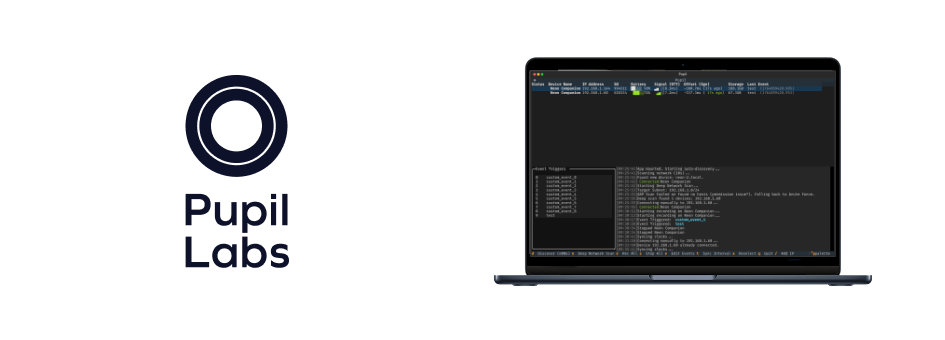
A TUI to monitor, control and send synchronized events to multiple eye-trackers.
pl-realtime-tui is a Python-based Text User Interface (TUI) application designed to monitor, control, and send synchronized events to multiple Pupil Labs eye-trackers (Neon/Pupil Invisible). It leverages the pupil-labs-realtime-api for low-latency communication with devices and textual for a responsive terminal-based dashboard.
See the accompanying Alpha Lab article for more details and example use cases.
Installation
pip install pupil-labs-realtime-tui # or pip install git+https://github.com/pupil-labs/pl-realtime-tui.git
If you have UV installed. You can also run it as a one time:
uvx --from pupil-labs-realtime-tui pl-realtime-tui
or, if you want to run more than one time, you can install it as a tool.
uv tool install pupil-labs-realtime-tui
Run It
From there, you would be able to invoke it with just pl-realtime-tui from anywhere in the terminal, check out the -h help flag for other parameters.
Related Work
We would like to also acknowledge the following published work using terminal-based interfaces for eye-tracking device management, concretely with our own devices:
Key Features
- Discovery: Implements both standard mDNS discovery and a "Deep Scan" (ARP-based or brute-force subnet scan).
- Device Dashboard: Displays connected devices in a
DataTablewith real-time status, battery, storage, and last event info. - Recording Control: Start/stop recordings on selected devices or all devices simultaneously.
- Event Triggers: Keyboard keys
0-9trigger events sent to either the selected device or all connected devices if none is selected. - Selection Logic: Clicking a device in the
DataTableselects it, allowing targeted start/stop/event commands. - Time Sync: Automatically estimates clock offsets periodically to maintain synchronization.
Tech Stack
- Language: Python (>=3.10, <4.0)
- TUI Framework: Textual
- CLI Framework: Typer
- API: pupil-labs-realtime-api
- Networking:
aiohttpfor HTTP API calls,scapyfor deep network scans (ARP).
Development Conventions
- Code Quality: Strictly follows PEP 8 via
ruff. Ensure all changes passmake checkbefore committing. - Typing: Uses static type hints throughout.
mypyis used for verification. - Asynchronous Code: Heavily relies on
asynciofor non-blocking I/O with multiple devices. Textual workers (@work) are used for long-running tasks like network discovery. - Time Synchronization: Uses
TimeOffsetEstimatorfrom the realtime API to calculate clock offsets between the host and eye-trackers, ensuring events are accurately timestamped in the device's clock domain. - UI Styling: Uses Textual CSS (
.tcss). Modifications to the UI look should be done insrc/pupil_labs/realtime_tui/css/main.tcss. - Pre-commit: Pre-commit hooks are configured to run linting and formatting on every commit.
1 maintainer

Metadata
1 maintainer
Release files for pupil-labs-realtime-tui 1.0.1
For a detailed explanation of source distributions (sdists) and built distributions (wheels), please see the package formats documentation.
Source distribution (sdist)
| File | Size | Uploaded | Provenance | |
|---|---|---|---|---|
| pupil_labs_realtime_tui-1.0.1.tar.gz | 621.2 kB | With provenance | Details |
Built distribution (wheel)
| File | Interpreter | ABI | Platform | Reset |
|---|---|---|---|---|
| pupil_labs_realtime_tui-1.0.1-py3-none-any.whl | Python 3 | none | any | Details |
Total release size: 647.2 kB
Release files / pupil_labs_realtime_tui-1.0.1.tar.gz
| Download URL | pupil_labs_realtime_tui-1.0.1.tar.gz |
|---|---|
| Size | 621.2 kB |
| Tags | Source |
|
SHA-256 checksum How to use checksums |
424f2547fbc4d388c0877ce09358cf083391603fc66ca0decbcd4451b930f0ee
|
|
BLAKE2b-256 checksum How to use checksums |
b04c12c92eb30a42b36e012531c8bd5f842ccc74e0ece7eb7a1441065f01370a
|
| Upload date | |
|
Uploaded using Trusted Publishing? What is trusted publishing? |
Yes |
| Uploaded via |
twine/7.0.0 CPython/3.13.14
|
Provenance
Provenance describes where a file came from. On PyPI, provenance is shared via attestations, which provide a verifiable record of the build or publishing details. View details, limitations and caveats.


PyPI Publish Attestation
PyPI verified that this artifact, at this checksum, originated from the publisher listed below.
Signed by GitHub Actions, verified by PyPI on Sep 3, 2026.
Transparency logRelease files / pupil_labs_realtime_tui-1.0.1-py3-none-any.whl
| Download URL | pupil_labs_realtime_tui-1.0.1-py3-none-any.whl |
|---|---|
| Size | 26.0 kB |
| Tags | Python 3 |
|
SHA-256 checksum How to use checksums |
6c54807a380cfee0b5abb8291ebb0cbdda0f9c8b5784c422064e6a6546159662
|
|
BLAKE2b-256 checksum How to use checksums |
1d8fd164d1e72f1c0f3fa26151b6141dbeba1ae05828fa8da1828ec6f1dba9be
|
| Upload date | |
|
Uploaded using Trusted Publishing? What is trusted publishing? |
Yes |
| Uploaded via |
twine/7.0.0 CPython/3.13.14
|
Provenance
Provenance describes where a file came from. On PyPI, provenance is shared via attestations, which provide a verifiable record of the build or publishing details. View details, limitations and caveats.
PyPI Publish Attestation
PyPI verified that this artifact, at this checksum, originated from the publisher listed below.
Signed by GitHub Actions, verified by PyPI on Sep 3, 2026.
Transparency logSecurity for pupil-labs-realtime-tui 1.0.1
Provenance
Provenance describes where a file came from. On PyPI, provenance is shared via attestations, which provide a verifiable record of the build or publishing details. View details, limitations and caveats.
Full provenance
All 2 files in this release have been uploaded with provenance metadata.
Attestation for pupil_labs_realtime_tui-1.0.1.tar.gz
PyPI Publish Attestation
PyPI verified that this artifact, at this checksum, originated from the publisher listed below.
Signed by GitHub Actions, verified by PyPI on Sep 3, 2026.
Transparency logA note on package security
PyPI is a repository for distributing packages, not a service for auditing them. While third-party security researchers and our staff do their best to detect and remove malicious packages, PyPI cannot guarantee the quality, security or suitability of any given package.
To learn more about protecting yourself from malicious actors, visit our package security documentation.














