



Pupmapper: A Pileup Mappability Calculator
Table of Contents
Motivation
The Pileup Mappability metric can be used to quickly identify regions which may be more difficult to perform variant calling with short-read WGS data. pupmapper was created to allow users to quickly convert k-mer mappability scores to pileup mappability.
The first step of the pupmapper pipeline is to calculate k-mer uniquness scores using the Genmap software. Then pupmapper will summarize the pileup mappability of each genomic position using the k-mer uniqueness of all overlapping k-mers.
How is pileup mappability calculated from individual k-mer uniqueness/mappability scores?
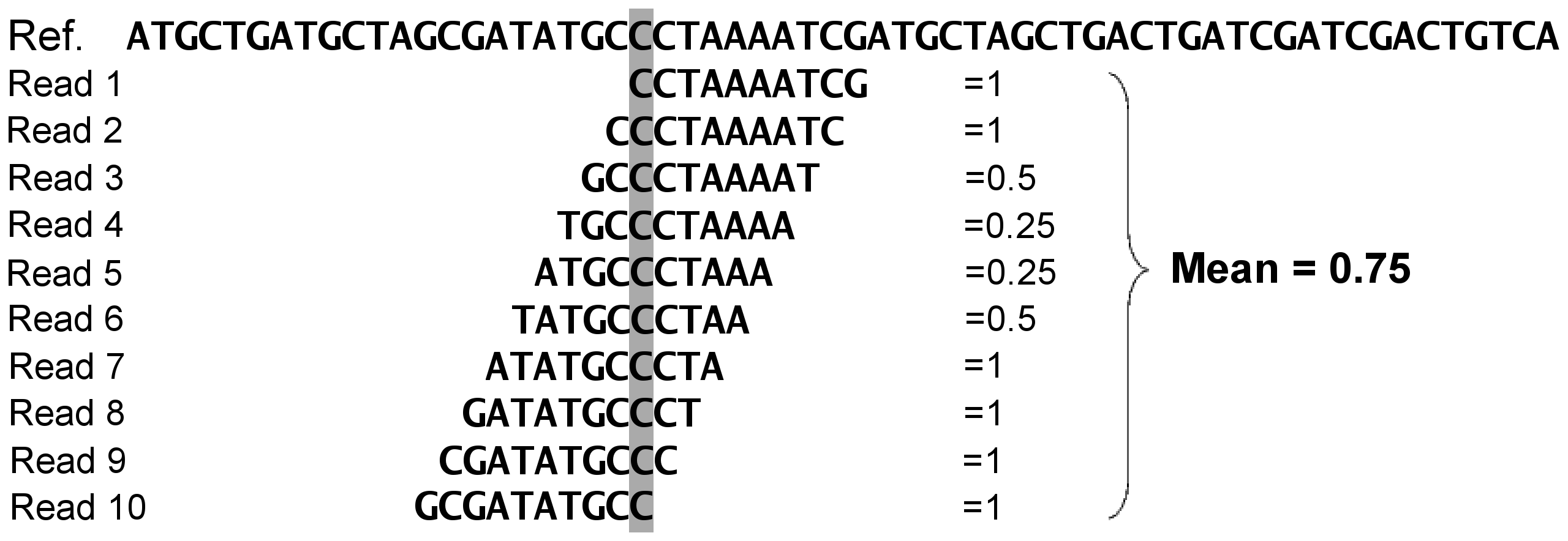 The Pileup mappability of a position is specifically calculated as the mean k-mer mappability of all k-mers overlapping a given position.
 A pileup mappability score of 1 indicates that all k-mers overlapping with a position are unique within the genome (using the user defined parameters of uniqueness).
Simply put, Pileup mappability is useful because it gives a sense of uniquemess of all possible reads (of defined length) that could arise from given genomic position.
Useful reading for k-mer mappability and pileup mappability:
Derrien, T, (2012). Fast Computation and Applications of Genome Mappability. PLOS ONE 7(1): e30377. https://doi.org/10.1371/journal.pone.0030377
Pockrandt C, (2020) GenMap: ultra-fast computation of genome mappability, Bioinformatics, Volume 36, Issue 12, June 2020, Pages 3687–3692, https://doi.org/10.1093/bioinformatics/btaa222
Lee H, Schatz MC. (2012). Genomic dark matter: the reliability of short read mapping illustrated by the genome mappability score, Bioinformatics, Volume 28, Issue 16, August 2012, Pages 2097–2105, https://doi.org/10.1093/bioinformatics/bts330
Installation
You will need to install both the pupmapper python package and ensure that the genmap software is installed (available on your $PATH environmental variable.)
If conda is used for installation software dependencies are installed automatically. If pupmapper is installed via pip, then genmap and bigtools need to be installed independently available on your $PATH environmental variable.).
conda
Installing pupmapper via conda will install both the pupmapper package and needed software dependencies (genmap and bigtools) in one command.
To install pupmapper to your current environment:
conda install -c bioconda pupmapper
To create a dedicated conda environment with pupmapper installed:
conda create -n pupmapper_env -c bioconda pupmapper
pip
pupmapper can be installed via pip python package manager.
pip install pupmapper
Install locally
pupmapper can be installed by cloning this repository and installing with pip.
git clone git@github.com:maxgmarin/pupmapper.git

cd pupmapper

pip install .
Basic usage
1) pupmapper all - Run the full pipeline starting with an input genome
pupmapper all -i Input.Genome.fasta -o output_directory/ -k 50 -e 1
The above command will first use genmap to calculate k-mer mappability scores for the input genome and then calculate pileup mappability scores.
Analyzing included test sequence
If you wish to run an pupmapper on a small test sequence (15 bp), you can run the following commands:
cd tests/data/Genmap_Ex1/

pupmapper all -i Ex1.genome.fasta -o Ex1_OutputDir -k 4 -e 0
This command will analyze the pileup mappability of the test sequence with a k-mer size of 4 bp and a max mismatch of 0 (K=4,E=0).
Full usage
pupmapper all --help
usage: pupmapper all [-h] -i IN_GENOME_FA -o OUTDIR -k KMER_LEN -e ERRORS [-g GFF] [-p PREFIX] [--save-numpy] [--save-bigwig] [--verbose]

optional arguments:
  -h, --help            show this help message and exit
  -i IN_GENOME_FA, --in_genome_fa IN_GENOME_FA
                        Input genome fasta file (.fasta)
  -o OUTDIR, --outdir OUTDIR
                        Directory for all outputs of k-mer and pileup mappability processing.
  -k KMER_LEN, --kmer_len KMER_LEN
                        k-mer length (bp) used to generate the k-mer mappability values
  -e ERRORS, --errors ERRORS
                        Number of allowed mismatches (hamming distance) in k-mer mapping step.
  -g GFF, --gff GFF     GFF formatted genome annotations for input genome (.gff) (Optional)
  -p PREFIX, --prefix PREFIX
                        File prefix for all output files generated by Pupmapper. By default, the prefix is the basename of the input genome fasta file.
  --save-numpy          If enabled, all pileup mappability scores will be output as compressed numpy arrays (.npz).
  --save-bigwig         If enabled, pileup mappability scores will be output in .bigwig format.
  --verbose             Output additional messages during processing. Useful for troubleshooting.
1 maintainer

Download files
Download the file for your platform. If you're not sure which to choose, learn more about installing packages.
Source Distribution
Built Distribution
Filter files by name, interpreter, ABI, and platform.
If you're not sure about the file name format, learn more about wheel file names.
Copy a direct link to the current filters
File details
Details for the file pupmapper-0.2.0.tar.gz.
File metadata
- Download URL: pupmapper-0.2.0.tar.gz
- Upload date:
- Size: 163.7 kB
- Tags: Source
- Uploaded using Trusted Publishing? No
- Uploaded via:
twine/5.0.0 CPython/3.8.18
File hashes
| Algorithm | Hash digest | |
|---|---|---|
| SHA256 |
66fbb2ba6324e1233d141a3a76563add37e688e283fa340f991593174e9979dd
|
|
| MD5 |
5745b57247ec511824dd1a0e7627649b
|
|
| BLAKE2b-256 |
fa123e7ec9aa98453505baf502a6a8987fa92c8ac8238017285d2e9ad72cdb0d
|
File details
Details for the file pupmapper-0.2.0-py3-none-any.whl.
File metadata
- Download URL: pupmapper-0.2.0-py3-none-any.whl
- Upload date:
- Size: 15.4 kB
- Tags: Python 3
- Uploaded using Trusted Publishing? No
- Uploaded via:
twine/5.0.0 CPython/3.8.18
File hashes
| Algorithm | Hash digest | |
|---|---|---|
| SHA256 |
644ca1c7ab5db1797f1fc989688c39b09c94f78576d0e92d7edfb90a9424de41
|
|
| MD5 |
16c5f0f58e048de0b4aaa06ce2dffa25
|
|
| BLAKE2b-256 |
7924b513d60992828ebedf84272ad0a82f583a7577de9e1fe048ebe9bc91cd08
|














