
Pure Python ADB Reborn
This package is a fork of Pure Python ADB (https://github.com/swind/pure-python-adb) Pure Python ADB was not being maintained, so it was forked to give new life to it.
As such, it has been renamed to ppadb-reborn on PyPi.
Introduction
This is pure-python implementation of the ADB client.
You can use it to communicate with adb server (not the adb daemon on the device/emulator).
When you use adb command
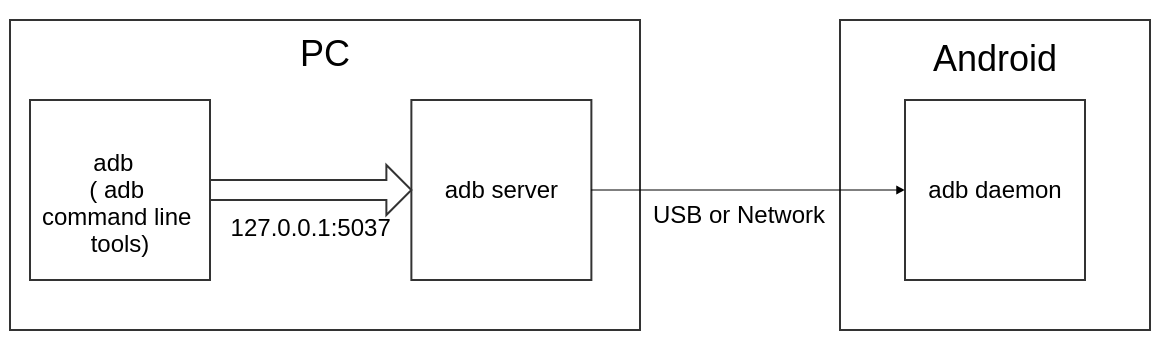
Now you can use pure-python-adb to connect to adb server as adb command line
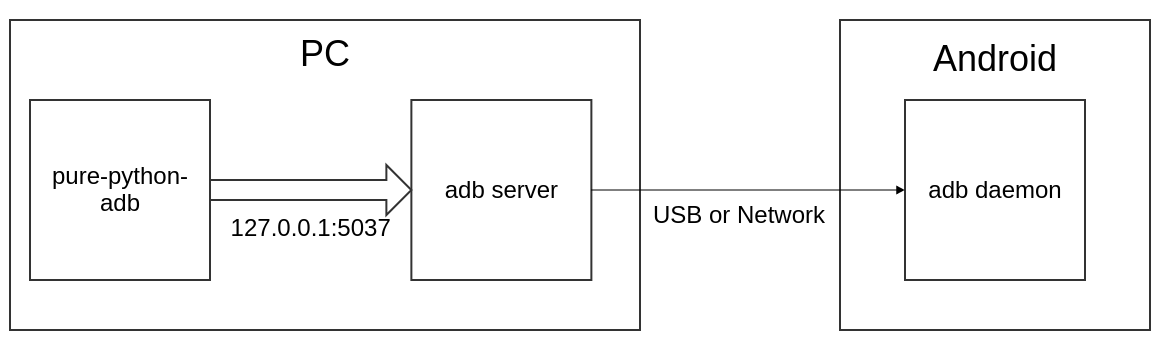
This package supports most of the adb command line tool’s functionality.
adb devices
adb shell
adb forward
adb pull/push
adb install/uninstall
Requirements
Python 3.12+
Installation
$pip install -U ppadb-rebornExamples
Connect to adb server and get the version
from ppadb.client import Client as AdbClient
# Default is "127.0.0.1" and 5037
client = AdbClient(host="127.0.0.1", port=5037)
print(client.version())

>>> 39
Connect to a device
from ppadb.client import Client as AdbClient
# Default is "127.0.0.1" and 5037
client = AdbClient(host="127.0.0.1", port=5037)
device = client.device("emulator-5554")
List all devices ( adb devices ) and install/uninstall an APK on all devices
from ppadb.client import Client as AdbClient

apk_path = "example.apk"

# Default is "127.0.0.1" and 5037
client = AdbClient(host="127.0.0.1", port=5037)
devices = client.devices()

for device in devices:
    device.install(apk_path)

# Check apk is installed
for device in devices:
    print(device.is_installed("example.package"))

# Uninstall
for device in devices:
    device.uninstall("example.package")
adb shell
from ppadb.client import Client as AdbClient
# Default is "127.0.0.1" and 5037
client = AdbClient(host="127.0.0.1", port=5037)
device = client.device("emulator-5554")
device.shell("echo hello world !")
def dump_logcat(connection):
while True:
data = connection.read(1024)
if not data:
break
print(data.decode('utf-8'))
connection.close()
from ppadb.client import Client as AdbClient
# Default is "127.0.0.1" and 5037
client = AdbClient(host="127.0.0.1", port=5037)
device = client.device("emulator-5554")
device.shell("logcat", handler=dump_logcat)read logcat line by line
from ppadb.client import Client

def dump_logcat_by_line(connect):
    file_obj = connect.socket.makefile()
    for index in range(0, 10):
        print("Line {}: {}".format(index, file_obj.readline().strip()))

file_obj.close()
connect.close()

client = Client()
device = client.device("emulator-5554")
device.shell("logcat", handler=dump_logcat_by_line)
Screenshot
from ppadb.client import Client as AdbClient
client = AdbClient(host="127.0.0.1", port=5037)
device = client.device("emulator-5554")
result = device.screencap()
with open("screen.png", "wb") as fp:
    fp.write(result)
Push file or folder
from ppadb.client import Client as AdbClient
client = AdbClient(host="127.0.0.1", port=5037)
device = client.device("emulator-5554")

device.push("example.apk", "/sdcard/example.apk")
Pull
from ppadb.client import Client as AdbClient
client = AdbClient(host="127.0.0.1", port=5037)
device = client.device("emulator-5554")

device.shell("screencap -p /sdcard/screen.png")
device.pull("/sdcard/screen.png", "screen.png")
Connect to device
from ppadb.client import Client as AdbClient
client = AdbClient(host="127.0.0.1", port=5037)
client.remote_connect("172.20.0.1", 5555)

device = client.device("172.20.0.1:5555")

# Disconnect all devices
client.remote_disconnect()

##Disconnect 172.20.0.1
# client.remote_disconnect("172.20.0.1")
##Or
# client.remote_disconnect("172.20.0.1", 5555)
Enable debug logger
logging.getLogger("ppadb").setLevel(logging.DEBUG)Async Client
import asyncio
import aiofiles
from ppadb.client_async import ClientAsync as AdbClient

async def _save_screenshot(device):
    result = await device.screencap()
    file_name = f"{device.serial}.png"
    async with aiofiles.open(f"{file_name}", mode='wb') as f:
        await f.write(result)

    return file_name

async def main():
    client = AdbClient(host="127.0.0.1", port=5037)
    devices = await client.devices()
    for device in devices:
        print(device.serial)

    result = await asyncio.gather(*[_save_screenshot(device) for device in devices])
    print(result)

asyncio.run(main())
How to run test cases
Prepare
Install Docker
Install Docker Compose
pip install docker-composeModify test/conftest.py
Change the value of adb_host to the “emulator”
adb_host="emulator"Run testcases
docker-compose upResult
Starting purepythonadb_emulator_1 ... done
Recreating purepythonadb_python_environment_1 ... done
Attaching to purepythonadb_emulator_1, purepythonadb_python_environment_1
emulator_1            | + echo n
emulator_1            | + /home/user/android-sdk-linux/tools/bin/avdmanager create avd -k system-images;android-25;google_apis;x86 -n Docker -b x86 -g google_apis --device 8 --force
Parsing /home/user/android-sdk-linux/emulator/package.xmlParsing /home/user/android-sdk-linux/patcher/v4/package.xmlParsing /home/user/android-sdk-linux/platform-tools/package.xmlParsing /home/user/android-sdk-linux/platforms/android-25/package.xmlParsing /home/user/android-sdk-linux/system-images/android-25/google_apis/x86/package.xmlParsing /home/user/android-sdk-linux/tools/package.xml+ echo hw.keyboard = true
emulator_1            | + adb start-server
emulator_1            | * daemon not running; starting now at tcp:5037
python_environment_1  | ============================= test session starts ==============================
python_environment_1  | platform linux -- Python 3.6.1, pytest-3.6.3, py-1.5.4, pluggy-0.6.0
python_environment_1  | rootdir: /code, inifile:
python_environment_1  | collected 27 items
python_environment_1  |
emulator_1            | * daemon started successfully
emulator_1            | + exec /usr/bin/supervisord
emulator_1            | /usr/lib/python2.7/dist-packages/supervisor/options.py:298: UserWarning: Supervisord is running as root and it is searching for its configuration file in default locations (including its current working directory); you probably want to specify a "-c" argument specifying an absolute path to a configuration file for improved security.
emulator_1            |   'Supervisord is running as root and it is searching '
emulator_1            | 2018-07-07 17:19:47,560 CRIT Supervisor running as root (no user in config file)
emulator_1            | 2018-07-07 17:19:47,560 INFO Included extra file "/etc/supervisor/conf.d/supervisord.conf" during parsing
emulator_1            | 2018-07-07 17:19:47,570 INFO RPC interface 'supervisor' initialized
emulator_1            | 2018-07-07 17:19:47,570 CRIT Server 'unix_http_server' running without any HTTP authentication checking
emulator_1            | 2018-07-07 17:19:47,570 INFO supervisord started with pid 1
emulator_1            | 2018-07-07 17:19:48,573 INFO spawned: 'socat-5554' with pid 74
emulator_1            | 2018-07-07 17:19:48,574 INFO spawned: 'socat-5555' with pid 75
emulator_1            | 2018-07-07 17:19:48,576 INFO spawned: 'socat-5037' with pid 76
emulator_1            | 2018-07-07 17:19:48,578 INFO spawned: 'novnc' with pid 77
emulator_1            | 2018-07-07 17:19:48,579 INFO spawned: 'socat-9008' with pid 78
emulator_1            | 2018-07-07 17:19:48,582 INFO spawned: 'emulator' with pid 80
emulator_1            | 2018-07-07 17:19:49,607 INFO success: socat-5554 entered RUNNING state, process has stayed up for > than 1 seconds (startsecs)
emulator_1            | 2018-07-07 17:19:49,607 INFO success: socat-5555 entered RUNNING state, process has stayed up for > than 1 seconds (startsecs)
emulator_1            | 2018-07-07 17:19:49,607 INFO success: socat-5037 entered RUNNING state, process has stayed up for > than 1 seconds (startsecs)
emulator_1            | 2018-07-07 17:19:49,607 INFO success: novnc entered RUNNING state, process has stayed up for > than 1 seconds (startsecs)
emulator_1            | 2018-07-07 17:19:49,608 INFO success: socat-9008 entered RUNNING state, process has stayed up for > than 1 seconds (startsecs)
emulator_1            | 2018-07-07 17:19:49,608 INFO success: emulator entered RUNNING state, process has stayed up for > than 1 seconds (startsecs)
python_environment_1  | test/test_device.py ..............                                       [ 51%]
python_environment_1  | test/test_host.py ..                                                     [ 59%]
python_environment_1  | test/test_host_serial.py ........                                        [ 88%]
python_environment_1  | test/test_plugins.py ...                                                 [100%]
python_environment_1  |
python_environment_1  | ------------------ generated xml file: /code/test_result.xml -------------------
python_environment_1  | ========================= 27 passed in 119.15 seconds ==========================
purepythonadb_python_environment_1 exited with code 0
Aborting on container exit...
Stopping purepythonadb_emulator_1 ... done
More Information
A pure Node.js client for the Android Debug Bridge
ADB documents
1 maintainer

Metadata
1 maintainer
Release files for pure-python-adb-reborn 1.0.0
For a detailed explanation of source distributions (sdists) and built distributions (wheels), please see the package formats documentation.
Source distribution (sdist)
| File | Size | Uploaded | |
|---|---|---|---|
| pure_python_adb_reborn-1.0.0.tar.gz | 97.5 kB | Details |
Built distribution (wheel)
| File | Interpreter | ABI | Platform | Reset |
|---|---|---|---|---|
| pure_python_adb_reborn-1.0.0-py3-none-any.whl | Python 3 | none | any | Details |
Total release size: 197.7 kB
Release files / pure_python_adb_reborn-1.0.0.tar.gz
| Download URL | pure_python_adb_reborn-1.0.0.tar.gz |
|---|---|
| Size | 97.5 kB |
| Tags | Source |
|
SHA-256 checksum How to use checksums |
131a45b860c3bb7e472ddbf8d868269bf28cd9d6913bcc1ac61ed5efc621665d
|
|
BLAKE2b-256 checksum How to use checksums |
55d6a7c1f2df67ccb7f4bbf55a3ce7f8a4aa32502aead135f2dd49a51f336f7c
|
| Upload date | |
|
Uploaded using Trusted Publishing? What is trusted publishing? |
No |
| Uploaded via |
twine/6.1.0 CPython/3.12.9
|
Release files / pure_python_adb_reborn-1.0.0-py3-none-any.whl
| Download URL | pure_python_adb_reborn-1.0.0-py3-none-any.whl |
|---|---|
| Size | 100.2 kB |
| Tags | Python 3 |
|
SHA-256 checksum How to use checksums |
b539bd37d7841e41a532bc040b4b66f149893a5632c571d63b5a2d48a88734a4
|
|
BLAKE2b-256 checksum How to use checksums |
140c8a53f96aebe0993f17738091e05f29273eb4c96e1be5cc1989b28495da20
|
| Upload date | |
|
Uploaded using Trusted Publishing? What is trusted publishing? |
No |
| Uploaded via |
twine/6.1.0 CPython/3.12.9
|














