
PurpleCaffeine: tracking of quantum programs and experiments






Tracking experiments and programs is known problem in scientific community. This project is aimed to create simple general interface to track quantum experiments, store and search them in an easy way.
Table of Contents
For Users
- Quickstart
- Source Code Installation
- Documentation
- Guides
- How to Give Feedback
- Contribution Guidelines
- References and Acknowledgements
- License
Quickstart
pip install purplecaffeine
from qiskit.circuit.random import random_circuit
from qiskit.quantum_info.random import random_pauli
from qiskit.primitives import Estimator

from purplecaffeine.core import Trial, LocalStorage
from purplecaffeine.widget import Widget

n_qubits = 4
depth = 3
shots = 2000

circuit = random_circuit(n_qubits, depth)
obs = random_pauli(n_qubits)

local_storage = LocalStorage("./")

with Trial("Example trial", storage=local_storage) as trial:
    # track some parameters
    trial.add_parameter("estimator", "qiskit.primitives.Estimator")
    trial.add_parameter("depth", depth)
    trial.add_parameter("n_qubits", n_qubits)
    trial.add_parameter("shots", shots)

    # track objects of interest
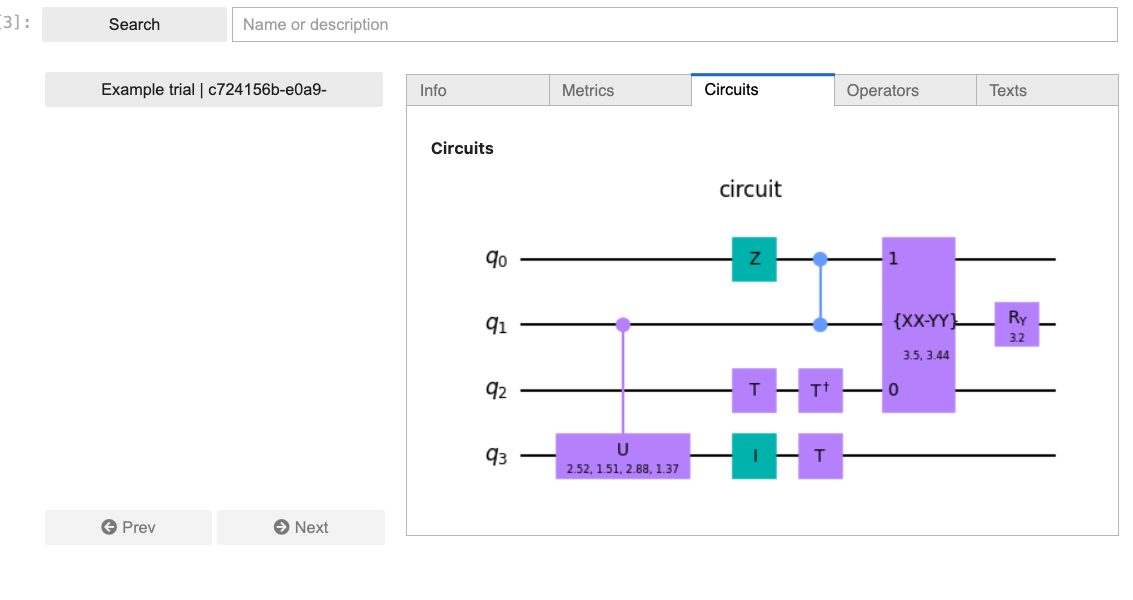
    trial.add_circuit("circuit", circuit)
    trial.add_operator("obs", obs)

    # run
    exp_value = Estimator().run(circuit, obs, shots=shots).result().values.item()

    # track results of run
    trial.add_metric("exp_value", exp_value)

Widget(local_storage).show()
Source Code Installation
If you want to install from source code, execute while in the root folder of the project:
cd client
pip install .
Documentation
Documentation for project is hosted at https://icekhan13.github.io/purplecaffeine/
How to Give Feedback
We encourage your feedback! You can share your thoughts with us by:
- Opening an issue in the repository
Contribution Guidelines
For information on how to contribute to this project, please take a look at our contribution guidelines.
References and Acknowledgements
[1] Qiskit is an open-source SDK for working with quantum computers at the level of circuits, algorithms, and application modules.
https://github.com/Qiskit/qiskit
License
1 maintainer

Metadata
1 maintainer
Release files for purplecaffeine 0.2.5
For a detailed explanation of source distributions (sdists) and built distributions (wheels), please see the package formats documentation.
Source distribution (sdist)
| File | Size | Uploaded | Provenance | Actions |
|---|---|---|---|---|
| purplecaffeine-0.2.5.tar.gz | 16.7 kB | Without provenance | Details for purplecaffeine-0.2.5.tar.gz |
Built distribution (wheel)
| File | Interpreter | ABI | Platform | Actions Reset |
|---|---|---|---|---|
| purplecaffeine-0.2.5-py3-none-any.whl | Python 3 | none | any | Details for purplecaffeine-0.2.5-py3-none-any.whl |
Total release size: 35.3 kB
Release files / purplecaffeine-0.2.5.tar.gz
| Download URL | purplecaffeine-0.2.5.tar.gz |
|---|---|
| Size | 16.7 kB |
| Tags | Source |
|
SHA-256 checksum How to use checksums |
961f438bd25b706af1fa3762d840441c15aa2ec2f1411f7f43fa6b7cd231dc3f
|
|
BLAKE2b-256 checksum How to use checksums |
5174aa552d402134955ac5bc4f0725d00ea07b80b39cb3e6148f7887b6109614
|
| Upload date | |
|
Uploaded using Trusted Publishing? What is trusted publishing? |
No |
| Uploaded via |
twine/4.0.2 CPython/3.9.18
|
Release files / purplecaffeine-0.2.5-py3-none-any.whl
| Download URL | purplecaffeine-0.2.5-py3-none-any.whl |
|---|---|
| Size | 18.6 kB |
| Tags | Python 3 |
|
SHA-256 checksum How to use checksums |
3add606e1ac0b4ec63a7bd5f14d8c6232a00526591059706bab26fb0625028a8
|
|
BLAKE2b-256 checksum How to use checksums |
e114a5247882273ff5f5c062004438493f5c6f62fa96abe4564e5c94f6c2ec8f
|
| Upload date | |
|
Uploaded using Trusted Publishing? What is trusted publishing? |
No |
| Uploaded via |
twine/4.0.2 CPython/3.9.18
|
Security for purplecaffeine 0.2.5
Provenance
Provenance describes where a file came from. On PyPI, provenance is shared via attestations, which provide a verifiable record of the build or publishing details. View details, limitations and caveats.
No provenance found
None of the files in this release were uploaded with provenance metadata.
A note on package security
PyPI is a repository for distributing packages, not a service for auditing them. While third-party security researchers and our staff do their best to detect and remove malicious packages, PyPI cannot guarantee the quality, security or suitability of any given package.
To learn more about protecting yourself from malicious actors, visit our package security documentation.














