
Purview Automation is a Python wrapper library built on top of Purview REST APIs that's designed to be simple to use and make scaling and automating Purview easier.

Project description



Welcome to Purview Automation!
Purview Automation is a Python wrapper library built on top of Azure Purview REST APIs that's designed to be simple to use and make scaling and automating Purview easier.
Phase I is all about making it easier to work with, scale, rollback and automate Purview collections!
Documentation: https://purviewautomation.netlify.app
Source Code: https://github.com/Ludwinic1/purviewautomation
Key benefits:
-
Easy: Create and delete collections and collection hierarchies with one line of code
-
Rollback: Rollback to previous collection hierarchy states and save versions for later use
-
Deploy: Extract/deploy collections to UAT/PROD environments to ensure consistency across Purviews
-
Delete Assets: Delete all assets in a collection or all assets in a collection hierarchy
-
Safe: Does NOT supercede any Purview permissions. Unable to create/delete collections unless the Collection Admin role is granted in Purview. See: Purview Roles
-
Ease of Use: Use either the friendly collection name (what is shown in the Purview UI) or the actual collection name (under the hood name) instead of being required to find and use the actual name when calling APIs. See: Purview Collection Names Overview
Example Showcase:
Azure Purview before:
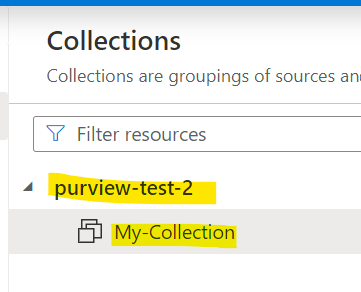
Write simple code:
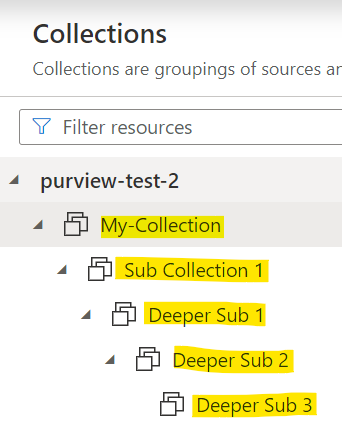
client.create_collections(start_collection="My-Collection",
                          collection_names="Sub Collection 1/Deeper Sub 1/Deeper Sub 2/Deeper Sub 3")
Azure Purview after:
Installation
pip install purviewautomation
Quick Start
Connect to Purview With a Service Principal
Create a Python file main.py (can be called anything), gather the Azure Service Principal information and replace yourtenantid, yourclientid, yourclientsecret and yourpurviewaccountname:
from purviewautomation import (ServicePrincipalAuthentication,
                                PurviewCollections)

auth = ServicePrincipalAuthentication(tenant_id="yourtenantid",
                                      client_id="yourclientid",
                                      client_secret="yourclientsecret")

client = PurviewCollections(purview_account_name="yourpurviewaccountname",
                            auth=auth)
Important: Make sure the Service Principal is assigned the Collection Admin role to a collection in Purview. The below examples assume the Service Principal is assigned the Collection Admin role at the root collection level. See here for more info: Assign the Service Principal the Collection Admin Role in Purview.
To learn how to create a Service Principal, see: Create a Service Principal.
Connect to Purview With the Azure-Identity Package Via the Azure CLI
Alternatively, to connect with your own credentials or other options (Managed Identity, Environment Credentials, Azure CLI Credentials) instead of the Service Principal, use the Azure-Identity package:
pip install azure-identity
Then sign in with your Azure CLI credentials (in a terminal type az login and sign in via the link that pops up):
from azure.identity import AzureCliCredential

from purviewautomation import PurviewCollections, AzIdentityAuthentication

auth = AzIdentityAuthentication(credential=AzureCliCredential())

client = PurviewCollections(purview_account_name="yourpurviewaccountname",
                            auth=auth)
Important: Make sure the user or entity is assigned the Collection Admin role to a collection in Purview. The below examples assume the role is assigned at the root collection level (yourpurviewaccountname collection). For more info, see: Purview Roles.
Now interact with the Purview collections:
Print Collections
print(client.list_collections())
Print Only the Relevant Collection Name Info
client.list_collections(only_names=True, pprint=True)
Return Collections as a List or Only Names as a Dictionary
collection_list = client.list_collections()
for coll in collection_list:
    print(coll)

# Return only the relevant names as a dictionary
collection_names = client.list_collections(only_names=True)
for name, value in collection_names.items():
    print(name, value)

# Return just the keys (actual names)
for name in collection_names:
    print(name)

# Return the friendly names or parent collection names
for name in collection_names.values():
    friendly_name = name["friendlyName"]
    parent_name = name["parentCollection"]
Create a Collection
# Replace "yourpurviewaccountname"

client.create_collections(start_collection="yourpurviewaccountname",
                          collection_names="My First Collection")
Create a Collection Hierarchy
# Create a collection hierarchy

client.create_collections(start_collection="My First Collection",
                          collection_names="Child1/Sub Collection 1/Deeper Sub Collection1")
Create Multiple Collections
# Both random collections are at the same level under Sub Collection 1

client.create_collections(start_collection="Sub Collection 1",
                          collection_names=["Random Collection", "Random Collection 2"])
Create Multiple Collection Hierarchies
hierarchy_1 = "hierarchy1/hierarchysub1/hierarchysub2/hierarchysub3"
hierarchy_2 = "hierarchy 2/hierarchy sub2"

client.create_collections(start_collection="My First Collection",
                          collection_names=[hierarcy_1, hierarchy_2])
Delete All Assets in a Collection
Important: The Service Principal or user that authenticated/connected to Purview would need to be listed as a Data Curator on the collection in order to delete assets in that collection. For more info, see: Purview Roles
client.delete_collection_assets(collection_names="My First Collection")
Delete All Assets in Multiple Collections
Important: The Service Principal or user that authenticated/connected to Purview would need to be listed as a Data Curator on the collection in order to delete assets in that collection. For more info, see: Purview Roles
collections = ["Random Collection", "hierarchy sub2"]
client.delete_collection_assets(collection_names=collections)
Extract Collections
# Useful for recreating entire collection hierarchies in a new Purview
# or saving the output as a version to rollback later
# Will output the exact script needed to recreate the entire hierarchy

client.extract_collections("My First Collection")
Delete a Collection
client.delete_collections(collection_names="Random Collection")
Delete a Collection with Rollback Enabled
# Will delete the collection
# and output the exact script needed to recreate the collection

client.delete_collections(collection_names="Random Collection 2",
                          safe_delete="client")
Delete All Assets in a Collection and Delete the Collection
Important: The Service Principal or user that authenticated/connected to Purview would need to be listed as a Data Curator on the collection in order to delete assets in that collection. For more info, see: Purview Roles
# Delete all of the assets in the collection
# And delete the collection as well

client.delete_collections("My First Collection", delete_assets=True)
Delete a Collection Hierarchy with Rollback Enabled
# Will delete all of the children and their children and output the exact script
# needed to recreate the entire hierarchy to rollback or deploy to another Purview

client.delete_collections_reursively("My First Collection", safe_delete="client")
Delete All Assets in a Collection Hierarchy and Delete the Hierarchy
Important: The Service Principal or user that authenticated/connected to Purview would need to be listed as a Data Curator on the collection in order to delete assets in that collection. For more info, see: Purview Roles
# Delete all of the assets in all of the collections under the hierarchy
# And delete the collection hierarchy as well

client.delete_collections_recursively("My First Collection", delete_assets=True)


Download files
Download the file for your platform. If you're not sure which to choose, learn more about installing packages.
Source Distribution
Built Distribution
Filter files by name, interpreter, ABI, and platform.
If you're not sure about the file name format, learn more about wheel file names.
Copy a direct link to the current filters
File details
Details for the file purviewautomation-0.1.2.tar.gz.
File metadata
- Download URL: purviewautomation-0.1.2.tar.gz
- Upload date:
- Size: 3.1 MB
- Tags: Source
- Uploaded using Trusted Publishing? No
- Uploaded via: twine/4.0.2 CPython/3.9.6
File hashes
| Algorithm | Hash digest | |
|---|---|---|
| SHA256 |
c09a0531008b20338a82295f9e689b51e2ac2cf8c7e8315662d665733ca6ccc2
|
|
| MD5 |
d8b16b998ef96e6401ac57ce4853862d
|
|
| BLAKE2b-256 |
e5fe88c7f4facc0a1f07f425afc424f4940732179b63ab15977e1c17e3d52148
|
File details
Details for the file purviewautomation-0.1.2-py3-none-any.whl.
File metadata
- Download URL: purviewautomation-0.1.2-py3-none-any.whl
- Upload date:
- Size: 11.8 kB
- Tags: Python 3
- Uploaded using Trusted Publishing? No
- Uploaded via: twine/4.0.2 CPython/3.9.6
File hashes
| Algorithm | Hash digest | |
|---|---|---|
| SHA256 |
95bec99b79d4bffdb781ab93e78ef4cb84b060ff215106d49ba93d705e0a3ab7
|
|
| MD5 |
04fa800a43a72d9d51b7a3ad04dee9f2
|
|
| BLAKE2b-256 |
b70b9a639493be94b40cb3de776e2f35d8da7937b09d821a2af1dcc6acaf3fec
|






