
This package provides a command line interface to Azure Purview's REST API.

Project description
Azure Purview CLI
This package provides a command line interface to Azure Purview's REST API.
Installation
pip install purviewcli
Getting Started
-
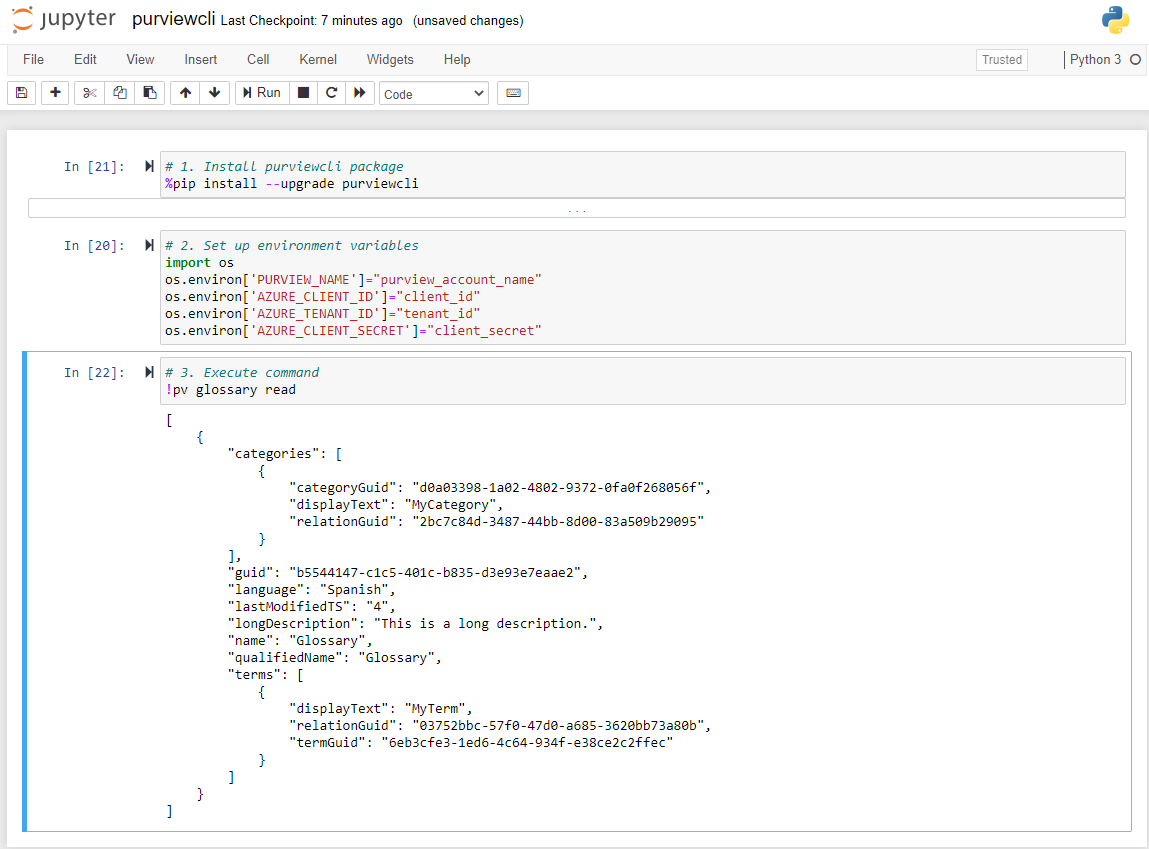
Install purviewcli (e.g.
pip install purviewcli) -
Set environment variable(s).
PURVIEW_NAME(mandatory)AZURE_CLIENT_ID(optional)AZURE_TENANT_ID(optional)AZURE_CLIENT_SECRET(optional)
Note: The environment variables related to authentication are optional as there are several methods in which we can pass credentials to purviewcli in order to authenticate with an instance of Azure Purview. See Authentication for more details.
-
Execute command (e.g.
!pv glossary read)
Snippet of an example Python-based notebook.
Authentication
The purviewcli package leverages the DefaultAzureCredential method from azure-identity. This provides purviewcli a variety of credential sources it can use to attempt authentication (e.g. Environment Variables, Managed Identity, Visual Studio Code, Azure CLI, Interactive). For example, if you are signed into Azure within Visual Studio Code, purviewcli will leverage those existing credentials when executing a command. This negates the need to store and manage credentials specific to the purviewcli package by leveraging what exists already. Read the azure-identity documentation to understand the authentication hierarchy.
Authorization
The identity executing Azure Purview CLI commands will need access to the deployed Azure Purview resource along with the following role assignments:
- Purview Data Curator
- Purview Data Source Administrator
Usage
pv command sub-command --parameter1='value' --parameter2='value'
Parameter Types
- All parameters are required by default.
- Parameters enclosed with square brackets "[ ]" are optional.
- Mutually exclusive parameters are enclosed with parens "( )" and separated with a pipe "|".
- The "=<val>" indicates parameters which require an input (e.g. --parameter=<val>). Input can be specified after a space (e.g. --parameter 'value') or equal "=" sign (e.g. --parameter='value').
- Parameters that do not require an input are False by default and True if present (e.g. --ignoreRelationships).
- The ellipsis "..." indicates parameters that are allowed to repeat (e.g. --guid='12345' --guid='23451' --guid='34512')
Commands
Search
pv search advanced [--keywords=<val> --limit=<val> --offset=<val> --facet=<val>...]
Entity
pv entity create --name=<val> --qualifiedName=<val> --typeName=<val> [--description=<val>]
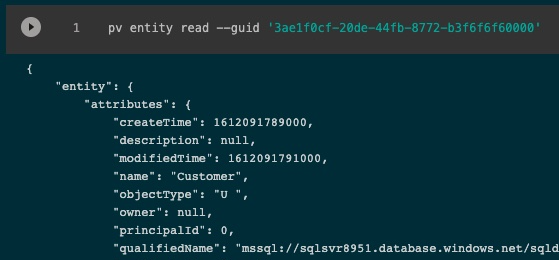
pv entity read --guid=<val> [--ignoreRelationships --minExtInfo]
pv entity update --guid=<val> --attrKey=<val> --attrVal=<val>
pv entity delete --guid=<val>
pv entity createBulk --name=<val>... --qualifiedName=<val>... --typeName=<val>...
pv entity readBulk --guid=<val>... [--ignoreRelationships --minExtInfo]
pv entity readHeader --guid=<val>
pv entity createClassifications --guid=<val> --classificationName=<val>...
pv entity readClassifications --guid=<val>
pv entity readClassification --guid=<val> --classificationName=<val>
pv entity deleteClassification --guid=<val> --classificationName=<val>
pv entity createBulkClassification --classificationName=<val> --guid=<val>...
pv entity readUniqueAttributeType --typeName=<val> --attrKey=<val> --attrVal=<val> [--ignoreRelationships --minExtInfo]
pv entity deleteUniqueAttributeType --typeName=<val> --attrKey=<val> --attrVal=<val>
pv entity updateUniqueAttributeType --typeName=<val> --attrKey=<val> --attrVal=<val> [--description=<val>]
pv entity readBulkUniqueAttributeType --typeName=<val> --attrKey=<val>... --attrVal=<val>... [--ignoreRelationships --minExtInfo]
pv entity createUniqueAttributeTypeClassifications --typeName=<val> --attrKey=<val> --attrVal=<val> --classificationName=<val>...
pv entity updateUniqueAttributeTypeClassifications --typeName=<val> --attrKey=<val> --attrVal=<val> --classificationName=<val>...
pv entity deleteUniqueAttributeTypeClassification --typeName=<val> --attrKey=<val> --attrVal=<val> --classificationName=<val>
Glossary
pv glossary create --glossaryName=<val>
pv glossary read [--glossaryGuid=<val> --limit=<val> --offset=<val> --sort=<val>]
pv glossary update --glossaryGuid=<val> --language=<val>
pv glossary delete --glossaryGuid=<val>
pv glossary readDetailed --glossaryGuid=<val>
pv glossary updatePartial --glossaryGuid=<val> --attrKey=<val>... --attrVal=<val>...
pv glossary updateCategoryPartial --categoryGuid=<val> --attrKey=<val>... --attrVal=<val>...
pv glossary updateTermPartial --termGuid=<val> --attrKey=<val>... --attrVal=<val>...
pv glossary createCategory --glossaryGuid=<val> --categoryName=<val>
pv glossary readCategory --categoryGuid=<val>
pv glossary updateCategory --categoryGuid=<val> [--longDescription=<val>]
pv glossary deleteCategory --categoryGuid=<val>
pv glossary readCategoryRelated --categoryGuid=<val> [--limit=<val> --offset=<val> --sort=<val>]
pv glossary readCategoryTerms --categoryGuid=<val> [--limit=<val> --offset=<val> --sort=<val>]
pv glossary createCategories --glossaryGuid=<val> --categoryName=<val>...
pv glossary readCategories --glossaryGuid=<val> [--limit=<val> --offset=<val> --sort=<val>]
pv glossary readCategoriesHeaders --glossaryGuid=<val> [--limit=<val> --offset=<val> --sort=<val>]
pv glossary createTerm --glossaryGuid=<val> --termName=<val> [--status=<val> --longDescription=<val> --abbreviation=<val> --synonym=<val>... --related=<val>... --resourceName=<val>... --resourceUrl=<val>... --expertId=<val>... --stewardId=<val>...]
pv glossary readTerm --termGuid=<val>
pv glossary updateTerm --termGuid=<val> [--termName=<val> --glossaryGuid=<val> --status=<val> --longDescription=<val> --abbreviation=<val> --synonym=<val>... --related=<val>... --resourceName=<val>... --resourceUrl=<val>... --expertId=<val>... --stewardId=<val>...]
pv glossary deleteTerm --termGuid=<val>
pv glossary createTerms --glossaryGuid=<val> --termName=<val>... [--status=<val>... --longDescription=<val>...]
pv glossary readTerms --glossaryGuid=<val> [--limit=<val> --offset=<val> --sort=<val>]
pv glossary readTermsHeaders --glossaryGuid=<val> [--limit=<val> --offset=<val> --sort=<val>]
pv glossary readTermsRelated --termGuid=<val> [--limit=<val> --offset=<val> --sort=<val>]
pv glossary createAssignedEntities --termGuid=<val> --guid=<val>...
pv glossary readAssignedEntities --termGuid=<val> [--limit=<val> --offset=<val> --sort=<val>]
pv glossary deleteAssignedEntities --termGuid=<val> --guid=<val>... --relationshipGuid=<val>...
Lineage
pv lineage read --guid=<val> [--depth=<val> --width=<val> --direction=<val>]
pv lineage readUniqueAttributeType --typeName=<val> --attrKey=<val> --attrVal=<val> [--depth=<val> --direction=<val>]
Relationship
pv relationship create --typeName=<val> --end1Guid=<val> --end1Type=<val> --end2Guid=<val> --end2Type=<val> [--status=<val>]
pv relationship read --relationshipGuid=<val> [--extendedInfo]
pv relationship update --relationshipGuid=<val> [--status=<val>]
pv relationship delete --relationshipGuid=<val>
Types
pv types createTypedefs --category=<val>... --defName=<val>... [--defDescription=<val>...]
pv types readTypedefs [--type=<val>]
pv types updateTypedefs --category=<val>... --defName=<val>... [--defDescription=<val>...]
pv types deleteTypedefs --defName=<val>...
pv types readTypedefsHeaders
pv types readTypedef (--guid=<val> | --name=<val>)
pv types deleteTypedefName --name=<val>
pv types readClassificationdef (--guid=<val> | --name=<val>)
pv types readBusinessmetadatadef (--guid=<val> | --name=<val>)
pv types readEntitydef (--guid=<val> | --name=<val>)
pv types readEnumdef (--guid=<val> | --name=<val>)
pv types readRelationshipdef (--guid=<val> | --name=<val>)
pv types readStructdef (--guid=<val> | --name=<val>)
pv types addAttributedef --name=<val> --type=<val> --typeName=<val>
Scan
pv scan read --datasource=<val> --scanName=<val>
pv scan run --datasource=<val> --scanName=<val> [--scanLevel=<val>]
pv scan createSource --datasource=<val> --kind=<val> [--accountUri=<val> --subscriptionId=<val> --resourceGroup=<val> --location=<val> --resourceName=<val> --endpoint=<val> --serverEndpoint=<val> --tenant=<val> --parentCollection=<val> --host=<val> --applicationServer=<val> --systemNumber=<val> --clusterUrl=<val> --roleARN=<val> --serviceUrl=<val>]
pv scan readSource --datasource=<val>
pv scan deleteSource --datasource=<val>
pv scan readSources
pv scan readScans --datasource=<val>
pv scan readHistory --datasource=<val> --scanName=<val>
pv scan readFilters --datasource=<val> --scanName=<val>
pv scan readScanRulesets
pv scan readSystemScanRulesets
pv scan readSystemScanRulesetsSettings
pv scan readClassificationRules
pv scan readClassificationRule --classificationName=<val>
pv scan createCollection --collection=<val> [--parentCollection=<val>]
pv scan deleteCollection --collection=<val>
Insight (Guardian)
pv insight assetDistributionByDataSource [--registeredSourceGroup=<val> --classificationCategory=<val> --classificationName=<val>]
pv insight assetDistributionByTopPaths --datasource=<val> [--registeredSourceGroup=<val> --classificationCategory=<val> --classificationName=<val>]
pv insight fileTypeSizeTimeSeries --fileType=<val> --window=<val> [--registeredSourceGroup=<val> --datasource=<val>]
pv insight fileTypeSizeTrendByDataSource --fileType=<val> --window=<val> [--registeredSourceGroup=<val> --datasource=<val>]
pv insight topFileTypesBySize [--registeredSourceGroup=<val> --datasource=<val>]
pv insight topLevelSummary [--registeredSourceGroup=<val>]
pv insight registeredSourceGroupsWithAssets
Release history Release notifications | RSS feed


Download files
Download the file for your platform. If you're not sure which to choose, learn more about installing packages.
Source Distribution
Built Distribution
Filter files by name, interpreter, ABI, and platform.
If you're not sure about the file name format, learn more about wheel file names.
Copy a direct link to the current filters
File details
Details for the file purviewcli-0.1.7.tar.gz.
File metadata
- Download URL: purviewcli-0.1.7.tar.gz
- Upload date:
- Size: 17.1 kB
- Tags: Source
- Uploaded using Trusted Publishing? No
- Uploaded via: twine/3.3.0 pkginfo/1.6.1 requests/2.25.1 setuptools/41.2.0 requests-toolbelt/0.9.1 tqdm/4.55.1 CPython/3.7.6
File hashes
| Algorithm | Hash digest | |
|---|---|---|
| SHA256 |
3677a2c310f146d95bd38268da90ecea66a9d6e8d2189a064178857314b50f68
|
|
| MD5 |
1674310f35040fce94fa3f43a346f8d8
|
|
| BLAKE2b-256 |
9e4704f3959dcec346fe07e507413a8c994a7cc346765a7e8d1904856d154a5f
|
File details
Details for the file purviewcli-0.1.7-py3-none-any.whl.
File metadata
- Download URL: purviewcli-0.1.7-py3-none-any.whl
- Upload date:
- Size: 37.1 kB
- Tags: Python 3
- Uploaded using Trusted Publishing? No
- Uploaded via: twine/3.3.0 pkginfo/1.6.1 requests/2.25.1 setuptools/41.2.0 requests-toolbelt/0.9.1 tqdm/4.55.1 CPython/3.7.6
File hashes
| Algorithm | Hash digest | |
|---|---|---|
| SHA256 |
2194748a87cd7393566504aa51d36bbc93c12f918a4bc714020074a57e87e265
|
|
| MD5 |
0f715f9330e40116790354bf7539faa5
|
|
| BLAKE2b-256 |
403aed30c569a68a31ae853659fd7ae23c3ebcf154b0de638aa9a79e59e8539e
|






