
pushcv — a local-first CLI to track your job applications, right from the terminal.
Verified details
These details have been verified by PyPIProject links
GitHub Statistics
Maintainers

Project description
pushcv
Git for job hunting — a local-first, privacy-focused CLI that tracks your job applications, scrapes postings, tailors your resume with a local AI model, and estimates compensation — all from your terminal. No account, no cloud, no data leaving your machine.
Built with Typer · Rich · SQLModel on a local SQLite database.
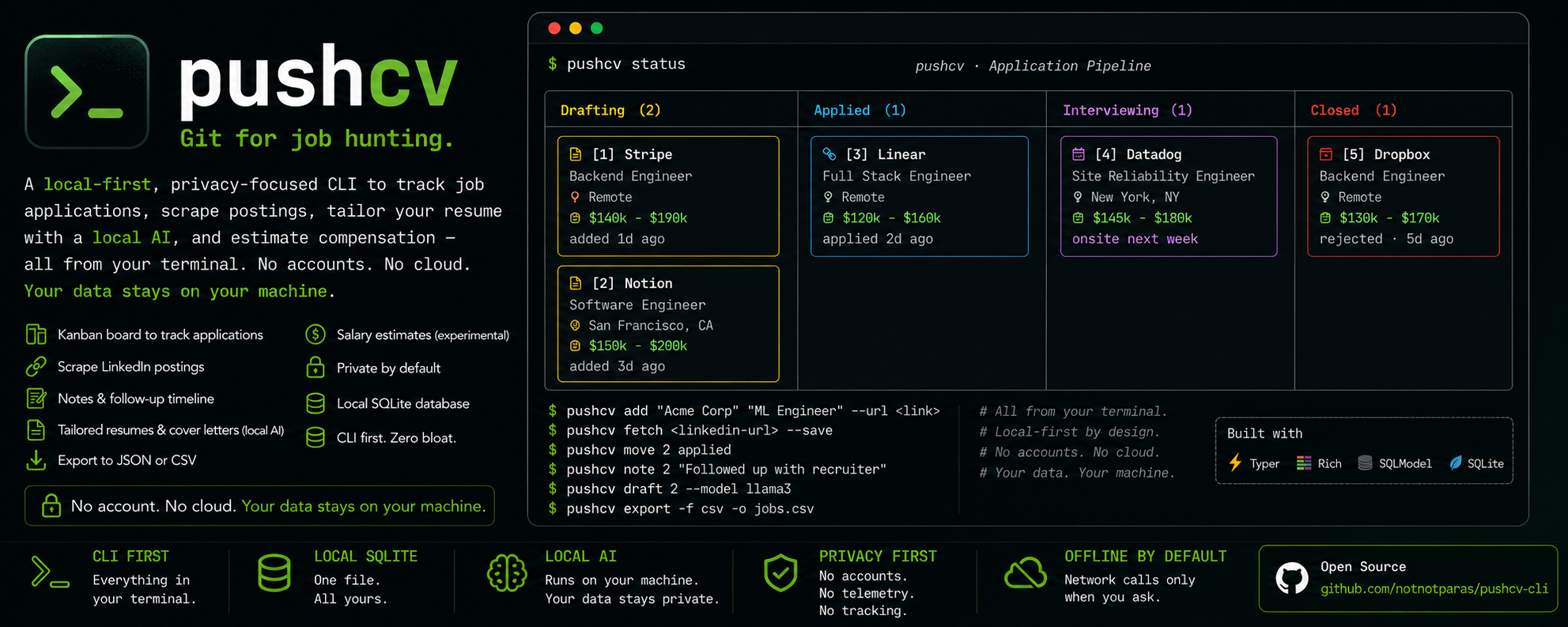
Local-first by design. Your applications live in a single SQLite file on your disk. Resume tailoring runs on a model on your laptop. The only network calls are (1) scraping a posting you explicitly point it at and (2) a web search (DuckDuckGo) for salary data, which sends the job's title, company, and location. Salary lookups run when
pushcv statusfills in missing estimates — turn them off entirely with"salary_estimates_enabled": falsein.pushcv.json.
Features
- 📋 Track applications on a Rich Kanban board in your terminal (Drafting → Applied → Interviewing → Closed).
- ⏱ Follow-up nudges — pushcv records when you apply and flags stale
applications right on the board ("applied 15d ago — follow up?"). Keep a
dated timeline per job with
pushcv note. - 🔎 Scrape postings from LinkedIn, Greenhouse, Lever, and SmartRecruiters
with one command — the ATS boards via their public JSON APIs, LinkedIn via
TLS/browser impersonation (
curl_cffi) that reaches the public guest view even when the site fights back. Anything else falls back to a best-effort schema.orgJobPostingparse (covers Ashby, Workable, and most career sites). A LinkedIn posting whose apply button leads to a supported ATS is automatically chain-scraped for the fuller, canonical description. - 💰 Salary estimates (experimental) grounded in live web data (DuckDuckGo), with an optional local-AI synthesis pass for a tighter, role-anchored range.
- ✍️ Tailor your resume — and cover letter — to any tracked job using a local LLM (via LiteLLM → an OpenAI-compatible server such as Lemonade). No API keys, no cost, no data sent anywhere.
- 🔒 Private by default — one local SQLite DB, no telemetry, no accounts.
- 📦 Your data is yours — export everything to JSON or CSV anytime with
pushcv export.
Prefer a visual board? pushcv-ui is an optional local web UI over the same workspace — same
pushcv.db, same local-first rules,uvx pushcv-uito try it. The CLI stays the core product.
Requirements
- Python ≥ 3.10
- (Optional, for AI features) a local OpenAI-compatible inference server — e.g. Lemonade — serving a chat model. Core tracking works without any of this.
Installation
Try it without installing anything, via uv:
uvx pushcv init
Or install it — pipx keeps the CLI in an isolated
environment and puts pushcv on your PATH:
pipx install pushcv # from PyPI
Bleeding edge, straight from the repo:
pipx install git+https://github.com/notnotparas/pushcv-cli.git
From source (development)
git clone https://github.com/notnotparas/pushcv-cli.git
cd pushcv-cli
python3 -m venv .venv && source .venv/bin/activate
pip install -e .        # wires up the global `pushcv` command
Quick start
pushcv init                                   # create ./pushcv.db + ./profile.md
# → fill in profile.md (your name, experience, skills) before drafting
pushcv add "Acme Corp" "Senior Engineer"      # track a job manually
pushcv fetch "https://www.linkedin.com/jobs/view/<id>/"   # …or scrape one
# fetch also understands Greenhouse, Lever, and SmartRecruiters URLs —
# and falls back to JobPosting metadata on any other careers page
pushcv status                                 # see your pipeline (Kanban board)
pushcv draft 1                                # tailor a resume for job #1
pushcv move 1 applied                         # advance it on the board
pushcv note 1 "recruiter call Friday 3pm"     # keep a dated timeline
pushcv show 1                                 # full details for one job
Everything is written to the current working directory, so keep a dedicated
folder (e.g. ~/job-hunt/) and run pushcv from there.
Fill in
profile.mdfirst. It's your master profile — name, experience, skills, and projects — and the source of truth the AI uses to tailor resumes and cover letters. The generated template starts with your name so drafts sign off correctly; the prompts never invent facts, so anything you leave blank simply won't appear.
Commands
| Command | What it does |
|---|---|
pushcv init |
Create the local pushcv.db and a profile.md template. |
pushcv add <company> <title> [--url] |
Add a job manually (starts in Drafting). |
pushcv fetch <url> [--save] [--debug] |
Scrape a job posting (LinkedIn, Greenhouse, Lever, SmartRecruiters, or any page with JobPosting metadata); preview, then confirm to save. --save skips the prompt; --debug (LinkedIn only) dumps raw HTML for troubleshooting. |
pushcv status |
Render the Kanban board. Backfills any missing salary estimates. |
pushcv move <n> <status> |
Move the job at position n to a new status — a column (drafting, applied, interviewing, closed) or a synonym (offer, rejected, onsite, ghosted, …). |
pushcv show <n> |
Show everything stored for the job at position n — status, dates, notes, and the full scraped description. |
pushcv note <n> "text" |
Append a dated note to the job's timeline (shown in show). |
pushcv export [-f json|csv] [-o file] |
Export all tracked jobs. Prints to stdout by default (pipe-friendly); -o writes a file. |
pushcv draft <n> [--model] [--cover-letter] |
Generate a tailored, ATS-optimized Markdown resume for the job at board position n, saved to drafts/. Sets status → ready to apply. With --cover-letter/-c, drafts a short tailored cover letter instead (status unchanged). |
pushcv delete <n> [--yes] |
Remove the job at position n (and its draft). Confirms first; --yes skips. |
Positions, not IDs.
move,show,note,draft, anddeletetake the position number ([1],[2], …) shown on thestatusboard — not raw database IDs — so there are never confusing gaps after a deletion.deletealways shows the company/title and asks before removing.
Resume & cover letter tailoring (AI setup)
pushcv draft (resume or --cover-letter) and, optionally, salary synthesis
use a local language model through LiteLLM, pointed at an OpenAI-compatible
endpoint:
- Endpoint:
http://localhost:13305/v1(Lemonade's default) - Default model:
Qwen3-8B-GGUF— override per command with--model, or changeDEFAULT_AI_MODELinmain.py.
Start your local server (e.g. Lemonade), load a chat model, then:
pushcv draft 1 --model Qwen3-8B-GGUF     # tailored, ATS-optimized resume
pushcv draft 1 --cover-letter            # short tailored cover letter
Both are grounded strictly in your profile.md — the prompts forbid inventing
employers, dates, or skills. If the server isn't running, draft fails
gracefully with a clear message and does not corrupt your data. Nothing is
ever sent to a remote provider.
Salary estimation (experimental)
⚠️ Experimental. Estimates come from live public web data and can be noisy, stale, or wrong for niche roles and smaller companies. Treat them as a triage signal, never as an offer benchmark.
When you add or fetch a job, pushcv asks once whether to enable AI salary
estimates (the choice is remembered in .pushcv.json):
- Web extraction (default): parses figures from reputable salary sites
(levels.fyi, Glassdoor, AmbitionBox, Payscale, …) and cites the source, e.g.
💰 ₹27L - ₹35L · per ambitionbox.com. No model required. - AI synthesis (opt-in): the local model cleans the web data into a tighter,
role-anchored range (using the posting's seniority and your years of
experience from
profile.md).
Estimates are a ballpark, not a quote — they vary with the live search results. The cited band is the signal, not the exact digits. Currency is inferred from the job's location (INR, USD, GBP, EUR, …).
Privacy note: estimation is the one feature that talks to an external
service — the job's title, company, and location go to DuckDuckGo as a search
query. To disable salary estimation (and its network calls) completely, add
"salary_estimates_enabled": false to .pushcv.json.
Data model
A single job_application table (local SQLite, pushcv.db):
| Field | Type | Notes |
|---|---|---|
id |
INTEGER | Primary key, auto-incrementing (internal). |
company |
VARCHAR | Required. |
title |
VARCHAR | Required. |
url |
TEXT | Posting link (optional). |
apply_url |
TEXT | Where to actually apply, when it differs from url — e.g. a LinkedIn posting whose application lives on the employer's ATS (optional). |
location |
TEXT | From fetch (optional). |
description |
TEXT | Scraped job description (optional). |
salary_estimate |
VARCHAR | Web/AI compensation estimate (optional). |
status |
VARCHAR | Pipeline state; defaults to drafting. |
created_at |
TIMESTAMP | UTC creation time. |
applied_at |
TIMESTAMP | When the job first moved to Applied (drives the follow-up nudge). |
notes |
TEXT | Dated timeline lines from pushcv note (optional). |
New columns are auto-migrated on startup, so upgrading pushcv never breaks an existing database.
Configuration & files
Everything pushcv writes lives in your working directory:
| Path | Contents |
|---|---|
pushcv.db |
Your applications (SQLite). |
profile.md |
Your master profile — the source of truth for resume tailoring. |
.pushcv.json |
Per-workspace preferences (AI salary toggle, salary_estimates_enabled). |
drafts/ |
Generated resume & cover-letter Markdown files. |
.env (optional) |
Local overrides such as PUSHCV_AI_BASE / PUSHCV_AI_KEY. |
All of these are git-ignored by default — they're personal and never meant to be
committed. A filled-in reference, profile.example.md, is
included in the repo to show what a complete profile looks like.
Privacy & responsible use
- No telemetry, no accounts, no cloud. Your data stays on your machine.
- The scraper is for personal use on postings you're applying to. Respect the target site's Terms of Service and rate limits; don't hammer endpoints.
- Salary numbers are estimates aggregated from public web data — verify against
the cited sources before relying on them. Disable the lookups entirely with
"salary_estimates_enabled": falsein.pushcv.json. - pushcv loads a
.envfile from the working directory (forPUSHCV_AI_BASEoverrides). Treat workspaces like you treat shell rc files: don't run pushcv's AI features inside a folder you don't trust — a planted.envcould point the AI client at a server you don't control.
Development
python3 -m venv .venv && source .venv/bin/activate
pip install -e ".[dev]"     # editable install + test tooling
pushcv --help
pytest                       # run the test suite
Project layout (src/ layout):
pushcv-cli/
├── pyproject.toml        # PEP 621 metadata, pinned deps, `pushcv` entry point
├── README.md · LICENSE · CONTRIBUTING.md · .gitignore
├── profile.example.md    # filled-in reference profile
├── tests/                # helpers, portal parsers, and CLI command flows
└── src/pushcv/
    ├── __init__.py       # version
    ├── main.py           # Typer app — the terminal presentation layer
    ├── core.py           # service layer: Workspace, statuses, positions,
    │                     #   migrations (shared with pushcv-ui)
    ├── models.py         # SQLModel table (JobApplication)
    ├── scraper.py        # LinkedIn fetch/parse (curl_cffi + BeautifulSoup)
    ├── portals/          # multi-portal registry: greenhouse, lever,
    │                     #   smartrecruiters, linkedin, generic JSON-LD fallback
    ├── search.py         # DuckDuckGo salary search + extraction
    ├── ai_engine.py      # LiteLLM → local model (resume + salary synthesis)
    └── config.py         # per-workspace preferences (.pushcv.json)
Contributions welcome! Please read CONTRIBUTING.md for dev setup, the local-first ground rules, and how to add a new job board. Open an issue to discuss substantial changes before you start.
Roadmap — contributions welcome!
These are scoped to be approachable first PRs; open an issue to claim one:
- More job boards for
fetch— Greenhouse, Lever, and SmartRecruiters are built in (see src/pushcv/portals/); Ashby and Workable are natural next adapters (both have public JSON APIs and currently ride the generic JSON-LD fallback), and Workday is the big-enterprise prize. A portal module just needsmatches(url)andfetch_job(url)returning the normalized dict from portals/base.py. - Expand the test suite — helpers, portal parsers, and the main command flows are covered; the LinkedIn scraper's HTML paths and the AI engine still aren't.
- Optional dependency extras (
pushcv[ai]) so a minimal install doesn't pull the LLM stack. - PDF export for drafted resumes/cover letters (e.g. via pandoc or typst).
License
MIT © pushcv contributors
Project details
Verified details
These details have been verified by PyPIProject links
GitHub Statistics
Maintainers
Release history Release notifications | RSS feed


Download files
Download the file for your platform. If you're not sure which to choose, learn more about installing packages.
Source Distribution
Built Distribution
Filter files by name, interpreter, ABI, and platform.
If you're not sure about the file name format, learn more about wheel file names.
Copy a direct link to the current filters
File details
Details for the file pushcv-0.2.0.tar.gz.
File metadata
- Download URL: pushcv-0.2.0.tar.gz
- Upload date:
- Size: 1.5 MB
- Tags: Source
- Uploaded using Trusted Publishing? Yes
- Uploaded via: twine/6.1.0 CPython/3.13.12
File hashes
| Algorithm | Hash digest | |
|---|---|---|
| SHA256 |
efa90521a087d0b7423cc550f85091b47c10bc8fbf26633493899eaf18847ada
|
|
| MD5 |
7d5af94709672323213b8dc633c7c881
|
|
| BLAKE2b-256 |
7ac76c0e74953fc5098fc29294bd2e4017aa59420a079ad49fe56bde09d1caff
|
Provenance
The following attestation bundles were made for pushcv-0.2.0.tar.gz:
Publisher:
release.yml on notnotparas/pushcv-cli
-
Statement:
-
Statement type:
https://in-toto.io/Statement/v1 -
Predicate type:
https://docs.pypi.org/attestations/publish/v1 -
Subject name:
pushcv-0.2.0.tar.gz -
Subject digest:
efa90521a087d0b7423cc550f85091b47c10bc8fbf26633493899eaf18847ada - Sigstore transparency entry: 2084967552
- Sigstore integration time:
-
Permalink:
notnotparas/pushcv-cli@b72206859e238b5b24cdb9ab9baae70fc4118da1 -
Branch / Tag:
refs/tags/v0.2.0 - Owner: https://github.com/notnotparas
-
Access:
public
-
Token Issuer:
https://token.actions.githubusercontent.com -
Runner Environment:
github-hosted -
Publication workflow:
release.yml@b72206859e238b5b24cdb9ab9baae70fc4118da1 -
Trigger Event:
push
-
Statement type:
File details
Details for the file pushcv-0.2.0-py3-none-any.whl.
File metadata
- Download URL: pushcv-0.2.0-py3-none-any.whl
- Upload date:
- Size: 54.9 kB
- Tags: Python 3
- Uploaded using Trusted Publishing? Yes
- Uploaded via: twine/6.1.0 CPython/3.13.12
File hashes
| Algorithm | Hash digest | |
|---|---|---|
| SHA256 |
6e35649f526534a8610631df16316a7bf02f3466a386a546029c608ba95c0c1d
|
|
| MD5 |
1b357f025a907b192c031e07bad7bc40
|
|
| BLAKE2b-256 |
8568e506ba3844c87456ba4af879981b26b7b6112eb0ec65a08abb27ad3afe12
|
Provenance
The following attestation bundles were made for pushcv-0.2.0-py3-none-any.whl:
Publisher:
release.yml on notnotparas/pushcv-cli
-
Statement:
-
Statement type:
https://in-toto.io/Statement/v1 -
Predicate type:
https://docs.pypi.org/attestations/publish/v1 -
Subject name:
pushcv-0.2.0-py3-none-any.whl -
Subject digest:
6e35649f526534a8610631df16316a7bf02f3466a386a546029c608ba95c0c1d - Sigstore transparency entry: 2084967570
- Sigstore integration time:
-
Permalink:
notnotparas/pushcv-cli@b72206859e238b5b24cdb9ab9baae70fc4118da1 -
Branch / Tag:
refs/tags/v0.2.0 - Owner: https://github.com/notnotparas
-
Access:
public
-
Token Issuer:
https://token.actions.githubusercontent.com -
Runner Environment:
github-hosted -
Publication workflow:
release.yml@b72206859e238b5b24cdb9ab9baae70fc4118da1 -
Trigger Event:
push
-
Statement type:






