
Peering Workbench — consolidated ASN, WHOIS, PeeringDB, RPKI, IRR, DNS, and Looking Glass desktop tool for network engineers

Project description
⚡ pwb — Peering Workbench
A consolidated desktop tool for network engineers who are tired of juggling browser tabs between PeeringDB, WHOIS, looking glass sites, and RPKI validators. One app, one search bar, every lookup you need.
Built with PyQt6. All APIs are free and require no keys.



Install
pip install pwb
For Team Cymru IP→ASN lookups and the DNS Lookup tab (recommended):
pip install pwb[cymru]
Launch
python -m pwb
Or if installed via pip:
peering-workbench
Features
⚡ Quick Lookup Bar
The toolbar input auto-detects what you type and routes to the right tab:
| Input | Detected as | Tab |
|---|---|---|
15169 or AS15169 |
ASN | ASN Lookup |
8.8.8.8 |
IPv4 address | IP Lookup |
2607:f8b0:4001::1 |
IPv6 address | IP Lookup |
1.0.0.0/24 or 2620:129::/44 |
Prefix (v4/v6) | Prefix / LG |
cloudflare.com |
Hostname | DNS Lookup |
One search bar for everything. No mode switching, no tab hunting.
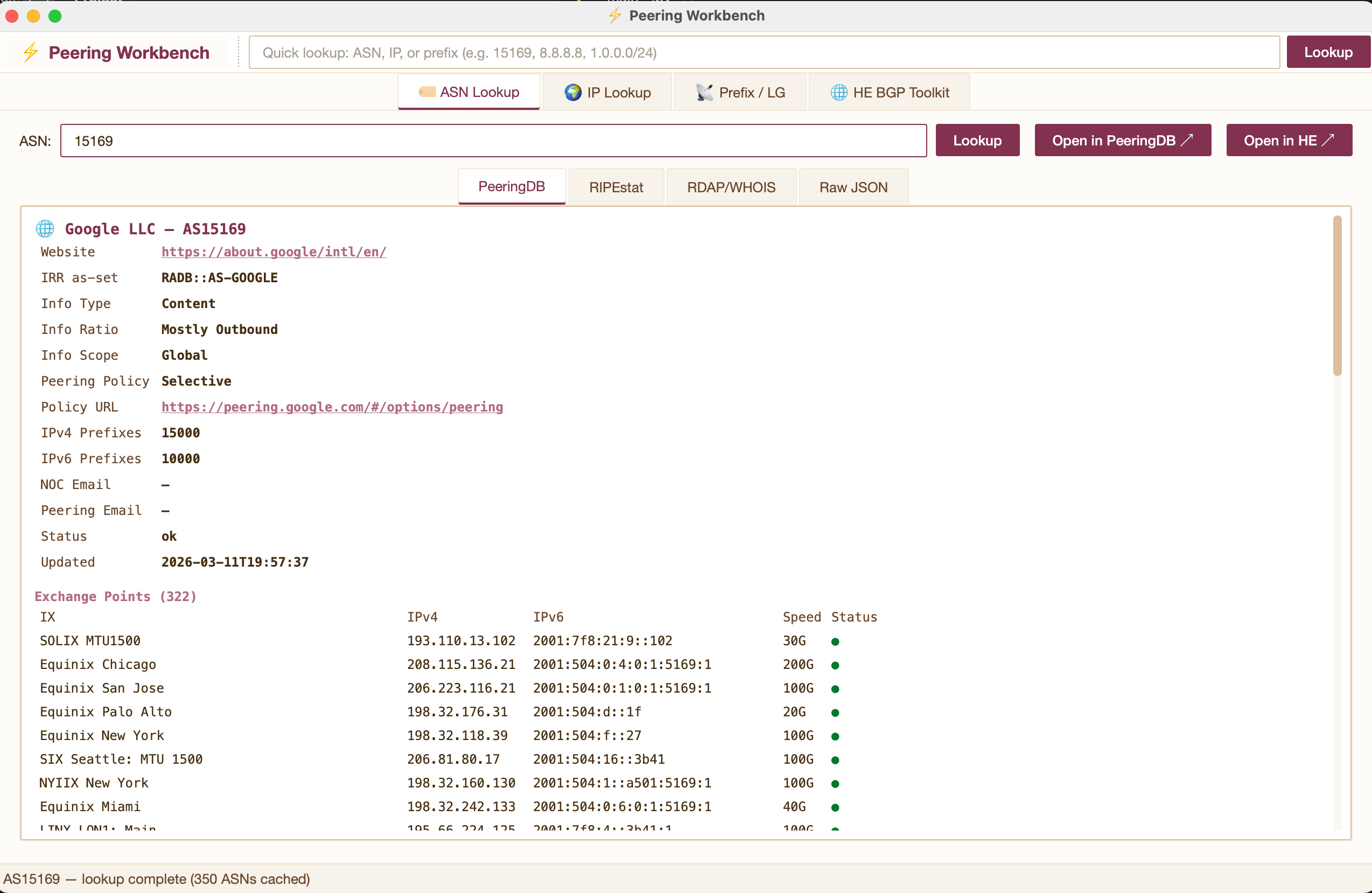
🏷 ASN Lookup
Enter any ASN — pulls PeeringDB, RIPEstat, and RDAP simultaneously in background threads. Sub-tabs for each data source plus raw JSON. One-click "Open in HE" jumps to the embedded HE tab for that ASN.
- IX presence with port speeds
- Facility list with cities
- Peering policy, NOC/policy email contacts
- Announced prefixes, upstream/downstream neighbors
- WHOIS registration, abuse contacts
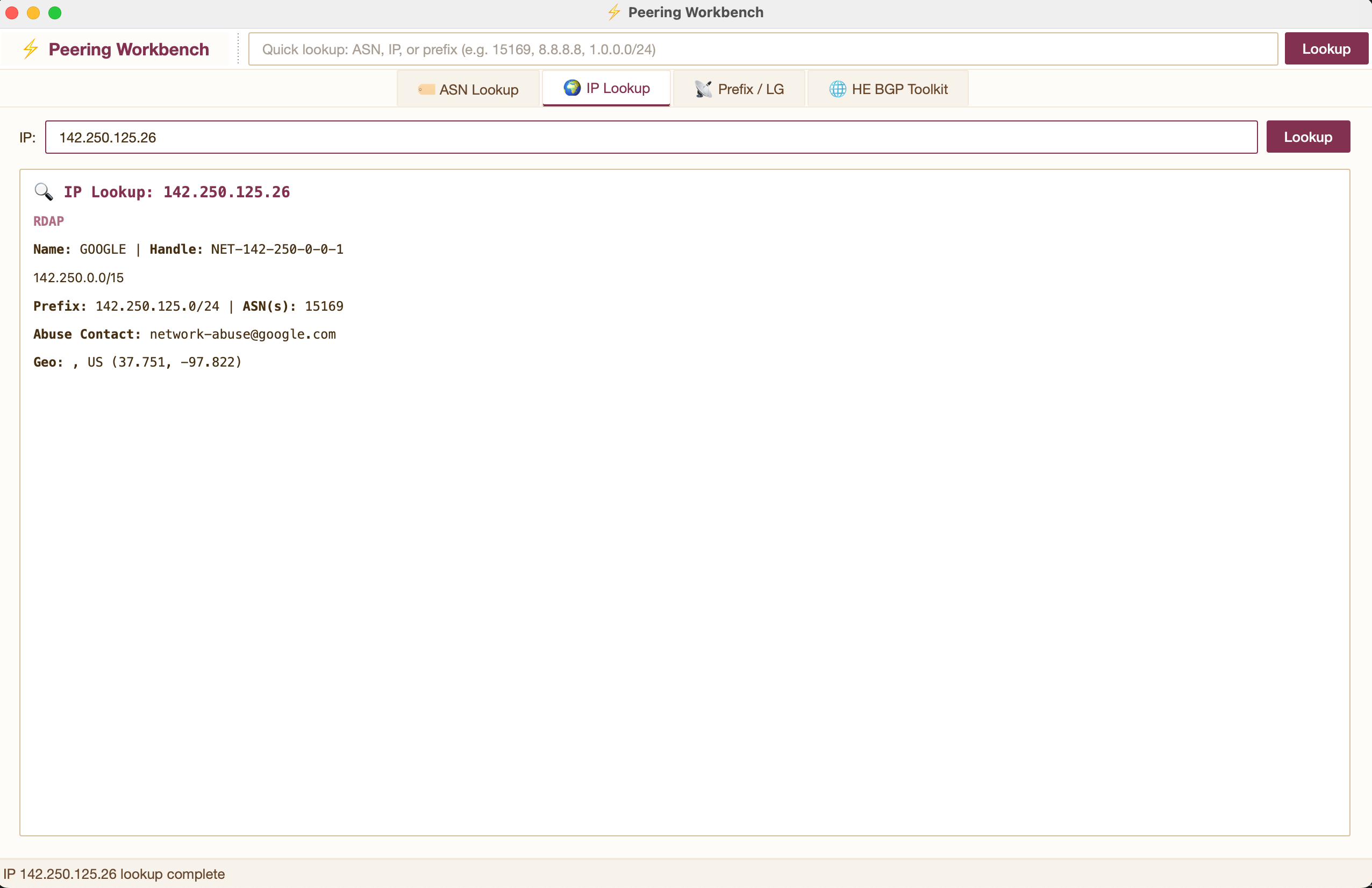
🌍 IP Lookup
Full context for any IPv4 or IPv6 address in a single view:
- Team Cymru DNS-based IP→ASN mapping with resolved network name (IPv4 and IPv6)
- RDAP network allocation and CIDR blocks
- RIPEstat geolocation, abuse contacts, prefix info
- RPKI validation — automatically derives the covering prefix and origin ASN, then checks ROA validity inline. You see whether the prefix is RPKI-valid without leaving the tab.
- One-click prefix drill-down — click the "Full Prefix Lookup" link to jump to the Prefix tab with the covering prefix pre-filled, launching the full lookup (RPKI, IRR, looking glass, related prefixes) in one click.
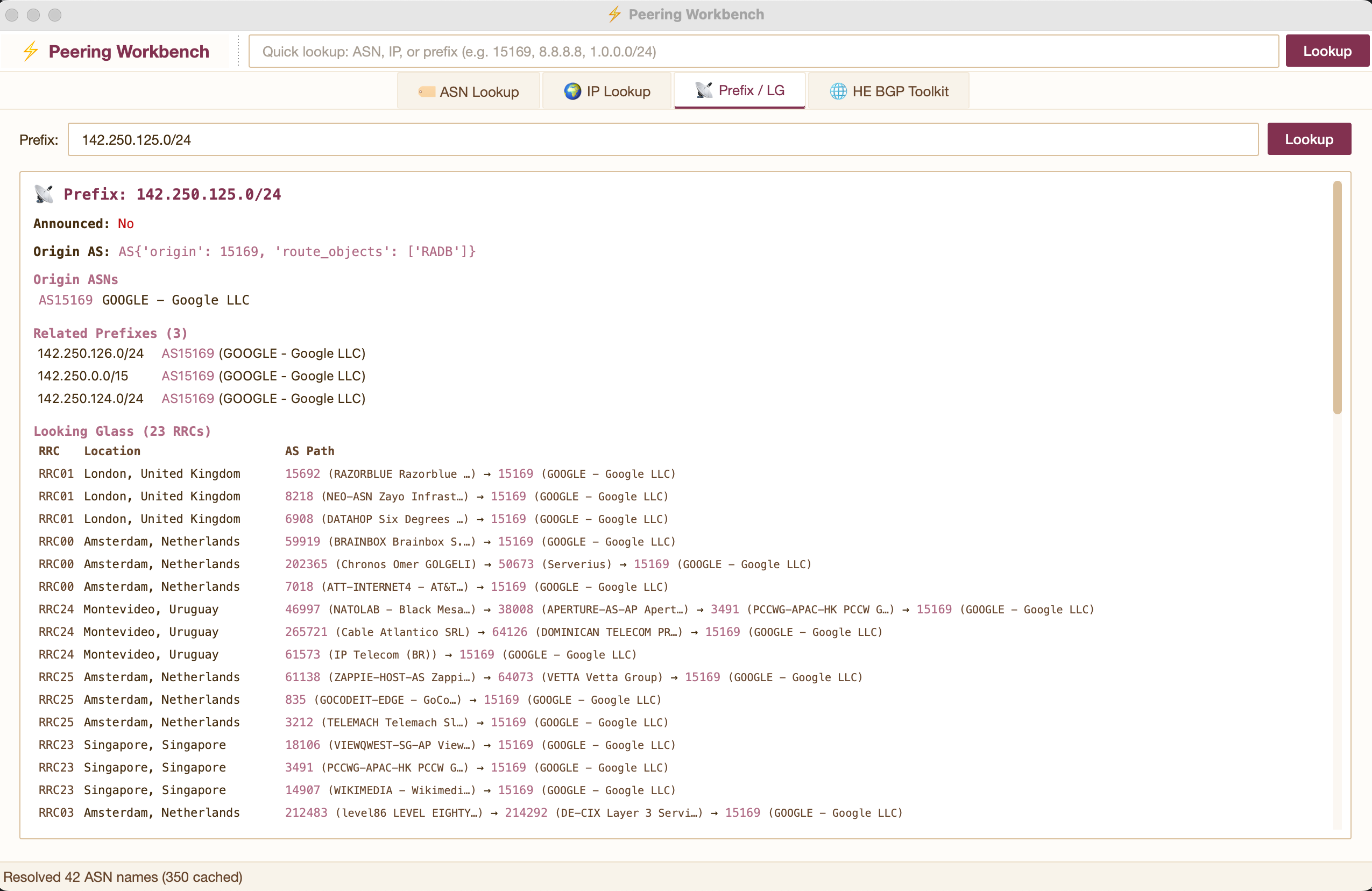
📡 Prefix / Looking Glass
Query any IPv4 or IPv6 prefix for routing status, origin AS, related/covering prefixes, and RIPEstat looking glass data from 25+ RIPE RRC route collectors worldwide — with resolved AS-path names.
Every ASN in every AS path is automatically resolved via PeeringDB and cached to disk. First lookup resolves names in the background; subsequent lookups render instantly from cache.
RPKI Validation
Each origin ASN is checked against the RPKI via RIPEstat's Routinator-backed validator. Results are color-coded:
- 🟢 Valid — a ROA exists and matches the prefix/origin/maxLength
- 🟡 Not Found — no ROA covers this prefix (RPKI-unknown)
- 🔴 Invalid — a ROA exists but the origin or prefix length doesn't match
Matching ROAs are displayed with their origin, prefix, and maxLength so you can immediately spot maxLength mismatches — the most common "everything looks right but traffic is dropping" RPKI issue.
IRR Route Object Consistency
Shows whether route/route6 objects exist in the IRR for the prefix, which registries they're in, and whether they match what's actually announced in BGP:
- BGP + IRR ✓ — announced and registered (healthy)
- BGP only — no IRR ✗ — announced but no route object (peers filtering on IRR will drop it)
- IRR only — not announced — registered but not in the BGP table (stale object)
This surfaces the kind of mismatch where RPKI is valid but a peer's IRR-based filters silently reject the prefix.
🔎 DNS Lookup
General-purpose DNS record lookup powered by dnspython. Enter any hostname to query all record types at once, or select a specific type from the dropdown:
- A / AAAA — IPv4 and IPv6 addresses
- CNAME — canonical name aliases
- MX — mail exchangers with preference values
- NS — authoritative nameservers
- TXT — SPF, DKIM, verification records
- SOA — zone authority (serial, refresh, retry, expire)
- PTR — reverse DNS (auto-detected when you enter an IP instead of a hostname)
- CAA — certificate authority authorization
Enter an IP address and it automatically performs a reverse PTR lookup instead. Useful for identifying router hostnames from traceroute output.
💾 ASN Name Cache
Persistent disk cache at ~/.peering_workbench/asn_cache.json. Grows automatically as you use the tool — after a few prefix lookups you'll have the entire tier-1/tier-2 transit universe cached. The file is portable: back it up, sync across machines, or seed it from other sources.
🔑 PeeringDB API Key (optional)
PeeringDB throttles anonymous API requests. If you hit 429 Too Many Requests errors during heavy use, register for a free API key at peeringdb.com and configure it one of two ways:
# Environment variable
export PEERINGDB_API_KEY=your-key-here

# Or save to config file
echo "your-key-here" > ~/.peering_workbench/peeringdb_api_key
Authenticated requests get significantly higher rate limits. The tool will also automatically retry on 429 responses with backoff, but an API key avoids the delays in the first place.
APIs Used
All free, no API keys required.
| Source | What it provides |
|---|---|
| PeeringDB | Network info, IX connections, facilities, peering policy, contacts |
| RIPEstat | ASN overview, announced prefixes, neighbors, looking glass (RRCs), RPKI validation, IRR routing consistency |
| RDAP | Structured WHOIS replacement (auto-routes to ARIN/RIPE/APNIC) |
| Team Cymru | DNS-based IP→ASN mapping for IPv4 and IPv6 (requires dnspython) |
Requirements
- Python 3.10+
- PyQt6
- requests
- dnspython (optional but recommended — enables Team Cymru lookups and the DNS Lookup tab)
Development
git clone https://github.com/speterman/pwb.git
cd pwb
python -m venv .venv
source .venv/bin/activate
pip install -e ".[dev,cymru]"
python -m pwb
Publishing
python -m build
twine upload dist/*
License
MIT — see LICENSE.
Release history Release notifications | RSS feed


Download files
Download the file for your platform. If you're not sure which to choose, learn more about installing packages.
Source Distribution
Built Distribution
Filter files by name, interpreter, ABI, and platform.
If you're not sure about the file name format, learn more about wheel file names.
Copy a direct link to the current filters
File details
Details for the file pwb-0.1.1.tar.gz.
File metadata
- Download URL: pwb-0.1.1.tar.gz
- Upload date:
- Size: 23.5 kB
- Tags: Source
- Uploaded using Trusted Publishing? No
- Uploaded via: twine/6.2.0 CPython/3.10.12
File hashes
| Algorithm | Hash digest | |
|---|---|---|
| SHA256 |
1f898f766d5066b15a52b2d7f3d8a3ba4fd6e403c0c693421930c6c747013058
|
|
| MD5 |
c0c192dc8b5d7581b3e38191bb04e836
|
|
| BLAKE2b-256 |
aedccb16ff6449bfb5b2ecbc561eb520982d4dbbe1e973d2ceb9b53583972e83
|
File details
Details for the file pwb-0.1.1-py3-none-any.whl.
File metadata
- Download URL: pwb-0.1.1-py3-none-any.whl
- Upload date:
- Size: 20.7 kB
- Tags: Python 3
- Uploaded using Trusted Publishing? No
- Uploaded via: twine/6.2.0 CPython/3.10.12
File hashes
| Algorithm | Hash digest | |
|---|---|---|
| SHA256 |
51917542baf2f6f85b683f98f5f684ffaff3611bcae285a4ae8eb86e6fd54802
|
|
| MD5 |
d77c70b0db7171fae5c8f237a63d0a41
|
|
| BLAKE2b-256 |
ebc8ec23f80e9028090bd2446433ffe026dfbe5845821ba7a441741091b92d6c
|






