
pwtgbot
PwnWiki Telegram database searching bot.
Screenshots
How it looks like in the terminal when running

How it looks like in Telegram
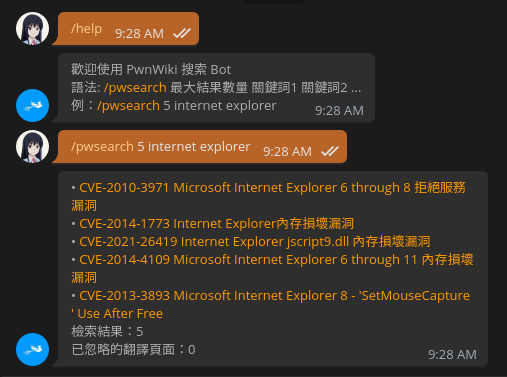
Run Directly From Source
# clone and enter repository
git clone https://github.com/k4yt3x/pwtgbot.git
cd pwtgbot

# set Telegram bot token
export PWTGBOT_SECRET="TELEGRAM BOT SECRET"

# launch bot
python -m pwtgbot
Run With Docker/Podman
You can run this bot from its Docker image.
$PWTGBOT_SECRET: Telegram bot secret token$VERSION_TAG: pwtgbot version (e.g., 1.2.0)- You can check out the newest tag on Docker Hub
# add Telegram bot token as secret
echo $PWTGBOT_SECRET | podman secret create pwtgbot -

# launch docker container
docker run -it --name pwtgbot --secret pwtgbot docker.io/k4yt3x/pwtgbot:$VERSION_TAG
Building the Docker Image
# clone and enter repository
git clone https://github.com/k4yt3x/pwtgbot.git
cd pwtgbot

# build the image
docker build -t pwtgbot:latest .
License
Due to management issues, this program is now licensed under a proprietary license. You must read and agree to the EULA prior to using this program. Should you need to modify or redistribute the source code, please contact the author for exclusive permissions.
1 maintainer

Metadata
1 maintainer
Release files for pwtgbot 1.2.3
For a detailed explanation of source distributions (sdists) and built distributions (wheels), please see the package formats documentation.
Source distribution (sdist)
| File | Size | Uploaded | Provenance | |
|---|---|---|---|---|
| pwtgbot-1.2.3.tar.gz | 6.5 kB | Without provenance | Details |
Built distribution (wheel)
| File | Interpreter | ABI | Platform | Reset |
|---|---|---|---|---|
| pwtgbot-1.2.3-py3-none-any.whl | Python 3 | none | any | Details |
Total release size: 13.8 kB
Release files / pwtgbot-1.2.3.tar.gz
| Download URL | pwtgbot-1.2.3.tar.gz |
|---|---|
| Size | 6.5 kB |
| Tags | Source |
|
SHA-256 checksum How to use checksums |
c8f21277e15ebf765b39dfbb9bbe580dfb2750a7b3aa39e7f4ac5a8820ff8ca5
|
|
BLAKE2b-256 checksum How to use checksums |
50ccf8e2589a09898fc8d4d0d25106ec5025ac4a0faaec8ff22c5b13dbffd9c0
|
| Upload date | |
|
Uploaded using Trusted Publishing? What is trusted publishing? |
No |
| Uploaded via |
twine/3.4.1 importlib_metadata/4.0.1 pkginfo/1.7.0 requests/2.25.1 requests-toolbelt/0.9.1 tqdm/4.61.0 CPython/3.9.5
|
Release files / pwtgbot-1.2.3-py3-none-any.whl
| Download URL | pwtgbot-1.2.3-py3-none-any.whl |
|---|---|
| Size | 7.3 kB |
| Tags | Python 3 |
|
SHA-256 checksum How to use checksums |
562ffd649ddc0a64433e7e2f4e926291b3030dcce17bbe984224f2ccde5dfb5e
|
|
BLAKE2b-256 checksum How to use checksums |
251b56408ee5773d5a5af393eab758312cca2e2d0d0077c244f021b549d80ea2
|
| Upload date | |
|
Uploaded using Trusted Publishing? What is trusted publishing? |
No |
| Uploaded via |
twine/3.4.1 importlib_metadata/4.0.1 pkginfo/1.7.0 requests/2.25.1 requests-toolbelt/0.9.1 tqdm/4.61.0 CPython/3.9.5
|
Security for pwtgbot 1.2.3
Provenance
Provenance describes where a file came from. On PyPI, provenance is shared via attestations, which provide a verifiable record of the build or publishing details. View details, limitations and caveats.
No provenance found
None of the files in this release were uploaded with provenance metadata.
A note on package security
PyPI is a repository for distributing packages, not a service for auditing them. While third-party security researchers and our staff do their best to detect and remove malicious packages, PyPI cannot guarantee the quality, security or suitability of any given package.













