
Terminal music player — stream YouTube audio from your CLI

Project description


PX7 Terminal Music
Stream music from YouTube directly in your terminal. No browser, no GUI, no nonsense.
PX7 is a lightweight CLI music player that searches YouTube via yt-dlp and streams audio through mpv or vlc — no downloads, no accounts, no ads. Just type a song name and play.
>> search radiohead
>> play 2
Features
- Search and stream directly, no ads
- Persistent favorites and playlists saved across sessions
- Queue shuffling and hands-free autoplay mode
- MPV and VLC support
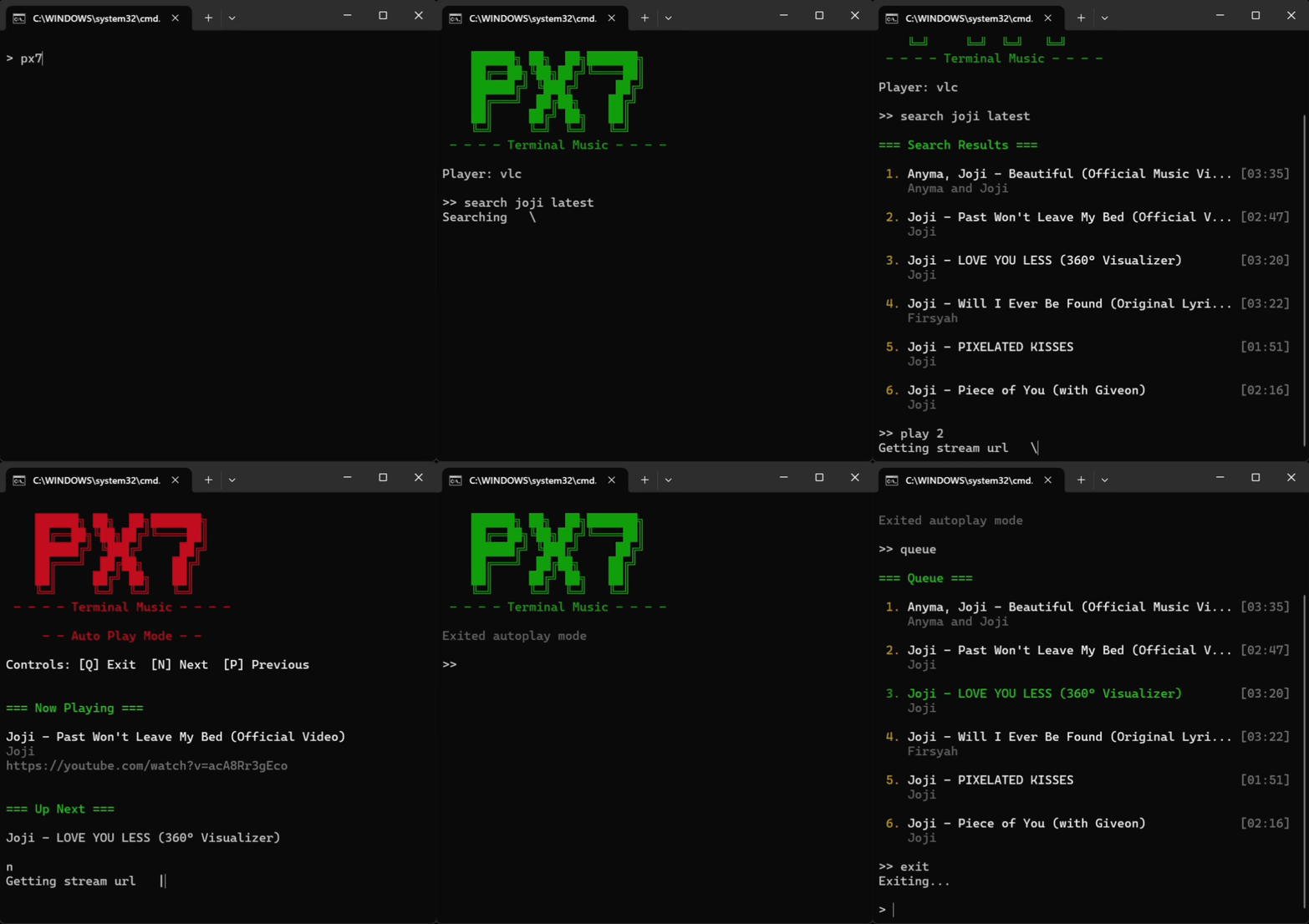
Preview
Requirements
- Python 3.10+
- MPV (recommended) or VLC
Installation
Install via pip (Recommended)
pip install px7-music
Start the application:
px7-music
You will see a prompt:
>>
Usage
command [arguments] [--flags]
Search & Play
| Command | Args | Description |
|---|---|---|
search / /s |
<query> |
Search YouTube and fill the results |
play |
[index] |
Play a track from the current results and load them into queue |
playwith no arguments defaults toplay 1.
Search flags:
| Flag | Default | Description |
|---|---|---|
--limit=<n> |
6 |
Number of results to fetch |
--no-postfix |
off | Disable the auto-appended "song" keyword |
--p |
off | Fetch tracks from a YouTube playlist URL instead of searching |
Examples
>> /s https://youtube.com/playlist?list=... --p
>> search hotel california --limit=1
>> /s my dear melancholy
>> play 2
Playback Controls
| Command | Description |
|---|---|
pause |
Pause the current track |
resume |
Resume a paused track |
next |
Skip to the next track in queue |
prev |
Go back to the previous track |
seek |
Show current playback position |
seek <position> |
Jump to a position in the current track |
Seek formats
>> seek           # show current position
>> seek 1:30      # jump to 1 min 30 sec (mm:ss)
>> seek 90        # jump to 90 seconds
>> seek +30       # skip forward 30 seconds
>> seek -10       # rewind 10 seconds
Queue & Info
| Command | Description |
|---|---|
queue |
List all tracks in the current queue |
current / now |
Show info about the currently playing track |
load |
Load last results into queue and reset playback |
shuffle |
Shuffle the queue (current track stays at top) |
Examples
>> /s the weeknd
>> load
>> shuffle
>> play 1
Note: Viewing
queue,favs, or a playlist loads them as the active results, soplay <index>works directly after them.
Favorites
Save tracks across sessions. Favorites persist to ~/.px7/.px7_favorites.json.
New favorites appear at the top (newest first).
| Command | Args | Description |
|---|---|---|
fav add |
Add the currently playing track | |
fav add |
<index> |
Add a track from the queue by index |
fav add |
all |
Add all queued tracks |
fav remove |
<index> |
Remove a favorite by index |
fav remove |
all |
Clear all favorites (asks for confirmation) |
favs |
List all saved favorites |
Favs flags:
| Flag | Default | Description |
|---|---|---|
--order=<by> |
newest first | Sort by: name, date-added, duration |
--limit=<n> |
all | Show only the top N favorites |
--reverse |
off | Reverse the sort direction |
Tip:
favsloads your favorites as results, so you canload→playthem directly.
Examples
>> fav add
>> fav add 3
>> fav add all
>> fav remove 2
>> favs
>> favs --order=name
>> favs --order=duration --limit=5
>> favs --order=date-added --reverse
Playlists
Organize tracks into named playlists. Playlists persist to ~/.px7/.px7_playlists.json.
New tracks in a playlist appear at the top (newest first).
| Command | Args | Description |
|---|---|---|
pl / pl list |
List all playlists | |
pl create |
<name> |
Create a new playlist |
pl delete |
<name> |
Delete a playlist (asks for confirmation) |
pl rename |
<old> -> <new> |
Rename a playlist |
pl add |
<name> |
Add the currently playing track to a playlist |
pl add |
<name> <index> |
Add a queue track by index to a playlist |
pl add |
<name> all |
Add all queued tracks to a playlist |
pl remove |
<name> <index> |
Remove a track from a playlist by index |
pl show |
<name> |
Display tracks in a playlist |
pl <name> |
Shorthand for pl show <name> |
|
pl load |
<name> |
Load a playlist into the queue |
pl show / pl load flags:
| Flag | Default | Description |
|---|---|---|
--order=<by> |
newest first | Sort by: name, date-added, duration |
--limit=<n> |
all | Limit number of tracks shown or loaded |
--reverse |
off | Reverse the sort direction |
Tip:
pl loadsets the loaded playlist as active results, soload→playandshufflework directly after it.
Examples
>> pl create Chill Mix
>> pl add Chill Mix
>> pl add Chill Mix 3
>> pl add Chill Mix all
>> pl Chill Mix
>> pl load Chill Mix
>> pl load Chill Mix --order=name --reverse
>> pl remove Chill Mix 2
>> pl rename Chill Mix -> Evening Vibes
>> pl delete Evening Vibes
Volume
>> volume         # print current volume
>> volume 70      # set volume to 70
Auto-Play Mode
Hands-free mode that plays through the queue automatically.
>> autoplay
Alias:
/a
Auto-Play Keybinds
| Key | Action |
|---|---|
N / > / . |
Next track |
P / < / , |
Previous track |
SPACE |
Pause / Resume |
+ / = |
Volume up (+10) |
- / _ |
Volume down (−10) |
R |
Force refresh display |
Q / X |
Quit autoplay mode |
Utility
| Command | Description |
|---|---|
latency |
Check network latency |
clear / cls |
Clear the screen and redraw the banner |
help |
Show the help screen |
exit |
Quit PX7 Music |
How It Works
searchqueries YouTube viayt-dlpin metadata-only mode (fast, no download)- Results are stored as "last results";
play <index>loads them into the queue and starts streaming play <index>fetches the direct audio stream URL and pipes it to mpv or vlc- Auto-play uses a thread-safe event queue to advance tracks without blocking the input loop
- Favorites and playlists are saved to
~/.px7/and persist between sessions
Project Structure
px7_music/
├── config.py               # yt-dlp options, defaults, file paths
├── main.py                 # entry point, command registration, main loop
├── core/
│   ├── handler.py          # command handlers (search, play, volume, fav, pl)
│   ├── parser.py           # command parser and flag parser
│   ├── latency.py          # network latency check
│   ├── seek_handler.py     # seek command parsing and dispatch
│   └── youtube.py          # yt-dlp search and stream URL extraction
├── library/
│   ├── favorites.py        # favorites persistence (load, save, add, remove)
│   └── playlists.py        # playlists persistence (create, delete, rename, add, remove)
├── player/
│   ├── player_base.py      # abstract Player interface
│   ├── player.py           # MPV and VLC backend implementations
│   ├── playback.py         # queue state, playback control, autoplay events
│   └── auto_play_mode.py   # autoplay UI and input listener thread
└── utility/
    ├── docs.py             # help text and installation guide
    └── utils.py            # ANSI codes, spinner, screen utilities
Dependencies
| Package | Purpose |
|---|---|
yt-dlp |
YouTube search and stream URL extraction |
python-mpv |
MPV player bindings (optional) |
python-vlc |
VLC player bindings (optional) |
At least one of
python-mpvorpython-vlcmust be installed and its corresponding player binary must be present on your system.
Known Limitations
- Streams directly from YouTube; subject to rate limiting or regional restrictions
License
MIT — do whatever you want, just don't remove the header.
Release history Release notifications | RSS feed


Download files
Download the file for your platform. If you're not sure which to choose, learn more about installing packages.
Source Distribution
Built Distribution
Filter files by name, interpreter, ABI, and platform.
If you're not sure about the file name format, learn more about wheel file names.
Copy a direct link to the current filters
File details
Details for the file px7_music-1.2.0.tar.gz.
File metadata
- Download URL: px7_music-1.2.0.tar.gz
- Upload date:
- Size: 28.1 kB
- Tags: Source
- Uploaded using Trusted Publishing? No
- Uploaded via: twine/6.2.0 CPython/3.14.2
File hashes
| Algorithm | Hash digest | |
|---|---|---|
| SHA256 |
bd8454f70e283f2b1ee447bf41157b482cdc3bbe8f111b3994a1da0daa4a9a70
|
|
| MD5 |
a62141ad73d3bb59dac3c12c758e81df
|
|
| BLAKE2b-256 |
9de7bc66fe14956c42c5ac655980e9e4647dc75ef27294ddf673cb301a8e0778
|
File details
Details for the file px7_music-1.2.0-py3-none-any.whl.
File metadata
- Download URL: px7_music-1.2.0-py3-none-any.whl
- Upload date:
- Size: 29.6 kB
- Tags: Python 3
- Uploaded using Trusted Publishing? No
- Uploaded via: twine/6.2.0 CPython/3.14.2
File hashes
| Algorithm | Hash digest | |
|---|---|---|
| SHA256 |
991f14b2c59e4c2ca316d196b48634f783dc7193f322dc8631ab25ba21c42f07
|
|
| MD5 |
f813cad7d4674f8350e6073de663c2c7
|
|
| BLAKE2b-256 |
8501e9ea356e6dbff71bd3cbe97c04e7b84c74d9d69124c47e4ed8120ec5b1b6
|






