
Python Bulk Image Compressor


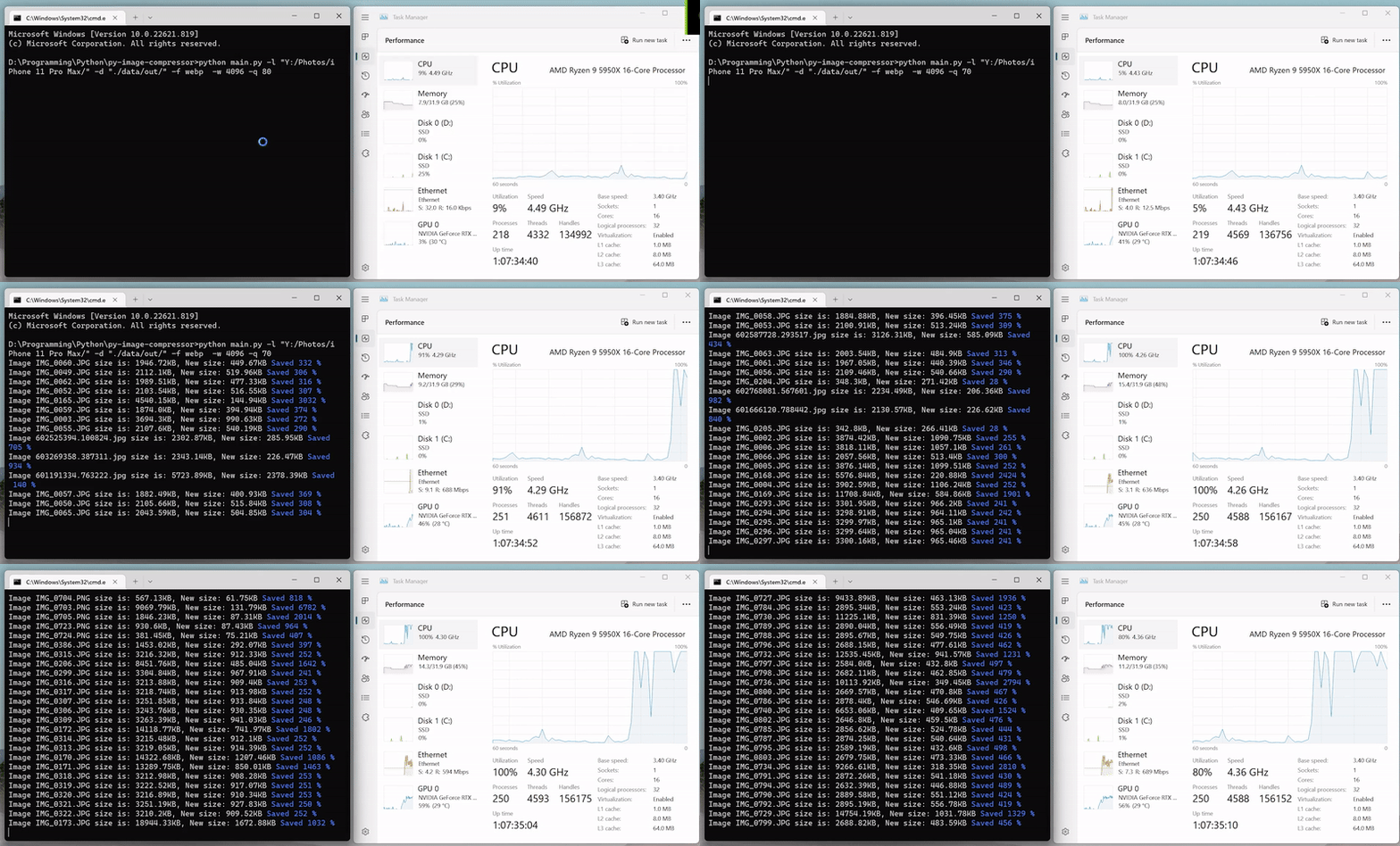
py-bulk-image-compressor is a user-friendly CLI tool for compressing and resizing images in bulk. It offers extensive options for managing image quality, format, and metadata while maintaining fast, efficient performance.
Key Features
- Supports Multiple Formats: JPEG, PNG, WEBP, AVIF, HEIF, and more.
- Metadata Handling: Choose whether to preserve or remove EXIF data.
- Multicore Processing: Utilizes all available CPU cores.
- Flexible Settings: Customize output quality, max width, and destination directory.
Installation
From PyPI
pip install py-bulk-image-compressor
Requires Python 3.10+
From Source
- Clone the repository:
git clone https://github.com/georgekhananaev/py-image-compressor.git
cd py-image-compressor
- Install dependencies:
pip install -r requirements.txt
- Install locally:
pip install .
- Run the CLI:
py-bulk-image-compressor -h
Usage
After installation, you can run:
py-bulk-image-compressor -h
Example Commands
-
Basic compression and resize:
py-bulk-image-compressor -l "path/to/original_images" -d "path/to/output"
Uses default format (
jpeg), quality=80, max_width=1920px. -
Specific format and quality:
py-bulk-image-compressor -l "path/to/original_images" \
    -d "path/to/output" -f webp -w 800 -q 70
-
Remove metadata & skip larger compressed files:
py-bulk-image-compressor -l "path/to/original_images" \
    -d "path/to/output" -rm y -r y
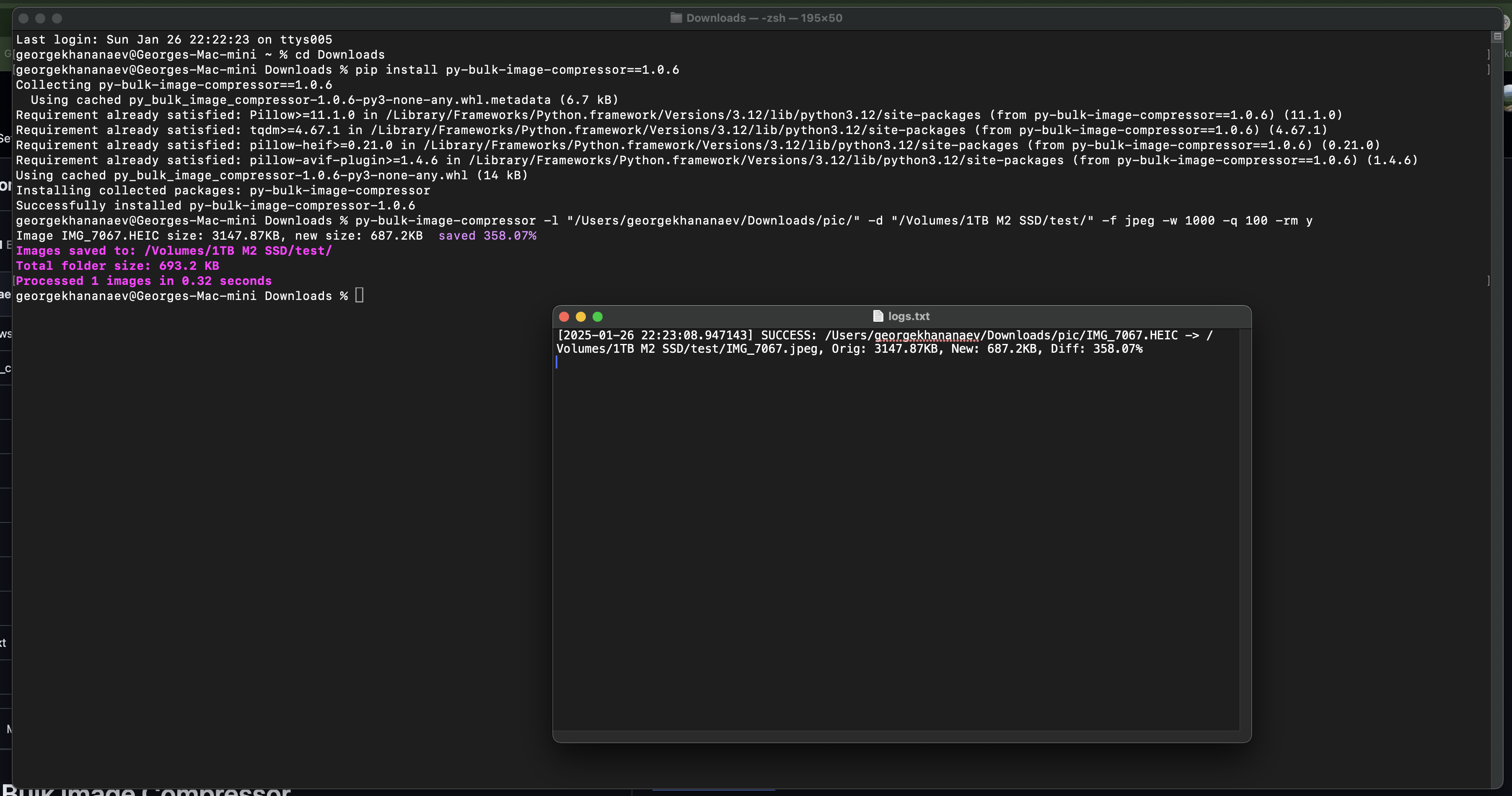
Logs are saved to logs.txt in the current cmd/terminal working directory. Installation & Usage screenshot below:
Command-Line Options
| Option | Required | Default Value | Description |
|---|---|---|---|
-l |
Yes | (No Default) | Input directory for original images. (Example: -l "C:/images/") |
-d |
No | /data/output/ |
Output directory for compressed images. |
-f |
No | jpeg |
Output format (e.g., webp, png, avif). |
-w |
No | 1920 |
Maximum width (px). |
-q |
No | 80 |
Image quality (0-100). |
-r |
No | n (off) |
Remove compressed if it’s larger than the original (-r y). |
-rm |
No | n (off) |
Remove all metadata (-rm y). |
Logging
- Generates or appends to a
logs.txtfile in your current working directory. - The
configurations.inifile controls log settings (e.g.,max_rows).
Contributing
- Fork the repository.
- Create a new branch:
git checkout -b feature-name. - Commit your changes:
git commit -m "Add awesome feature". - Push to your branch:
git push origin feature-name. - Open a pull request on GitHub.
License
This project is licensed under the MIT License.
Questions or Issues?
- Open an issue on GitHub
- Contributions, suggestions, and bug reports are welcome!
Support
If you find this tool helpful, consider supporting:

Your support helps me continue to create and maintain useful projects.
Updates
13/04/2025
- Added JPEG normalization step to ensure consistent color‑space conversion and correct chroma placement.
- Upgraded compressor to use progressive encoding, optimized Huffman tables, and 4:2:0 subsampling by default for smaller output sizes.
- Added official support for Python 3.13.x.
27/01/2025
- Deployed to pypi, installation:
pip install py-bulk-image-compressor
usage:py-bulk-image-compressor -h
26/01/2025
- EXIF metadata is preserved if supported by the output format (e.g., JPEG).
- Added support for
.avifformat (requirespillow-avif-plugin). - Minor speed optimizations for faster compression.
- Updated
requirements.txtwith the latest package versions. - Added logs, which is exported to logs.txt
- Added tests, use
pytest --maxfail=1 --disable-warnings -v
02/12/2023
- Automatic detection and handling of RGB/RGBA channels.
- Thanks to "ZenithVal" for the suggestion.
06/04/2023
- Updated
README.md. - Updated
requirements.txtwith the latest package versions.
12/12/2022
- Introduced a
resourcesfolder containingconfigurations.inifor storing program settings. - Set up future GUI plans using
customtkinter. - Removed PySimpleGUI from dependencies.
06/12/2022
- Default values added for
-d,-f, and-qoptions. You can run:
Defaults: JPEG format, 80% quality, 1920px max width,python main.py -l "C:/Your Folder/"/data/output/as the destination folder. - Simplified the code using
*argsand**kwargs.
05/12/2022
- Added support for
.heifand.heicformats (e.g., iPhone photos). - Updated
requirements.txtto includepillow-heif.
04/12/2022
- Improved the output to display the actual size saved for each image, with full multithreading conversion support.
- Enhanced terminal output for better visualization of size savings.
- Began GUI development for Windows and Ubuntu.
- Added
-r yto skip retaining larger compressed images.
1 maintainer

Metadata
1 maintainer
Release files for py-bulk-image-compressor 1.0.8
For a detailed explanation of source distributions (sdists) and built distributions (wheels), please see the package formats documentation.
Source distribution (sdist)
| File | Size | Uploaded | |
|---|---|---|---|
| py_bulk_image_compressor-1.0.8.tar.gz | 15.1 kB | Details |
Built distribution (wheel)
| File | Interpreter | ABI | Platform | Reset |
|---|---|---|---|---|
| py_bulk_image_compressor-1.0.8-py3-none-any.whl | Python 3 | none | any | Details |
Total release size: 31.8 kB
Release files / py_bulk_image_compressor-1.0.8.tar.gz
| Download URL | py_bulk_image_compressor-1.0.8.tar.gz |
|---|---|
| Size | 15.1 kB |
| Tags | Source |
|
SHA-256 checksum How to use checksums |
22533d3c98276cdc081fb394ad1df472f3ad1d75c755d79c46f48dd9b8742624
|
|
BLAKE2b-256 checksum How to use checksums |
c71bbd8aa23c9359ce1fb6d785f994dfe103902b494f438862881e1c9fd65f5d
|
| Upload date | |
|
Uploaded using Trusted Publishing? What is trusted publishing? |
No |
| Uploaded via |
twine/6.1.0 CPython/3.12.9
|
Release files / py_bulk_image_compressor-1.0.8-py3-none-any.whl
| Download URL | py_bulk_image_compressor-1.0.8-py3-none-any.whl |
|---|---|
| Size | 16.7 kB |
| Tags | Python 3 |
|
SHA-256 checksum How to use checksums |
fb38cdbcf1eaba68fad8c36d99bffb7569366820a72592547d9ea790d75a7121
|
|
BLAKE2b-256 checksum How to use checksums |
85aa8a71adce4808c454da91970a0a2c7f4e514dd0f4022a42cf2698621886e8
|
| Upload date | |
|
Uploaded using Trusted Publishing? What is trusted publishing? |
No |
| Uploaded via |
twine/6.1.0 CPython/3.12.9
|














