
Welcome to py-console
I've always liked the ease with which we can log colorfull warning, errors and messages using JavaScript in a webbrowser console. This package allows you to do just that. Check out more information here.
Installation
pip install py-console
Usage
Main features:
- printing lines with colored text and/or text backgrounds
- printing lines of which parts have colored text or text backgrounds
Demo
    from py_console import console, bgColor, textColor

# Specify console settings
# Show time in console.log, console.warn etc by default?
console.setShowTimeDefault(True)
# Custom format for showing time (default H:M:S)
# Here we've added miliseconds
console.setTimeFormat(timeFormat='%H:%M:%S.%f')

# normal logging
console.log("log")
console.warn("warn", severe=False)
console.error("error", severe=False)
console.success("success", severe=False)
console.info("info", severe=False)

print(" ")

# Change time format back
console.setTimeFormat(timeFormat='%H:%M:%S')

# all of these colors also have the 'severe' option
console.log("log severe", severe=True)
console.warn("warn severe", severe=True)
console.error("error severe", severe=True)
console.success("success severe", severe=True)
console.info("info severe", severe=True)

print(" ")

# Specifying showTime ignores the defaults
console.warn('Not showing time', showTime=False)

print(" ")

# Logging with highlighted text
console.log(f"Normal log with default {console.highlight('highlighted')} part")
console.log(
    f"Normal log with a {console.highlight('FAIL', bgColor=bgColor.RED)} "
    f"and a {console.highlight('SUCCESS', bgColor=bgColor.GREEN)} part")
console.log(
    f"Severe log with a {console.highlight('FAIL', bgColor=bgColor.RED, textColor=textColor.BLACK)} "
    f"and a {console.highlight('SUCCESS', bgColor=bgColor.GREEN, textColor=textColor.BLACK)} part", severe=True)
console.log(f"Normal log with {console.highlight('highlighted red', bgColor=bgColor.RED)} part")
console.info(f"normal info with {console.highlight('highlighted red text', textColor=textColor.RED)} part")
console.warn(f"Normal warn with {console.highlight('only red text', textColor=textColor.RED, bgColor='')} part")
console.error(f"Error text with custom {console.highlight('black-yellow', textColor=textColor.YELLOW, bgColor=bgColor.BLACK)} highlights")
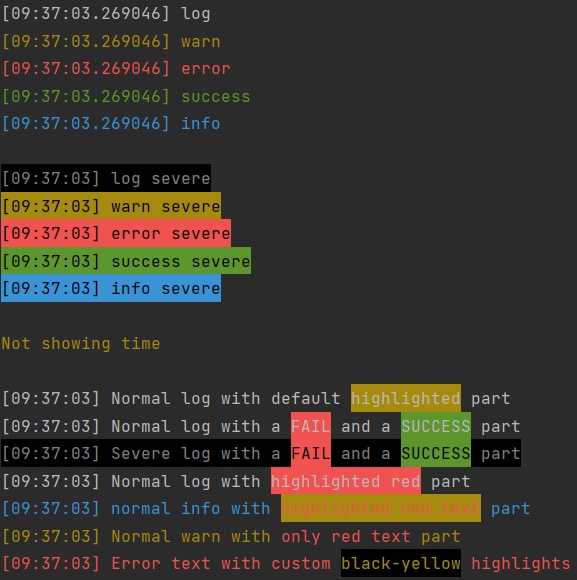
Output:
Contributing
Pull requests are welcome. For major changes, please open an issue first to discuss what you would like to change.
License
1 maintainer

Metadata
1 maintainer
Release files for py-console 0.1.6
For a detailed explanation of source distributions (sdists) and built distributions (wheels), please see the package formats documentation.
Built distribution (wheel)
| File | Interpreter | ABI | Platform | Reset |
|---|---|---|---|---|
| py_console-0.1.6-py3-none-any.whl | Python 3 | none | any | Details |
Release files / py_console-0.1.6-py3-none-any.whl
| Download URL | py_console-0.1.6-py3-none-any.whl |
|---|---|
| Size | 6.0 kB |
| Tags | Python 3 |
|
SHA-256 checksum How to use checksums |
af6cfc23af72c6e5b4b784aa4bcd92cad0090e53ee3612e9e8c809cd5646d9e3
|
|
BLAKE2b-256 checksum How to use checksums |
1024810f4ca2f94f16eda80d29338c301bfe9ed11e16088f667bb7c4fdc61f6e
|
| Upload date | |
|
Uploaded using Trusted Publishing? What is trusted publishing? |
No |
| Uploaded via |
twine/4.0.2 CPython/3.9.1
|














