
A cross-platform GUI and CLI tool for managing Python virtual environments and packages. Features include environment creation, activation, package installation, requirements management, updates, deletion, and export.
Verified details
These details have been verified by PyPIProject links
GitHub Statistics
Maintainers

Project description

🐍🏠 Py Env Studio













Py Env Studio is a cross-platform Graphical Environment & Package Manager for Python that makes managing virtual environments and packages effortless without using the command line.
Perfect for:
- ✅ Python beginners who want simplicity
- ✅ Data scientists setting up ML/DL stacks
- ✅ Developers managing Django, Flask, FastAPI projects
- ✅ Teams who need secure, isolated environments
🌟 GUI Key Features
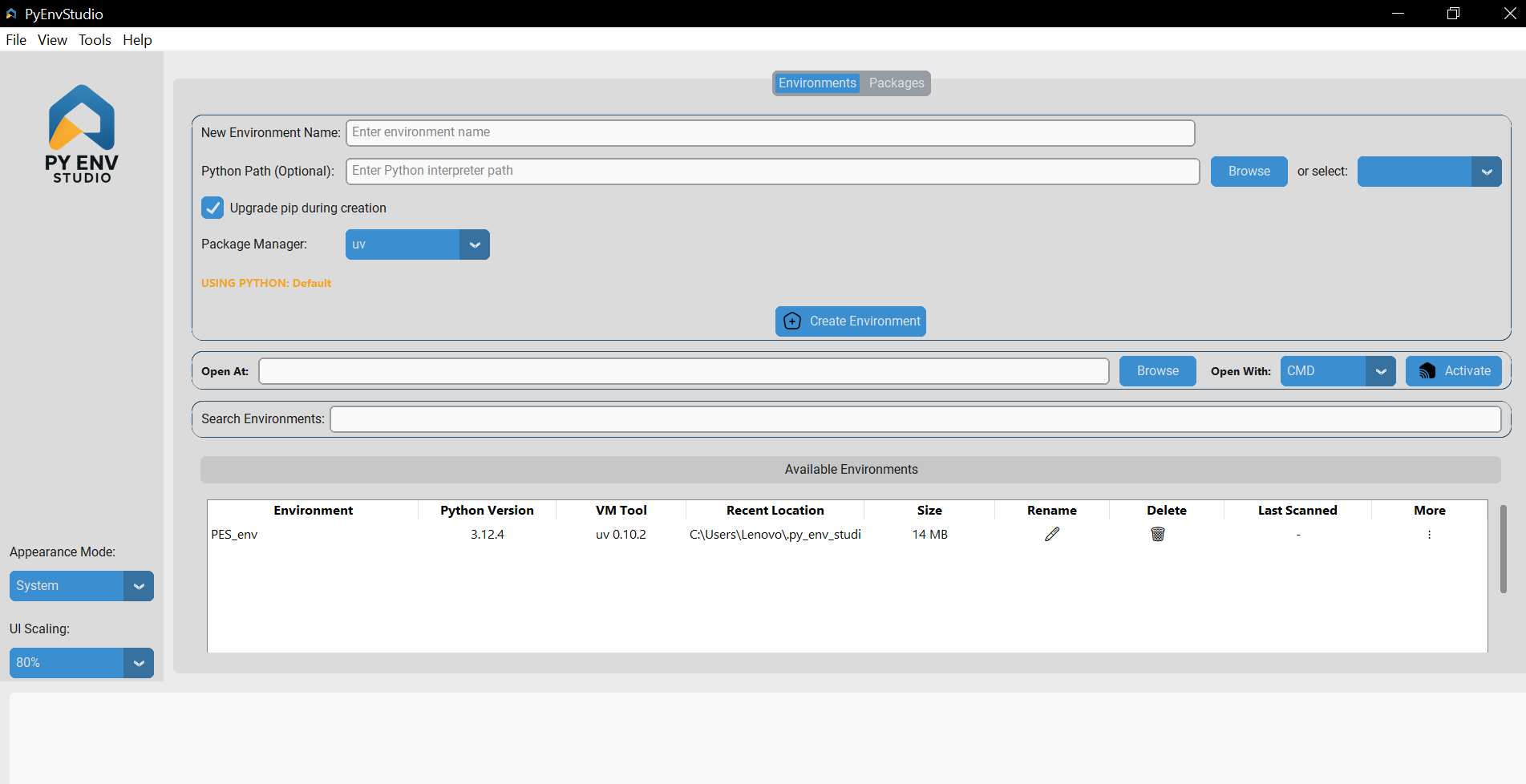
- ➕ Create and delete virtual environments
Easily set up new virtual environments or remove unused ones with a single click, without touching the command line.
- ⚡ One click environment activation
Instantly activate environments directly from the GUI, eliminating the need to type activation commands manually.
- 📁 Open environment at a specific location (choose working directory)
Launch the environment’s working directory in your file explorer to quickly access project files and scripts.
- 🔷 Integrated launch: CMD, VSCode, PyCharm (Beta)
Open your environment directly in your preferred editor or terminal, streamlining your workflow.
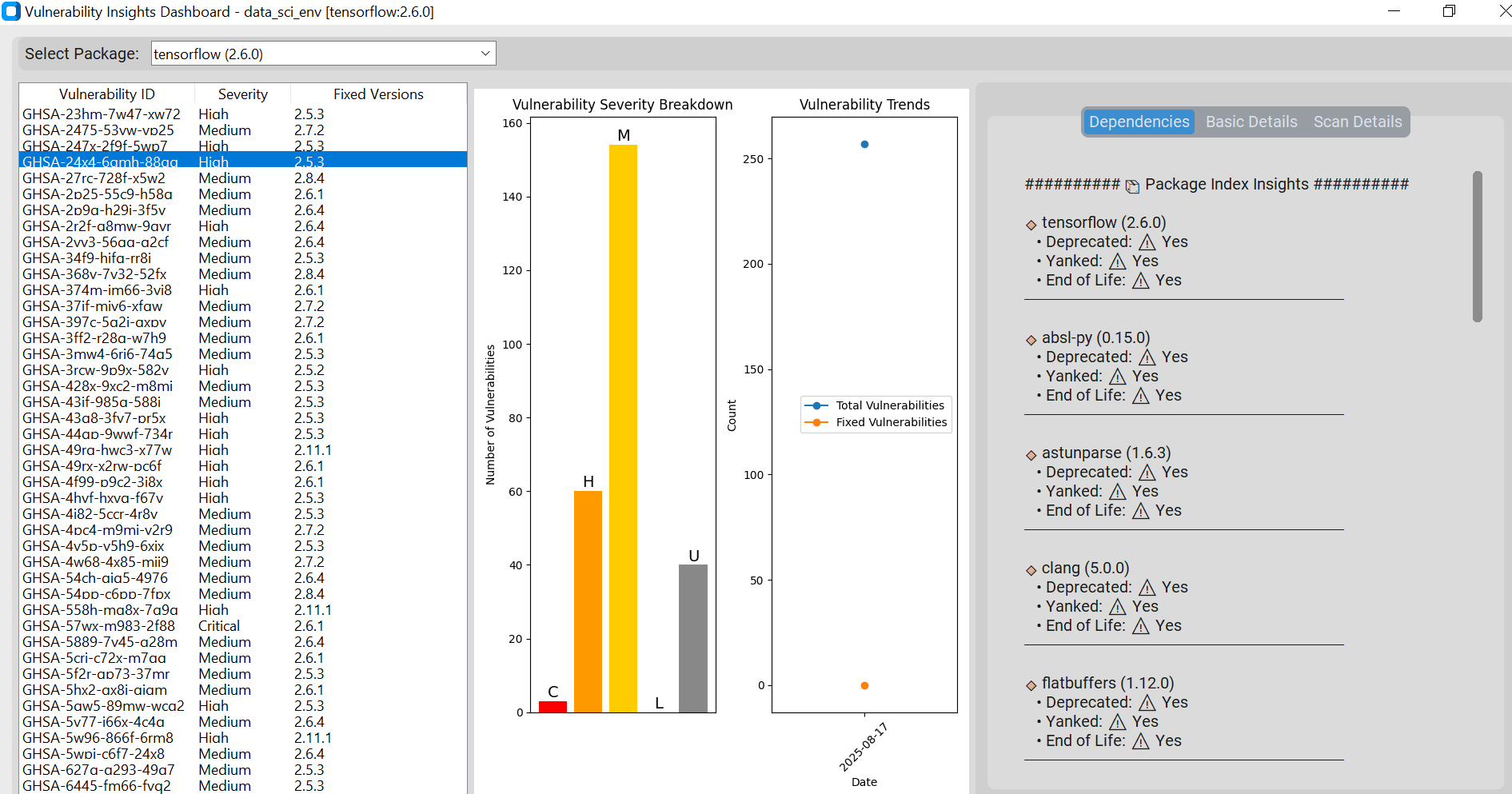
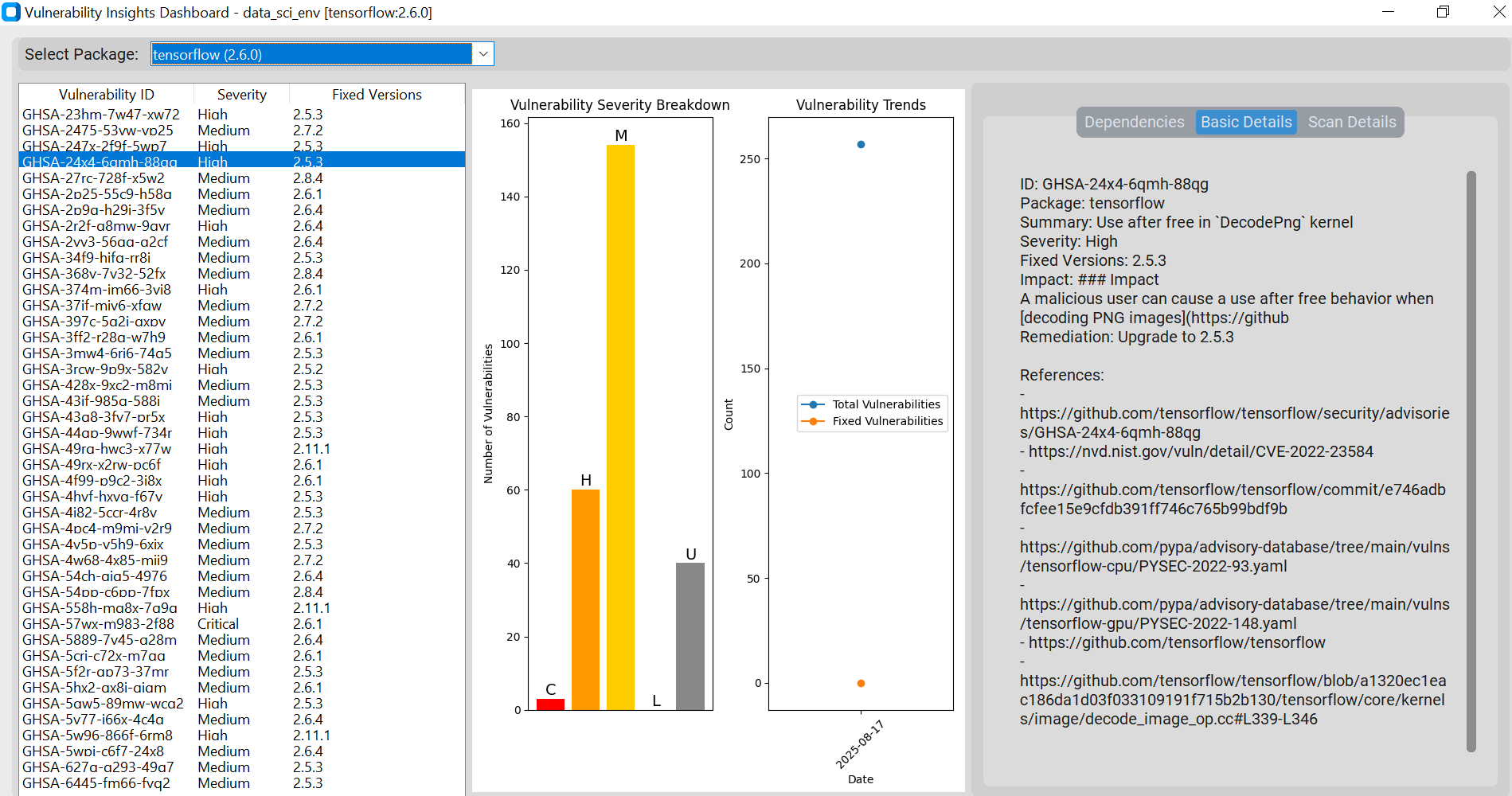
- 🛡️ Environment Vulnerability Scanner with Insights Dashboard
Scan environments for known security vulnerabilities in installed packages.
Generate insightful reports with risk levels, recommended updates, and a dashboard overview to keep your projects secure.
- 🔍 Search environments instantly
Use the built-in search bar to quickly locate any environment, even in large collections.
- ✏️ Rename environments
Quickly rename environments to maintain clarity and organization in your workspace.
- 🕑 View recent used location for each environment
Track where each environment was last accessed, making it easy to jump back into active projects.
- 📏 See environment size details
View the size of each environment to identify heavy setups and manage disk space effectively.
- 💫 Visual management of all environments
Manage all your environments through a clean, organized, and user-friendly interface with minimal clutter.
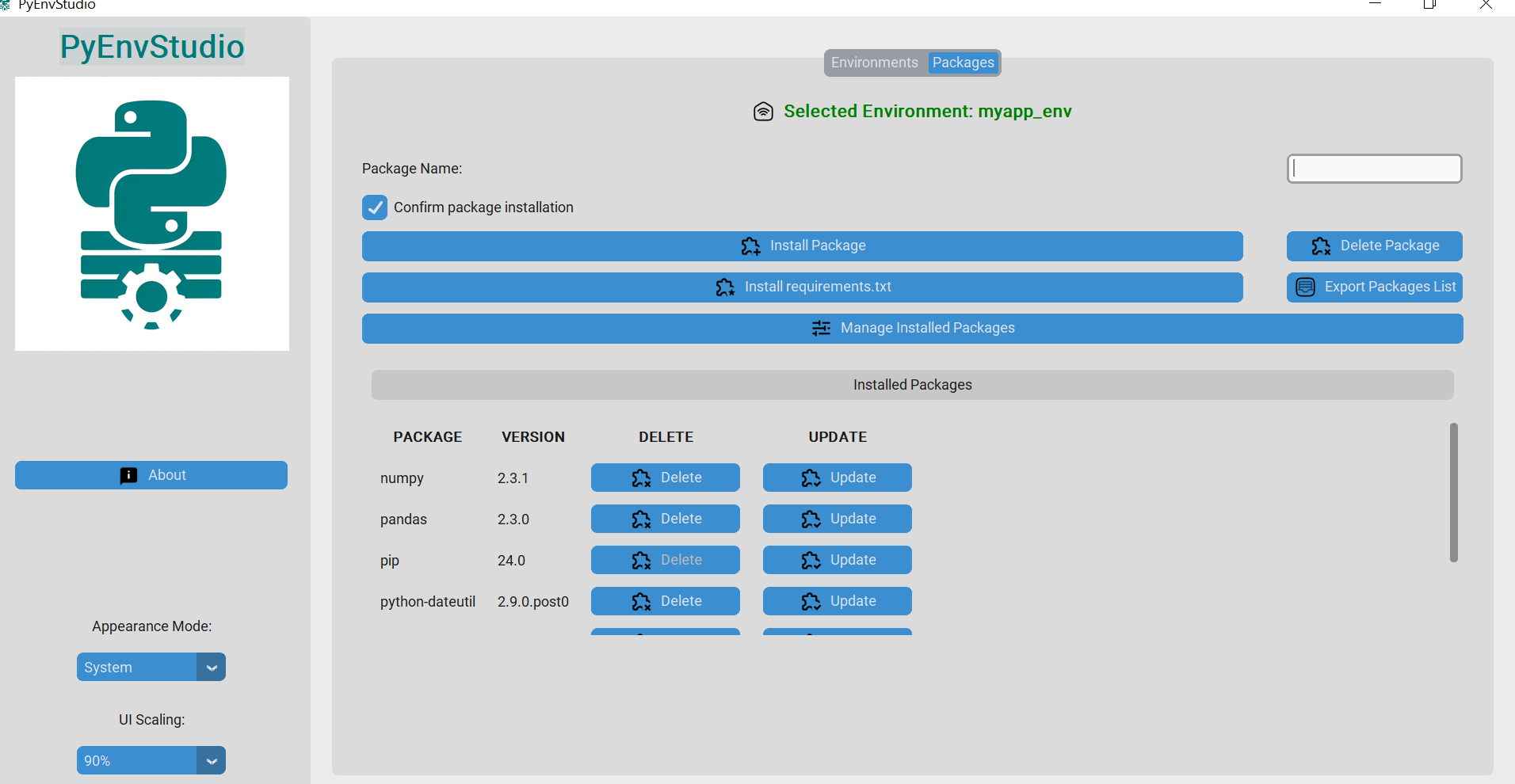
- 📦 Package Management
Install, update, and uninstall packages visually without typing a single command.
- 🚚📄 Export or import requirements
Import dependencies from a requirements file or export your current setup with just a click.
☕ Support
If you find Py Env Studio helpful, consider supporting me:

📥 Install via PyPI:
pip install py-env-studio
🖥️ Launch the GUI (Recommended)
py-env-studio
Command-Line Options (For Advanced Users)
Create environment
py-env-studio --create <environment name>
Create environment and upgrade pip
py-env-studio --create <environment name> --upgrade-pip
Delete environment
py-env-studio --delete <environment name>
List all environments
py-env-studio --list
Activate environment (prints activation command)
py-env-studio --activate <environment name>
Install package
py-env-studio --install <environment name>,numpy
Uninstall package
py-env-studio --uninstall <environment name>,numpy
Export requirements to file
py-env-studio --export <environment name>,requirements.txt
Import requirements from file
py-env-studio --import-reqs ,requirements.txt
🔑 Activating Environments Manually activate your environment after creation:
Windows:
.\envs\<environment name>\Scripts\activate
Linux/macOS:
source envs/<environment name>/bin/activate
📁 Project Structure
py-env-studio/
├── __init__.py
├──resources
├── core/
│   ├── __init__.py
│   ├── env_manager.py
│   └── pip_tools.py
├── utils/
│   ├── __init__.py
│   ├── handlers.py
│   └── vulneribility_scanner.py
│   └── vulneribility_insights.py
├── ui/
│   ├── __init__.py
│   └── main_window.py
└── static/
    └── icons/
├── main.py
├── config.ini
├── requirements.txt
├── README.md
└── pyproject.toml
🚀 Roadmap
🏙️ Multiple Python based Environements
🔍 Global package search
⬆️ One-click upgrade of all packages
📝 Package version locking
🐳 Dockerized version
🌐 References & Network Access
This project uses public APIs for core features:
| Service | Purpose | URL |
|---|---|---|
| PyPI | Package metadata | pypi.org |
| deps.dev | Dependency data | deps.dev |
| OSV.dev | Vulnerability info | osv.dev |
Ensure HTTPS access to these domains.
APIs are public, read-only, no auth required.
🤝 Contributing We welcome contributions! Feel free to fork the repository, raise issues, or submit pull requests.
⚖️ License This project is licensed under the MIT License.
Py Env Studio — Simplifying Python environment management for everyone with built-in security scanner.
⭐ Star this repo if you find it useful! | 💬 Join us on Telegram
Project details
Verified details
These details have been verified by PyPIProject links
GitHub Statistics
Maintainers
Release history Release notifications | RSS feed


Download files
Download the file for your platform. If you're not sure which to choose, learn more about installing packages.
Source Distribution
Built Distribution
Filter files by name, interpreter, ABI, and platform.
If you're not sure about the file name format, learn more about wheel file names.
Copy a direct link to the current filters
File details
Details for the file py_env_studio-2.0.4.tar.gz.
File metadata
- Download URL: py_env_studio-2.0.4.tar.gz
- Upload date:
- Size: 2.8 MB
- Tags: Source
- Uploaded using Trusted Publishing? Yes
- Uploaded via: twine/6.1.0 CPython/3.13.7
File hashes
| Algorithm | Hash digest | |
|---|---|---|
| SHA256 |
01ca8ce133dcf5776a13fb14ca08fe4aa80a4f3fc67a0abfd32b1a0df5ff0bed
|
|
| MD5 |
e8fc2db4414784b5677e747ddf319762
|
|
| BLAKE2b-256 |
3636fe666ed822342ab62f5d759705ea1785116ccadbb451d419b2495072da94
|
Provenance
The following attestation bundles were made for py_env_studio-2.0.4.tar.gz:
Publisher:
publish.yml on pyenvstudio/py-env-studio
-
Statement:
-
Statement type:
https://in-toto.io/Statement/v1 -
Predicate type:
https://docs.pypi.org/attestations/publish/v1 -
Subject name:
py_env_studio-2.0.4.tar.gz -
Subject digest:
01ca8ce133dcf5776a13fb14ca08fe4aa80a4f3fc67a0abfd32b1a0df5ff0bed - Sigstore transparency entry: 622070225
- Sigstore integration time:
-
Permalink:
pyenvstudio/py-env-studio@0d43b97b0e02332795611fe896911c9c803c1f73 -
Branch / Tag:
refs/tags/v2.0.4 - Owner: https://github.com/pyenvstudio
-
Access:
public
-
Token Issuer:
https://token.actions.githubusercontent.com -
Runner Environment:
github-hosted -
Publication workflow:
publish.yml@0d43b97b0e02332795611fe896911c9c803c1f73 -
Trigger Event:
release
-
Statement type:
File details
Details for the file py_env_studio-2.0.4-py3-none-any.whl.
File metadata
- Download URL: py_env_studio-2.0.4-py3-none-any.whl
- Upload date:
- Size: 2.8 MB
- Tags: Python 3
- Uploaded using Trusted Publishing? Yes
- Uploaded via: twine/6.1.0 CPython/3.13.7
File hashes
| Algorithm | Hash digest | |
|---|---|---|
| SHA256 |
501fa2604b7c815ef30de99e905a00293539713423d306b4f0606f8f09ef24d7
|
|
| MD5 |
3e051df828df4af43d885e72f611d2c5
|
|
| BLAKE2b-256 |
973da68478df93fd79d2e03c89658a7e74ede2b2295d8c723576b128b2c7912b
|
Provenance
The following attestation bundles were made for py_env_studio-2.0.4-py3-none-any.whl:
Publisher:
publish.yml on pyenvstudio/py-env-studio
-
Statement:
-
Statement type:
https://in-toto.io/Statement/v1 -
Predicate type:
https://docs.pypi.org/attestations/publish/v1 -
Subject name:
py_env_studio-2.0.4-py3-none-any.whl -
Subject digest:
501fa2604b7c815ef30de99e905a00293539713423d306b4f0606f8f09ef24d7 - Sigstore transparency entry: 622070226
- Sigstore integration time:
-
Permalink:
pyenvstudio/py-env-studio@0d43b97b0e02332795611fe896911c9c803c1f73 -
Branch / Tag:
refs/tags/v2.0.4 - Owner: https://github.com/pyenvstudio
-
Access:
public
-
Token Issuer:
https://token.actions.githubusercontent.com -
Runner Environment:
github-hosted -
Publication workflow:
publish.yml@0d43b97b0e02332795611fe896911c9c803c1f73 -
Trigger Event:
release
-
Statement type:






