
IBM/Toshiba 4610 SureMark



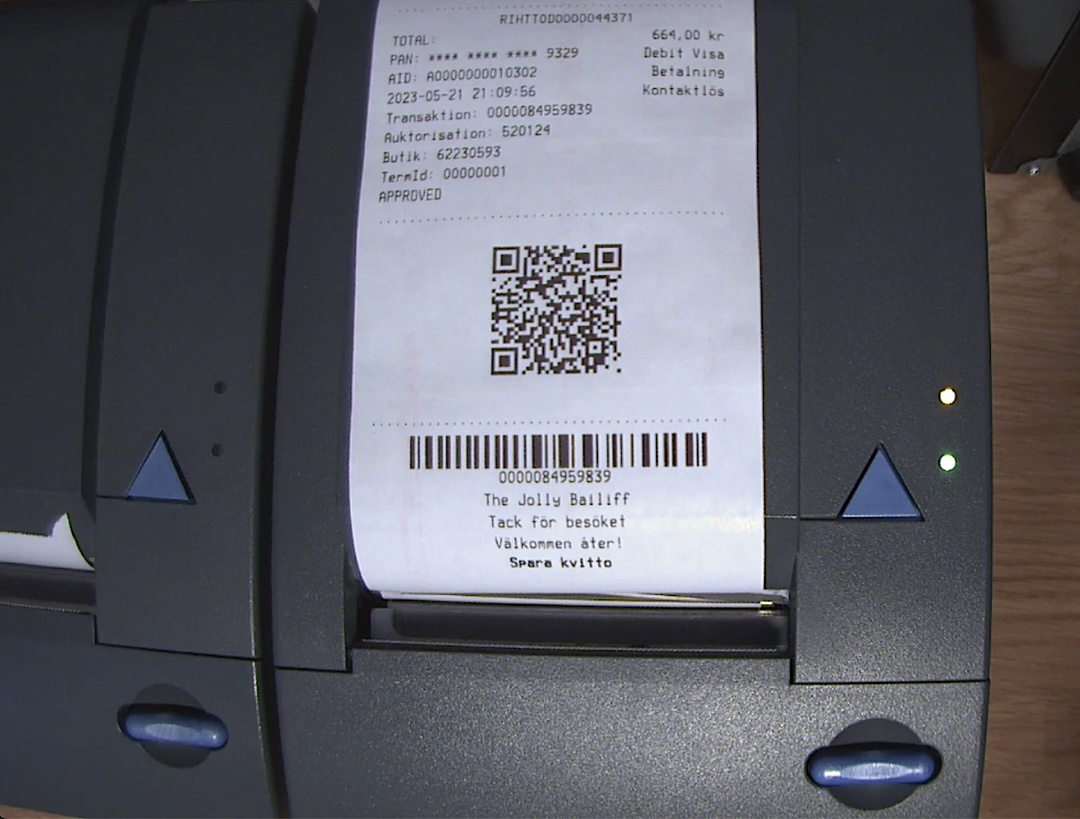
Python library for IBM / Toshiba 4610 SureMark POS thermal receipt printers, communicating over USB.
There are three communication modes supported:
- Compatibility Legacy 4610
- Native Mode
- EPSON Emulation (RS-232 only)
This library targets the Native Mode which is basically the only viable option for the models with USB interface.
The library has been slop-reverse-engineered from JavaPOS, and then slop-coded into python. It's on the way to getting groomed to be a regular mediocre human-made nonsense.
Communication: Github Issues
Hardware
| Model | Station(s) | Tested | Notes |
|---|---|---|---|
| 4610-1NR | Receipt (thermal roll) | + | VID=0x04B3 PID=0x4535 |
| 4610-TI3 | Receipt + Slip/DI + Check scanner | - | Full-featured model |
| Other | Varies | - | Use IBM4610 base class |
Installation
pip install py-ibm-4610
pyusb may require libusb to be installed on the system. This needs to be verified.
Also udev features must listed and verified.
Quick start
import logging
from py_ibm_4610 import IBM4610_1NR
from py_ibm_4610 import FONT_A, FONT_B, FONT_C, ALIGN_CENTER, BC_CODE39, QR_EC_H

logging.basicConfig(
    level=logging.DEBUG,
)

# Context manager opens and closes the USB connection automatically
with IBM4610_1NR() as p:
    # Modifying parameters one by one
    p.select_font(FONT_B)
    p.alignment(ALIGN_CENTER)
    p.bold(True)
    p.scale_font(width=1, height=1)
    p.text("py-ibm-4610 works!\n")
    # Print all we've got so far
    p.flush()
    # An easy way to go back to defaults
    p.reinit()
    # Modifying parameters in chain
    second_line = ("That's an example of how to use our library."
                   "The newlines are handled automatically by the printer")
    p.bold(True).text(f"{second_line}\n").bold(False)
    # Showing off with a barcode
    p.barcode(BC_CODE39, "IT-WORKS", height=50, width=4, align=ALIGN_CENTER)
    p.feed(2)
    # Print a QR Code
    url = "https://github.com/printer-stream/py-ibm-4610"
    p.qr_code(url, ec=QR_EC_H)
    p.flush()
    # Feed paper so the print get above the knife
    p.feed(10)
    # Finally cut the paper
    p.cut()
Reference page
There is a ReferencePage() class slop-coded recently. It needs to be refactored.
Usage:
from py_ibm_4610 import IBM4610_1NR, ReferencePage

with IBM4610_1NR() as p:
    ReferencePage(p).enable_all().print()
Available sections:
TEXT_FORMATTING, FONT_SCALING, FONT_FACES, ALIGNMENT, FONT_COLOR,
ROTATION, LINE_SPACING, FEED, TAB_STOPS, MARGINS, DOT_SPACING,
CHAR_SETS, PRINT_QUALITY, BARCODES, BITMAP, PAGE_MODE,
BUFFER_CONTROL, STATUS, LINE_COUNT, STATUS_SENT, ERROR_RECOVERY,
FEED_BUTTON, CASH_DRAWER, BEEPER, MCT, STATISTICS.
Refer to the source code for more information. Otherwise, please submit a ticket with your question.
API overview
All command methods return self for chaining. Data is buffered until
flush() is called (or cut(), which flushes automatically).
p.select_station(STATION_RECEIPT)
p.bold(True).text("Header\n").bold(False)
p.alignment(ALIGN_CENTER).text("Centered\n").alignment(ALIGN_LEFT)
p.barcode(BC_EAN13, "5901234123457", height=60)
p.feed(5)
p.cut()
Buffered workflow
This is not tested well enough, and could be unstable.
p.select_station(STATION_RECEIPT)
p.text("Line 1\n")
p.text("Line 2\n")
total_bytes = p.flush()             # sends everything at once
Printing QR Codes
QR Code printing on IBM/Toshiba 4610 from python is possible now with py-ibm-4610 and IBM4610_1NR.qr_code() method.
Refer to examples for more information.
Print QR Barcode command supported on 4610 models 1NR, 2NR, and 2CR at firmware level OF.xx or above. Command will be rejected on older model printers (4610-TIx) and on 4610-1NR/2NR/2CR that are not at level OF.xx or above.
Building from source
make build        # produces dist/py_ibm_4610-<version>-py3-none-any.whl
make install      # installs the wheel for the current user
make clean        # removes the built wheel
Notes
Reverse-engineered from the IBM JavaPOS driver (posj.jar) sourced out of a random place most probably.
License
GNU General Public License v3.0
1 maintainer

Metadata
1 maintainer
Release files for py-ibm-4610 1.3.1
For a detailed explanation of source distributions (sdists) and built distributions (wheels), please see the package formats documentation.
Source distribution (sdist)
| File | Size | Uploaded | |
|---|---|---|---|
| py_ibm_4610-1.3.1.tar.gz | 74.1 kB | Details |
Built distribution (wheel)
| File | Interpreter | ABI | Platform | Reset |
|---|---|---|---|---|
| py_ibm_4610-1.3.1-py3-none-any.whl | Python 3 | none | any | Details |
Total release size: 129.8 kB
Release files / py_ibm_4610-1.3.1.tar.gz
| Download URL | py_ibm_4610-1.3.1.tar.gz |
|---|---|
| Size | 74.1 kB |
| Tags | Source |
|
SHA-256 checksum How to use checksums |
767bc1b151514bde20d2c2525b07fad41bf2c7b4df446cc9a4eb9f816e3e2b38
|
|
BLAKE2b-256 checksum How to use checksums |
b1e0f8c9ee24c4b0e3e89cbd4e72e62b1a652406244d6bfa528173e9215bb160
|
| Upload date | |
|
Uploaded using Trusted Publishing? What is trusted publishing? |
Yes |
| Uploaded via |
twine/6.1.0 CPython/3.13.12
|
Provenance
Provenance describes where a file came from. On PyPI, provenance is shared via attestations, which provide a verifiable record of the build or publishing details. View details, limitations and caveats.


PyPI Publish Attestation
PyPI verified that this artifact, at this checksum, originated from the publisher listed below.
Signed by GitHub Actions, verified by PyPI on May 7, 2026.
Transparency logRelease files / py_ibm_4610-1.3.1-py3-none-any.whl
| Download URL | py_ibm_4610-1.3.1-py3-none-any.whl |
|---|---|
| Size | 55.7 kB |
| Tags | Python 3 |
|
SHA-256 checksum How to use checksums |
dee97295f0cc8ef6e19c045c93e01fe98b08da45b558965e2fd0657975edba7a
|
|
BLAKE2b-256 checksum How to use checksums |
55c26e4d0113a81f0f23d23cfc894f54397bedef264a9107ac77717fb977c1f2
|
| Upload date | |
|
Uploaded using Trusted Publishing? What is trusted publishing? |
Yes |
| Uploaded via |
twine/6.1.0 CPython/3.13.12
|
Provenance
Provenance describes where a file came from. On PyPI, provenance is shared via attestations, which provide a verifiable record of the build or publishing details. View details, limitations and caveats.
PyPI Publish Attestation
PyPI verified that this artifact, at this checksum, originated from the publisher listed below.
Signed by GitHub Actions, verified by PyPI on May 7, 2026.
Transparency log













