
py_idt_order
A python interface for creating IDT bulk oligo order forms in Excel.




You might find this module useful if you design DNA oligos in python and then order them from IDT.
Install
pip install py-idt-order
Quickstart
from py_idt_order import IDTOrder

# where the .xlsx will be written
IDTOrder.settings['output_dir'] = 'example_order'

# an order carries defaults that each oligo can override
order = IDTOrder()

order.add_oligo('Test_oligo_1', 'ACGTACGTACGTACGTACGT')
order.add_oligo('Test_oligo_2', 'TGCATGCATGCATGCATGCATGCATGCATGCATGCATGCA',
                scale='250nm', purification='PAGE')
order.add_oligo('Test_oligo_3', '/5Phos/AAAAACCCCCGGGGGTTTTT',
                scale='100nm', purification='HPLC')

# write the IDT bulk order form
order.save()
That writes an Excel file suitable for upload to IDT's custom DNA oligo bulk input form:
example_order/<timestamp>_idt_order.xlsx
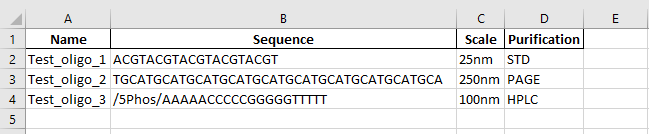
A runnable version of this is in examples/basic_order.py.
Ordering from the generated file
-
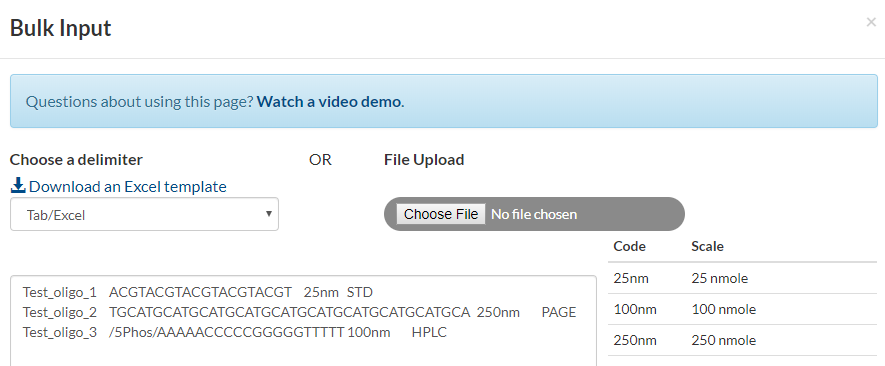
Upload the Excel file to IDT's Bulk Input page: https://www.idtdna.com/site/order/oligoentry
-
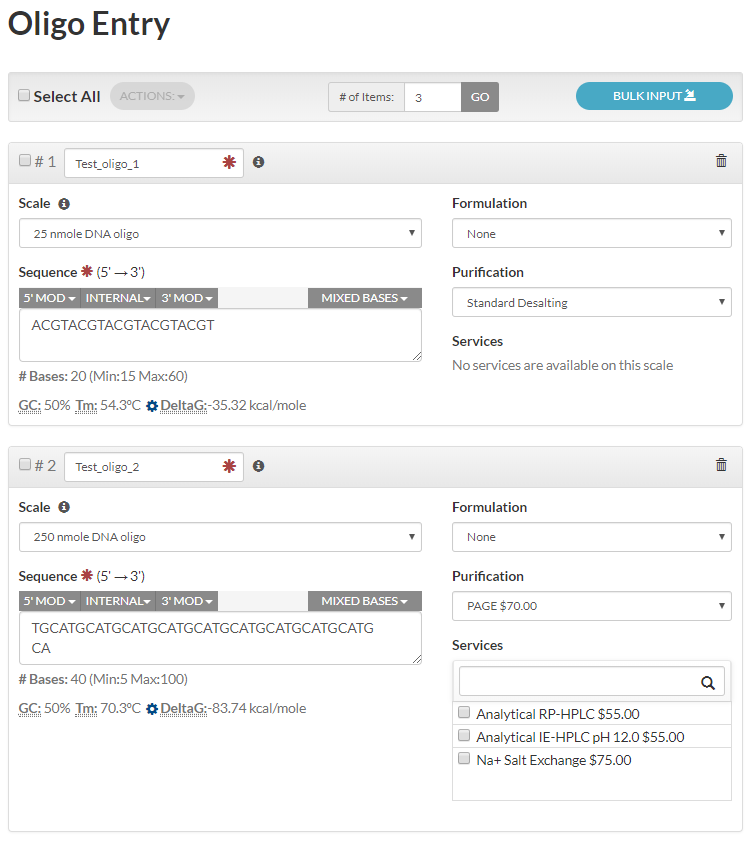
Click "Update" to generate the oligos.
-
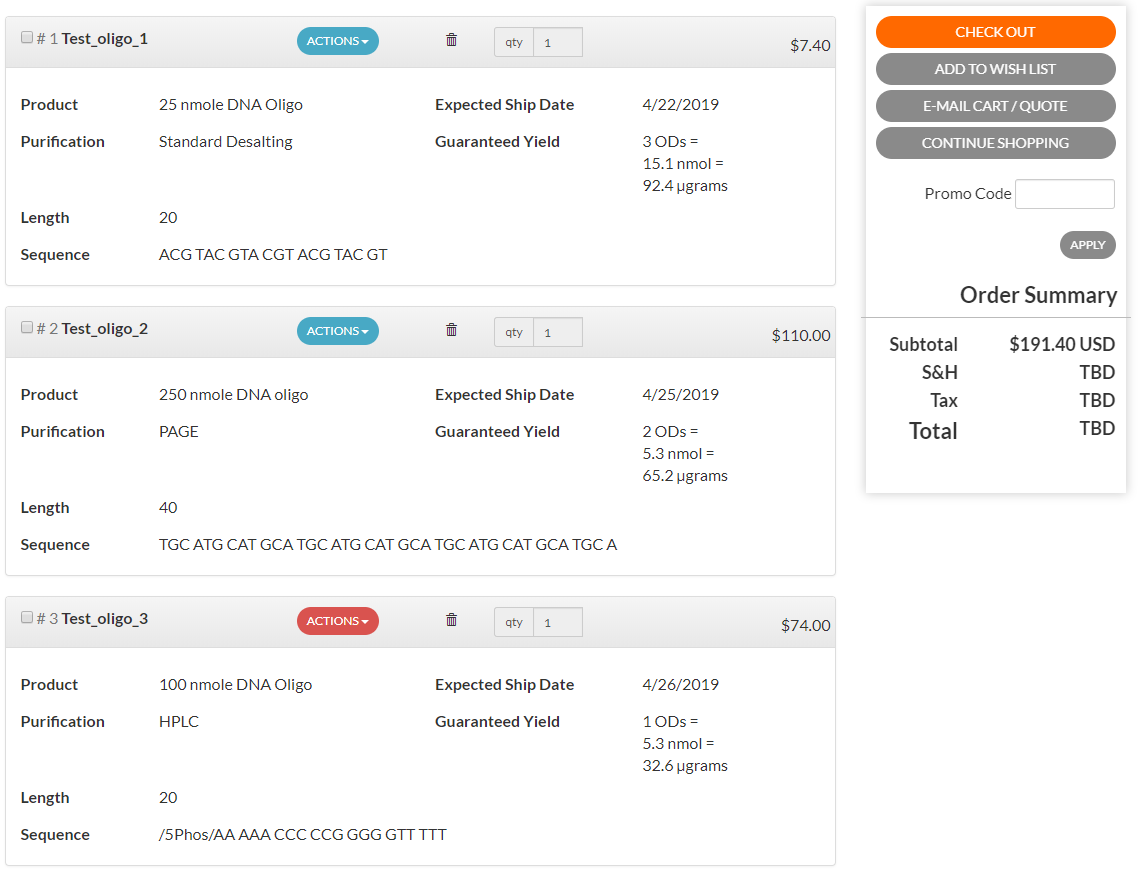
Add the oligos to your cart and check out.
Documentation
Full documentation, including the API reference, is at https://conorcamplisson.github.io/py_idt/.
License
MIT. See LICENSE.
1 maintainer

Metadata
1 maintainer
Release files for py-idt-order 0.1.2
For a detailed explanation of source distributions (sdists) and built distributions (wheels), please see the package formats documentation.
Source distribution (sdist)
| File | Size | Uploaded | |
|---|---|---|---|
| py_idt_order-0.1.2.tar.gz | 151.1 kB | Details |
Built distribution (wheel)
| File | Interpreter | ABI | Platform | Reset |
|---|---|---|---|---|
| py_idt_order-0.1.2-py3-none-any.whl | Python 3 | none | any | Details |
Total release size: 158.7 kB
Release files / py_idt_order-0.1.2.tar.gz
| Download URL | py_idt_order-0.1.2.tar.gz |
|---|---|
| Size | 151.1 kB |
| Tags | Source |
|
SHA-256 checksum How to use checksums |
61d6ac8d5b88ba922b97039b6e01a896b7c30fd991e4c79aeae3ab6e7c522cd6
|
|
BLAKE2b-256 checksum How to use checksums |
51df4386cb74cc7e61a60a31210ff6ab1a30ace34638246aac7f5e409bc605d8
|
| Upload date | |
|
Uploaded using Trusted Publishing? What is trusted publishing? |
No |
| Uploaded via |
uv/0.12.15 {"installer":{"name":"uv","version":"0.12.15","subcommand":["publish"]},"python":null,"implementation":{"name":null,"version":null},"distro":{"name":"Ubuntu","version":"24.04","id":"noble","libc":null},"system":{"name":null,"release":null},"cpu":null,"openssl_version":null,"setuptools_version":null,"rustc_version":null,"ci":true}
|
Release files / py_idt_order-0.1.2-py3-none-any.whl
| Download URL | py_idt_order-0.1.2-py3-none-any.whl |
|---|---|
| Size | 7.6 kB |
| Tags | Python 3 |
|
SHA-256 checksum How to use checksums |
575a5215f05e254b4ca419c8094ea72cded9b56b51662dfdc1c5a5e676d5a203
|
|
BLAKE2b-256 checksum How to use checksums |
82de4a38cd9cbbccfe46bb487e8a0a20b129689cfbc4e3b3c7c5c482d0fab1a0
|
| Upload date | |
|
Uploaded using Trusted Publishing? What is trusted publishing? |
No |
| Uploaded via |
uv/0.12.15 {"installer":{"name":"uv","version":"0.12.15","subcommand":["publish"]},"python":null,"implementation":{"name":null,"version":null},"distro":{"name":"Ubuntu","version":"24.04","id":"noble","libc":null},"system":{"name":null,"release":null},"cpu":null,"openssl_version":null,"setuptools_version":null,"rustc_version":null,"ci":true}
|













