
PyListener
PyListener is tool for near real-time voice processing and speech to text conversion, it can be pretty fast to slightly sluggish depending on the compute and memory availability of the environment, I suggest using it in situations where a delay of ~1 second is reasonable, e.g. AI assistants, voice command processing etc.
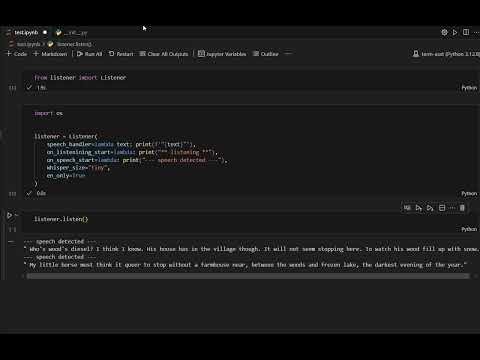
Installation
Use the package manager pip to install foobar.
pip install py-listener
Basic Usage
from listener import Listener

# prints what the speaker is saying, look at all
# parameters of the constructor to find out more features
try:
    listener = Listener(speech_handler=print)
except:
    listener.close()
    raise

# start listening
listener.listen(block=True)

# stops listening
# listener.close()

# starts listening again
# listener.listen()
Documentation
There is only one class in the package, the Listener.
It starts collecting audio data after instantation into n second chunks, n is a number passed as an argument, it checks if the audio chunk contains any human voice in it and if there is human voice, it collects that chunk for later processing (conversion to text or any other user-defined processing) and discards the chunk otherwise.
Constructor parameters
-
speech_handler: a function that is called with the text segments extracted from the human voice in the recorded audio as the only argument,speech_handler(speech: List[str]). -
on_listening_start: a parameterless function that is called right after the Listener object starts collecting audio. -
time_window: an integer that specifies the chunk size of the collected audio in seconds,2is the default. -
no_channels: the number of audio channels to be used for recording,1is the default. -
has_voice: a function that is called on the recorded audio chunks to determine if they have human voice in them, it gets the audio chunk in anumpy.ndarrayobject as the only argument, Silero is used by default to do this,has_voice(chunk: numpy.ndarrray). -
voice_handler: a function that is used to process an utterance, a continuous segment of speech, it gets a list of audio chunks as the only argument,voice_handler(List[numpy.ndarray]). -
min_speech_ms: the minimum number of miliseconds of voice activity that counts as speech, default is0, that means all human voice activity is considered valid speech, no matter how brief. -
speech_prob_thresh: the minimum probability of voice activity that is actually considered human voice, must be0-1, default is0.5. -
whisper_size: a size for the underlying whisper model, options:tiny,tiny.en,base,base.en,small,small.en,medium,medium.en,large,turbo. f -
whisper_kwargs: keyword arguments for the underlyingfaster_whisper.WhisperModelinstance see faster_whisper for all available arguments. -
compute_type: compute type for the whisper model, options:int8,int8_float32,int8_float16s,int8_bfloat16,int16,float16,bfloat16,float32, check OpenNMT docs for an updated list of options. -
en_only: a boolean flag indicating if the the voice detection and speech-to-text models should use half precision arithmetic to save memory and reduce latency, the default isTrueif CUDA is available, it has no effect on CPUs at the time of this writing so it's set toFalseby default on CPU environments. -
device: this the device where the speech detection and speech to text conversion models run, the default iscuda if available, else cpu. -
show_download: controls whether progress bars are shown while downloading the whisper models, default isTrue.
Methods
-
listen: starts recording audio and -
- if a
voice_handlerfunction is passed, calls the function with the accumulated human voice,voice_handler(list[numpy.ndarray]).
- if a
-
- else, it keeps recording human voice in
time_windowsecond chunks until atime_windowsecond long silence is detected, at which point it converts the accumulated voice to text, and calls the givenspeech_handlerfunction and passes this transcription to it as the only argument, the transcription is a list of text segments,speech_handler(List[str]).
- else, it keeps recording human voice in
-
pause: pauses listening without clearing up held resources. -
resume: resumes listening if it was paused. -
close: stops recording audio and frees the resource held by the listener. -
- NOTE: it is imperative to call the
closemethod when the listener is no longer required, because on CPU-only systems, the audio is sent to the model running in the child process in shared memory objects and if theclosemethod is not called, thos objects may not get cleared and result in memory leaks, it also terminates the child process.
- NOTE: it is imperative to call the
Tasks
- use shared memory to pass audio to child process on POSIX
-
- issue: resource tracker keeps tracking shared memory object even if instructed not to do so since shared memory is cleared by library's code
- in
core.py -> choose_whisper_model()method, allow larger models ascompute_typegets smaller, the logic is too rigid at the moment.
Contributing
Pull requests are welcome. For major changes, please open an issue first to discuss what you would like to change.
License
1 maintainer

Metadata
1 maintainer
Release files for py-listener 1.1.0
For a detailed explanation of source distributions (sdists) and built distributions (wheels), please see the package formats documentation.
Source distribution (sdist)
| File | Size | Uploaded | |
|---|---|---|---|
| py_listener-1.1.0.tar.gz | 1.1 MB | Details |
Built distribution (wheel)
| File | Interpreter | ABI | Platform | Reset |
|---|---|---|---|---|
| py_listener-1.1.0-py3-none-any.whl | Python 3 | none | any | Details |
Total release size: 2.2 MB
Release files / py_listener-1.1.0.tar.gz
| Download URL | py_listener-1.1.0.tar.gz |
|---|---|
| Size | 1.1 MB |
| Tags | Source |
|
SHA-256 checksum How to use checksums |
d8cf9af09d4f9fda992f20922083679f0d2a8516227cf01af365ae12c9cf6ec6
|
|
BLAKE2b-256 checksum How to use checksums |
8b5df1d48945a16601fd021482d321245643ce7b8d619f4b8ab6557cebe5b15d
|
| Upload date | |
|
Uploaded using Trusted Publishing? What is trusted publishing? |
No |
| Uploaded via |
twine/6.1.0 CPython/3.13.5
|
Release files / py_listener-1.1.0-py3-none-any.whl
| Download URL | py_listener-1.1.0-py3-none-any.whl |
|---|---|
| Size | 1.1 MB |
| Tags | Python 3 |
|
SHA-256 checksum How to use checksums |
a332e892d119ab2b77612650ad7c779ab79b5f3cd9feca567d4a1631d9439e40
|
|
BLAKE2b-256 checksum How to use checksums |
ca65f3af716fe97960606f1c474de0d477ae6d2235eb21144abd773a616f5736
|
| Upload date | |
|
Uploaded using Trusted Publishing? What is trusted publishing? |
No |
| Uploaded via |
twine/6.1.0 CPython/3.13.5
|














