
Python Messenger




This is a python single-chat application separated on client-side and server-side. General-purpose of the project is to message between hosts in the local network. Additionally, you can download a desktop application in two versions.
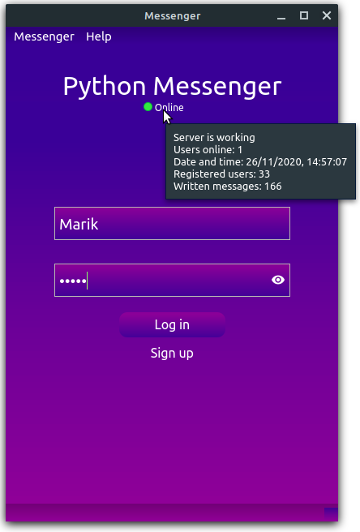
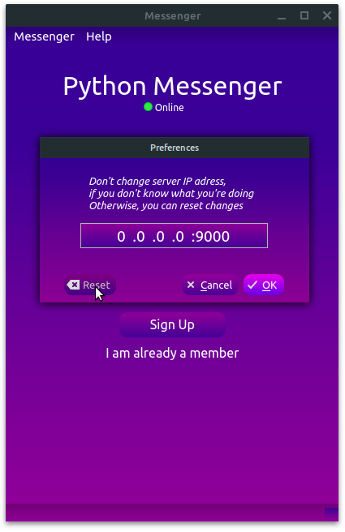
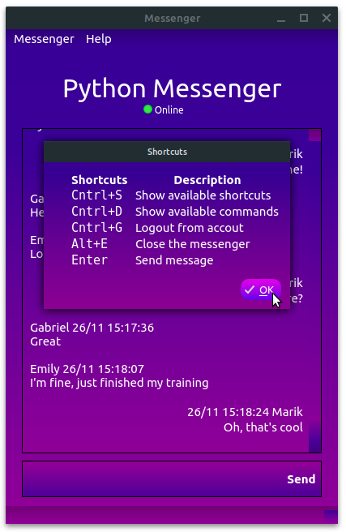
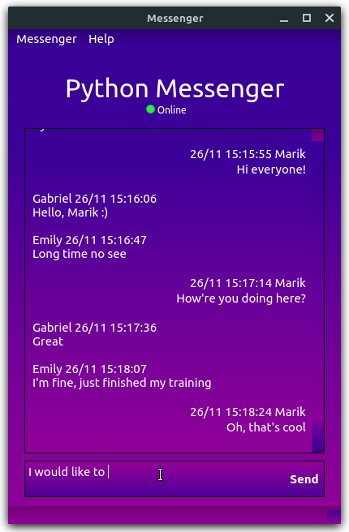
Table of content
Installation
Clone the project from GitHub, then you'll need Git installed on your computer:
# Clone this repository
$ git clone https://github.com/marik348/python-messegner
Usage
The next steps explain how to use the messenger in your local network.
To run this application, you'll need Python 3.6+ installed on your computer. In your working environment from the command line:
# Go into the repository
$ cd python-messenger

# Install dependencies
$ pip3 install -r requirements.txt
Once you've installed all the dependencies, run the server on your local network in the first command prompt with arguments [username] [password] to create an administrator account:
# Navigate to server-side
$ cd ./messenger/server

# Run server and create [username] with administrator role
$ python server.py [username] [password]
From that moment, your computer will work as a server (receive requests)
in the local network.
You can stop the server with Ctrl+C combination pressed twice in the terminal.
Next time it's not necessary to run the server with arguments to create an
admin account unless you've deleted the database.sqlite3 file.
After running the server, everyone from your network can run a messenger. Go to the root directory of the project and run the messenger client in the second command line prompt:
# Navigate to client-side
$ cd ./messenger/client

# Run client
$ python messenger.py
To connect to the server, everyone from your local network should change the IP address in Preferences to the local IP address with 9000 port (the local IP of the computer which runs the server).
Register an account or log in to the administrator account. Finally, you can use the messenger to communicate in the local network.
P.S. Originally project was developed on Debian family distribution, that's why it causes some UI problems on Windows.
Download
There are two executable desktop versions with the ability to chat in the:
- local network
- global network
Get them for Windows and Linux from here.
The main difference between versions is that the second one has the deployed server IP address by default without the ability to change the IP address in Preferences.
Features
- Shortcuts
- Gradient Design
- Lots of commands
- Ability to change a server IP address
- Ability to check server status in the login form
- Ability to promote/demote users (for admins)
- Ability to ban users (for moderators and above)
- Cross-platform
- Windows and Linux ready
There are 3 roles in messenger:
- User: Has standard commands
- Moderator: The above + permissions to ban/unban users
- Administrator: All the above + the ability to change the role of the user
Available user commands:
| COMMAND | VARIABLES | DESCRIPTION |
|---|---|---|
| /close | Closes the messenger | |
| /logout | Logs out from the account | |
| /reload | Clears commands messages | |
| /help | [command] | Prints available commands or detailed description about [command] if specified |
| /myself | Prints info about user | |
| /status | Prints server status | |
| /online | [users] | Prints online users or [users] status if specified |
| /reg | Prints registered users |
Available moderator commands:
| COMMAND | VARIABLES | DESCRIPTION |
|---|---|---|
| /ban | [users] | Bans [users] |
| /unban | [users] | Unbans [users] |
Available administrator commands:
| COMMAND | VARIABLES | DESCRIPTION |
|---|---|---|
| /role | [user] [1-3] | Changes [user] role |
License
You can check out the full license here.
This project is licensed under the terms of the MIT license.
Gmail vadimich348@gmail.com · GitHub @marik348 · LinkedIn @mariiechko
1 maintainer

Download files
Download the file for your platform. If you're not sure which to choose, learn more about installing packages.
Source Distribution
Built Distribution
Filter files by name, interpreter, ABI, and platform.
If you're not sure about the file name format, learn more about wheel file names.
Copy a direct link to the current filters
File details
Details for the file py-messenger-1.2.1.tar.gz.
File metadata
- Download URL: py-messenger-1.2.1.tar.gz
- Upload date:
- Size: 365.9 kB
- Tags: Source
- Uploaded using Trusted Publishing? No
- Uploaded via:
twine/3.2.0 pkginfo/1.6.1 requests/2.23.0 setuptools/50.3.2 requests-toolbelt/0.9.1 tqdm/4.54.0 CPython/3.8.0
File hashes
| Algorithm | Hash digest | |
|---|---|---|
| SHA256 |
052879a14b1b4d8a7ea6811c5c3bc89d8b7f44b68d416cfa7c467ee5e79bf260
|
|
| MD5 |
0e4978dd57af0f614e274176cde36eb3
|
|
| BLAKE2b-256 |
544a8152f958f1d64495c27a113c807283418461ff65825adb25d4c239c40eed
|
File details
Details for the file py_messenger-1.2.1-py3-none-any.whl.
File metadata
- Download URL: py_messenger-1.2.1-py3-none-any.whl
- Upload date:
- Size: 372.4 kB
- Tags: Python 3
- Uploaded using Trusted Publishing? No
- Uploaded via:
twine/3.2.0 pkginfo/1.6.1 requests/2.23.0 setuptools/50.3.2 requests-toolbelt/0.9.1 tqdm/4.54.0 CPython/3.8.0
File hashes
| Algorithm | Hash digest | |
|---|---|---|
| SHA256 |
009c6e6bb2ef0ccb8cb95e0bab4bcdaf4d049e9d042a2d9333b407ccb625242a
|
|
| MD5 |
8733160b750721ab7ba0dc84c0783f42
|
|
| BLAKE2b-256 |
0179cf05d926aa89acbf88014f3f8a56b0c99ea6f99117d77b05680df7453378
|







