
Version: v0.0.8
py-nest-thermostat
Python CLI Nest Controller and Reporting Tool.
Build it with me on Twitch: https://www.twitch.tv/datafrittata
Disclaimer: This project is very much work in progress while in version 0 anything can change, anything can break and some parts of the code are probably very ugly. Feel free to test it, contribute (see CONTRIBUTING.md), report bugs
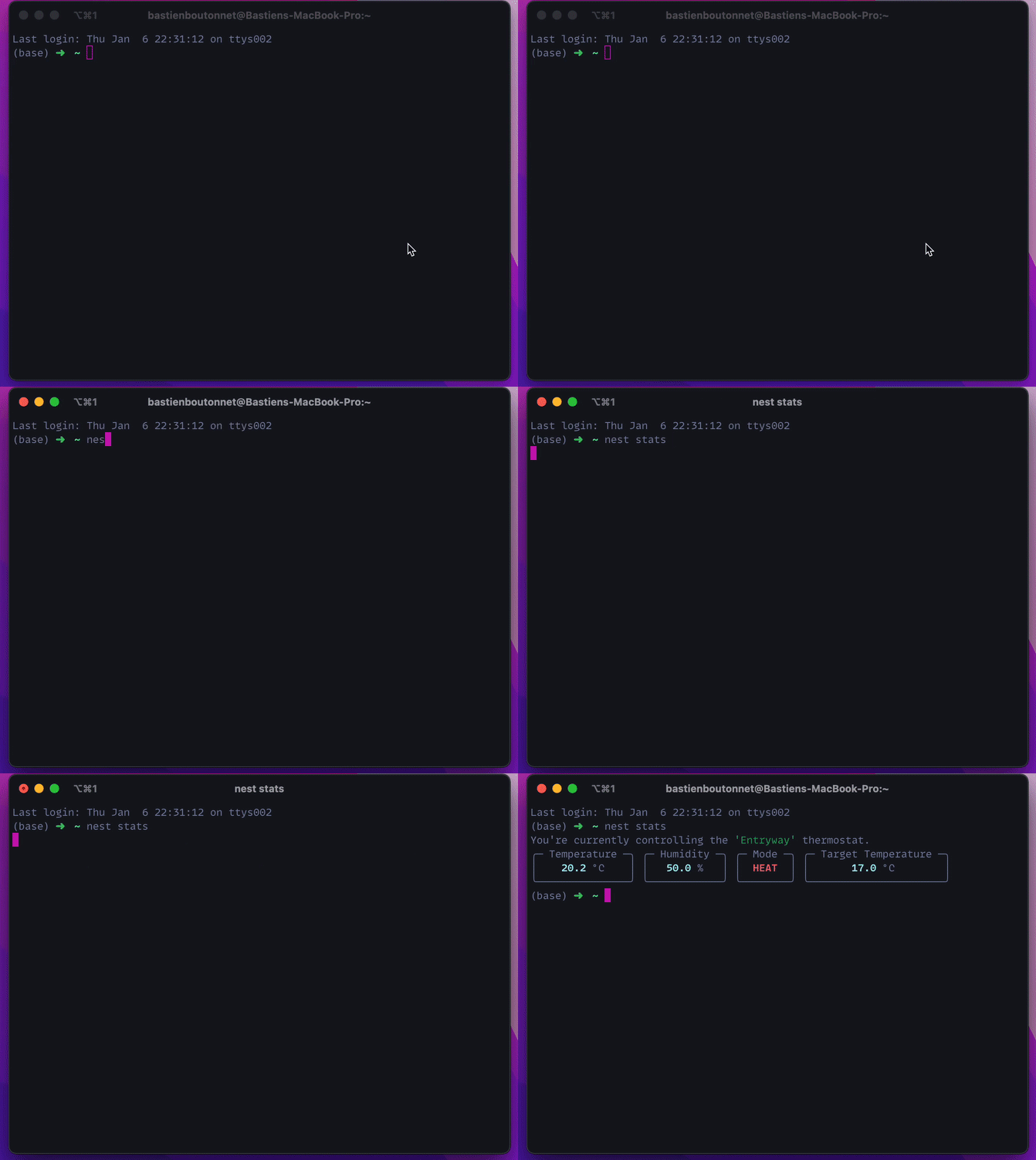
Get device stats:
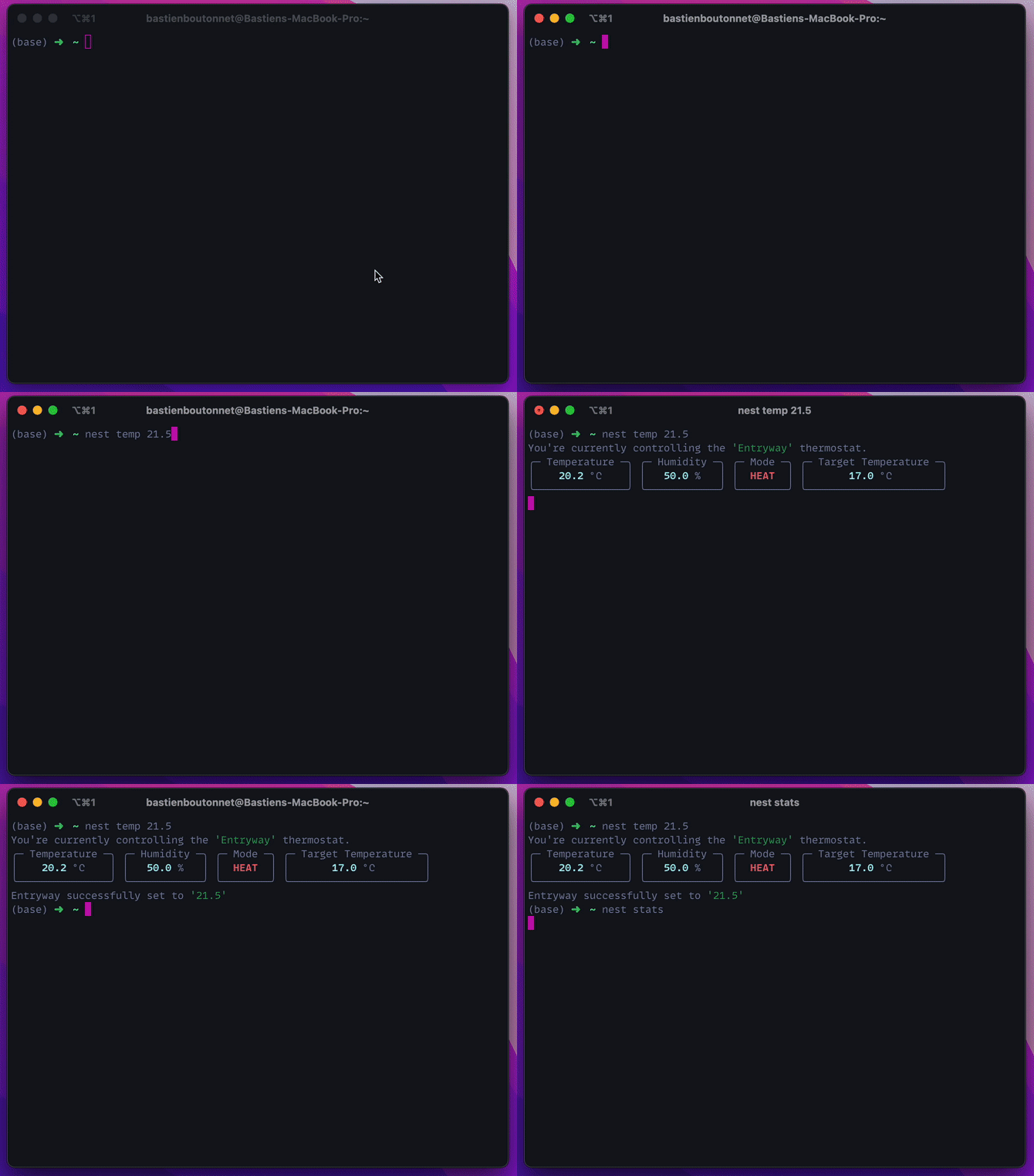
Set Device Temperature:
Features:
- print device stats
- set target temperature
Future Features:
- capture device statistics into a database
- plot device statistics over time
- some ML?
Installation
The tool is intallable from PyPI via pip or pipx. But you must first set up access via Google's Developer console (which currently costs a one time $5 fee and is a bit of a pain).
Set Up Google and Authorization
This part of the process is a real pain, especially if you've never set up Authorization via Google. Luckily Wouter Nieuwerth made a really nice guide with pictures that I encourage you to check out
Google Documentation Links
Google has some pretty extensive documentation:
Once setup, you will be able to access your nest devicesc, and manage your authorizations in the following places:
If you have issues, and neither the step by step guide from Wouter nor the links above help you feel free to open an issue and if I have time I'll try and help out.
Install py-nest-thermostat
If you want to be able to access the tool from anywhere I recomment setting it up via pipx. Pipx will give you access to py-nest globally while keeping it in an isolated python virtual environment. The best of both worlds really!
You can install with pipx like so:
pipx install py-nest-thermostat
Create your credentials file
nest expects your credentials and other handy authentication parameters to be in an file named config.yaml and it should be placed at this location ~/.py-nest-thermostat/. We might implement the possibility to pass a custom location later. If you're too impatient feel free to help out! :)
You can find an example of this file here
If you prefer to use regular pip, follow those steps:
- create a python3 virtual environment (with
venvorvirtualenv--up to you) - activate the virtual environment (
source /path/to/virtual/environment) pip install py-nest-thermostat
Usage
Until I write some more extensive docs, once you have installed the tool use use the CLI --help command
nest --help
1 maintainer

Metadata
1 maintainer
Release files for py-nest-thermostat 0.0.8
For a detailed explanation of source distributions (sdists) and built distributions (wheels), please see the package formats documentation.
Source distribution (sdist)
| File | Size | Uploaded | |
|---|---|---|---|
| py-nest-thermostat-0.0.8.tar.gz | 13.0 kB | Details |
Built distribution (wheel)
| File | Interpreter | ABI | Platform | Reset |
|---|---|---|---|---|
| py_nest_thermostat-0.0.8-py3-none-any.whl | Python 3 | none | any | Details |
Total release size: 27.4 kB
Release files / py-nest-thermostat-0.0.8.tar.gz
| Download URL | py-nest-thermostat-0.0.8.tar.gz |
|---|---|
| Size | 13.0 kB |
| Tags | Source |
|
SHA-256 checksum How to use checksums |
f796e0fc9ad1beb23a4a979c76d658946db6844af250968fd678394ed33c4fca
|
|
BLAKE2b-256 checksum How to use checksums |
fa51c42fdb4c79b49e70ed1540985e2ef41fd52cea10904752b91ccc8c94b306
|
| Upload date | |
|
Uploaded using Trusted Publishing? What is trusted publishing? |
No |
| Uploaded via |
poetry/1.1.12 CPython/3.9.2 Darwin/23.3.0
|
Release files / py_nest_thermostat-0.0.8-py3-none-any.whl
| Download URL | py_nest_thermostat-0.0.8-py3-none-any.whl |
|---|---|
| Size | 14.3 kB |
| Tags | Python 3 |
|
SHA-256 checksum How to use checksums |
1b6078d23c7030a28165151d0b1696e653b0ac66788fae351145634c5655ccf7
|
|
BLAKE2b-256 checksum How to use checksums |
259b5314b37298be96cd74447c071f384c2d57aaa767df8afca51cd32ce914db
|
| Upload date | |
|
Uploaded using Trusted Publishing? What is trusted publishing? |
No |
| Uploaded via |
poetry/1.1.12 CPython/3.9.2 Darwin/23.3.0
|














