
notes-cli
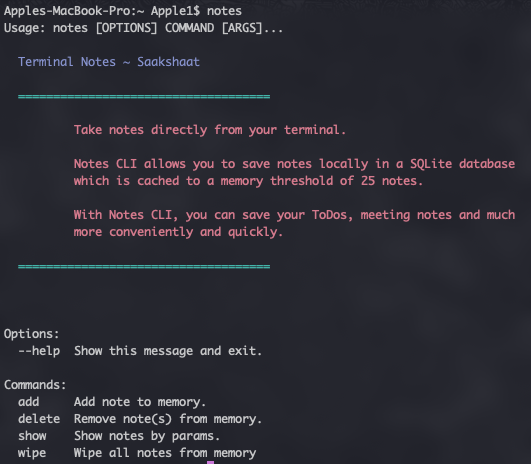
A Python based CLI for taking notes from your terminal.
This application was built using Click, which is a wonderful Python package for building interactive CLIs.
Installation
PIP
We're published to PyPI, which means you can install this package directly through Pip.
pip install py-notes
Local
You must first clone this repository with:
git clone https://github.com/Saakshaat/notes-cli
Then, after cding into its directory, install the executable on your system with:
pip install --editable .
If you don't want to have this installed globally, you can run it in a virtual environment. To create a virtual env, go to the repo's directory and on the top-level run
virtualenv venv. venv/bin/activatepip install --editable .
Running
After installing the CLI successfully, you can run it from whichever environment you installed it in with
notes <command>
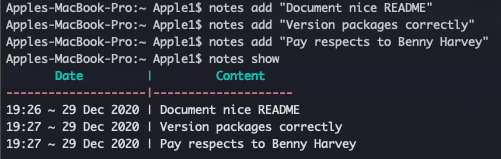
The application uses a SQLite database to save notes in memory and maintains a threshold of (currently) 25 notes.
When the total number of notes reaches the threshold, it deletes the oldest note in memory before adding the new note.
1 maintainer

Metadata
1 maintainer
Release files for py-notes 1.0.4
For a detailed explanation of source distributions (sdists) and built distributions (wheels), please see the package formats documentation.
Source distribution (sdist)
| File | Size | Uploaded | |
|---|---|---|---|
| py-notes-1.0.4.tar.gz | 5.8 kB | Details |
Built distribution (wheel)
| File | Interpreter | ABI | Platform | Reset |
|---|---|---|---|---|
| py_notes-1.0.4-py3-none-any.whl | Python 3 | none | any | Details |
Total release size: 12.0 kB
Release files / py-notes-1.0.4.tar.gz
| Download URL | py-notes-1.0.4.tar.gz |
|---|---|
| Size | 5.8 kB |
| Tags | Source |
|
SHA-256 checksum How to use checksums |
89eeac1b56208d4917a780e81bccaeaab74f882c4cf2decf7872a590885cee64
|
|
BLAKE2b-256 checksum How to use checksums |
68f2e47e0194435434b2cd65eef97a3e8bc3eb7899ba5992810424f60de0c2ad
|
| Upload date | |
|
Uploaded using Trusted Publishing? What is trusted publishing? |
No |
| Uploaded via |
poetry/1.1.4 CPython/3.8.6 Darwin/19.6.0
|
Release files / py_notes-1.0.4-py3-none-any.whl
| Download URL | py_notes-1.0.4-py3-none-any.whl |
|---|---|
| Size | 6.2 kB |
| Tags | Python 3 |
|
SHA-256 checksum How to use checksums |
80eb68e26cc025ca60908356416b48aee272e01c878b976ebf8ec4265f4d613e
|
|
BLAKE2b-256 checksum How to use checksums |
58ced9a2285286e4e68cda1f560d1dbbd1b2486641fe091124832e985039f726
|
| Upload date | |
|
Uploaded using Trusted Publishing? What is trusted publishing? |
No |
| Uploaded via |
poetry/1.1.4 CPython/3.8.6 Darwin/19.6.0
|














