
Polar Codes in Python
A library written in Python3 for Polar Codes, a capacity-achieving channel coding technique used in 5G. The library includes functions for construction, encoding, decoding, and simulation of polar codes. In addition, it supports puncturing and shortening.
It provides:
- a systematic and non-systemic encoder.
- non-recursive implementations of the successive cancellation decoder (SCD).
- mothercode construction of polar codes using Bhattacharyya Bounds or Gaussian Approximation
- support for puncturing and shortening.
- Bit-Reversal Shortening (BRS), Wang-Liu Shortening (WLS), and Bioglio-Gabry-Land (BGL) shortening constructions.
- an AWGN channel with BPSK modulation.
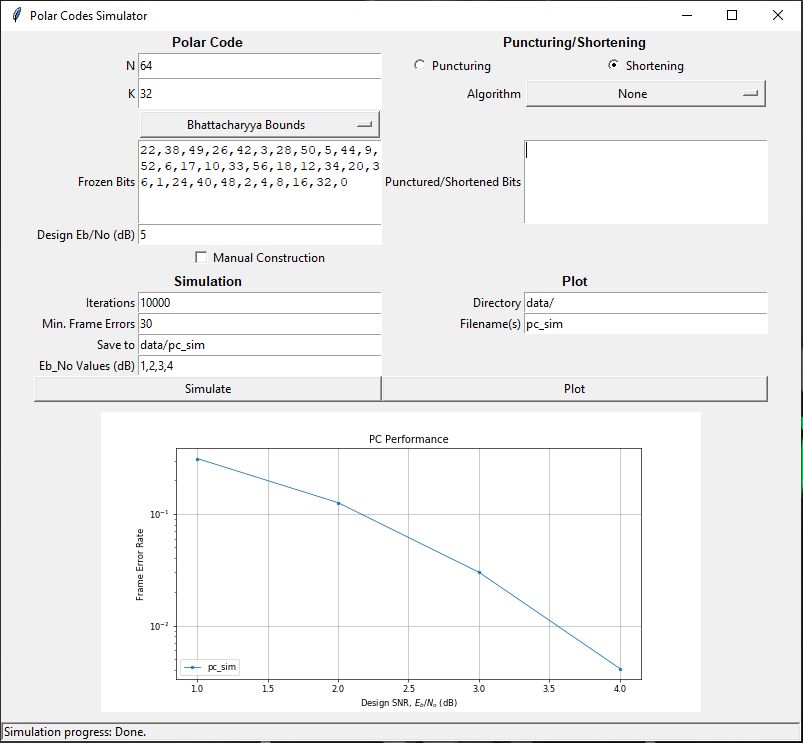
- an easy-to-use Graphical User Interface (GUI)
Documentation:
- Main reference (pdf)
- Quick reference (website)
- Introduction to polar codes, shortening, and the library: http://www.youtube.com/watch?v=v47rn77RAxM
Getting Started
- Install the package with
pip install py-polar-codesfrom https://pypi.org/project/py-polar-codes/. - Install matplotlib from https://matplotlib.org/users/installing.html.
- Install numpy from https://docs.scipy.org/doc/numpy/user/install.html.
- Run test.py using a Python3 compiler. If the program runs successfully, the library is ready to use. Make sure the compiler has writing access to directory "root/data", where simulation data will be saved by default.
- Call
GUI()to start the GUI.
Examples
Mothercode Encoding & Decoding
An example of encoding and decoding over an AWGN channel for a (256,100) non-systematic mothercode, using Bhattacharyya Bounds for construction and SCD for decoding.
For systematic encoding and decoding, replace Encode(myPC) with Encode(myPC, 'systematic_encode') and Decode(myPC) with Decode(myPC, 'systematic_scd').
   import numpy as np
   from polarcodes import *

    # initialise polar code
    myPC = PolarCode(256, 100)
    myPC.construction_type = 'bb'

    # mothercode construction
    design_SNR  = 5.0
    Construct(myPC, design_SNR)
    print(myPC, "\n\n")

    # set message
    my_message = np.random.randint(2, size=myPC.K)
    myPC.set_message(my_message)
    print("The message is:", my_message)

    # encode message
    Encode(myPC)
    print("The coded message is:", myPC.get_codeword())

    # transmit the codeword
    AWGN(myPC, design_SNR)
    print("The log-likelihoods are:", myPC.likelihoods)

    # decode the received codeword
    Decode(myPC)
    print("The decoded message is:", myPC.message_received)
Shortened Code Construction
An example of constructing a shortened polar code with Bit-Reversal Shortening (BRS) algorithm.
The shortening parameters are set by the tuple shorten_params, the third argument of PolarCode, and is defined by:
- Puncturing type:
shortenorpunct. - Puncturing algorithm:
brs,wls, orbgl. - Puncturing set (for manual puncturing):
ndarray<int> - Overcapable set (for manual puncturing):
ndarray<int> - Update reliabilities after puncturing (or use mothercode reliabilities):
TrueorFalse.
   import numpy as np
   from polarcodes import *

    # initialise shortened polar code
    shorten_params = ('shorten', 'brs', None, None, False)
    myPC = PolarCode(200, 100, shorten_params)

    # construction
    design_SNR  = 5.0
    Shorten(myPC, design_SNR)
    print(myPC, "\n\n")
Simulation & Plotting
A script to simulate a defined polar code, save the data to directory "/data", and then display the result in a matplotlib figure.
    # simulate polar code
    myPC.simulate(save_to='data/pc_sim', Eb_No_vec=np.arange(1,5), manual_const_flag=True)

    # plot the frame error rate
    myPC.plot(['pc_sim'], 'data/')
The simulation will save your PolarCode object in a JSON file, for example:
{
    "N": 64,
    "n": 6,
    "K": 32,
    "frozen": [
        22, 38, 49, 26, 42, 3, 28, 50, 5,44,9, 52, 6, 17, 10, 33, 56, 18, 12, 34, 20, 36, 1, 24, 40, 48, 2, 4, 8, 16, 32, 0
    ],
    "construction_type": "bb",
    "punct_flag": false,
    "punct_type": "",
    "punct_set": [],
    "source_set": [],
    "punct_algorithm": "",
    "update_frozen_flag": [],
    "BER": [
        0.09709375, 0.03740625, 0.00815625, 0.0010184612211221122
    ],
    "FER": [
        0.313, 0.126, 0.03,0.004125412541254125
    ],
    "SNR": [
        1, 2, 3, 4
    ]
}
Graphical User Interface
An example of using the GUI to simulate and plot a specified polar code. Note: if "manual construction" is ticked, the user is required to input the frozen bits and the shortened bits.
This is a final year project created by Brendon McBain under the supervision of Dr Harish Vangala at Monash University.
1 maintainer

Metadata
1 maintainer
Release files for py-polar-codes 1.2.2
For a detailed explanation of source distributions (sdists) and built distributions (wheels), please see the package formats documentation.
Source distribution (sdist)
| File | Size | Uploaded | |
|---|---|---|---|
| py-polar-codes-1.2.2.tar.gz | 18.2 kB | Details |
Release files / py-polar-codes-1.2.2.tar.gz
| Download URL | py-polar-codes-1.2.2.tar.gz |
|---|---|
| Size | 18.2 kB |
| Tags | Source |
|
SHA-256 checksum How to use checksums |
e132d7983d27a097c957d579a05c4850ee3120357f478491e9a3e8b786698b0e
|
|
BLAKE2b-256 checksum How to use checksums |
5f6ac4847108e0045b77c2748e30f0a867d2899786120027fcbf6de213d47f64
|
| Upload date | |
|
Uploaded using Trusted Publishing? What is trusted publishing? |
No |
| Uploaded via |
twine/3.2.0 pkginfo/1.5.0.1 requests/2.21.0 setuptools/50.3.0 requests-toolbelt/0.9.1 tqdm/4.49.0 CPython/3.6.1
|














