
PY Profiler
A library to measure method, function or your restful api execution time.
Install
- Run
pip install py-profilerorpip3 install py-profilerto install this library
Usage
It comes with a really easy api to use, you can add profiler(name = None) decorator to any method or function you want
to measure its execution time.
E.g:
from py_profiler import profiler, profiling_service


@profiler('hello')
def hello():
    print('hello')


class Foo:

    @profiler('Food.some_thing')
    def some_thing(self):
        print('some_thing')

    # By default, profiler name is f'{class_name}.{method_name}'
    @profiler()
    def method_2(self):
        print('method_2')
Access Profiler
There are 3 ways to access the profiler:
- View as a raw table in the console.

- View as a HTML page using a provided Flask blueprint.

- Integrate with your own RESTFul framework.
- Exec time is in milliseconds
- View as a table
from py_profiler import profiling_service

print(profiling_service.as_table())
| No | Name | Total Req | Pending Req | Total Exec Time | Last Exec Time | Highest Exec Time | Request Rate (req/sec) | Avg Time/Request (millis/req) |
|---|---|---|---|---|---|---|---|---|
| 1 | Foo.method_2 | 1 | 0 | 0.014 | 0.014 | 0.014 | 71428.571 | 0.014 |
| 2 | Food.some_thing | 1 | 0 | 0.011 | 0.011 | 0.011 | 90909.091 | 0.011 |
| 3 | hello | 1 | 0 | 0.031 | 0.031 | 0.031 | 32258.065 | 0.031 |
- Integrate with FastAPI
- If you are using FastAPI to implement your Restful API. You can add
profiler_routerto your FastAPI app.
E.g:
from fastapi import FastAPI
from py_profiler.fastapi_profiler_controller import profiler_router

app = FastAPI()
app.include_router(profiler_router)
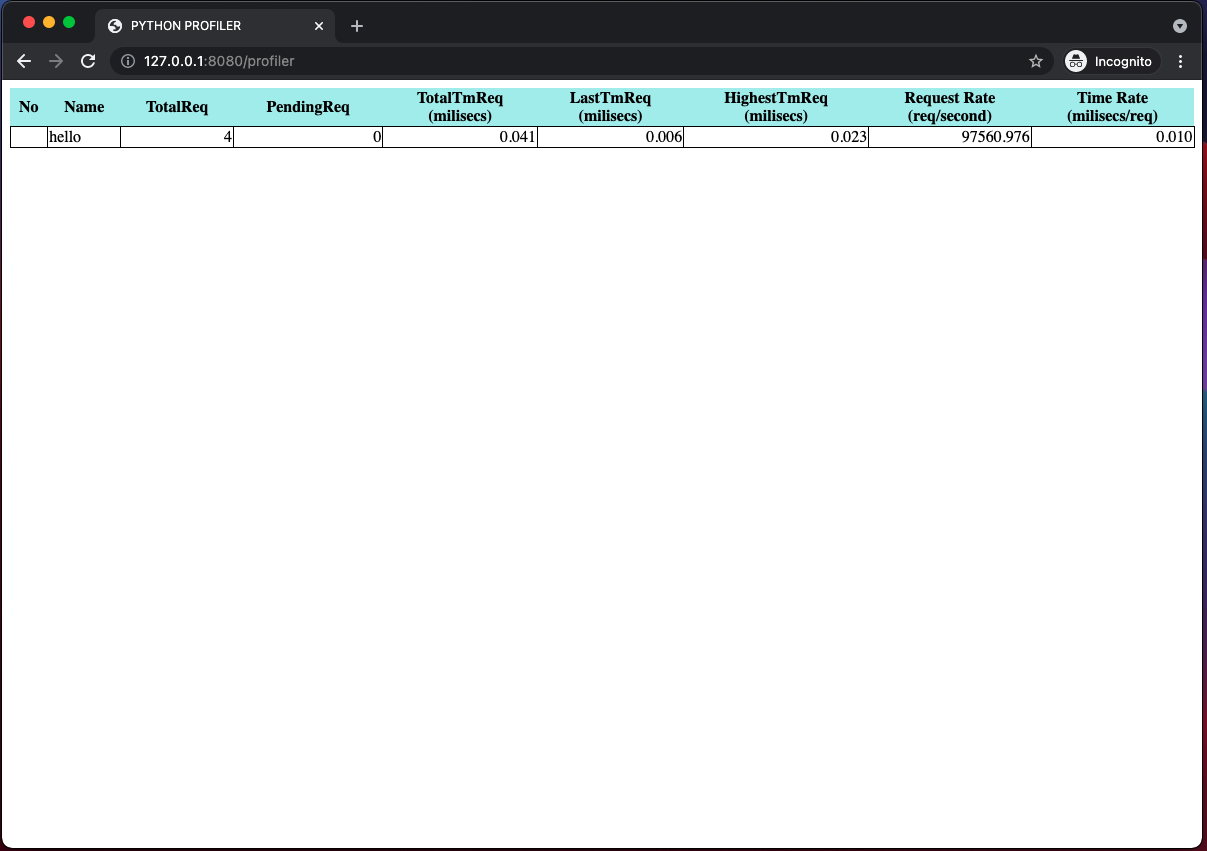
Then you can access the profiler page at: http://127.0.0.1:8080/profiler
- Integrate with Flask
- If you are using Flask to implement your Restful API. You can add
profiler_blueprintto your Flash app.
E.g:
from flask import Flask
from waitress import serve
from py_profiler.profiler_controller import profiler_blueprint

app = Flask(__name__)
app.register_blueprint(profiler_blueprint)

serve(
    app,
    host="0.0.0.0",
    port=8080
)
Then you can access the profiler page at: http://127.0.0.1:8080/profiler
- Integrate with 3rd restful library.
You can build your custom profiler viewer by using as_html()
from py_profiler import profiling_service

html_page = profiling_service.as_html()
Then, you can implement a html page and return this html_page to your client to see profiler viewer.
1 maintainer

Metadata
1 maintainer
Release files for py-profiler 0.3.1
For a detailed explanation of source distributions (sdists) and built distributions (wheels), please see the package formats documentation.
Source distribution (sdist)
| File | Size | Uploaded | |
|---|---|---|---|
| py_profiler-0.3.1.tar.gz | 8.0 kB | Details |
Built distribution (wheel)
| File | Interpreter | ABI | Platform | Reset |
|---|---|---|---|---|
| py_profiler-0.3.1-py3-none-any.whl | Python 3 | none | any | Details |
Total release size: 16.3 kB
Release files / py_profiler-0.3.1.tar.gz
| Download URL | py_profiler-0.3.1.tar.gz |
|---|---|
| Size | 8.0 kB |
| Tags | Source |
|
SHA-256 checksum How to use checksums |
cc3b7a3f8c04c17f9776a03878a9ed47d243f84102c7dfa54016c8a69b86c427
|
|
BLAKE2b-256 checksum How to use checksums |
05b9f492f752229834ea6b07fb0d9310a58d7e131dff02a2bd3dcfe21c162ff1
|
| Upload date | |
|
Uploaded using Trusted Publishing? What is trusted publishing? |
No |
| Uploaded via |
twine/4.0.2 CPython/3.8.9
|
Release files / py_profiler-0.3.1-py3-none-any.whl
| Download URL | py_profiler-0.3.1-py3-none-any.whl |
|---|---|
| Size | 8.2 kB |
| Tags | Python 3 |
|
SHA-256 checksum How to use checksums |
62a3101fa45f2d7b37abfc706e3820c0137a36e6474139126631964ef3ea2cdb
|
|
BLAKE2b-256 checksum How to use checksums |
e3ced9dcea5e948c4281fb142d3eb0e09da8b4a82d017f6a0ccafca184e85a1f
|
| Upload date | |
|
Uploaded using Trusted Publishing? What is trusted publishing? |
No |
| Uploaded via |
twine/4.0.2 CPython/3.8.9
|














