
Rattler: Rust crates for fast handling of conda packages






Rattler is a library that provides common functionality used within the conda ecosystem (what is conda & conda-forge?). The goal of the library is to enable programs and other libraries to easily interact with the conda ecosystem without being dependent on Python. Its primary use case is as a library that you can use to provide conda related workflows in your own tools.
Rattler is written in Rust and tries to provide a clean API to its functionalities (see: Components). With the primary goal in mind we aim to provide bindings to different languages to make it easy to integrate Rattler in non-rust projects.
Rattler is actively used by pixi, rattler-build, and the https://prefix.dev backend.
Showcase
This repository also contains a binary that shows some of the capabilities of the library.
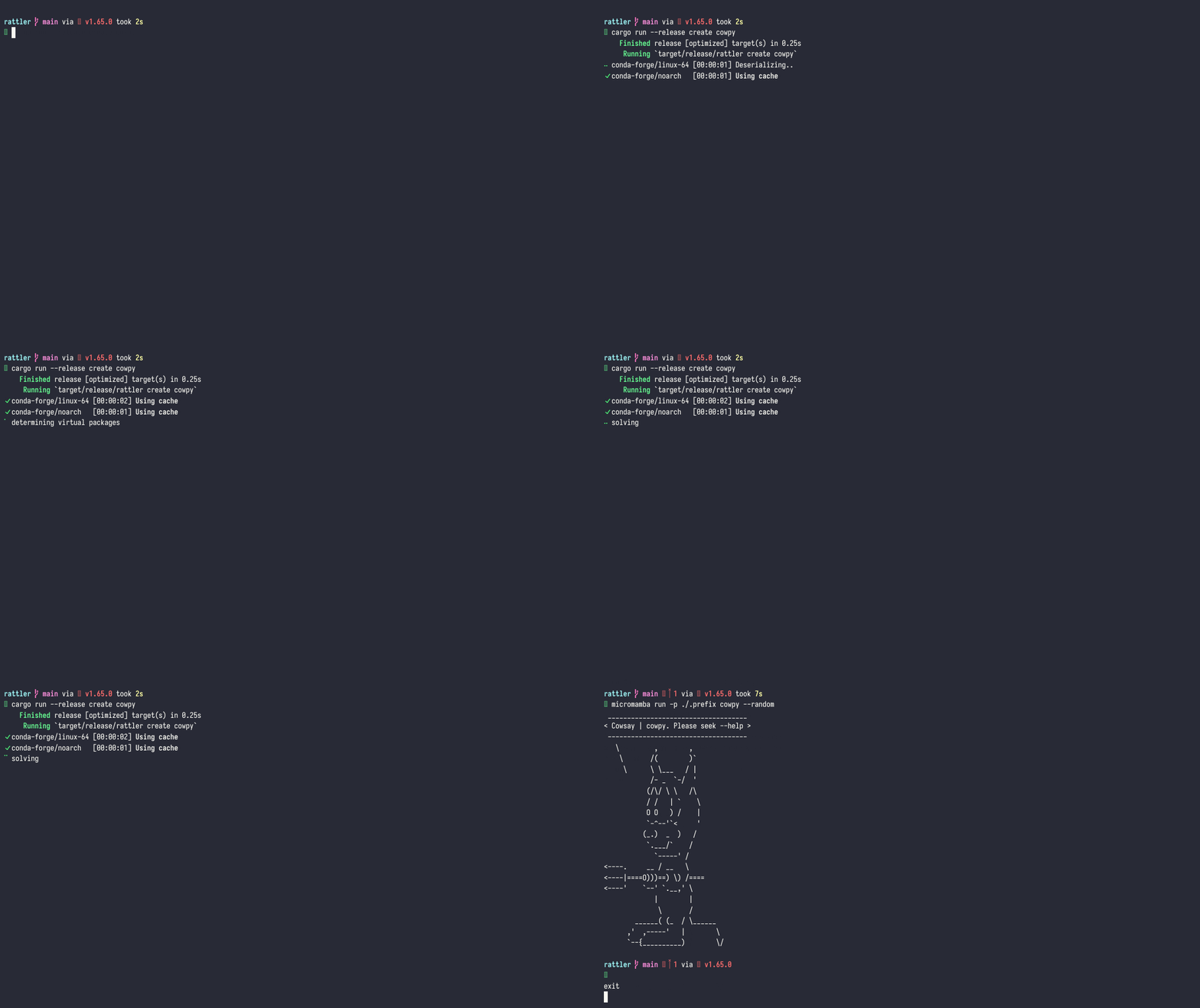
This is an example of installing an environment containing cowpy and all its dependencies from scratch (including Python!):
Development: getting started
To get started developing with Rattler, let's install an environment with cowpy and its dependencies.
Clone the Rattler repository, and in your terminal, navigate to the root folder of the repository, and execute the following commands (in order):
git submodule update --init
cargo run --bin rattler --release create cowpy
cargo run --bin rattler --release run -p .prefix/ cowpy --random
Python and Javascript bindings
You can invoke rattler from Python or Javascript via our powerful bindings to solve, install and run commands in conda environments. Rattler offers you the fastest and cleanest Python bindings to the conda ecosystem.
Python
To install the Python bindings, you can use pip or conda:
pip install py-rattler
# or
conda install -c conda-forge py-rattler
You can find the extensive documentation for the Python bindings here.
Example usage of rattler from Python
The Python bindings to rattler are designed to be used with `asyncio`. You can access the raw power of the rattler library to solve environments, install packages, and run commands in the installed environments.import asyncio
import tempfile
from rattler import solve, install, VirtualPackage
async def main() -> None:
# Start by solving the environment.
#
# Solving is the process of going from specifications of package and their
# version requirements to a list of concrete packages.
print("started solving the environment")
solved_records = await solve(
# Channels to use for solving
channels=["conda-forge"],
# The specs to solve for
specs=["python ~=3.12.0", "pip", "requests 2.31.0"],
# Virtual packages define the specifications of the environment
virtual_packages=VirtualPackage.detect(),
)
print("solved required dependencies")
# Install the packages into a new environment (or updates it if it already
# existed).
env_path = tempfile.mkdtemp()
await install(
records=solved_records,
target_prefix=env_path,
)
print(f"created environment: {env_path}")
if __name__ == "__main__":
asyncio.run(main())
Javascript
To use the Javascript bindings, you can install the @conda-org/rattler package via npm. rattler is compiled to WebAssembly and can be used in the browser or in Node.js.
npm install @conda-org/rattler
Using rattler from Javascript is useful to get access to the same version comparison functions as used throughout the conda ecosystem. It is also used as part of mambajs which uses the rattler library to solve and install packages from the emscripten-forge channel in the browser.
Give it a try!
Before you begin, make sure you have the following prerequisites:
Follow these steps to clone, compile, and run the rattler project:
# Clone the rattler repository along with its submodules:
git clone --recursive https://github.com/conda/rattler.git
cd rattler

# Compile and execute rattler to create a JupyterLab instance:
pixi run rattler create jupyterlab
The above command will execute the rattler executable in release mode.
It will download and install an environment into the .prefix folder that contains jupyterlab and all the dependencies required to run it (like python)
Run the following command to start jupyterlab:
# on windows
.\.prefix\Scripts\jupyter-lab.exe

# on linux or macOS
 ./.prefix/bin/jupyter-lab
Voila! You have a working installation of jupyterlab installed on your system! You can of course install any package you want this way. Try it!
Contributing 😍
We would love to have you contribute! See the CONTRIBUTION.md for more info. For questions, requests or a casual chat, we are very active on our discord server. You can join our discord server via this link.
Components
Rattler consists of several crates that provide different functionalities.
- rattler_conda_types: foundational types for all datastructures used within the conda eco-system.
- rattler_boot_id: identifies boot sessions for reboot-sensitive caches.
- rattler_environment_digest: computes stable environment fingerprints from package artifact traits.
- rattler_package_streaming: provides functionality to download, extract and create conda package archives.
- rattler_repodata_gateway: downloads, reads and processes information about existing conda packages from an index.
- rattler_shell: code to activate an existing environment and run programs in it.
- rattler_solve: a backend agnostic library to solve the package satisfiability problem.
- rattler_virtual_packages: a crate to detect system capabilities.
- rattler_virtual_package_detectors: discovers and runs trusted channel detector packages in isolated environments.
- rattler_index: create local conda channels from local packages. See the rattler_index README for channel options documentation.
- rattler_sigstore: discovers, fetches and verifies Sigstore attestations of conda packages.
- rattler: functionality to create complete environments from scratch using the crates above.
- rattler-lock: a library to create and parse lockfiles for conda environments.
- rattler-networking: common functionality for networking, like authentication, mirroring and more.
- rattler-bin: an example of a package manager using all the crates above (see: showcase)
You can find these crates in the crates folder.
Additionally, we provide Python bindings for most of the functionalities provided by the above crates.
A python package py-rattler is available on conda-forge and PyPI.
Documentation for the python bindings can be found here.
What is conda & conda-forge?
The conda ecosystem provides cross-platform, binary packages that you can use with any programming language.
conda is an open-source package management system and environment management system that can install and manage multiple versions of software packages and their dependencies.
conda is written in Python.
The aim of Rattler is to provide all functionality required to work with the conda ecosystem from Rust.
Rattler is not a reimplementation of conda.
conda is a package management tool.
Rattler is a library to work with the conda ecosystem from different languages and applications.
For example, it powers the backend of https://prefix.dev.
conda-forge is a community-driven effort to bring new and existing software into the conda ecosystem.
It provides tens-of-thousands of up-to-date packages that are maintained by a community of contributors.
For an overview of available packages see https://prefix.dev.
3 maintainers


Metadata
3 maintainers
Release files for py-rattler 0.28.0
For a detailed explanation of source distributions (sdists) and built distributions (wheels), please see the package formats documentation.
Source distribution (sdist)
| File | Size | Uploaded | Provenance | |
|---|---|---|---|---|
| py_rattler-0.28.0.tar.gz | 2.0 MB | With provenance | Details |
Built distributions (wheels)
Total release size: 469.0 MB
Release files / py_rattler-0.28.0.tar.gz
| Download URL | py_rattler-0.28.0.tar.gz |
|---|---|
| Size | 2.0 MB |
| Tags | Source |
|
SHA-256 checksum How to use checksums |
84aef2aca9df0f8e0b0c635b2ff32c8568ac41e612f6f192fde12b99e48397cd
|
|
BLAKE2b-256 checksum How to use checksums |
7d18f6ff162b2bba15db1a1475e86ef48cd3aa2b70638aaba2c0694d31885f27
|
| Upload date | |
|
Uploaded using Trusted Publishing? What is trusted publishing? |
Yes |
| Uploaded via |
twine/7.0.0 CPython/3.13.14
|
Provenance
Provenance describes where a file came from. On PyPI, provenance is shared via attestations, which provide a verifiable record of the build or publishing details. View details, limitations and caveats.


PyPI Publish Attestation
PyPI verified that this artifact, at this checksum, originated from the publisher listed below.
Signed by GitHub Actions, verified by PyPI on Oct 23, 2026.
Transparency logRelease files / py_rattler-0.28.0-cp310-abi3-win_arm64.whl
| Download URL | py_rattler-0.28.0-cp310-abi3-win_arm64.whl |
|---|---|
| Size | 19.7 MB |
| Tags | CPython 3.10 Windows ARM64 abi3 |
|
SHA-256 checksum How to use checksums |
81cef9b72c334c54442135badfedaf2db18622c37fe18d0261a52ee4a54c0fd4
|
|
BLAKE2b-256 checksum How to use checksums |
dfd584e43cd58cd4332710d6e39c51431ba74385965c6b2480f9058d662f1f92
|
| Upload date | |
|
Uploaded using Trusted Publishing? What is trusted publishing? |
Yes |
| Uploaded via |
twine/7.0.0 CPython/3.13.14
|
Provenance
Provenance describes where a file came from. On PyPI, provenance is shared via attestations, which provide a verifiable record of the build or publishing details. View details, limitations and caveats.
PyPI Publish Attestation
PyPI verified that this artifact, at this checksum, originated from the publisher listed below.
Signed by GitHub Actions, verified by PyPI on Oct 23, 2026.
Transparency logRelease files / py_rattler-0.28.0-cp310-abi3-win_amd64.whl
| Download URL | py_rattler-0.28.0-cp310-abi3-win_amd64.whl |
|---|---|
| Size | 20.9 MB |
| Tags | CPython 3.10 Windows x86-64 abi3 |
|
SHA-256 checksum How to use checksums |
6108ea83ba3d2a2637afa45cf655d0b3ae0a4ab1106dde84de2da8c08b1e16df
|
|
BLAKE2b-256 checksum How to use checksums |
cebe9edeae346ccaf3bc3f16fe4ece5f0dec81ad064edb733ccf1813ce0b436a
|
| Upload date | |
|
Uploaded using Trusted Publishing? What is trusted publishing? |
Yes |
| Uploaded via |
twine/7.0.0 CPython/3.13.14
|
Provenance
Provenance describes where a file came from. On PyPI, provenance is shared via attestations, which provide a verifiable record of the build or publishing details. View details, limitations and caveats.
PyPI Publish Attestation
PyPI verified that this artifact, at this checksum, originated from the publisher listed below.
Signed by GitHub Actions, verified by PyPI on Oct 23, 2026.
Transparency logRelease files / py_rattler-0.28.0-cp310-abi3-win32.whl
| Download URL | py_rattler-0.28.0-cp310-abi3-win32.whl |
|---|---|
| Size | 18.5 MB |
| Tags | CPython 3.10 Windows x86-32 abi3 |
|
SHA-256 checksum How to use checksums |
acf5761d639b9a5b0cda990fdf131ae5e97d09f29fab4a144c32285c77275892
|
|
BLAKE2b-256 checksum How to use checksums |
2c1da451c727c810b19fc06b91dbfddc16252f4261d58556604644f6f6e70fae
|
| Upload date | |
|
Uploaded using Trusted Publishing? What is trusted publishing? |
Yes |
| Uploaded via |
twine/7.0.0 CPython/3.13.14
|
Provenance
Provenance describes where a file came from. On PyPI, provenance is shared via attestations, which provide a verifiable record of the build or publishing details. View details, limitations and caveats.
PyPI Publish Attestation
PyPI verified that this artifact, at this checksum, originated from the publisher listed below.
Signed by GitHub Actions, verified by PyPI on Oct 23, 2026.
Transparency logRelease files / py_rattler-0.28.0-cp310-abi3-musllinux_1_2_x86_64.whl
| Download URL | py_rattler-0.28.0-cp310-abi3-musllinux_1_2_x86_64.whl |
|---|---|
| Size | 27.2 MB |
| Tags | CPython 3.10 Linux musl 1.2+ x86-64 abi3 |
|
SHA-256 checksum How to use checksums |
1c566fb1b0fc3d0d892b7ba021d6863aaff1f476c245178a07f560729aa7ecdb
|
|
BLAKE2b-256 checksum How to use checksums |
32ecdefe414f5d60261afe4704ab2a9a73c1f2533bf698044b6820437f0cb5ba
|
| Upload date | |
|
Uploaded using Trusted Publishing? What is trusted publishing? |
Yes |
| Uploaded via |
twine/7.0.0 CPython/3.13.14
|
Provenance
Provenance describes where a file came from. On PyPI, provenance is shared via attestations, which provide a verifiable record of the build or publishing details. View details, limitations and caveats.
PyPI Publish Attestation
PyPI verified that this artifact, at this checksum, originated from the publisher listed below.
Signed by GitHub Actions, verified by PyPI on Oct 23, 2026.
Transparency logRelease files / py_rattler-0.28.0-cp310-abi3-musllinux_1_2_riscv64.whl
| Download URL | py_rattler-0.28.0-cp310-abi3-musllinux_1_2_riscv64.whl |
|---|---|
| Size | 27.3 MB |
| Tags | CPython 3.10 Linux musl 1.2+ RISC-V 64 abi3 |
|
SHA-256 checksum How to use checksums |
d707bffcf2cf9a0593fb6fb753f3df0c4a9eb2990e61d1748016a32e54a7028d
|
|
BLAKE2b-256 checksum How to use checksums |
0abf0a5730e5f656dcd839d702bbbb1419137cfedb8a6be6b51787c239aaa656
|
| Upload date | |
|
Uploaded using Trusted Publishing? What is trusted publishing? |
Yes |
| Uploaded via |
twine/7.0.0 CPython/3.13.14
|
Provenance
Provenance describes where a file came from. On PyPI, provenance is shared via attestations, which provide a verifiable record of the build or publishing details. View details, limitations and caveats.
PyPI Publish Attestation
PyPI verified that this artifact, at this checksum, originated from the publisher listed below.
Signed by GitHub Actions, verified by PyPI on Oct 23, 2026.
Transparency logRelease files / py_rattler-0.28.0-cp310-abi3-musllinux_1_2_i686.whl
| Download URL | py_rattler-0.28.0-cp310-abi3-musllinux_1_2_i686.whl |
|---|---|
| Size | 29.8 MB |
| Tags | CPython 3.10 Linux musl 1.2+ x86-32 abi3 |
|
SHA-256 checksum How to use checksums |
bc18e46ed1b7bd72aa3ce48e0cc6582f48d540f956a96e4d6c63edd7373b746b
|
|
BLAKE2b-256 checksum How to use checksums |
00f4e0b58510e23b18f4c23a59ed2949fe5be588d85524394b350445592dca47
|
| Upload date | |
|
Uploaded using Trusted Publishing? What is trusted publishing? |
Yes |
| Uploaded via |
twine/7.0.0 CPython/3.13.14
|
Provenance
Provenance describes where a file came from. On PyPI, provenance is shared via attestations, which provide a verifiable record of the build or publishing details. View details, limitations and caveats.
PyPI Publish Attestation
PyPI verified that this artifact, at this checksum, originated from the publisher listed below.
Signed by GitHub Actions, verified by PyPI on Oct 23, 2026.
Transparency logRelease files / py_rattler-0.28.0-cp310-abi3-musllinux_1_2_armv7l.whl
| Download URL | py_rattler-0.28.0-cp310-abi3-musllinux_1_2_armv7l.whl |
|---|---|
| Size | 25.9 MB |
| Tags | CPython 3.10 Linux musl 1.2+ ARMv7l abi3 |
|
SHA-256 checksum How to use checksums |
f08d164065b8b6b7053006b8459af5602f89494b57d4b7404e6281cef2cbb18a
|
|
BLAKE2b-256 checksum How to use checksums |
73355c57746dcec734008dfe463594466e2bec350a46fb72fa97169efc39cb83
|
| Upload date | |
|
Uploaded using Trusted Publishing? What is trusted publishing? |
Yes |
| Uploaded via |
twine/7.0.0 CPython/3.13.14
|
Provenance
Provenance describes where a file came from. On PyPI, provenance is shared via attestations, which provide a verifiable record of the build or publishing details. View details, limitations and caveats.
PyPI Publish Attestation
PyPI verified that this artifact, at this checksum, originated from the publisher listed below.
Signed by GitHub Actions, verified by PyPI on Oct 23, 2026.
Transparency logRelease files / py_rattler-0.28.0-cp310-abi3-musllinux_1_2_aarch64.whl
| Download URL | py_rattler-0.28.0-cp310-abi3-musllinux_1_2_aarch64.whl |
|---|---|
| Size | 26.7 MB |
| Tags | CPython 3.10 Linux musl 1.2+ ARM64 abi3 |
|
SHA-256 checksum How to use checksums |
6218478af88d45ac1e08e605ede4f67bbe4ffbbbb40b5e32622a4746f98fe331
|
|
BLAKE2b-256 checksum How to use checksums |
0f578e6401ca4c28c6140aea9a80f5fa657ab6f14b73e030a28667c02331c286
|
| Upload date | |
|
Uploaded using Trusted Publishing? What is trusted publishing? |
Yes |
| Uploaded via |
twine/7.0.0 CPython/3.13.14
|
Provenance
Provenance describes where a file came from. On PyPI, provenance is shared via attestations, which provide a verifiable record of the build or publishing details. View details, limitations and caveats.
PyPI Publish Attestation
PyPI verified that this artifact, at this checksum, originated from the publisher listed below.
Signed by GitHub Actions, verified by PyPI on Oct 23, 2026.
Transparency logRelease files / py_rattler-0.28.0-cp310-abi3-manylinux_2_31_riscv64.whl
| Download URL | py_rattler-0.28.0-cp310-abi3-manylinux_2_31_riscv64.whl |
|---|---|
| Size | 27.2 MB |
| Tags | CPython 3.10 Linux glibc 2.31+ RISC-V 64 abi3 |
|
SHA-256 checksum How to use checksums |
31c6770fc2294855488532b015bc051ac3e785c30c46ddea29ea82f6b7b55876
|
|
BLAKE2b-256 checksum How to use checksums |
72397cf4395a93a5232fc77c2a2b48e6773a8b8942038cc2638b8dcfd54578f3
|
| Upload date | |
|
Uploaded using Trusted Publishing? What is trusted publishing? |
Yes |
| Uploaded via |
twine/7.0.0 CPython/3.13.14
|
Provenance
Provenance describes where a file came from. On PyPI, provenance is shared via attestations, which provide a verifiable record of the build or publishing details. View details, limitations and caveats.
PyPI Publish Attestation
PyPI verified that this artifact, at this checksum, originated from the publisher listed below.
Signed by GitHub Actions, verified by PyPI on Oct 23, 2026.
Transparency logRelease files / py_rattler-0.28.0-cp310-abi3-manylinux_2_28_ppc64le.whl
| Download URL | py_rattler-0.28.0-cp310-abi3-manylinux_2_28_ppc64le.whl |
|---|---|
| Size | 35.1 MB |
| Tags | CPython 3.10 Linux glibc 2.28+ PowerPC 64-le abi3 |
|
SHA-256 checksum How to use checksums |
595e415bc27f01bd95cc3c03138c0dc4087d57d8db2e80c72ca0063ee66c01b8
|
|
BLAKE2b-256 checksum How to use checksums |
19775955a8a86891686ef2a348be466d674fd09459578e5b0ce7ef0a6ebad843
|
| Upload date | |
|
Uploaded using Trusted Publishing? What is trusted publishing? |
Yes |
| Uploaded via |
twine/7.0.0 CPython/3.13.14
|
Provenance
Provenance describes where a file came from. On PyPI, provenance is shared via attestations, which provide a verifiable record of the build or publishing details. View details, limitations and caveats.
PyPI Publish Attestation
PyPI verified that this artifact, at this checksum, originated from the publisher listed below.
Signed by GitHub Actions, verified by PyPI on Oct 23, 2026.
Transparency logRelease files / py_rattler-0.28.0-cp310-abi3-manylinux_2_28_armv7l.whl
| Download URL | py_rattler-0.28.0-cp310-abi3-manylinux_2_28_armv7l.whl |
|---|---|
| Size | 25.8 MB |
| Tags | CPython 3.10 Linux glibc 2.28+ ARMv7l abi3 |
|
SHA-256 checksum How to use checksums |
d990d0bd3d2259332d26b96848b522dfc67b0e308a3dce565d08de79b56e531b
|
|
BLAKE2b-256 checksum How to use checksums |
3d737764d44e1eee7a134d8cbf227eee407b707261e97a886947984298e0d2bc
|
| Upload date | |
|
Uploaded using Trusted Publishing? What is trusted publishing? |
Yes |
| Uploaded via |
twine/7.0.0 CPython/3.13.14
|
Provenance
Provenance describes where a file came from. On PyPI, provenance is shared via attestations, which provide a verifiable record of the build or publishing details. View details, limitations and caveats.
PyPI Publish Attestation
PyPI verified that this artifact, at this checksum, originated from the publisher listed below.
Signed by GitHub Actions, verified by PyPI on Oct 23, 2026.
Transparency logRelease files / py_rattler-0.28.0-cp310-abi3-manylinux_2_28_aarch64.whl
| Download URL | py_rattler-0.28.0-cp310-abi3-manylinux_2_28_aarch64.whl |
|---|---|
| Size | 26.6 MB |
| Tags | CPython 3.10 Linux glibc 2.28+ ARM64 abi3 |
|
SHA-256 checksum How to use checksums |
61b24202374188e72130f1b3dc63b455befaafc3e49e5481a38b6a6c8828c1e0
|
|
BLAKE2b-256 checksum How to use checksums |
abd12160739ab3796b2285871c3b653ceefab19fa5d7dcf3179e7435f0bfacbd
|
| Upload date | |
|
Uploaded using Trusted Publishing? What is trusted publishing? |
Yes |
| Uploaded via |
twine/7.0.0 CPython/3.13.14
|
Provenance
Provenance describes where a file came from. On PyPI, provenance is shared via attestations, which provide a verifiable record of the build or publishing details. View details, limitations and caveats.
PyPI Publish Attestation
PyPI verified that this artifact, at this checksum, originated from the publisher listed below.
Signed by GitHub Actions, verified by PyPI on Oct 23, 2026.
Transparency logRelease files / py_rattler-0.28.0-cp310-abi3-manylinux_2_17_x86_64.manylinux2014_x86_64.whl
| Download URL | py_rattler-0.28.0-cp310-abi3-manylinux_2_17_x86_64.manylinux2014_x86_64.whl |
|---|---|
| Size | 24.9 MB |
| Tags | CPython 3.10 Linux glibc 2.17+ x86-64 abi3 |
|
SHA-256 checksum How to use checksums |
4f4ab1d34d5394e7ce130a86e59009c95ace4f5757d9c3af04de1351bcea47eb
|
|
BLAKE2b-256 checksum How to use checksums |
8f6d3fa200701f73ba8c2230d76f01c4e928c1abad98d6c43722f5cace3c12ab
|
| Upload date | |
|
Uploaded using Trusted Publishing? What is trusted publishing? |
Yes |
| Uploaded via |
twine/7.0.0 CPython/3.13.14
|
Provenance
Provenance describes where a file came from. On PyPI, provenance is shared via attestations, which provide a verifiable record of the build or publishing details. View details, limitations and caveats.
PyPI Publish Attestation
PyPI verified that this artifact, at this checksum, originated from the publisher listed below.
Signed by GitHub Actions, verified by PyPI on Oct 23, 2026.
Transparency logRelease files / py_rattler-0.28.0-cp310-abi3-manylinux_2_17_ppc64.manylinux2014_ppc64.whl
| Download URL | py_rattler-0.28.0-cp310-abi3-manylinux_2_17_ppc64.manylinux2014_ppc64.whl |
|---|---|
| Size | 35.7 MB |
| Tags | CPython 3.10 Linux glibc 2.17+ PowerPC 64-be abi3 |
|
SHA-256 checksum How to use checksums |
be4b243c1ae8b8009b0d265de8432e59b057639dd48cce2d0f7a445e9f4d271d
|
|
BLAKE2b-256 checksum How to use checksums |
dad01ae5dbfa4995e23cb0261cde94eb7e6f4e32ab962187d2f28cee393892af
|
| Upload date | |
|
Uploaded using Trusted Publishing? What is trusted publishing? |
Yes |
| Uploaded via |
twine/7.0.0 CPython/3.13.14
|
Provenance
Provenance describes where a file came from. On PyPI, provenance is shared via attestations, which provide a verifiable record of the build or publishing details. View details, limitations and caveats.
PyPI Publish Attestation
PyPI verified that this artifact, at this checksum, originated from the publisher listed below.
Signed by GitHub Actions, verified by PyPI on Oct 23, 2026.
Transparency logRelease files / py_rattler-0.28.0-cp310-abi3-manylinux_2_17_i686.manylinux2014_i686.whl
| Download URL | py_rattler-0.28.0-cp310-abi3-manylinux_2_17_i686.manylinux2014_i686.whl |
|---|---|
| Size | 28.7 MB |
| Tags | CPython 3.10 Linux glibc 2.17+ x86-32 abi3 |
|
SHA-256 checksum How to use checksums |
d25e3eb18127571757f5d9ad7ccd2c2c24aaac5575b28a9cab6463997357a4eb
|
|
BLAKE2b-256 checksum How to use checksums |
a8b069407cc634b6cfff2c29d4d35e7cc575ec1cddb3eab2a48b1be03dbe7a5c
|
| Upload date | |
|
Uploaded using Trusted Publishing? What is trusted publishing? |
Yes |
| Uploaded via |
twine/7.0.0 CPython/3.13.14
|
Provenance
Provenance describes where a file came from. On PyPI, provenance is shared via attestations, which provide a verifiable record of the build or publishing details. View details, limitations and caveats.
PyPI Publish Attestation
PyPI verified that this artifact, at this checksum, originated from the publisher listed below.
Signed by GitHub Actions, verified by PyPI on Oct 23, 2026.
Transparency logRelease files / py_rattler-0.28.0-cp310-abi3-macosx_10_12_x86_64.whl
| Download URL | py_rattler-0.28.0-cp310-abi3-macosx_10_12_x86_64.whl |
|---|---|
| Size | 22.8 MB |
| Tags | CPython 3.10 abi3 macOS 10.12+ x86-64 |
|
SHA-256 checksum How to use checksums |
6a0312ba34d4e709fe5f20df6de617b9a4cd1e9293f2c8eaad2fb9c699a26746
|
|
BLAKE2b-256 checksum How to use checksums |
e5e18f9cee9f3b254ff358067c2653b129f3916700ada34fa57c9afedb3e779a
|
| Upload date | |
|
Uploaded using Trusted Publishing? What is trusted publishing? |
Yes |
| Uploaded via |
twine/7.0.0 CPython/3.13.14
|
Provenance
Provenance describes where a file came from. On PyPI, provenance is shared via attestations, which provide a verifiable record of the build or publishing details. View details, limitations and caveats.
PyPI Publish Attestation
PyPI verified that this artifact, at this checksum, originated from the publisher listed below.
Signed by GitHub Actions, verified by PyPI on Oct 23, 2026.
Transparency logRelease files / py_rattler-0.28.0-cp310-abi3-macosx_10_12_x86_64.macosx_11_0_arm64.macosx_10_12_universal2.whl
| Download URL | py_rattler-0.28.0-cp310-abi3-macosx_10_12_x86_64.macosx_11_0_arm64.macosx_10_12_universal2.whl |
|---|---|
| Size | 44.3 MB |
| Tags | CPython 3.10 abi3 macOS 10.12+ universal2 (ARM64, x86-64) macOS 10.12+ x86-64 macOS 11.0+ ARM64 |
|
SHA-256 checksum How to use checksums |
d26db63e41e6efaff75c3d89040b2c78b4887be8e782dff281fb426835308b2b
|
|
BLAKE2b-256 checksum How to use checksums |
9028f1c24f28ee23bbc11e4aaf7c85d8a5b9c52a0915d8e78344e2452089515b
|
| Upload date | |
|
Uploaded using Trusted Publishing? What is trusted publishing? |
Yes |
| Uploaded via |
twine/7.0.0 CPython/3.13.14
|
Provenance
Provenance describes where a file came from. On PyPI, provenance is shared via attestations, which provide a verifiable record of the build or publishing details. View details, limitations and caveats.
PyPI Publish Attestation
PyPI verified that this artifact, at this checksum, originated from the publisher listed below.
Signed by GitHub Actions, verified by PyPI on Oct 23, 2026.
Transparency logSecurity for py-rattler 0.28.0
Provenance
Provenance describes where a file came from. On PyPI, provenance is shared via attestations, which provide a verifiable record of the build or publishing details. View details, limitations and caveats.
Full provenance
All 18 files in this release have been uploaded with provenance metadata.
Attestation for py_rattler-0.28.0.tar.gz
PyPI Publish Attestation
PyPI verified that this artifact, at this checksum, originated from the publisher listed below.
Signed by GitHub Actions, verified by PyPI on Oct 23, 2026.
Transparency logA note on package security
PyPI is a repository for distributing packages, not a service for auditing them. While third-party security researchers and our staff do their best to detect and remove malicious packages, PyPI cannot guarantee the quality, security or suitability of any given package.
To learn more about protecting yourself from malicious actors, visit our package security documentation.














